1. Informasi Keselamatan
Harap baca semua petunjuk keselamatan dengan saksama sebelum pemasangan dan pengoperasian. Kegagalan mengikuti petunjuk ini dapat mengakibatkan sengatan listrik, kebakaran, atau bahaya lainnya.
- Selalu matikan daya pada pemutus arus sebelum memasang atau memperbaiki perlengkapan.
- Installation must be performed by a qualified electrician or a person with knowledge of electrical wiring.
- Pastikan volume pasokantage is correct (120 Volts) before connecting the fixture.
- Do not attempt to modify the fixture. Any modifications may void the warranty and pose safety risks.
- This product is rated IP65 waterproof, suitable for outdoor use and resistant to dust and water jets. However, do not submerge the fixture in water.
- Avoid looking directly into the LED light source when the light is on, as it may cause eye strain or damage.
2. Produk Lebihview
The OREiN LED Flood Light is an outdoor motion sensor security light designed for enhanced illumination and security around your home. It features a 450° wide adjustable design, allowing for flexible light direction, and offers three distinct operating modes to suit various needs.

Figure 2.1: OREiN LED Flood Light, showcasing its dual adjustable heads and integrated motion sensor.
Fitur Utama:
- 3 Mode Operasi: Security Mode, Day to Day Mode, and Manual Mode for versatile usage.
- 450° Wide Adjustable Lighting: Patented design with 3 active joints for flexible adjustment of light heads, preventing light pollution and illuminating awkward corners.
- Bright 5000K Spotlights: Equipped with 12W (150W equivalent) high power LEDs, providing 1600 lumens of 5000K daylight white light for wide and far coverage.
- Durable and IP65 Waterproof: Constructed with upgraded LEDs and high-density ABS material, ensuring performance in various weather conditions and a 50,000-hour lifetime.
- Sensor Gerak yang Ditingkatkan: Reliable motion detection for security and convenience.
Apa yang ada di dalam kotak:
- OREiN LED Flood Light Fixture
- LED Lens (integrated)
- Perangkat Keras Pemasangan
3. Instalasi
The OREiN LED Flood Light is designed for hardwired installation and requires connection to a standard junction box (not included). It supports both wall mounting and soffit mounting.
Langkah-langkah Instalasi:
- Siapkan Permukaan Pemasangan: Ensure the power is off at the circuit breaker. Identify the location for installation, preferably a standard junction box.
- Perbaiki Braket: Secure the provided mounting bracket to the junction box or wall using the appropriate screws. The bracket dimensions are approximately 3.54 inches (9 cm) in diameter.
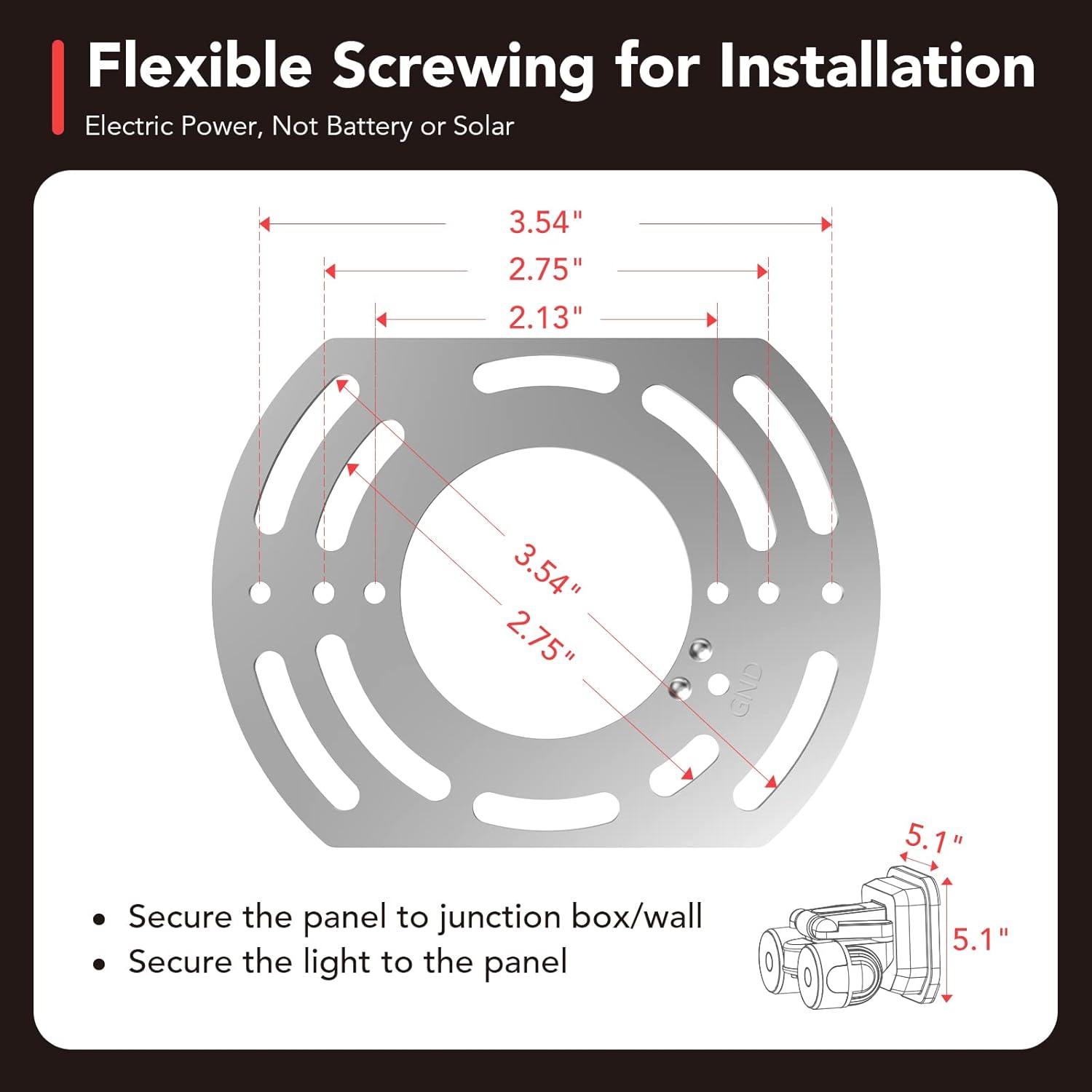
Figure 3.1: Mounting bracket dimensions and attachment to a junction box.
- Hubungkan Kabel: Connect the wires from the fixture to the corresponding wires in the junction box (e.g., black to black, white to white, ground to ground). Use wire nuts to secure connections.

Figure 3.2: Wiring connections for hardwired installation.
- Pasang Perlengkapan Lampu: Align the fixture with the mounting bracket and secure it with screws. Ensure a tight and stable fit.
- Sesuaikan Kepala Lampu: Once mounted, adjust the two light heads and the motion sensor to your desired angles. The fixture offers 450° of total adjustment.

Figure 3.3: Flexible adjustment of light heads to avoid light pollution or illuminate specific areas.

Figure 3.4: Soffit ceiling mount friendly design with no angle restrictions for the sensor.
- Pulihkan Daya: Nyalakan kembali daya pada pemutus arus.
4. Petunjuk Pengoperasian
The OREiN LED Flood Light features an integrated red button for mode selection and control. The motion sensor has a detection range of 6.4-40 feet.

Figure 4.1: Motion activated lighting with a detection range of 6.4-40 feet.
Red Button Setting Instructions:
- Aktif/Nonaktif: Long press the red button for 2 seconds to turn the light on or off.
- Beralih Mode: Single click the red button to cycle through the three operating modes. Observe the light's behavior to identify the current mode:
- Mode Keamanan: The light flashes twice slowly. In this mode, the motion sensor turns on the light to 100% brightness when motion is detected, and turns off when no motion is detected.

Figure 4.2: Security Mode operation (100% brightness on motion).
- Day to Day Mode: The light flashes twice quickly. In this mode, the light stays at 30% brightness when no motion is detected and switches to 100% brightness upon detecting motion.

Figure 4.3: Day to Day Mode operation (30% brightness, 100% on motion).
- Modus Manual: The light is fixed (no flashes). In this mode, the light turns on at night and stays on all night, controlled by a manual switch.

Figure 4.4: Manual Mode operation (controlled by external switch).
- Mode Keamanan: The light flashes twice slowly. In this mode, the motion sensor turns on the light to 100% brightness when motion is detected, and turns off when no motion is detected.
- Atur ulang: Long press the red button for 10 seconds to reset the light to its default settings.

Figure 4.5: Red button functions for On/Off, Mode Switching, and Reset.
Menyesuaikan Arah Cahaya:
The flood light features multiple adjustable joints on its light arms, allowing you to precisely direct the light where needed. This flexibility helps in avoiding light pollution to neighbors or illuminating specific areas like walkways or blind corners.

Figure 4.6: Adjustable joints for precise light direction.
5. Pemeliharaan
The OREiN LED Flood Light is designed for long-lasting performance with minimal maintenance. Its IP65 rating ensures protection against dust and water.

Figure 5.1: IP65 Waterproof design, suitable for various weather conditions.
- Pembersihan: Bersihkan perlengkapan secara berkala dengan kain lembut.amp Gunakan kain untuk membersihkan debu dan kotoran. Jangan gunakan pembersih abrasif atau pelarut.
- Inspeksi: Periksa secara berkala pemasangan dan kabel untuk melihat tanda-tanda keausan atau kerusakan. Pastikan semua sambungan tetap aman.
- Daya tahan: The fixture is built with high-density ABS material and upgraded LEDs, designed to resist heat, rust, and extreme weather, ensuring a long lifespan of approximately 50,000 hours.
6. Penyelesaian masalah
If you encounter issues with your OREiN LED Flood Light, refer to the following common problems and solutions:
| Masalah | Kemungkinan Penyebab | Larutan |
|---|---|---|
| Light stays on constantly (does not turn off or dim). | Incorrect mode setting (e.g., Manual Mode selected). Sensor sensitivity or ambient light sensor (LUX) setting. |
|
| Lampu tidak menyala saat terdeteksi gerakan. | Incorrect mode setting. Sensor obstruction or incorrect angle. Power supply issue. |
|
| Motion sensor does not detect motion at close range or angles. | Sensor angle not optimized for close-range detection. | Adjust the motion sensor's angle downwards to improve close-range detection. The sensor has a 350° rotation capability. |
| Lampu berkedip atau redup. | Loose wiring connection. Power fluctuation. |
|
7. Spesifikasi
| Fitur | Spesifikasi |
|---|---|
| Merek | OREiN |
| Nama Model | OL36002440 (Item Model Number: SL-1) |
| Jenis Sumber Cahaya | DIPIMPIN |
| Apatage | 12 Watt (setara 150W) |
| Kecerahan | 1600 lumen cahaya |
| Suhu Warna | 5000 Kelvin (Putih Siang Hari) |
| Jil.tage | 120 Volt |
| Bahan | Polycarbonate, Acrylonitrile Butadiene Styrene (ABS) |
| Warna | Hitam |
| Dimensi Produk | 7"P x 5"L x 5"T (17.78 cm x 12.7 cm x 12.7 cm) |
| Berat Barang | 1.67 pon (0.76 kg) |
| Tingkat Tahan Air | IP65 Tahan Air |
| Kehidupan Rata-rata | 50,000 Jam |
| Jenis Instalasi | Wall Mounting and Soffit Mounting |
| Metode Kontrol | Push Button (on fixture) |
| Sertifikasi | CE, FCC, RoHS |
8. Garansi dan Dukungan
OREiN stands behind the quality of its products. Your LED Flood Light comes with a comprehensive warranty and dedicated customer support.
- Jaminan: Produk ini dilindungi oleh a Garansi 24 bulan sejak tanggal pembelian.
- Dukungan Pelanggan: For any questions, issues, or warranty claims, please contact OREiN customer service.
- On line: Contact us directly on Amazon.
- Pertanyaan Umum: Pencarian untuk "OREiN" online to find our official contact information.
- Kebijakan Pengembalian: Items purchased through Amazon can be returned via Amazon's logistics. We recommend contacting us before initiating a return for potential troubleshooting or assistance.
OREiN products are certified by FCC, CE, and ROSH, ensuring high quality standards and safety.


