1. Pendahuluan
Welcome to the user manual for your new Avtex W195TS Smart TV. This television is specifically designed for mobile living, offering versatile power options (12V, 24V, and 240V) and a range of smart features, including Wi-Fi, Bluetooth, and an integrated Freesat satellite decoder. This manual provides essential information for setting up, operating, maintaining, and troubleshooting your device to ensure optimal performance and enjoyment.
2. Informasi Keselamatan
Harap baca semua petunjuk keselamatan dengan saksama sebelum menggunakan televisi. Simpan manual ini untuk referensi di masa mendatang.
- Catu Daya: Pastikan volume yang benartage is used (12V, 24V DC or 240V AC). Do not overload power outlets.
- Ventilasi: Jangan menghalangi lubang ventilasi. Beri ruang yang cukup di sekitar TV agar aliran udara lancar.
- Air dan Kelembaban: Jangan biarkan TV terkena hujan atau kelembapan. Jangan letakkan benda berisi cairan di atas TV.
- Pembersihan: Cabut TV sebelum membersihkannya. Gunakan kain yang lembut dan kering. Jangan gunakan pembersih cair atau aerosol.
- Penempatan: Place the TV on a stable, flat surface or mount securely to a wall/bracket. Avoid direct sunlight or heat sources.
- Pelayanan: Jangan mencoba untuk memperbaiki produk ini sendiri. Rujuk semua servis ke personel servis yang berkualifikasi.
3. Isi Paket
Before setup, please check that all items are present in the box:
- TV Pintar Avtex W195TS
- Kontrol Jarak Jauh dengan Baterai
- Kabel Daya DC 12V / 24V
- Adaptor Daya AC 240V
- Dudukan Meja (jika ada)
- User Manual (dokumen ini)
4. Produk Lebihview
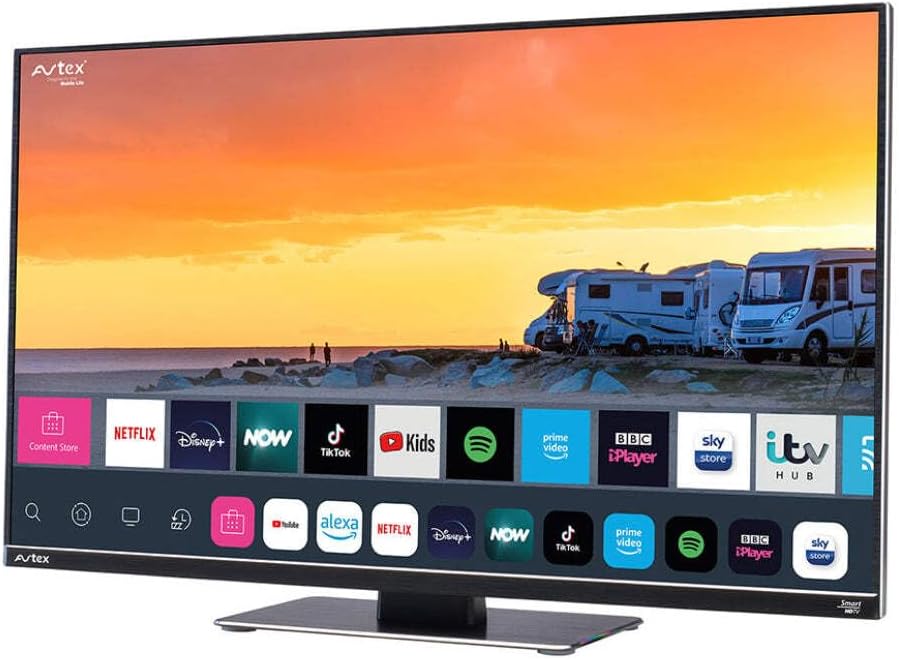
Figure 4.1: Avtex W195TS Smart TV Front View
This image shows the Avtex W195TS Smart TV from a slight angle, highlighting its slim design and the vibrant display. The screen shows a user interface with icons for popular streaming services like Netflix, Disney+, Now, TikTok, Kids, Spotify, Prime Video, BBC iPlayer, Sky Store, and ITV Hub. The background on the screen depicts a scenic view of motorhomes parked near a beach at sunset. The Avtex logo is visible on the top left and bottom left of the TV frame.
4.1. Port dan Koneksi
- Port HDMI: Untuk menghubungkan perangkat eksternal seperti pemutar Blu-ray, konsol game, atau set-top box.
- Port USB (2): Untuk pemutaran media dari drive USB atau menghubungkan aksesori USB.
- Masukan Antena: For connecting a terrestrial TV antenna.
- Masukan Satelit: For connecting a satellite dish for Freesat or other satellite services.
- Masukan Daya DC: For 12V/24V DC power connection.
- Input Daya AC: For 240V AC power connection via adapter.
- Port Ethernet: Untuk koneksi jaringan kabel.
- Keluaran Audio: Untuk menghubungkan sistem audio eksternal atau headphone.
5. Pengaturan
5.1. Installing the Stand (Optional)
- Letakkan TV dengan hati-hati menghadap ke bawah pada permukaan yang lembut dan bersih untuk mencegah kerusakan layar.
- Sejajarkan dudukan dengan lubang pemasangan di bagian bawah TV.
- Amankan dudukan menggunakan sekrup yang disediakan.
5.2. Koneksi Daya
The Avtex W195TS supports multiple power inputs:
- Tegangan DC 12V/24V: Connect the supplied 12V/24V DC power cable to the DC input on the TV and to your vehicle's 12V or 24V power outlet.
- AC 240V: Connect the supplied 240V AC power adapter to the AC input on the TV, then plug the adapter into a standard 240V AC wall socket.
Catatan: Do not connect both DC and AC power simultaneously.
5.3. Koneksi Antena/Satelit
- Terrestrial TV: Connect your aerial cable to the 'ANTENNA IN' port.
- Satellite TV (Freesat): Connect your satellite dish cable to the 'SATELLITE IN' port.
5.4. Pengaktifan Awal dan Pengaturan Pertama Kali
- Connect the TV to power and press the power button on the remote control or TV.
- The First-Time Setup Wizard will appear. Follow the on-screen prompts to select your language, country, and time zone.
- Perform an automatic channel scan for both terrestrial and satellite channels.
- Hubungkan ke jaringan Wi-Fi Anda dengan memilih nama jaringan dan memasukkan kata sandi.
6. Operasi
6.1. Fungsi Remote Control
Biasakan diri Anda dengan tombol-tombol remote control agar mudah bernavigasi dan mengontrol fitur-fitur TV Anda.
- Tombol Daya: Menghidupkan/mematikan TV.
- Tombol Sumber: Selects input sources (HDMI, USB, TV, Satellite).
- Volumenya +/-: Menyesuaikan tingkat volume.
- Saluran +/-: Mengganti saluran TV.
- Tombol Navigasi (Atas/Bawah/Kiri/Kanan/OK): Untuk navigasi dan pemilihan menu.
- Smart Hub/Home Button: Mengakses antarmuka Smart TV.
- Tombol Aplikasi: Dedicated buttons for popular streaming apps (if available).
6.2. Fitur Smart TV
Your Avtex W195TS is equipped with smart TV capabilities:
- Toko Aplikasi: Download and install various applications for streaming, news, and entertainment.
- Layanan Streaming: Access pre-installed or downloaded apps like Netflix, Disney+, Prime Video, BBC iPlayer, etc. (subscription may be required).
- Web Peramban: Jelajahi internet langsung di TV Anda.
- Pencerminan Layar: Connect your smartphone or tablet to display content on the TV screen (compatibility may vary).
6.3. Konektivitas Bluetooth
Pair Bluetooth devices such as headphones or external speakers for enhanced audio experience.
- Go to the TV's settings menu.
- Select 'Bluetooth' or 'Connected Devices'.
- Aktifkan Bluetooth dan masukkan perangkat Anda ke mode pemasangan.
- Pilih perangkat Anda dari daftar untuk dipasangkan.
6.4. Pemutaran Media melalui USB
Insert a USB drive into one of the USB ports to view melihat foto, memutar video, atau mendengarkan musik.
- The TV will usually prompt you to open the media player.
- Navigasi melalui Anda filemenggunakan remote control.
7. Pemeliharaan
7.1. Membersihkan TV
- Layar: Usap layar secara perlahan dengan kain lembut dan bebas serat. Untuk noda membandel, usap layar dengan lembut.ampbilas kain dengan air atau larutan pembersih khusus layar (jangan semprotkan langsung ke layar).
- Casing: Gunakan kain lembut dan kering untuk membersihkan TV casing. Hindari pembersih atau pelarut yang bersifat abrasif.
7.2. Pembaruan Perangkat Lunak
Periodically check for software updates to ensure your TV has the latest features and bug fixes. Updates can usually be found in the TV's settings menu under 'System' or 'Software Update'.
8. Penyelesaian masalah
If you encounter issues with your Avtex W195TS, refer to the following common problems and solutions:
| Masalah | Kemungkinan Penyebab | Larutan |
|---|---|---|
| Tidak Ada Daya | Kabel daya tidak terhubung; tidak ada daya dari stopkontak. | Check power cable connection; test outlet with another device; ensure correct voltage (12V/24V/240V). |
| Tidak Ada Gambar, tapi Ada Suara | Sumber input yang dipilih salah; kabel rusak. | Press the 'Source' button on the remote to select the correct input; check HDMI/antenna cables. |
| Tidak Ada Suara, tetapi Ada Gambar | Volume dimatikan atau terlalu rendah; masalah pada sistem audio eksternal. | Unmute volume or increase level; check connections to external audio devices. |
| Tidak Dapat Terhubung ke Wi-Fi | Kata sandi salah; masalah router; TV terlalu jauh dari router. | Re-enter Wi-Fi password; restart router; move TV closer to router or use an extender. |
| Kontrol Jarak Jauh Tidak Berfungsi | Dead batteries; obstruction; pairing issue. | Replace batteries; remove obstructions; re-pair remote if it's a Bluetooth remote. |
9. Spesifikasi
| Fitur | Spesifikasi |
|---|---|
| Merek | avtex |
| Nomor Model | AVTEX W195TS |
| Ukuran Layar | 19.5 inci |
| Resolusi | 1080p (HD Penuh) |
| Rasio Aspek | 16:9 |
| Teknologi Konektivitas | Bluetooth, HDMI, Wi-Fi |
| Jumlah Port USB | 2 |
| Jil.tage | 12 Volt, 24 Volt, 240 Volt |
| Berat Barang | 2.5 Kilogram |
| Tahun Model | 2018 |
10. Garansi dan Dukungan
Your Avtex W195TS Smart TV comes with a manufacturer's warranty. Please refer to the warranty card included in your product packaging for specific terms and conditions, including warranty period and coverage details. Keep your proof of purchase for warranty claims.
For technical support, troubleshooting assistance beyond this manual, or warranty inquiries, please contact Avtex customer service through their official website or the contact information provided with your product. When contacting support, please have your model number (AVTEX W195TS) and serial number ready.


