Perkenalan
This manual provides essential instructions for the safe and efficient operation, installation, and maintenance of your Midea JL1643S-UF Freestanding One Touch Filter Water Purifier. Please read this manual thoroughly before using the appliance and retain it for future reference.
Informasi Keselamatan
Selalu ikuti tindakan pencegahan keselamatan dasar saat menggunakan peralatan listrik untuk mengurangi risiko kebakaran, sengatan listrik, dan cedera pada orang.
- Pastikan voltase catu dayatage matches the appliance's rating (220 Volts).
- Jangan merendam alat, kabel, atau steker di dalam air atau cairan lainnya.
- Cabut steker alat dari stopkontak saat tidak digunakan, sebelum membersihkan, atau sebelum melakukan perawatan apa pun.
- Jauhkan alat dari sinar matahari langsung dan sumber panas.
- Peralatan ini hanya untuk penggunaan di dalam ruangan.
- Jangan mengoperasikan peralatan dengan kabel atau steker yang rusak.
- Jauhkan anak-anak dari alat selama pengoperasian.
Produk Selesaiview
The Midea JL1643S-UF is a freestanding water purifier designed to provide clean, filtered water. It features a 3rd generation one-touch filter system and UV-LED sterilization.
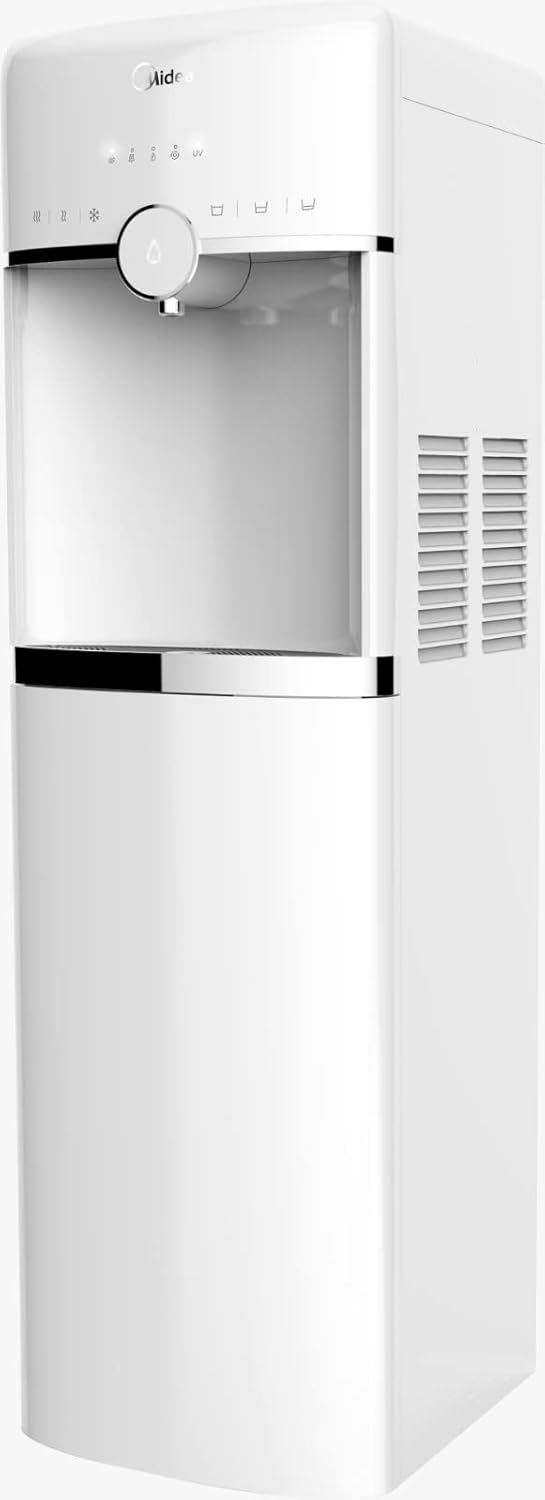
Gambar 1: Depan view of the Midea JL1643S-UF Freestanding Water Purifier. This image displays the sleek white design, the water dispenser nozzle, and the touch control panel at the top.
Komponen Utama:
- Water Dispenser Nozzle: For dispensing purified water.
- Panel Kontrol Sentuh: For operating various functions.
- Kompartemen Filter: Houses the multi-stage filter system.
- Tangki Air: Kapasitas 4.6 liter.
- UV-LED Sterilizer: Integrated for enhanced water purification.
- Baki Tetes: Collects any spills.
Pengaturan
- Membongkar: Carefully remove the water purifier from its packaging. Retain all packaging materials for future transport if needed.
- Penempatan: Place the freestanding unit on a flat, stable, and level surface. Ensure there is adequate space around the unit for ventilation, especially at the back and sides where air vents are located. Avoid placing it near direct heat sources or in direct sunlight.
- Pembersihan Awal: Before first use, wipe the exterior of the unit with a soft, damp cloth. Clean the water tank and drip tray with mild soap and water, then rinse thoroughly.
- Instalasi Filter:
- Buka penutup kompartemen filter.
- Insert the 3rd generation one-touch filters (PP, Pre Active Carbon, Ultrafiltration, Post Active Carbon) into their respective slots. Ensure they are securely locked in place. Refer to the markings on the filters and the unit for correct orientation.
- Tutup penutup kompartemen filter.
- Pengisian Air: Fill the water tank with potable tap water. Do not exceed the maximum fill line.
- Sambungan Daya: Plug the power cord into a grounded 220 Volt electrical outlet. The unit will power on, and indicator lights may illuminate.
- Pembilasan Awal: Dispense and discard at least 2-3 liters of water to flush the new filters and internal system before consuming.
Petunjuk Pengoperasian
- Daya Hidup/Mati: The unit typically powers on automatically when plugged in. Use the designated power button on the touch control panel to turn the unit on or off.
- Mengeluarkan Air:
- Place a cup or container under the water dispenser nozzle.
- Press the water dispense button on the touch control panel. Water will flow until the button is released or a preset volume is reached (if applicable).
- UV-LED Sterilization: The UV-LED sterilization function operates automatically or can be activated via the touch control panel, depending on the model's specific programming. Refer to the control panel icons for UV activation status.
- Perlindungan Kebocoran Air: The unit is equipped with water leakage protection. In the event of a leak, the system is designed to automatically shut off water flow to prevent damage. If this occurs, unplug the unit and contact customer support.
Pemeliharaan
Perawatan rutin memastikan kinerja optimal dan umur pakai yang lebih panjang untuk alat penjernih air Anda.
- Pengingat Penggantian Filter: The unit features a filter replacement reminder system. An indicator light on the control panel will illuminate when it's time to replace the filters.
- Penggantian Filter:
- Unplug the water purifier from the power outlet.
- Buka kompartemen filter.
- Putar dan tarik keluar filter lama.
- Insert new Midea JL1643S-UF compatible filters, ensuring they click into place.
- Tutup kompartemen filter.
- Plug the unit back in. Reset the filter reminder by pressing and holding the designated button (refer to control panel icons).
- Perform an initial flush as described in the Setup section.
- Membersihkan Unit:
- Bersihkan bagian luar dengan kain lembut dan kering.amp kain. Jangan gunakan pembersih atau pelarut yang bersifat abrasif.
- Regularly empty and clean the drip tray.
- For internal cleaning, follow the descaling instructions provided in a separate guide or contact customer support.
Penyelesaian Masalah
| Masalah | Kemungkinan Penyebab | Larutan |
|---|---|---|
| Tidak ada air yang dikeluarkan | Unit not plugged in; Water tank empty; Filters clogged; Water leakage protection activated. | Check power connection; Refill water tank; Replace filters; Unplug and re-plug, if issue persists contact support. |
| Aliran air lambat | Clogged filters; Air in the system. | Replace filters; Dispense water for a few minutes to release trapped air. |
| Rasa/bau yang tidak biasa | New filters not flushed; Filters need replacement. | Perform initial flush; Replace filters. |
| Filter reminder light stays on after replacement | Reminder not reset. | Press and hold the filter reset button until the light turns off. |
Spesifikasi

Gambar 2: Midea JL1643S-UF Water Purifier with key dimensions. The image shows the height as 106cm, depth as 31cm, and width as 37.5cm.
| Merek | Midea |
| Model | JL1643S-UF |
| Kapasitas | 4.6 liter |
| Dimensi (P x L x T) | Ukuran 31x37.5x106cm |
| Berat | 1.1 kg |
| Jil.tage | 220 Volt |
| Apatage | 520 Watt |
| Bahan | Aluminium, Polypropylene (PP) |
| Tingkat Kebisingan | 1 Desibel |
| Jenis Instalasi | Freestanding |
| Sistem Filter | 3rd Generation One-Touch (PP, Pre Active Carbon, Ultrafiltration, Post Active Carbon) |
| Fitur Khusus | UV-LED Sterilizer, Filter Replacement Reminder, Touch Control, Water Leakage Protection |
Garansi dan Dukungan
For warranty information or technical support, please refer to the warranty card included with your product or visit the official Midea webJangan mencoba memperbaiki alat sendiri.


