1. Produk Lebihview
The Point Wired Mini Keyboard Pt-350 is a compact and versatile keyboard designed for both gaming and general typing. It features a high-quality build and a modern design, adhering to industry standards for reliable performance. This keyboard is an ideal choice for users seeking a durable and efficient input device.
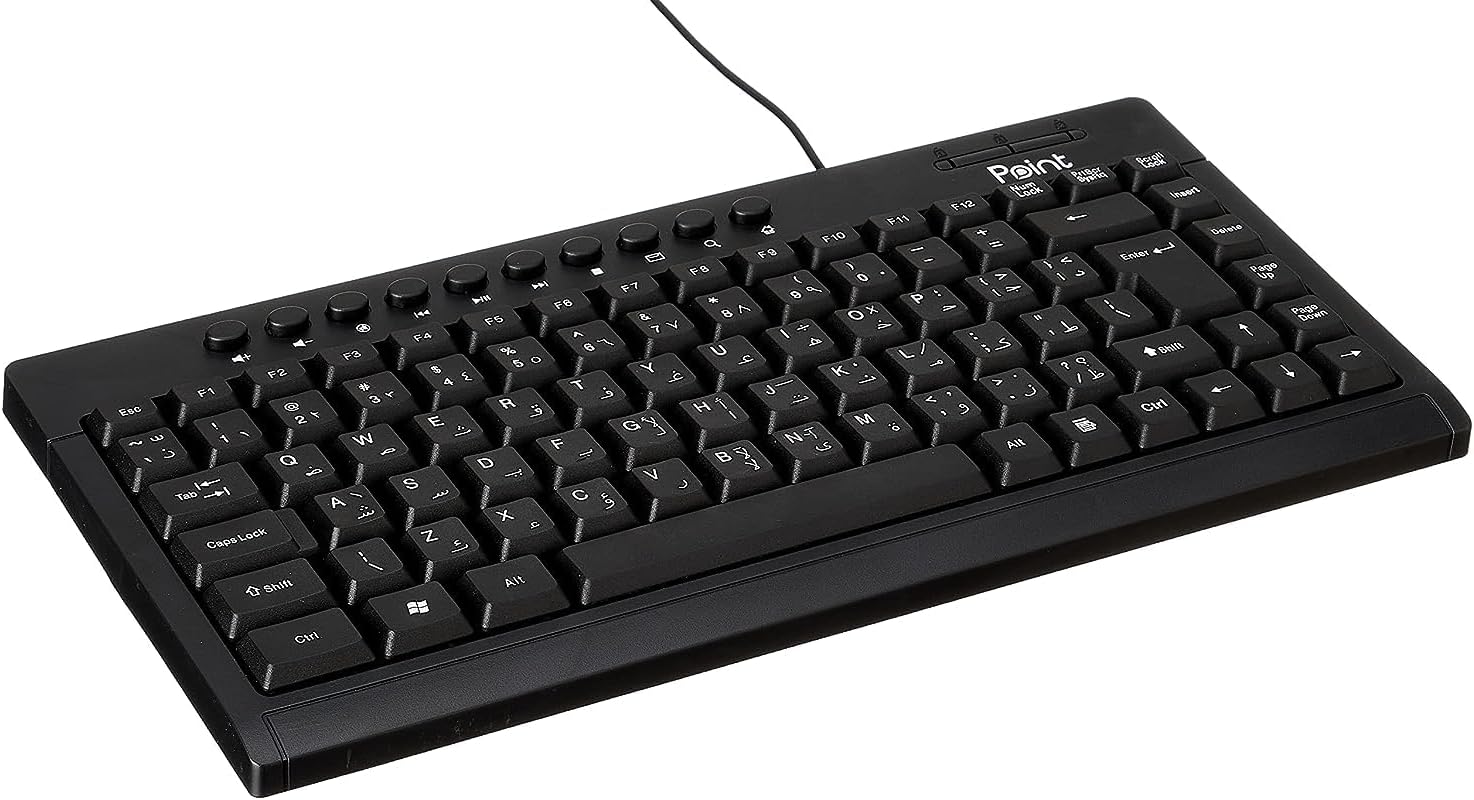
Gambar 1.1: Sudut view of the Point Wired Mini Keyboard Pt-350, showcasinberkat desainnya yang ringkas dan tata letak tombolnya.
Fitur Utama:
- Wired connectivity for stable performance.
- Compact design suitable for various setups.
- Durable construction from high-quality plastic materials.
- Designed for both gaming and typing applications.
2. Isi Paket
Harap periksa paket dengan cermat untuk memastikan semua item ada:
- Point Wired Mini Keyboard Pt-350
- User Manual (dokumen ini)
3. Pengaturan
Follow these steps to set up your Point Wired Mini Keyboard Pt-350:
- Bongkar Keyboardnya: Keluarkan keyboard dari kemasannya dengan hati-hati.
- Identifikasi Konektor USB: The keyboard comes with an integrated USB cable.
- Hubungkan ke Komputer Anda: Locate an available USB port on your computer (desktop PC, laptop, etc.). Insert the keyboard's USB connector firmly into the USB port.
- Instalasi Driver (Plug & Play): The keyboard is plug-and-play compatible. Your operating system (Windows, macOS, Linux) should automatically detect and install the necessary drivers. This process usually takes a few seconds.
- Verifikasi Fungsionalitas: Once connected, open a text editor or any application that accepts text input and test the keys to ensure proper operation.

Gambar 3.1: Atas-bawah view of the keyboard, illustrating the key layout and integrated cable for connection.
4. Petunjuk Pengoperasian
The Point Wired Mini Keyboard Pt-350 operates like a standard computer keyboard. Below are general instructions and tips for use:
Mengetik Dasar:
- Simply press the desired keys to input characters, numbers, and symbols into your active application.
- Gunakan Menggeser key for uppercase letters and alternative symbols on keys.
- Itu Kunci huruf kapital key toggles permanent uppercase typing.
- Itu spasi mundur key deletes characters to the left of the cursor.
- Itu Memasuki key confirms input or moves to the next line.
Tombol Fungsi (F1-F12):
The function keys (F1 through F12) perform various tasks depending on the active program or operating system. Some common uses include:
- F1: Often opens help for the active program.
- F2: Renames a selected item.
- F5: Menyegarkan a web page or document.
- F11: Toggles full-screen mode in many browsers.
Tombol Multimedia:
The keyboard may include dedicated multimedia keys or secondary functions on the F-keys (accessed via the Fn key, if present). These typically control:
- Volume control (Mute, Volume Up, Volume Down)
- Media playback (Play/Pause, Stop, Previous Track, Next Track)
5. Pemeliharaan
Perawatan yang tepat memastikan umur panjang dan kinerja optimal keyboard Anda:
- Pembersihan: Regularly clean the keyboard to prevent dust and debris buildup. Use a soft, lint-free cloth slightly dampDibersihkan dengan air atau larutan pembersih ringan. Hindari bahan kimia keras atau bahan abrasif.
- Penghilangan Debu: Use compressed air to blow out dust and crumbs from between the keys.
- Hindari Tumpahan: Keep liquids away from the keyboard to prevent damage to internal components. In case of a spill, immediately disconnect the keyboard and allow it to dry completely before reconnecting.
- Penyimpanan: Saat tidak digunakan, simpan keyboard di tempat yang bersih dan kering, jauhkan dari suhu ekstrem.
6. Penyelesaian masalah
If you encounter issues with your Point Wired Mini Keyboard Pt-350, refer to the following common problems and solutions:
Keyboard Tidak Merespons:
- Periksa Koneksi USB: Pastikan kabel USB terpasang dengan benar ke port USB yang berfungsi di komputer Anda. Coba port USB lain.
- Mulai Ulang Komputer: Seringkali, memulai ulang secara sederhana dapat menyelesaikan masalah konektivitas.
- Tes di Komputer Lain: Connect the keyboard to another computer to determine if the issue is with the keyboard or your computer's setup.
- Periksa Pengelola Perangkat (Windows): In Windows, go to Device Manager and check if the keyboard is listed under 'Keyboards' and if there are any error symbols. You might need to update or reinstall the driver.
Keys Not Working or Sticky:
- Kunci Bersih: Dust, crumbs, or liquid residue can cause keys to stick or malfunction. Refer to the Maintenance section for cleaning instructions.
- Kerusakan Fisik: Inspect the keys for any visible physical damage.
Keluaran Karakter Salah:
- Periksa Pengaturan Bahasa: Ensure your operating system's keyboard language settings match the physical layout of your keyboard.
- Masalah Driver: Reinstalling the keyboard driver might resolve this.
Jika masalah berlanjut setelah mencoba langkah-langkah ini, hubungi dukungan pelanggan.
7. Spesifikasi
Technical specifications for the Point Wired Mini Keyboard Pt-350:

Gambar 7.1: Sisi view of the keyboard, highlighting its profile and compact form factor.
| Fitur | Detil |
|---|---|
| Nama Merek | Titik |
| Model | Pt-350 |
| Teknologi Konektivitas | Berkabel |
| Perangkat yang Kompatibel | Komputer |
| Deskripsi Papan Ketik | Multifungsi |
| Penggunaan yang Direkomendasikan | Permainan PC |
| Fitur Khusus | Permainan |
| Warna | Hitam |
| Gaya | Modern |
| Bahan | Plastik |
| Dimensi Pengiriman | Ukuran 34.5x26.4x3 cm |
| Berat | 800 gram |
| Tanggal Pertama Tersedia | 4 Sept 2022 |
| ASIN | B0BD2DM9ZJ |
8. Garansi dan Dukungan
This product is covered by a standard manufacturer's warranty. Please refer to the warranty card included with your purchase for specific terms and conditions, including the warranty period and coverage details.
For technical support, troubleshooting assistance, or warranty claims, please contact Point customer service through the contact information provided on the product packaging or the official Point website. When contacting support, please have your product model (Pt-350) and purchase details ready.


