1. Pendahuluan
The LILYGO TTGO T4 V1.3 is an ESP32-based development board integrated with a 2.4-inch ILI9341 LCD. This versatile board offers Wi-Fi and Bluetooth connectivity, making it suitable for a wide range of IoT and embedded projects requiring a display interface. It includes onboard buttons for boot and reset functions, as well as battery power detection capabilities.
2. Produk Lebihview
The TTGO T4 V1.3 development board combines an ESP32 microcontroller with a vibrant 2.4-inch LCD, offering a compact solution for interactive projects. Key features include:
- microcontrollers: ESP32 chip
- Memori Flash: 4MB
- PSRAM: 8MB
- Menampilkan: 2.4-inch ILI9341 TFT LCD (320x240 resolution, 65K color display)
- Konektivitas Nirkabel: Wi-Fi (802.11 b/g/n) and Bluetooth (V4.2+BLE)
- Onboard Functions: Boot and Reset buttons, battery power detection
- Programming Platform: Arduino IDE, MicroPython
- Serial Chip: CH9102
- Catu Daya: Supports USB and Li-Po battery (JST GH 1.25mm connector)
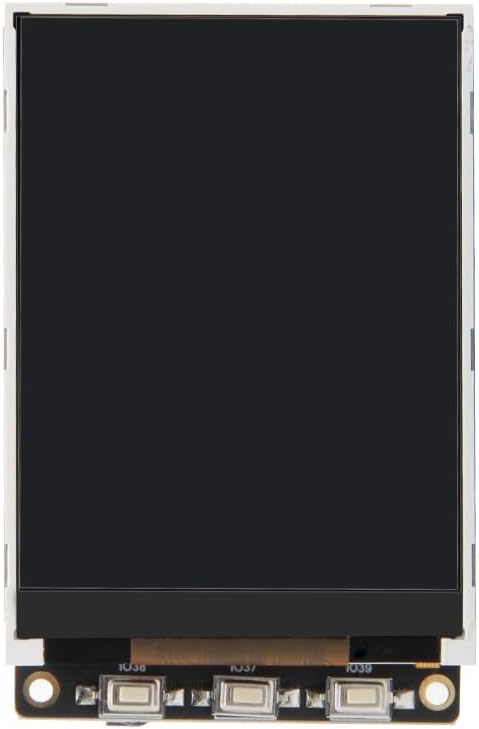
Gambar 2.1: Depan view of the LILYGO TTGO T4 V1.3 Development Board with the 2.4-inch LCD displaying the LILYGO logo.

Gambar 2.2: Kembali view of the development board, highlighting the various components and connectors.

Figure 2.3: The package includes one TTGO T4 V1.3 board, one Dupont line, and one power cable.
3. Spesifikasi
| Fitur | Spesifikasi |
|---|---|
| Merek | BUNGA LILYGO |
| Nama Model | T4 V1.3 |
| Tipe Nirkabel | Bluetooth, WiFi |
| Sistem Operasi | Real-Time Operating System (RTOS) |
| Dimensi Produk (P x L x T) | 2.6 x 1.7 x 0.47 inci (66 x 43 x 12 mm) |
| Merek Prosesor | Espressif (ESP32) |
| Jumlah Prosesor | 1 |
| Jenis Memori Komputer | DIMM |
| Ukuran Memori RAM Terpasang | 8 MB (PSRAM) |
| Kapasitas Penyimpanan Memori | 4 MB (Flash) |
| Jenis Tampilan | ILI9341 TFT LCD |
| Ukuran Layar | 2.4 inci |
| Resolusi Tampilan | ukuran 320x240 |
| Tampilan Antarmuka | SPI 4-kawat |
| Catu Daya yang Berfungsi | 3.3V |
| Konektor Baterai | JST GH 1.25mm |

Figure 3.1: Physical dimensions of the TTGO T4 V1.3 board.
4. Pengaturan
To begin using your LILYGO TTGO T4 V1.3 development board, follow these general setup steps:
- Sambungan Daya: Connect the board to a power source using the Micro USB port. Alternatively, a Li-Po battery can be connected to the JST GH 1.25mm connector.
- Instalasi Driver: Ensure you have the necessary USB-to-Serial drivers (for CH9102 chip) installed on your computer. These are typically available from the chip manufacturer's website or through common ESP32 development environment setups.
- Pengaturan Lingkungan Pengembangan: Install your preferred development environment, such as Arduino IDE or MicroPython. For Arduino IDE, you will need to add ESP32 board support and the appropriate display libraries (e.g., TFT_eSPI).
- Unggah Kode: Connect the board to your computer via USB. Select the correct board and COM port in your IDE. Upload your code to the ESP32.
- Resource Access: For detailed code examples, libraries, and further information, refer to the official LILYGO GitHub repository: github.com/Xinyuan-LilyGO/TTGO-T4-TestCode.
5. Petunjuk Pengoperasian
The TTGO T4 V1.3 board is designed for flexible operation, supporting various programming approaches. Once programmed, the board will execute the uploaded firmware.
- Daya Hidup/Mati: The board powers on automatically when connected to USB or a battery. There is no dedicated power switch.
- Tombol Reset (RST): A short press of the RST button will restart the ESP32 microcontroller, reloading the current program.
- Tombol Boot: The Boot button is typically used to put the ESP32 into programming mode. Hold down the Boot button, press and release the RST button, then release the Boot button to enter flash mode for uploading new firmware.
- Operasi Tampilan: The 2.4-inch ILI9341 LCD is controlled via the ESP32 using SPI. Your code will manage what is displayed on the screen. Ensure your display library is correctly initialized and configured for the ILI9341 driver.
- Penyesuaian Cahaya Latar: The display backlight can be controlled programmatically, often via PWM, to adjust brightness. Refer to your display library documentation for specific functions.
- Wi-Fi dan Bluetooth: Utilize the ESP32's built-in Wi-Fi and Bluetooth capabilities through your code to connect to networks, communicate with other devices, or create access points.
6. Diagram Pinout
Understanding the pinout is crucial for connecting external components and utilizing the full functionality of the TTGO T4 V1.3 board. The following diagram illustrates the pin assignments:

Figure 6.1: LILYGO T4 V1.3 Pinmap. This diagram details the GPIO connections for the ILI9341 LCD, buttons, and other available pins.
Penugasan Pin Tombol:
- ILI9341 TFT LCD: SCLK (IO18), RS (IO32), RST (IO05), SDI (IO23), CS (IO27), SDO (IO12), BL (IO04)
- Tombol: IO38, IO37, IO39
- Kekuatan: 3V3, 5V, GND, VBAT (for battery input)
- Mikro USB: For charging, powering, burning (uploading firmware), and debugging.
- Kartu TF: MISO (IO02), SCLK (IO14), MOSI (IO15), CS (IO13)
7. Pemeliharaan
Proper care and maintenance will ensure the longevity and reliable operation of your TTGO T4 V1.3 development board.
- Penanganan: Handle the board by its edges to avoid touching sensitive components, especially the display and exposed pins.
- Penyimpanan: Store the board in an anti-static bag when not in use to protect it from electrostatic discharge. Keep it in a dry environment, away from extreme temperatures.
- Pembersihan: Jika perlu, bersihkan papan secara perlahan dengan sikat kering yang lembut atau udara bertekanan untuk menghilangkan debu. Hindari penggunaan cairan atau bahan abrasif.
- Catu Daya: Always use a stable 5V power supply via USB or a compatible Li-Po battery. Ensure correct polarity when connecting a battery.
- Pembaruan Firmware: Regularly check the LILYGO GitHub repository for updated firmware or library versions to benefit from improvements and bug fixes.
8. Penyelesaian masalah
If you encounter issues with your TTGO T4 V1.3 board, consider the following troubleshooting steps:
- Papan Tidak Menyala:
- Verify the USB cable is functional and properly connected to both the board and your computer/power adapter.
- If using a battery, ensure it is charged and correctly connected to the JST connector with the correct polarity.
- Display Remains Blank/Dark:
- Ensure the display library is correctly initialized in your code for the ILI9341 driver.
- Check if the backlight is enabled in your code. Some display libraries require explicit backlight activation.
- Verify all display connections (SPI pins) are correct according to the pinout diagram.
- Pengunggahan Firmware Gagal:
- Confirm the correct COM port is selected in your IDE.
- Ensure the ESP32 is in flash mode (hold Boot, press/release RST, then release Boot).
- Install or update the USB-to-Serial drivers (CH9102).
- Coba kabel atau port USB lain.
- Masalah Konektivitas Wi-Fi/Bluetooth:
- Double-check your network credentials (SSID, password) in your code.
- Ensure the Wi-Fi/Bluetooth antenna (if external) is properly connected.
- Verify that the ESP32's Wi-Fi/Bluetooth functions are correctly initialized in your program.
9. Garansi dan Dukungan
For warranty information and technical support, please refer to the official LILYGO website or contact your point of purchase. Detailed documentation, community forums, and additional resources can often be found on the LILYGO GitHub page linked in the Setup section.


