Perkenalan
The mophie powerstation Go is a versatile portable device designed to provide power in various emergency situations. It functions as a car jump starter, a portable power bank for mobile devices, and a bright LED work light. This manual provides essential instructions for safe and effective use, maintenance, and troubleshooting of your powerstation Go.
Informasi Keselamatan
Read all safety warnings and instructions before using this product. Failure to follow these instructions may result in electric shock, fire, or serious injury.
- Do not expose the powerstation Go to moisture or extreme temperatures.
- Jangan mencoba membongkar atau memodifikasi perangkat.
- Jauhkan dari jangkauan anak-anak.
- Ensure proper polarity when connecting jumper cables to a vehicle battery. Incorrect connection can cause damage or injury.
- Use only the provided jumper cables and charging accessories.
- Hindari paparan sinar matahari langsung dalam waktu lama.
- If the device becomes excessively hot, discontinue use immediately.
Isi Paket
- mophie powerstation Go
- Mini Jumper Cables
- Kabel Pengisian Daya (USB-C ke USB-A)
- Panduan Pengguna
Produk Selesaiview
Familiarize yourself with the components of your mophie powerstation Go.


- Senter LED: Located at one end, provides bright illumination.
- Lampu kerja: Integrated into the body, offers broad area lighting.
- Tombol Daya: Activates the device and checks battery status.
- Indikator Baterai LED: Displays the remaining charge level.
- Port Keluaran USB-A: Untuk mengisi daya perangkat seluler.
- Port Kabel Jumper: Dedicated port for connecting the mini jumper cables.
- Port Input USB-C: For recharging the powerstation Go.
Pengaturan: Pengisian Awal
Before first use, fully charge your mophie powerstation Go.
- Connect the provided USB-C charging cable to the USB-C input port on the powerstation Go.
- Connect the other end of the charging cable to a compatible USB wall adapter (not included) or a powered USB port.
- The LED battery indicator lights will illuminate and flash, indicating the charging status. All four lights will be solid when fully charged.
- Waktu pengisian daya dapat bervariasi tergantung pada sumber listrik.
Petunjuk Pengoperasian
1. Memulai Kendaraan dengan Jump Starter
Ensure the powerstation Go is at least 50% charged before attempting to jump start a vehicle.
- Connect the mini jumper cables to the jumper cable port on the powerstation Go. Ensure a secure connection.
- Hubungkan merah clamp to the positive (+) terminal of the vehicle's dead battery.
- Hubungkan hitam clamp to a metal part of the vehicle's chassis (unpainted, non-moving part) or the negative (-) terminal of the battery, if accessible and safe.
- Once connected, the powerstation Go will automatically perform safety checks. Wait for the indicator light on the jumper cable connector to turn solid green.
- Start your vehicle. If it doesn't start immediately, wait 30 seconds and try again. Do not attempt more than three consecutive jump starts.
- Setelah kendaraan menyala, segera lepaskan kabel hitam.amp, lalu cl merahamp, and finally disconnect the jumper cables from the powerstation Go.
2. Mengisi Daya Perangkat Seluler
Use the USB-A output port to charge your smartphone, tablet, or other USB-powered devices.

- Connect your device's USB charging cable to the USB-A output port on the powerstation Go.
- The powerstation Go will automatically begin charging your device. The LED battery indicator lights will show the remaining charge.
- Lepaskan perangkat Anda setelah pengisian daya selesai.
3. Using the LED Flashlight and Work Light
The powerstation Go features both a focused LED flashlight and a broad work light.
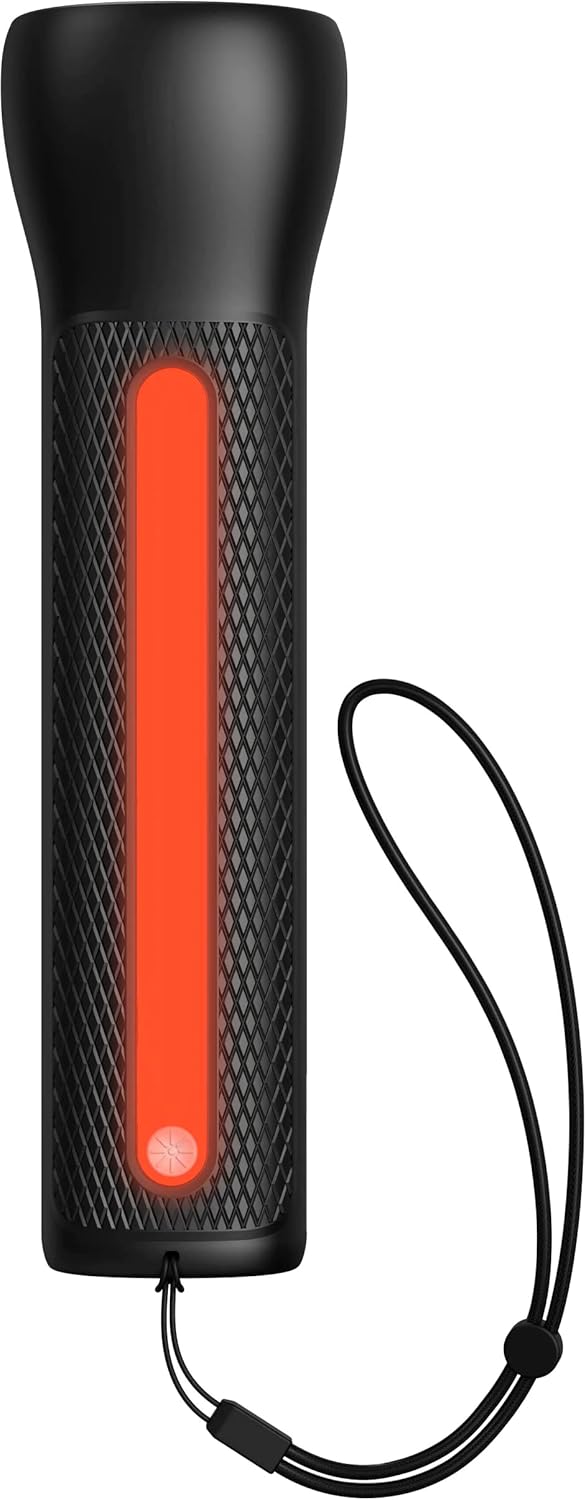

- Untuk mengaktifkan Senter LED: Press and hold the power button for 2 seconds. Press again to cycle through modes (high, low, strobe, off).
- To activate the Work Light: Double-press the power button. Double-press again to cycle through modes (white, red, flashing red, off).
Pemeliharaan
- Pembersihan: Bersihkan perangkat dengan kain lembut dan kering. Jangan gunakan bahan kimia keras atau bahan abrasif.
- Penyimpanan: Store the powerstation Go in a cool, dry place away from direct sunlight. For optimal battery life, recharge the device every 3 months if not in regular use.
- Perawatan Baterai: The internal battery is not user-replaceable. Do not attempt to open the device.
Penyelesaian Masalah
| Masalah | Kemungkinan Penyebab | Larutan |
|---|---|---|
| Perangkat tidak mengisi daya | Charging cable or adapter faulty; port obstruction. | Try a different USB-C cable and wall adapter. Ensure ports are clean and free of debris. |
| Vehicle not jump starting | Low powerstation Go charge; incorrect cable connection; severely dead battery. | Ensure powerstation Go is fully charged. Verify correct clamp polarity. Check vehicle battery for severe damage. Consult vehicle manual. |
| Mobile device not charging | Powerstation Go battery low; faulty USB cable; device incompatibility. | Recharge powerstation Go. Try a different USB cable. Ensure your device is compatible with standard USB charging. |
| Lampu tidak menyala | Powerstation Go battery low; incorrect button press. | Recharge powerstation Go. Refer to "Using the LED Flashlight and Work Light" section for correct operation. |
Spesifikasi
- Merek: mofi
- Nomor Model: mpsgrgd-FL36630
- Nomor Bagian Pabrikan: 401107454
- Kapasitas Baterai: 9900mAh (36.6Wh)
- Jil.tage: 12 Volts (for jump starting)
- Berat Produk: 1.07 Kilogram
- Ukuran: 30.3 x 24.69 x 10.79 cm (Paket)
- Fitur Khusus: LED Indicator Lights, 450-lumen LED Flashlight, Spark-proof Jumper Cables
- Automotive Service Type: Truck, Car
Garansi dan Dukungan
For warranty information and customer support, please visit the official mophie websitus web atau hubungi layanan pelanggan mereka. Simpan bukti pembelian Anda untuk klaim garansi.
Dukungan online: www.mophie.com/support


