1. Pendahuluan
The EDISION Picco S2 Pro is a Full HD DVB-S2 H.265/HEVC digital satellite receiver designed for receiving satellite signals. This dynamically designed receiver features a built-in card reader, Multistream support, and on-board Wi-Fi for accessing various internet applications. It also includes a 2-in-1 universal remote control and H.265 media player capabilities.

Image: EDISION Picco S2 Pro product packaging.
2. Produk Lebihview
2.1 Fitur Utama
- DVB-S2 H.265/HEVC digital satellite receiver for satellite channels.
- On-board Wi-Fi, card reader, Multistream, Unicable & SCR Unicable 2 support.
- USB connection for PVR (Personal Video Recorder), Timeshift, Playback, software updates, and backup function.
- Internet connection for applications: YouTube, Stalker TV, Xtream, WebTV, Shoutcast, Dailymotion, Weather.
- H.265 media player (supports MP3/AC3/AAC/JPEG/PNG/MP4/MOV/AVI/MKV/MPG/MPEG/Xvid/DviX).
- Ergonomic 2-in-1 universal remote control for set-top box and TV, with 4 programmable buttons for TV.
2.2 Isi Paket
Pastikan semua item ada dalam paket:

Image: EDISION Picco S2 Pro package contents.
- EDISION Picco S2 Pro Receiver
- Kontrol Jarak Jauh Universal 2-in-1
- Power Supply Unit (PSU 12V/1A)
- 2x Baterai AAA
- Panduan Pengguna Cepat
2.3 Front & Side Panel
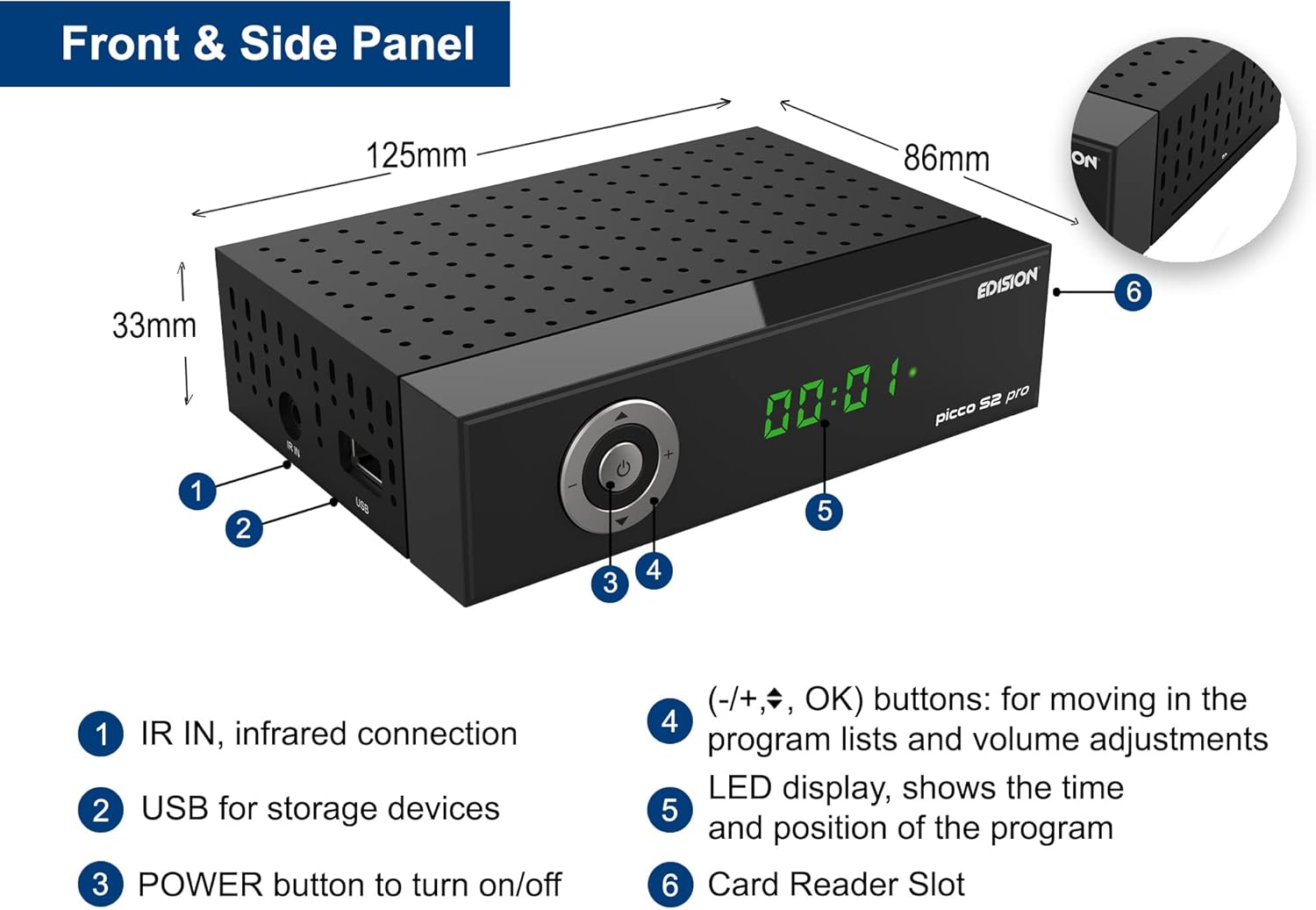
Image: Front and side panel layout with dimensions and labeled components.
- IR DI: Infrared connection for external IR sensor.
- Kabel USB: For storage devices (PVR, media playback, software updates).
- Tombol power: Untuk menghidupkan/mematikan perangkat.
- (-/+, OK) buttons: For navigating program lists and adjusting volume.
- Tampilan LED: Shows the time and current program position.
- Slot Pembaca Kartu: For conditional access cards.
2.4 Sambungan Panel Belakang

Image: Rear panel connections with labeled ports.
- LNB IN (13V/18V 400mA Max): DVB-S2 tuner to receive satellite channels.
- S/PDIF: Coaxial audio connection.
- HDMI: HDMI connection, up to Full HD 1080p.
- SCART: Koneksi TV analog.
- DC12V: Connection for external power supply.
2.5 Kontrol Jarak Jauh Universal 2-dalam-1

Image: EDISION 2-in-1 Universal Remote Control.
The remote control is designed for both the set-top box (STB) and your TV. It comes pre-programmed with the 4 most important functions for SAMSUNG and LG TVs. You can program these 4 buttons as desired for other TV brands.
3. Pengaturan
3.1 Menghubungkan Penerima
Follow these steps to connect your EDISION Picco S2 Pro receiver:
- Koneksi Antena Satelit: Connect the LNB cable from your satellite dish to the 'LNB IN' port on the rear panel of the receiver.
- Koneksi TV:
- For High Definition (HD) output, connect an HDMI cable from the 'HDMI' port on the receiver to an HDMI input on your television.
- For Standard Definition (SD) output, connect a SCART cable from the 'SCART' port on the receiver to the SCART input on your television.
- Koneksi Sistem Audio (Opsional): If you have an external audio system, connect it to the 'S/PDIF' coaxial audio output for digital audio.
- Sambungan Daya: Connect the provided 12V/1A power adapter to the 'DC 12V' input on the receiver, then plug the adapter into a wall outlet.

Image: Receiver connected to a television, showing the main menu interface.
3.2 Penyalaan Awal
After connecting all cables, press the POWER button on the front panel or the remote control to turn on the receiver. The LED display will show the current status. Follow the on-screen instructions for initial setup, which typically includes language selection, country, and satellite scanning.
4. Petunjuk Pengoperasian
4.1 Operasi Dasar
- Pencarian Saluran: Access the 'Installation' menu to perform an automatic or manual channel scan for available satellite channels.
- Navigasi Saluran: Use the CH+/CH- buttons on the remote to change channels. Use the numeric keypad to directly enter channel numbers.
- Kontrol Volume: Use the VOL+/VOL- buttons to adjust the volume.
- Akses Menu: Press the 'MENU' button to access the main menu for settings, applications, and other functions.
4.2 Wi-Fi & Internet Applications
The built-in Wi-Fi allows you to connect the receiver to your home network and access various online applications:
- Youtube
- Stalker TV
- Ekstrim
- WebTV
- Siaran langsung
- Dailymotion
- Ramalan cuaca

Image: Stalker TV application logo, one of the supported internet applications.
4.3 Media Playback & PVR
Connect a USB storage device to the USB port on the front panel to utilize the following functions:
- PVR (Perekam Video Pribadi): Record live TV programs.
- Pergeseran waktu: Pause, rewind, and fast-forward live TV.
- Pemutaran Media: Memutar berbagai media files including MP3, AC3, AAC, JPEG, PNG, MP4, MOV, AVI, MKV, MPG, MPEG, Xvid, and DviX.
- Software Updates & Backup: Use the USB port for convenient software updates and system backups.
5. Pemeliharaan
To ensure optimal performance and longevity of your receiver:
- Pembersihan: Gunakan kain lembut dan kering untuk membersihkan bagian luar receiver. Jangan gunakan cairan pembersih atau aerosol.
- Ventilasi: Ensure the receiver has adequate ventilation. Do not block the ventilation holes.
- Pembaruan Perangkat Lunak: Regularly check for and install online software updates to improve performance and add new features. These can typically be found in the system settings menu or via USB.
- Matikan: If the receiver will not be used for an extended period, disconnect it from the power supply.
6. Penyelesaian masalah
If you encounter issues with your EDISION Picco S2 Pro, consider the following basic troubleshooting steps:
- Tidak Ada Daya: Check if the power adapter is securely connected to both the receiver and the wall outlet. Ensure the outlet is functional.
- Tidak ada sinyal: Verify that the satellite LNB cable is correctly connected to the 'LNB IN' port. Check your satellite dish alignment.
- Tidak Ada Gambar/Suara: Ensure the HDMI or SCART cable is securely connected to both the receiver and the TV. Check the TV's input source selection.
- Kontrol Jarak Jauh Tidak Berfungsi: Check the batteries in the remote control and replace them if necessary. Ensure there are no obstructions between the remote and the receiver's IR sensor.
- Masalah Koneksi Internet: Verify your Wi-Fi network is active and the receiver is correctly connected. Re-enter Wi-Fi credentials if needed.
- System Freeze/Unresponsive: Try restarting the receiver by unplugging it from the power outlet for a few seconds and then plugging it back in.
For persistent issues, consult the detailed user manual (if available) or contact EDISION customer support.
7. Spesifikasi
| Fitur | Spesifikasi |
|---|---|
| Merek | Edisi |
| Warna | Hitam |
| Teknologi Konektivitas | HDMI, SCART, USB, Wi-Fi |
| Jumlah Port USB | 1 |
| Jumlah Port HDMI | 1 |
| Mode Keluaran Audio | Stereo |
| Perangkat yang Kompatibel | Television with HDMI, SCART, or 3RCA connection |
| Format Audio yang Didukung | Various formats (MP3/AC3/AAC) |
| Jil.tage | 12 Volt (DC) |
| Penggunaan Produk yang Direkomendasikan | Watching high-definition satellite channels |
| Nomor Model Barang | Telepon: 01-07-0028 |
| Pabrikan | EDISI |
| Negara Asal | Cina |
| Komposisi Baterai | basa |
| Baterai Isi Ulang | TIDAK |
| Ketersediaan Suku Cadang | Informasi tidak tersedia |
| Pembaruan Perangkat Lunak Dijamin Hingga | Informasi tidak tersedia |
8. Garansi dan Dukungan
Information regarding specific warranty terms and conditions for the EDISION Picco S2 Pro is not available in the provided product details. For warranty claims or technical support, please refer to the documentation included with your purchase or contact EDISION customer service directly.
Spare parts availability and guaranteed software update periods are also not specified in the available information.


