1. Pendahuluan
This manual provides essential information for the proper installation, operation, and maintenance of the POTTER AFC-1000-1270 Point Addressable Fire Alarm Control Panel (FACP). The AFC-1000-1270 is designed to monitor and control fire detection and suppression systems in various commercial and residential environments. Adherence to these instructions is crucial for ensuring the system's reliability and compliance with safety standards.
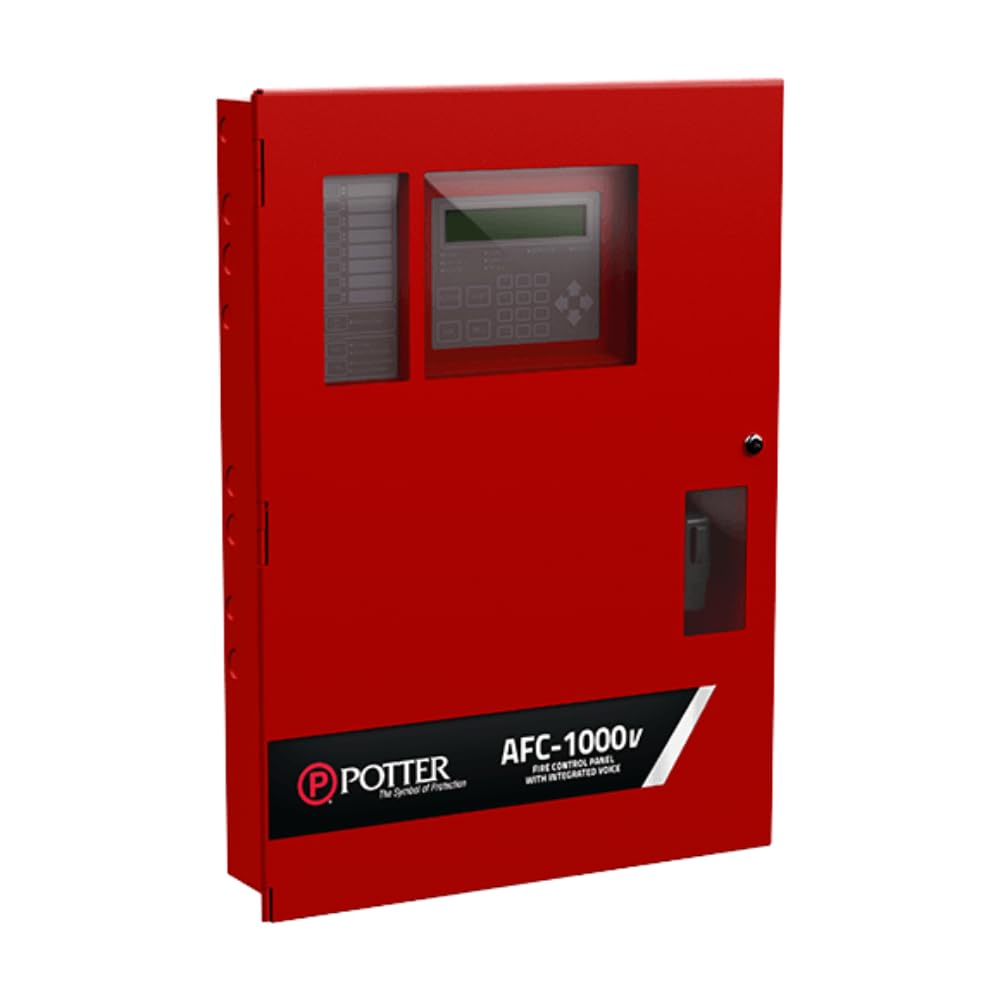
Gambar yang menunjukkan bagian depan view of the POTTER AFC-1000-1270 Point Addressable Fire Alarm Control Panel, typically wall-mounted.
2. Informasi Keselamatan
Read all instructions carefully before installing or operating the AFC-1000-1270 FACP. Failure to follow these safety guidelines may result in property damage, serious injury, or death. This device must be installed and serviced by qualified personnel only, in accordance with all national and local codes and regulations.
- Bahaya Listrik: Putuskan sambungan semua sumber listrik sebelum melakukan servis atau memasang unit.
- Static Sensitive Device: Handle circuit boards with care to prevent electrostatic discharge damage.
- Pembumian yang Tepat: Ensure the system is properly grounded to prevent electrical shock.
- Keamanan Baterai: Follow manufacturer guidelines for battery installation and replacement.
- Pengujian: Regularly test the system as per local codes and manufacturer recommendations.
3. Pengaturan
3.1 Membongkar
Carefully unpack the AFC-1000-1270 FACP and all included components. Verify that all items listed in the packing slip are present and undamaged. The package should include the main FACP unit and a wall mount bracket.
3.2 Pemasangan
The AFC-1000-1270 is designed for wall mounting. Select a suitable location that is clean, dry, and free from excessive vibration or extreme temperatures. Ensure the mounting surface can support the weight of the FACP. Use appropriate fasteners to secure the wall mount bracket, then attach the FACP to the bracket according to the detailed instructions provided in the separate installation guide.
3.3 Pengkabelan dan Koneksi
All wiring must comply with local and national electrical codes. Connect power, communication lines, and detection/notification device circuits to the FACP terminals as specified in the system's wiring diagrams. Ensure all connections are secure and properly insulated. Refer to the detailed wiring schematics for specific terminal assignments and wire gauges.
3.4 Penyalaan Awal
After all wiring is complete and verified, connect the primary power source to the FACP. The system will perform a self-diagnostic test. Observe the status indicators for any fault conditions. If faults are present, refer to the Troubleshooting section.
4. Operating the FACP
The AFC-1000-1270 FACP features a touch control interface for system management. The main display provides real-time status information, event logs, and access to various system functions.
4.1 Fungsi Dasar
- Mengakui: Press the 'Acknowledge' button on the touch screen to silence audible alarms and acknowledge new events.
- Kesunyian: Press the 'Silence' button to silence notification appliances (horns, strobes) after an alarm has been acknowledged.
- Atur ulang: Press the 'Reset' button to clear all active alarms and restore the system to a normal monitoring state. Ensure all alarm conditions have been resolved before resetting.
4.2 Indikator Status Sistem
The FACP display and indicator lights provide visual cues for system status:
- Normal: Green LED indicates the system is operating correctly with no active events.
- Alarm: Red LED and audible tone indicate a fire alarm condition.
- Masalah: Yellow LED and audible tone indicate a system fault or malfunction.
- Pengawas: Yellow LED and audible tone indicate a supervisory condition (e.g., sprinkler valve closed).
5. Pemeliharaan
Regular maintenance is essential for the reliable operation of your AFC-1000-1270 FACP. Perform the following tasks as recommended or as required by local codes.
5.1 Pemeriksaan Rutin
- Sehari-hari: Verify the 'Normal' indicator is illuminated. Check for any new trouble or alarm conditions.
- Bulanan: Conduct a functional test of a sample of detectors and notification appliances.
- Setiap tahun: Perform a comprehensive system test, including all detectors, manual pull stations, and notification appliances.
5.2 Pembersihan
Clean the exterior of the FACP with a soft, dry cloth. Do not use abrasive cleaners or solvents. Keep ventilation openings clear of dust and debris.
5.3 Penggantian Baterai
The FACP contains backup batteries to ensure continuous operation during power outages. These batteries have a limited lifespan and must be replaced periodically, typically every 3-5 years, or when a 'Battery Trouble' condition is indicated. Refer to the FACP's internal documentation for specific battery types and replacement procedures. Always disconnect AC power before replacing batteries.
6. Penyelesaian masalah
This section provides guidance for resolving common issues. For complex problems, contact qualified service personnel.
| Masalah | Kemungkinan Penyebab | Larutan |
|---|---|---|
| System displays 'Trouble' | Wiring fault, device malfunction, low battery, AC power loss. | Check event log for specific trouble code. Verify AC power. Inspect wiring. Test individual devices. Replace batteries if indicated. |
| No power to FACP | AC power disconnected, circuit breaker tripped, internal fuse blown. | Check AC power connection. Reset circuit breaker. Inspect and replace fuses if necessary (by qualified personnel). |
| Alarm Palsu | Dust in detectors, environmental factors (steam, smoke from cooking), detector malfunction. | Clean detectors. Identify and mitigate environmental sources. Test and replace faulty detectors. |
7. Spesifikasi
| Fitur | Spesifikasi |
|---|---|
| Nama Model | AFC-1000-1270 |
| Merek | tembikar |
| Jenis Pemasangan | Dudukan Dinding |
| Metode Kontrol | Menyentuh |
| Komponen yang Termasuk | Dudukan Dinding |
| UPC | 737214686781 |
| ASIN | B0C1D69BCD |
| Jenis Garansi | Terbatas |
| Penggunaan yang Direkomendasikan | For Fire Alarm Systems, Fire Safety Equipment, Commercial Buildings, Residential Buildings |
8. Informasi Garansi
The POTTER AFC-1000-1270 FACP comes with a Garansi Terbatas. This warranty covers defects in materials and workmanship under normal use and service. The duration and specific terms of the warranty are detailed in the warranty card included with your product or available on the manufacturer's official website. Please retain your proof of purchase for warranty claims. This warranty does not cover damage caused by improper installation, misuse, unauthorized modification, or acts of nature.
9. Dukungan
For technical assistance, service, or further information regarding the POTTER AFC-1000-1270 FACP, please contact POTTER customer support or your authorized distributor. Ensure you have your product model number and serial number available when contacting support.
- Pabrikan: tembikar
- Weblokasi: www.pottersignal.com (Catatan: Ini adalah tempat penampung URL, please refer to official product documentation for actual support contact details.)


