1. Pendahuluan
This user manual provides essential information for the safe and efficient operation of your HYCHIKA 3.6V Cordless Electric Rechargeable Screwdriver Drill Set. Please read this manual thoroughly before first use and keep it for future reference.
The HYCHIKA 3.6V Cordless Electric Screwdriver is designed for various screwing and light drilling tasks around the home. It features a maximum torque of 6 N-m, a 6.35 mm quick-change chuck, and a versatile design that allows for both pistol and straight grip configurations.
2. Petunjuk Keselamatan
Selalu perhatikan tindakan pencegahan keselamatan dasar saat menggunakan peralatan listrik untuk mengurangi risiko kebakaran, sengatan listrik, dan cedera pribadi.
- Keselamatan Area Kerja: Jaga area kerja Anda tetap bersih dan terang. Area yang berantakan atau gelap dapat menyebabkan kecelakaan. Jangan mengoperasikan perkakas listrik di lingkungan yang mudah meledak, seperti di dekat cairan, gas, atau debu yang mudah terbakar.
- Keamanan Listrik: Hindari kontak langsung tubuh dengan permukaan yang terhubung ke tanah atau diarde, seperti pipa, radiator, kompor, dan lemari es. Jangan biarkan peralatan listrik terkena hujan atau kondisi basah.
- Keamanan Pribadi: Always wear eye protection. Use safety glasses, goggles, or a face shield. Wear hearing protection when operating noisy tools. Dress properly; avoid loose clothing or jewelry.
- Penggunaan dan Perawatan Alat: Jangan memaksakan perkakas listrik. Gunakan perkakas listrik yang sesuai dengan kebutuhan Anda. Cabut steker dari sumber listrik dan/atau keluarkan baterai sebelum melakukan penyesuaian, mengganti aksesori, atau menyimpan perkakas listrik.
- Penggunaan dan Perawatan Baterai: Recharge only with the charger specified by the manufacturer. Do not use battery packs with any other power tools. When battery pack is not in use, keep it away from other metal objects.
3. Isi Paket
Pastikan semua barang yang tercantum di bawah ini termasuk dalam paket Anda. Jika ada barang yang hilang atau rusak, silakan hubungi layanan pelanggan.
- 1 x HYCHIKA 3.6V Cordless Screwdriver
- 19 x Obeng Bits
- 1 x Bilah Ekstensi
- 1 x Adaptor Pengisian Daya
- 1 x Panduan Pengguna

Figure 3.1: Contents of the HYCHIKA 3.6V Cordless Screwdriver package, including the screwdriver, various bits, and charging adapter.
4. Fitur dan Komponen Produk
Familiarize yourself with the different parts of your cordless screwdriver.

Figure 4.1: Key components of the screwdriver, including the magnetic chuck, PUSH button, front LED light, On/Off switch, LED charger indicator, 3.5mm charger port, and forward & reverse button.
- Magnetic Chuck: 1/4 inch (6.35mm) quick-change chuck for easy bit installation and removal.
- Lampu LED Depan: Illuminates the work area for improved visibility in dark environments.
- Sakelar Hidup/Mati: Activates and deactivates the screwdriver.
- Forward & Reverse Button: Controls the rotation direction for screwing and unscrewing.
- LED Charger Indicator: Provides status of battery charging.
- 3.5mm Charger Port: Connection point for the charging adapter.
- Tekan tombol: Used to adjust the grip configuration from pistol to straight.
5. Pengaturan
5.1 Mengisi Baterai
The screwdriver is powered by a 3.6V 2000 mAh Lithium-Ion battery. Before first use, fully charge the battery.
- Connect the charging adapter to the 3.5mm charger port on the screwdriver.
- Colokkan adaptor pengisi daya ke stopkontak listrik standar.
- The LED charger indicator will illuminate during charging. Once fully charged, the indicator may change color or turn off depending on the model.
- Cabut pengisi daya setelah pengisian selesai.

Figure 5.1: The screwdriver connected to its charging adapter, indicating a full charge.
The screwdriver is designed to maintain full power output even when the battery is low, ensuring consistent performance until the battery is depleted.
5.2 Memasang Mata Obeng
The screwdriver features a 1/4 inch (6.35mm) magnetic quick-change chuck for easy bit installation.
- Pilih mata obeng yang sesuai untuk tugas Anda.
- Insert the bit into the magnetic chuck until it is securely seated. The magnetic chuck will hold the bit firmly in place.
- To remove a bit, simply pull it out of the chuck. Bits with grooves are designed for easier removal.

Figure 5.2: Visual guide for inserting a bit into the magnetic chuck and removing it.
6. Petunjuk Pengoperasian
6.1 Adjusting Grip Configuration
The screwdriver can be used in two grip configurations: pistol grip or straight grip, for enhanced versatility and comfort.
- To change the grip, press and hold the "PUSH" button located at the top of the screwdriver.
- While holding the button, rotate the handle ninety degrees to switch between pistol and straight configurations.
- Release the "PUSH" button once the desired configuration is achieved. The handle will lock into place.
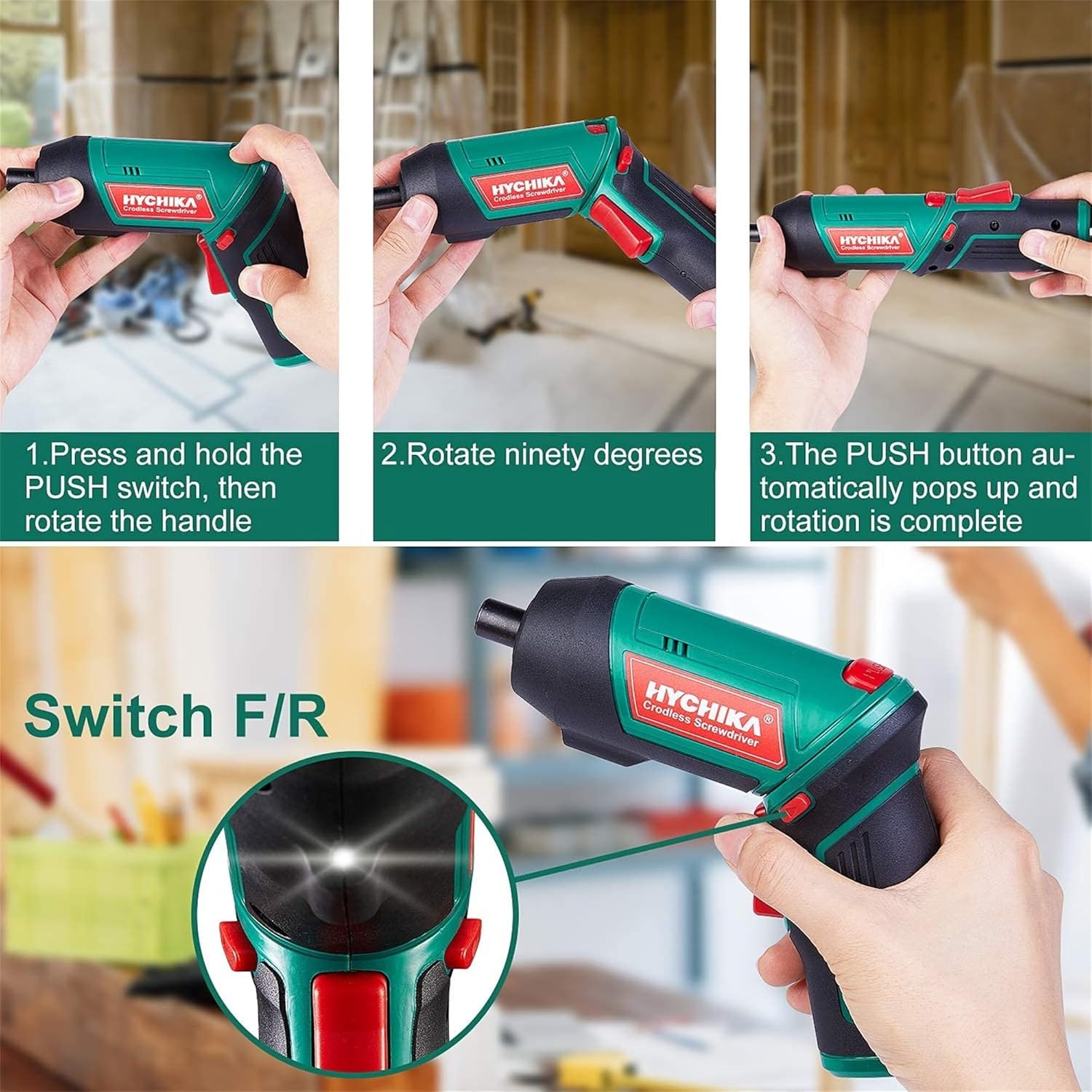
Figure 6.1: Demonstrates the process of transforming the screwdriver's grip by pressing the PUSH button and rotating the handle.
6.2 Operasi Maju dan Mundur
The forward/reverse button controls the direction of rotation for screwing and unscrewing.
- To drive screws (forward rotation), push the forward/reverse button to the left (when viewed dari bagian belakang alat).
- To remove screws (reverse rotation), push the forward/reverse button to the right.
- When the button is in the center position, the tool is locked, preventing accidental activation.
6.3 Menggunakan Lampu Kerja LED
The built-in LED light automatically illuminates when the screwdriver is in operation, providing visibility in dimly lit areas.

Figure 6.2: The integrated LED light provides clear illumination for working in dark environments.
7. Pemeliharaan
Regular maintenance ensures the longevity and optimal performance of your screwdriver.
- Pembersihan: Jaga agar lubang ventilasi tetap bersih dan bebas debu. Gunakan kain lembut dan kering.amp kain untuk membersihkan alat casing. Jangan menggunakan bahan kimia keras atau pembersih abrasif.
- Perawatan Bit: Clean screwdriver bits after use. Store them in the provided case to prevent loss and damage.
- Penyimpanan Baterai: If storing the tool for an extended period, ensure the battery is partially charged (around 50%) and store it in a cool, dry place. Recharge the battery every 3-6 months to maintain its health.
- Pemeriksaan Umum: Periodically check for any loose screws, damaged cords, or worn parts. Do not use the tool if any damage is observed.
8. Penyelesaian masalah
This section addresses common issues you might encounter with your screwdriver.
| Masalah | Kemungkinan Penyebab | Larutan |
|---|---|---|
| Obeng tidak menyala. | Baterai habis. Forward/Reverse switch is in the center (locked) position. | Isi daya baterai hingga penuh. Dorong sakelar maju/mundur ke kiri atau kanan. |
| Screwdriver loses power quickly. | Baterai tidak terisi penuh. Battery life degraded. | Pastikan baterai terisi penuh sebelum digunakan. If battery life is significantly reduced, contact customer support for replacement options. |
| Bits are not held securely in the chuck. | Bit is not fully inserted. Chuck is dirty or damaged. | Push the bit firmly into the chuck until it clicks into place. Clean the chuck area. If damage is visible, contact customer support. |
Jika masalah berlanjut setelah mencoba solusi ini, silakan hubungi dukungan pelanggan.
9. Spesifikasi
| Fitur | Spesifikasi |
|---|---|
| Merek | Overstock (HYCHIKA) |
| Nomor Model | c131a012-0da9-4306-aeab-b1d9ff5cd4b7 |
| Jil.tage | 3.6 Volt |
| Sumber Daya | Bertenaga Baterai |
| Kecepatan | 180 putaran/menit |
| Torsi Barang | 6 Newton Meters (6 N-m) |
| Jenis Baterai | Ion Litium |
| Kapasitas Baterai | 2000 mAh |
| Ukuran Chuck | 1/4 inci (6.35mm) |
| Bahan | Plastik, Karet |
| Warna | Hijau |
| UPC | 616859793583 |
10. Garansi dan Dukungan
Overstock offers lifetime after-sales service for this product. For any questions, concerns, or technical assistance, please contact our customer support team.
Please have your model number (c131a012-0da9-4306-aeab-b1d9ff5cd4b7) and purchase information ready when contacting support.


