1. Pendahuluan
This manual provides detailed instructions for the Anpviz 5MP PoE IP Camera (Model: IPC-D3053WD-S). This full-metal wired turret security camera is designed for outdoor use, featuring 5MP resolution (3072x1728 @20fps), a 2.8mm lens with a 114° wide angle, and advanced AI human and vehicle detection. It includes Smart Dual Light Color Night Vision, 120dB WDR, one-way audio, H.265+ compression, and an IP67 weatherproof rating for robust performance in various environments.
2. Apa yang ada di dalam kotak
Upon unboxing your Anpviz 5MP PoE IP Camera, verify that all components listed below are present:
- 1x Anpviz 5MP PoE IP Camera (IPC-D3053WD-S)
- 1x Tutup Tahan Air
- 1x Screw Kit (for mounting)
- 1x Panduan Pengguna
- 1x Kartu Purnajual

Untuk panduan visual tentang cara membuka kemasan, silakan lihat video di bawah ini:
3. Fitur Produk
The Anpviz 5MP PoE IP Camera is equipped with several advanced features to enhance your security surveillance:
- 5MP AI Human & Vehicle Detection: This camera features a 1/3” CMOS image sensor, delivering 5MP resolution (3072x1728 @20fps) with a 2.8mm lens providing a 114° wide angle. Smart AI technology precisely detects humans and vehicles, minimizing false alarms from environmental factors like leaves.
- Penglihatan Malam Warna Cahaya Ganda Cerdas: Equipped with both IR and warm light sources, and a 0.005 Lux @ F1.6 ultra-low lux lens, the camera ensures clear imaging in various lighting conditions. Warm light activates upon human or vehicle detection at night for colorful images, switching to IR mode for black-and-white images when no objects are present.
- One-Way Audio & H.265+ Compression: Capture vivid videos with integrated audio thanks to the built-in microphone with environment noise filtering. H.265+/H.265/H.264+/H.264 compression formats allow for efficient storage, reducing file sizes significantly.
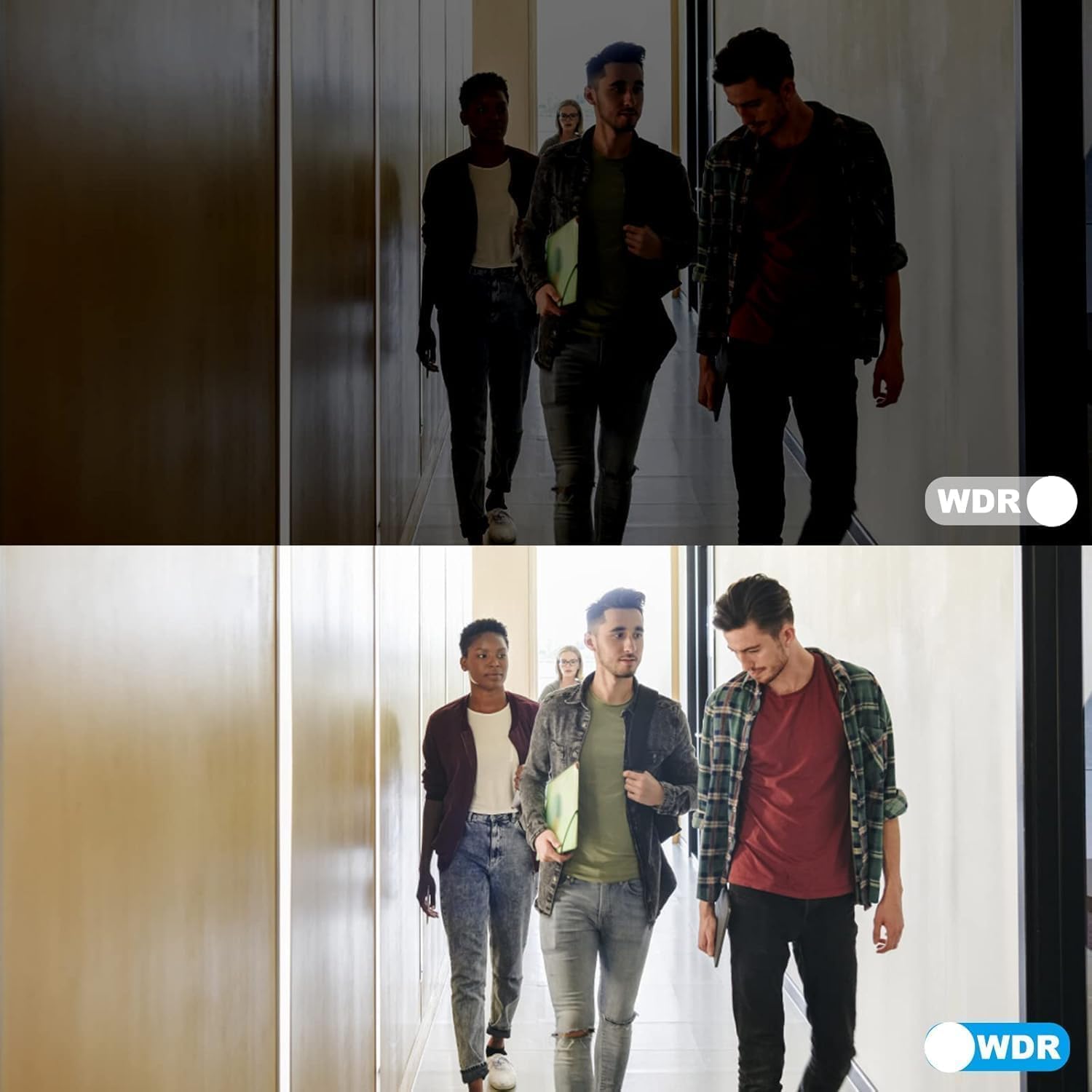
- 120dB Wide Dynamic Range (WDR): Optical WDR technology ensures clear images in scenes with both very bright and very dark areas, balancing exposure for optimal visibility.
- Robust Metal Housing & IP67 Weatherproof: Constructed with a full metal body, this camera is stable, durable, and IP67 rated, making it fully waterproof and dustproof. It can withstand adverse weather conditions, including heavy rain and storms.




Explore the main functions of this PoE camera in the video below:
See the Smart Dual Light Color Night Vision in action:
Understand the 120dB WDR technology:
4. Pengaturan & Instalasi
The Anpviz 5MP PoE IP Camera offers multiple working solutions for flexible setup. It supports Power over Ethernet (PoE) for simplified wiring, combining power and data through a single Ethernet cable.
4.1 Metode Koneksi
You can connect your PoE camera using one of the following methods:
- Plug & Play with Anpviz NVRs: For optimal performance and ease of use, connect directly to compatible Anpviz NVRs (NVR7608, NVR7616, NVR7632, NVR7732).
- Connect with a PoE Switch/Injector: Use a PoE switch or injector to power the camera and transmit data via a single Ethernet cable.
- Connect with a DC 12V Power Adapter: If not using PoE, power the camera with a DC 12V power adapter (not included) and connect to your network via a standard Ethernet cable.

For a visual guide on connecting your PoE camera, please watch the video below:
4.2 Instalasi Fisik
The camera supports both ceiling mount and wall mount installations. Use the provided drill template and screw kit for secure mounting.

For detailed physical installation steps, refer to the video below:
5. Petunjuk Pengoperasian
Operate your Anpviz 5MP PoE IP Camera using the Anpviz Viewer app or compatible third-party software.
5.1 Anpviz Viewer App Setup
Download the Anpviz Viewer app from your smartphone's app store. Follow the in-app instructions to activate the camera, add it to your device list, and begin live viewing.

For detailed instructions on app activation and adding the camera, refer to the video below:
5.2 Langsung View dan Pemutaran
Once connected, access live video feeds and recorded footage through the app or compatible software. Utilize features like digital zoom, snapshot, and video recording directly from the interface.

Experience the camera's live view and playback features:
6. Pemeliharaan
To ensure optimal performance and longevity of your Anpviz 5MP PoE IP Camera, regular maintenance is recommended:
- Pembersihan: Bersihkan lensa dan casing kamera secara berkala dengan kain lembut dan halus.amp kain. Hindari pembersih abrasif yang dapat menggores lensa.
- Pembaruan Firmware: Periksa Anpviz resmi website or app regularly for firmware updates to ensure your camera has the latest features and security enhancements.
- Pemeriksaan Kabel: Inspect all cables and connections for any signs of wear, damage, or loose connections, especially the waterproof lid for the Ethernet cable.
- Perlindungan Lingkungan: While the camera is IP67 weatherproof, extreme conditions can still impact performance. Ensure it is installed in a location that minimizes direct exposure to harsh elements where possible.

Learn more about the IP67 waterproof feature and mounting options:
7. Penyelesaian masalah
If you encounter any issues with your Anpviz 5MP PoE IP Camera, consider the following basic troubleshooting steps:
- Tidak Ada Daya/Tidak Ada Gambar: Verify all power connections. If using PoE, ensure the PoE switch or NVR is functioning correctly and providing power. If using a DC 12V adapter, confirm it is properly connected and supplying power.
- Masalah Koneksi Jaringan: Check Ethernet cable connections. Ensure the camera, NVR/PoE switch, and router are on the same local area network (LAN). Restart network devices if necessary.
- Masalah Konektivitas Aplikasi: Ensure your smartphone is connected to the internet. Verify the camera is properly added and activated in the Anpviz Viewer app. Check for app updates.
- Kualitas Gambar Buruk: Clean the camera lens. Check network bandwidth if streaming is choppy. Ensure WDR is enabled in high-contrast lighting conditions.
- Alarm Palsu: Adjust AI detection sensitivity settings in the app or NVR interface. Define specific detection zones to exclude areas prone to false triggers.
For further assistance, please contact Anpviz technical support.
8. Spesifikasi
Below are the detailed technical specifications for the Anpviz 5MP PoE IP Camera (IPC-D3053WD-S):
| Fitur | Spesifikasi |
|---|---|
| Nama Model | IPC-D3053WD-S |
| Resolusi Pengambilan Video | 5MP (3072x1728 @20fps) |
| Lensa | 2.8mm Lensa Tetap |
| Viewsudut ing | 114 Derajat |
| Teknologi Penglihatan Malam | Smart Dual Light Color Night Vision (67ft), IR Night Vision (100ft) |
| Rentang Dinamis | WDR 120dB |
| Deteksi | AI Human and Vehicle Detection |
| Suara | One-Way Audio (Built-in Microphone) |
| Kompresi Video | H.265 + / H.265 / H.264 + / H.264 |
| Penyimpanan | Micro SD Card Slot (up to 512GB, card not included) |
| Konektivitas | Kabel (PoE) |
| Sumber Daya | PoE (Power over Ethernet) or DC 12V (adapter not included) |
| Peringkat tahan cuaca | Tingkat IP67 |
| Bahan | Perumahan Logam Penuh |
| Ukuran | 6x6x6 inci |
| Berat Barang | 1.74 pon |
| Perangkat yang Kompatibel | Desktop, Laptop, Network Video Recorder, Smartphone, Television |
| Suhu Operasional | -22°F hingga 140°F (-30°C hingga 60°C) |
9. Garansi & Dukungan
Anpviz is committed to providing high-quality products and excellent customer service.
9.1 Informasi Garansi
Your Anpviz 5MP PoE IP Camera comes with a Garansi 2 Tahun. Please refer to the After-sales Card included in your package for specific terms and conditions.
9.2 Dukungan Teknis
For any questions, issues, or technical assistance, our professional tech staff is available to help. You can reach us via:
- E-mail: support@anpviz.com
- Jam Operasional: Monday - Friday, 9:00 AM - 6:00 PM (Time Zone not specified, typically local business hours)
Anpviz has been established since 2014, aiming to provide comprehensive camera solutions across Asia, North America, South America, Africa, Southeast Asia, and the Middle East. We maintain a customer-centric approach and a spirit of innovation to provide convenience and security for our customers' lives.


