1. Pendahuluan
The ULANZI VL49 Pro RGB Video Light is a compact and versatile lighting solution designed for photography and videography. It features 60 high color rendering LED beads, offering a wide illumination angle of up to 120°. With a brightness of up to 800LUX@0.5m and a CRI95+ rating, it ensures natural and lifelike lighting. This portable light supports full 360° RGB color, adjustable color temperature, and various dynamic light effects, making it suitable for diverse creative needs.

Figure 1: ULANZI VL49 Pro RGB Video Light. This image displays the compact design of the light, highlighting its bright output.
2. Isi Paket
Silakan periksa paket untuk memastikan semua item ada:
- ULANZI VL49 Pro RGB Video Light
- Kabel Pengisian Daya USB-C
- Adaptor Sepatu Dingin
- Silicone Soft Cover
- Honeycomb Spotlight Cover
- Panduan Pengguna
3. Produk Lebihview
Familiarize yourself with the main components of the VL49 Pro:
- Panel LED: Front light source with 60 LED beads.
- Layar LCD: Shows current settings (CCT, RGB, Scene, Brightness, Battery).
- Tombol Kontrol: Power switch, mode selection, and adjustment buttons.
- Port USB-C: Untuk mengisi daya baterai internal.
- Lubang Sekrup 1/4": Untuk dipasang pada tripod atau aksesori lainnya.
- Magnetik Kembali: Memungkinkan pemasangan pada permukaan logam.

Figure 2: Close-up of the ULANZI VL49 Pro's LCD display and control interface. This image illustrates the screen showing settings and the physical buttons for operation.
4. Pengaturan
4.1 Mengisi Daya Perangkat
The VL49 Pro is equipped with a 2500mAh rechargeable battery. Use the provided USB-C cable to connect the light to a compatible power source (e.g., USB wall adapter, computer USB port). A full charge typically takes approximately 2 hours. The light can be used while charging.
4.2 Opsi Pemasangan
- 1/4" Screw Mount: The light features a standard 1/4" screw hole, allowing it to be mounted on tripods, light stands, or other camera accessories.
- Adaptor Cold Shoe: Attach the included cold shoe adapter to the 1/4" screw hole to mount the light directly onto a camera's hot shoe or cold shoe mount.
- Daya Tarik Magnetik: The back of the light has a magnetic design, enabling it to be adsorbed onto most metal surfaces for quick and flexible scene setup.

Figure 3: The magnetic attraction feature of the VL49 Pro. This image shows the light adhering to a metal surface, illustrating its versatile placement options.
5. Petunjuk Pengoperasian
5.1 Daya Hidup/Mati
Locate the power switch on the side of the device. Slide it to the 'ON' position to power on the light. Slide it to 'OFF' to power off.
5.2 Pemilihan Mode
The VL49 Pro offers three main lighting modes: CCT (Correlated Color Temperature), RGB (Hue, Saturation, Brightness), and Scene Mode. Use the mode selection button to cycle through these options.
5.2.1 CCT Mode (Color Temperature)
In CCT mode, you can adjust the color temperature from 2500K (warm light) to 9000K (cold light) and the brightness from 0% to 100%. Use the up/down buttons to navigate between settings and the plus/minus buttons to adjust values.

Figure 4: CCT Mode functionality. This image shows the light producing various color temperatures, from warm to cool, indicating its adjustability.
5.2.2 RGB Mode (Full Color)
In RGB mode, you have access to 360° full-color adjustment. You can control the Hue (H), Saturation (S), and Brightness (I) to achieve any desired color. Use the navigation and adjustment buttons to fine-tune your color settings.

Figure 5: Full RGB Color capabilities. This image showcases the light's ability to produce a wide range of colors, demonstrating its versatility for creative lighting.
5.2.3 Scene Mode (Dynamic Light Effects)
The VL49 Pro includes 20 dynamic light effects to enhance your creative shots. These effects include Cop Car, Fireworks, Fault Bulb, Paparazzi, Green Flash, Blue Flash, Fire Engine, Candle, Strobe, H/L Beam, HSI Slow, Lightning, Party, RGB Strobe, Red Flash, and HSI Fast. Cycle through the scenes using the navigation buttons.
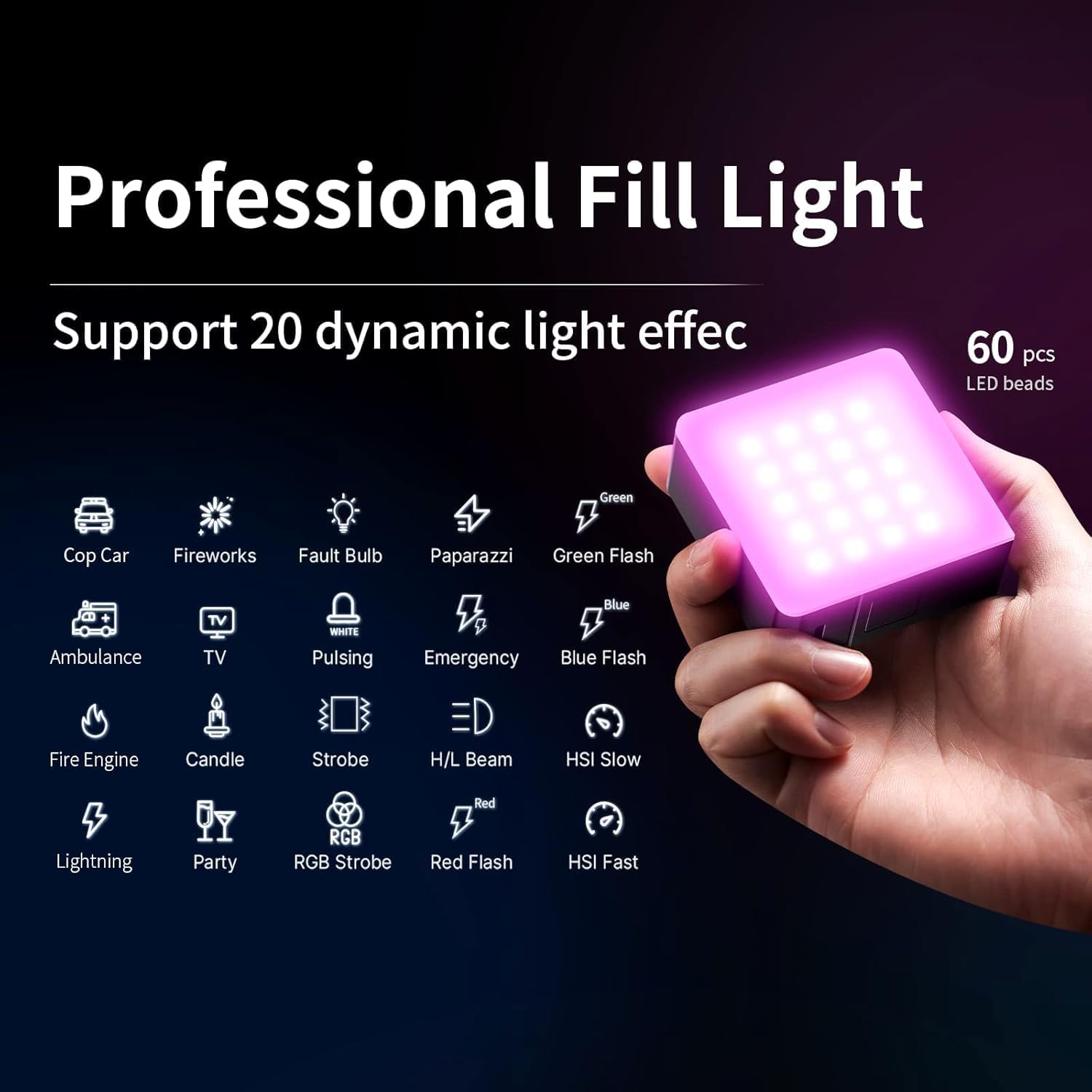
Figure 6: Dynamic Light Effects. This image displays the light cycling through various pre-programmed scene modes, such as police car lights and fireworks.
5.3 Using the Diffusers
The light comes with two covers: a silicone soft cover and a honeycomb spotlight cover. The silicone cover softens the light output, reducing harsh shadows, while the honeycomb cover helps control light spill and create more focused lighting effects.

Figure 7: Included accessories: silicone soft cover and honeycomb spotlight cover. These accessories modify the light's output for different effects.
6. Spesifikasi
| Fitur | Spesifikasi |
|---|---|
| Dimensi Produk | 3.94x3.78x3.15 inci |
| Berat Barang | 8.8 ons |
| Nomor Model Barang | VL49 PRO |
| Baterai | Diperlukan 1 baterai Lithium Ion (termasuk) |
| Daya Tahan Baterai | Over 90 minutes at maximum power, 10 hours at minimum |
| Teknologi Konektivitas | USB |
| Antarmuka Perangkat Keras | USB |
| Suhu Warna | 2500K-9000K |
| Penyesuaian Kecerahan | 0-100% |
| CRI | 95+ |
| Sudut iluminasi | 120° |
7. Penyelesaian masalah
- Lampu tidak menyala: Ensure the battery is charged. Connect the light to a power source using the USB-C cable and allow it to charge for a few minutes before attempting to power on again.
- Inconsistent brightness/color: Check the battery level. Low battery can affect performance. Ensure settings are correctly adjusted via the LCD display.
- Magnetic attachment issues: Ensure the surface is metal and clean. The magnetic strength may vary depending on the metal thickness and composition.
8. Pemeliharaan
- Keep the device dry and clean. Avoid exposure to water or excessive humidity.
- Use a soft, dry cloth to clean the light. Do not use harsh chemicals or abrasive materials.
- Simpan lampu di tempat sejuk dan kering bila tidak digunakan.
- Isi daya baterai secara teratur, meskipun tidak sering digunakan, untuk menjaga kesehatan baterai.
9. Garansi dan Dukungan
ULANZI products are covered by a manufacturer's warranty. For detailed warranty information, technical support, or service inquiries, please refer to the official ULANZI webKunjungi situs web mereka atau hubungi layanan pelanggan mereka secara langsung. Harap simpan bukti pembelian Anda untuk klaim garansi.
10. Video Produk
ULANZI VL49 Pro RGB Video Light Overview
Video ini memberikan penjelasan resmi.view of the ULANZI VL49 Pro RGB Video Light, demonstrating its features and functionality.