Perkenalan
This manual provides essential instructions for the safe and efficient operation, maintenance, and troubleshooting of your Instant Solo WIFI Connect Single Serve Coffee Maker. Please read all instructions thoroughly before first use and retain this manual for future reference.
Pengamanan Penting
Saat menggunakan peralatan listrik, tindakan pencegahan keselamatan dasar harus selalu diikuti untuk mengurangi risiko kebakaran, sengatan listrik, dan/atau cedera pada orang, termasuk yang berikut ini:
- Baca semua petunjuk.
- Jangan sentuh permukaan yang panas. Gunakan gagang atau kenop.
- Untuk melindungi dari kebakaran, sengatan listrik, dan cedera pada orang, jangan merendam kabel, steker, atau peralatan dalam air atau cairan lainnya.
- Pengawasan ketat diperlukan saat peralatan apa pun digunakan oleh atau di dekat anak-anak.
- Cabut steker dari stopkontak saat tidak digunakan dan sebelum membersihkan. Biarkan dingin sebelum memasang atau melepas komponen, dan sebelum membersihkan alat.
- Jangan mengoperasikan peralatan apa pun dengan kabel atau steker yang rusak atau setelah peralatan tersebut mengalami kegagalan fungsi, atau telah rusak dengan cara apa pun.
- Penggunaan aksesori tambahan yang tidak direkomendasikan oleh produsen alat dapat mengakibatkan kebakaran, sengatan listrik, atau cedera pada orang.
- Jangan gunakan di luar ruangan.
- Jangan biarkan kabel menggantung di tepi meja atau meja dapur, atau menyentuh permukaan panas.
- Jangan menaruhnya di atas atau di dekat kompor gas atau listrik yang panas, atau di dalam oven yang sedang dipanaskan.
- Selalu pasang steker ke alat terlebih dahulu, lalu colokkan kabel ke stopkontak. Untuk melepas, putar kontrol ke posisi "off", lalu cabut steker dari stopkontak.
- Jangan menggunakan alat ini untuk tujuan lain selain yang dimaksudkan.
- Panas dapat terjadi jika tutup dibuka selama siklus penyeduhan.
Produk Selesaiview
Familiarize yourself with the components of your Instant Solo WIFI Connect Single Serve Coffee Maker.

Image: The Instant Solo WIFI Connect Coffee Maker, shown brewing coffee into a mug, with a smartphone displaying the Instant Brands Connect app interface.

Gambar: Detail view of the coffee maker's top control panel with touch buttons for power, Wi-Fi, brew sizes (8oz, 10oz, 12oz), and the reusable coffee pod being inserted.
Komponen Utama:
- Panel Kontrol: Touch-sensitive buttons for power, Wi-Fi, and brew size selection.
- Tandon air: Removable 40oz capacity for water.
- Brew Head: Area where K-Cup pods or the reusable coffee pod are placed.
- Baki Tetes: Removable and dishwasher-safe tray to catch drips and accommodate travel mugs.
- Reusable Coffee Pod: Included for brewing with ground coffee.
Pengaturan
Pembersihan Awal:
- Lepaskan semua bahan kemasan dan stiker dari mesin pembuat kopi.
- Wash the water reservoir, reusable coffee pod, and drip tray in warm, soapy water. Rinse thoroughly and dry.
- Lap bagian luar pembuat kopi dengan iklanamp kain.
Penggunaan Pertama (Siklus Pembersihan):
- Isi wadah air dengan air bersih hingga garis pengisian MAKS.
- Letakkan cangkir besar (minimal 12 ons) pada baki tetesan.
- Do not insert a K-Cup pod or the reusable coffee pod.
- Tekan tombol daya untuk menyalakan pembuat kopi.
- Select the 12oz brew size. The machine will perform a hot water cycle to clean the internal components.
- Discard the hot water. Repeat this process 2-3 times to ensure thorough cleaning.
Water Reservoir Refill:

Image: A hand pouring water into the transparent, removable 40oz water reservoir of the Instant Solo coffee maker, highlighting its slim design and dimensions.
The 40oz removable water reservoir allows for multiple brews before refilling. To refill, simply lift the reservoir from the back of the unit and fill with fresh, cold water. Replace it securely on the coffee maker.
Petunjuk Pengoperasian
Brewing Hot Coffee:
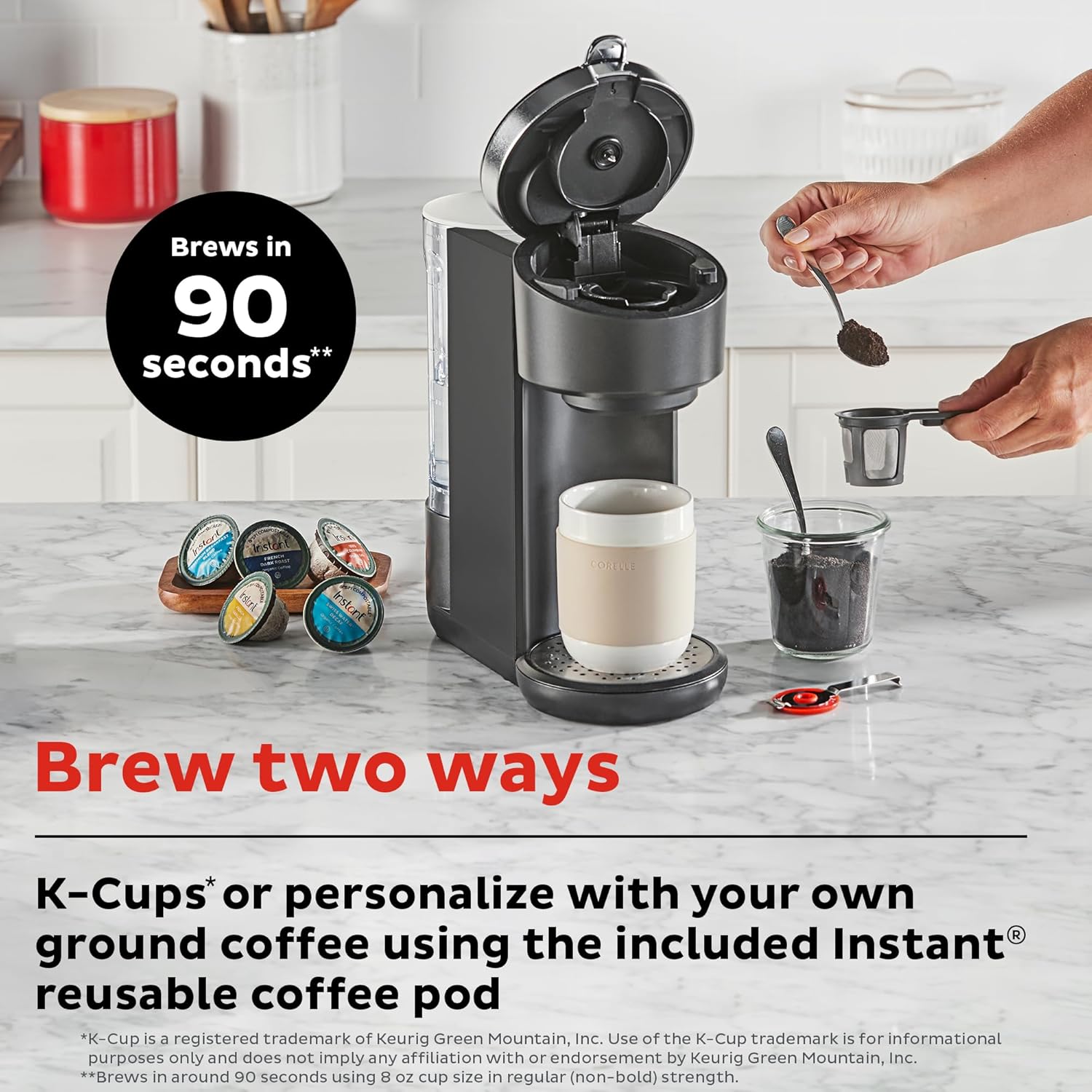
Image: The Instant Solo coffee maker on a countertop, illustrating the two brewing methods: using K-Cup compatible pods or filling the reusable coffee pod with ground coffee.
Using K-Cup Compatible Pods:
- Pastikan wadah air terisi.
- Lift the brew head handle.
- Insert a K-Cup compatible pod into the pod holder. Close the handle firmly.
- Letakkan cangkir pada baki tetesan.
- Press the power button. Select your desired brew size (8oz, 10oz, or 12oz).
- The coffee maker will begin the brewing process.
Using Ground Coffee with Reusable Pod:
- Pastikan wadah air terisi.
- Open the reusable coffee pod and fill it with your preferred ground coffee. Do not overfill.
- Close the reusable pod and insert it into the brew head. Close the handle firmly.
- Letakkan cangkir pada baki tetesan.
- Press the power button. Select your desired brew size (8oz, 10oz, or 12oz).
- The coffee maker will begin the brewing process.
Bold Setting and Pre-Infusion:

Image: A cutaway diagram showing the three stages of the pre-infusion brew process: Infuse (grounds soaked), Pause (grounds saturate), and Brew (remaining water extracted).
The Instant Solo features a pre-infusion brew process that gently soaks the coffee grounds before full brewing. This process enhances flavor and aroma. To activate the Bold setting for a stronger brew, select the 'Bold' option on the control panel or through the Instant Brands Connect app before selecting your brew size.
Brewing Iced Coffee:

Image: A graphic illustrating the customization capabilities of the coffee maker, including brew sizes (8, 10, 12 oz on device; 4, 8 oz via app), the Bold setting for deeper flavor, and the Iced Coffee mode accessible through the app.
To prepare iced coffee, fill your glass with ice cubes. Select the 'Bold' feature and choose an 8, 10, or 12oz brew size. The machine will brew a concentrated coffee over the ice. You may add milk or other ingredients after brewing to complete your iced coffee.
Wi-Fi Connect & App Usage:

Image: The Instant Solo coffee maker on a kitchen counter, with a hand holding a smartphone showing the Instant Brands Connect app, indicating remote control functionality.
The Instant Solo WIFI Connect coffee maker can be controlled remotely using the Instant Brands Connect app. This app allows you to initiate brewing, customize settings, and receive notifications.
- Download the Instant Brands Connect app from your device's app store (available for iOS and Android).
- Follow the in-app instructions to connect your coffee maker to your home Wi-Fi network.
- Once connected, you can use the app to select brew sizes (including additional 4oz and 6oz options), adjust brew strength, activate Iced Coffee mode, and schedule brewing.
- The app also provides notifications regarding brewing status and maintenance reminders.
Pemeliharaan
Pembersihan:
- Luar: Bersihkan bagian luar dengan iklanamp, kain lembut. Jangan gunakan pembersih abrasif.
- Tandon air: The 40oz removable water reservoir is dishwasher safe (top rack recommended) or can be hand-washed with warm, soapy water.
- Baki Tetes: The removable drip tray is dishwasher safe (top rack recommended) or can be hand-washed.
- Reusable Coffee Pod: Cuci dengan air sabun hangat setelah setiap penggunaan.
- Brew Head: Periodically wipe the area around the brew head with a damp kain.
Kerak:
Over time, mineral deposits (scale) can build up in your coffee maker, affecting performance. Descaling should be performed regularly, depending on water hardness and frequency of use.
- Kosongkan reservoir air.
- Fill the reservoir with a mixture of white vinegar and water (e.g., 1:1 ratio) or a commercial descaling solution according to product instructions.
- Tempatkan cangkir besar di atas nampan tetesan.
- Run several 12oz brew cycles until the reservoir is empty. Do not insert a coffee pod during descaling.
- After descaling, rinse the reservoir thoroughly and fill it with fresh water.
- Run several 12oz brew cycles with fresh water to flush out any remaining descaling solution.
Penyelesaian Masalah
| Masalah | Kemungkinan Penyebab | Larutan |
|---|---|---|
| Kopi belum diseduh | No water in reservoir; brew head not closed; power issue. | Fill reservoir; ensure brew head handle is fully down; check power connection. |
| Kopi lemah | Insufficient coffee grounds; incorrect brew size; descaling needed. | Use more grounds or a finer grind; select smaller brew size; activate Bold setting; descale the machine. |
| Kopi meluap | Mug too small; reusable pod overfilled. | Use a larger mug; do not overfill reusable pod. |
| Masalah koneksi Wi-Fi | Incorrect Wi-Fi password; router too far; app not updated. | Verify password; move coffee maker closer to router; update Instant Brands Connect app. |
| Machine flashes lights | Error indicator; descaling reminder. | Refer to app for specific error codes; perform descaling if due. |
Spesifikasi
- Merek: Seketika
- Nama Model: Instant Solo WIFI Connect
- Nomor Model: Telepon: 140-0095-01
- Warna: Hitam
- Dimensi Produk: 12.2"P x 5.3"L x 12.4"T (31 cm P x 13.5 cm L x 31.5 cm T)
- Berat Barang: 4.6 pon
- Kapasitas Waduk Air: 40 ons
- Ukuran Seduh: 8oz, 10oz, 12oz (additional 4oz, 6oz via app)
- Fitur Khusus: App-Controlled, Pre-Infusion Brew Process, Bold Setting, Iced Coffee Mode
- Kesesuaian: K-Cup compatible pods, ground coffee with reusable pod
- Mode Operasi: Sepenuhnya Otomatis
- Masukan Antarmuka Manusia: Layar sentuh
- UPC-nya: 810028589940
Garansi dan Dukungan
For warranty information and customer support, please refer to the warranty card included with your product or visit the official Instant Brands website. You can also find additional resources and frequently asked questions on the Instant Brands Connect app.


