1. Pendahuluan
Thank you for choosing the GenMachine Mini PC. This compact yet powerful computer is designed to deliver exceptional performance for a variety of tasks, including gaming, office productivity, and creative design. Equipped with an AMD Ryzen 7 3750H processor, ample memory, and fast storage, it offers a seamless computing experience. This manual provides essential information for setting up, operating, maintaining, and troubleshooting your new Mini PC.
2. Apa yang ada di dalam kotak
Please verify that all items are present and in good condition upon unboxing.
- 1 x GenMachine Mini PC
- 1 x Kabel HDMI
- 1 x Adaptor Daya
- 1 x Panduan Pengguna (dokumen ini)
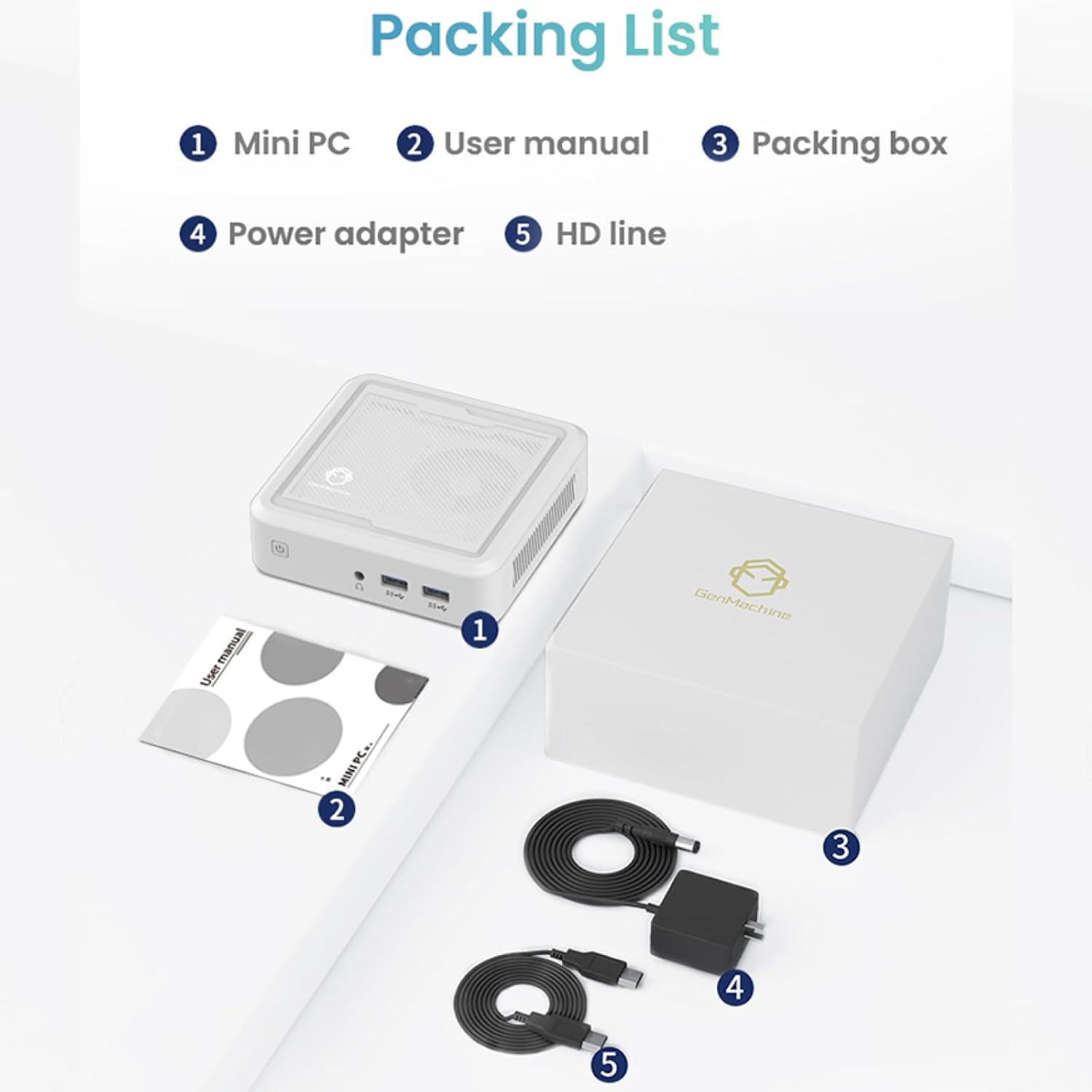
Figure 2.1: Packaging contents of the GenMachine Mini PC.
3. Fitur Produk
The GenMachine Mini PC is engineered with features to enhance your computing experience:
- Performa Kuat: Equipped with an AMD Ryzen 7 3750H processor, delivering speeds up to 4.0GHz with 4 cores and 8 threads for demanding tasks.
- Ample Memory and Storage: Features 8GB of DDR4 RAM and a 256GB SSD with M.2 NVMe support for seamless multitasking and quick file mengakses.
- Konektivitas Serbaguna: Advanced WiFi 6 and Bluetooth 5.2 capabilities ensure high-speed internet and smooth device pairing.
- Desain Kompak: A sleek, small form factor that fits easily into any workspace or gaming setup.
- Beberapa Pilihan Tampilan: HDMI and DisplayPort outputs support dual 4K displays for expanded productivity and immersive visuals.

Gambar 3.1: Depan view of the GenMachine Mini PC.
3.1 Rich Interface for Easy Connection
The Mini PC offers a comprehensive set of ports to meet various connectivity needs:
- Kabel USB 3.0x4
- HDMI x 1
- DisplayPort (DP) x 1
- LAN (Ethernet) x 1
- 3.5mm Audio Jack x 1
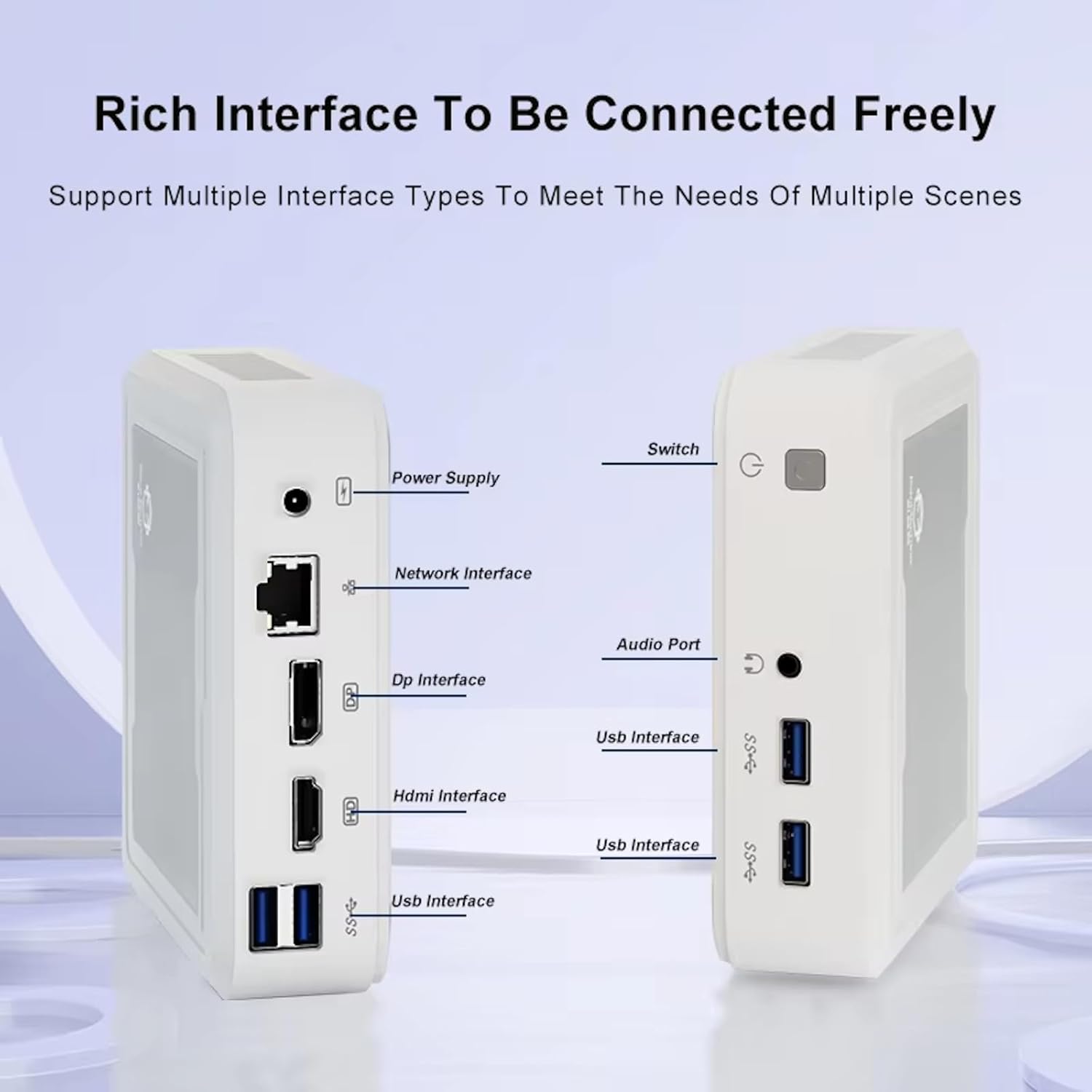
Figure 3.2: Available ports on the GenMachine Mini PC.
3.2 Dual Monitor Support
Enhance your productivity or gaming experience by connecting up to two 4K displays simultaneously using the HDMI and DisplayPort outputs.

Figure 3.3: Dual 4K display setup with the GenMachine Mini PC.
Video 3.1: Demonstration of the GenMachine Mini PC supporting two monitors simultaneously.
3.3 Energy Efficiency and Quiet Operation
Designed for low noise operation, the Mini PC maintains a quiet environment, making it suitable for various settings.

Figure 3.4: Noise level comparison of the GenMachine Mini PC.
3.4 Compact and Durable Design
The Mini PC features an ultra-durable, lightweight metal casing, making it space-saving and robust for any work environment.
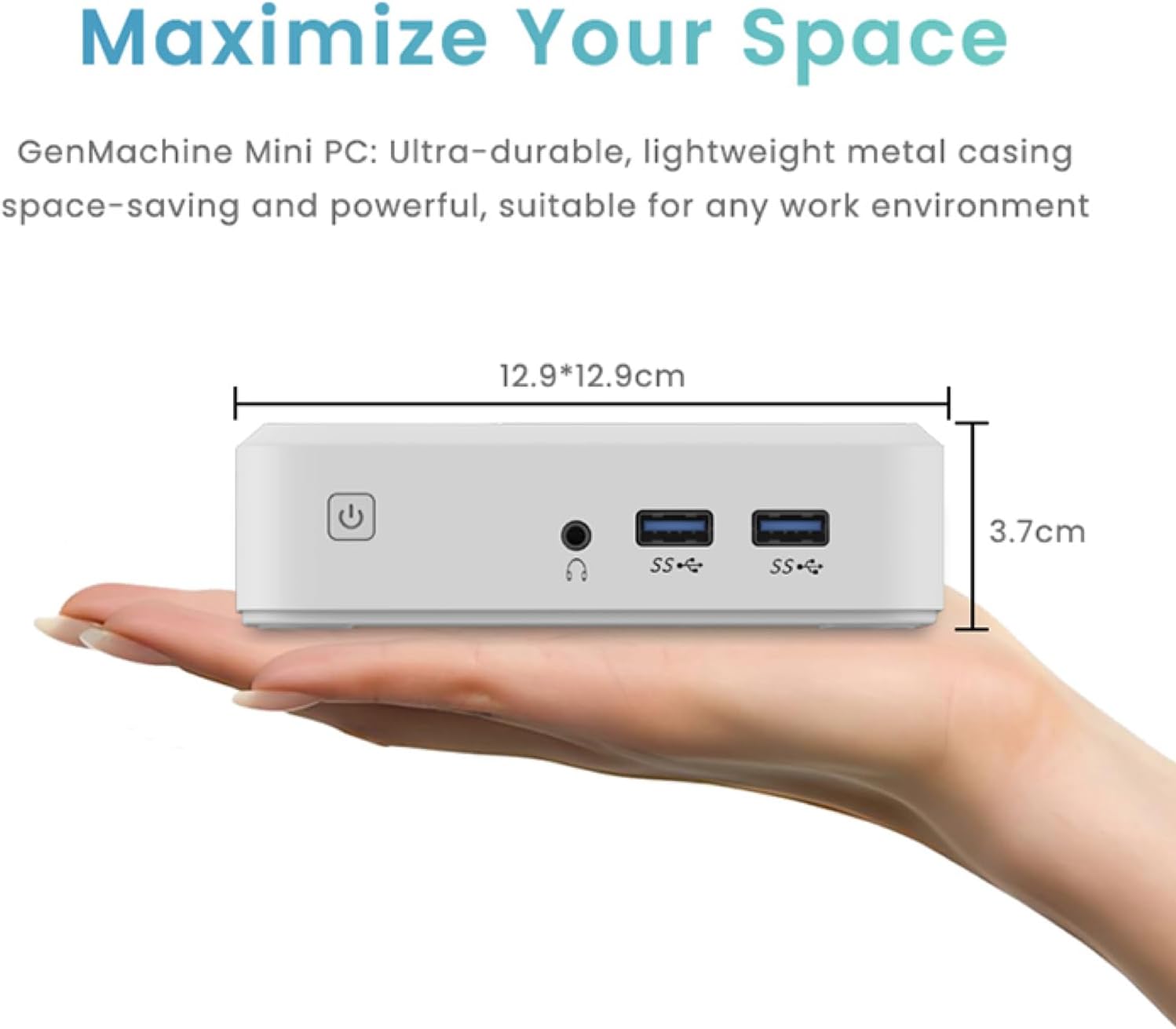
Figure 3.5: Compact size of the GenMachine Mini PC.
Video 3.2: Selesaiview of the GenMachine Mini PC's features and compact design.
4. Panduan Pengaturan
Follow these steps to set up your GenMachine Mini PC:
- Buka kemasan Mini PC: Keluarkan semua komponen dari kemasannya dengan hati-hati.
- Hubungkan ke Layar: Use the provided HDMI cable to connect the Mini PC to your monitor or TV. If using a DisplayPort monitor, use a compatible DP cable (not included).
- Hubungkan Periferal: Hubungkan keyboard, mouse, dan perangkat USB lainnya ke port USB 3.0 yang tersedia.
- Hubungkan ke Jaringan (Opsional): For a wired internet connection, connect an Ethernet cable to the LAN port. For wireless, ensure your WiFi network is available during initial setup.
- Hubungkan Daya: Plug the power adapter into the DC-in port on the Mini PC, then plug the adapter into a power outlet.
- Nyalakan: Press the power button on the front of the Mini PC. The system should boot up.
5. Petunjuk Pengoperasian
5.1 Booting Awal dan Pengaturan Sistem Operasi
Upon first power-on, the Mini PC will guide you through the operating system setup process. Follow the on-screen prompts to configure language, region, user accounts, and network settings.
5.2 Manajemen Daya
- Nyalakan: Tekan tombol daya sekali.
- Menutup: Access the power options through the operating system's start menu and select 'Shut down'.
- Mulai ulang: Access the power options through the operating system's start menu and select 'Restart'.
- Mode tidur: Access the power options through the operating system's start menu and select 'Sleep'.
5.3 Menghubungkan ke Wi-Fi dan Bluetooth
To connect to a wireless network or Bluetooth device, use the respective settings within your operating system. The Mini PC supports WiFi 6 and Bluetooth 5.2 for fast and reliable connections.
6. Pemeliharaan
Regular maintenance helps ensure the longevity and optimal performance of your Mini PC:
- Pembersihan: Use a soft, dry cloth to clean the exterior. For dust in vents, use compressed air. Ensure the device is powered off and unplugged before cleaning.
- Ventilasi: Ensure the Mini PC is placed in a well-ventilated area. Do not block the air vents.
- Pembaruan Perangkat Lunak: Regularly update your operating system, drivers, and applications to ensure security and performance.
- Pencadangan Data: Lakukan pencadangan data penting secara berkala ke hard drive eksternal atau penyimpanan cloud.
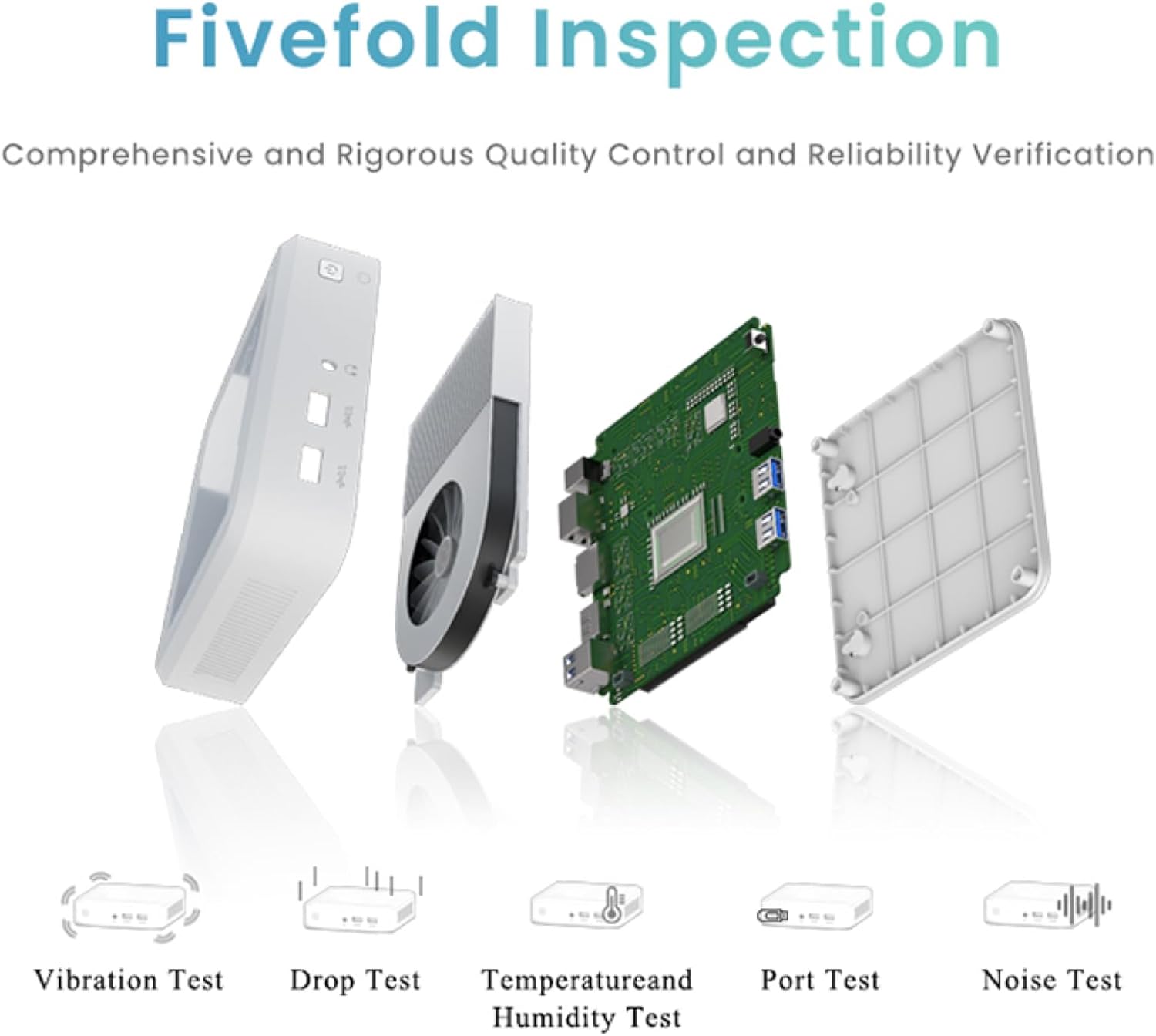
Figure 6.1: GenMachine's Fivefold Inspection process for quality control.
7. Penyelesaian masalah
Jika Anda mengalami masalah dengan Mini PC Anda, lihat masalah dan solusi umum berikut:
- Tidak Ada Daya:
- Pastikan adaptor daya terhubung dengan aman ke Mini PC dan stopkontak yang berfungsi.
- Coba stopkontak yang lain.
- Tidak Ada Tampilan:
- Verify that the HDMI or DisplayPort cable is securely connected to both the Mini PC and the monitor.
- Pastikan monitor dalam keadaan menyala dan diatur ke sumber input yang benar.
- Cobalah kabel display atau monitor yang berbeda jika memungkinkan.
- System Freezes or Unresponsive:
- Perform a hard reset by holding the power button for 5-10 seconds until the device powers off, then restart.
- Ensure the operating system and drivers are up to date.
- Periksa apakah terjadi panas berlebih; pastikan ventilasi yang memadai.
- Run a system diagnostic or memory test if the issue persists.
- Tidak ada koneksi internet:
- Untuk koneksi kabel, periksa kabel Ethernet dan status router.
- For Wi-Fi, ensure Wi-Fi is enabled in the operating system and you are connected to the correct network with the correct password.
- Mulai ulang router/modem Anda.
8. Spesifikasi
| Fitur | Spesifikasi |
|---|---|
| Prosesor | AMD Ryzen 7 3750H (4 cores, 8 threads, up to 4.0GHz) |
| RAM | Memori DDR8 4GB |
| Penyimpanan | 256GB SSD (with M.2 NVMe support) |
| Koprosesor Grafis | Grafis AMD Radeon Vega 10 |
| Resolusi Layar Maksimum | 3840 x 2160 piksel (4K) |
| Tipe Nirkabel | 802.11ac (WiFi 6), Bluetooth 5.2 |
| Port USB | 4 buah kabel USB 3.0 |
| Keluaran Video | HDMI, DisplayPort |
| Sistem Operasi | OS (Pre-installed) |
| Berat Barang | 2.1 pon |
| Dimensi Produk | 4.9x4.9x1.4 inci |
| Warna | Hitam |
9. Garansi dan Dukungan
For warranty information and technical support, please refer to the warranty card included with your product or visit the official GenMachine websitus. Simpan struk pembelian Anda sebagai bukti pembelian untuk klaim garansi.
If you require further assistance, please contact GenMachine customer support through the channels provided on their official weblokasi.


