Perkenalan
The Dirt Devil DD2505 Bagless Vacuum Cleaner is designed for efficient home cleaning, particularly beneficial for individuals with allergies or dust sensitivities. This vacuum features a HEPA 12 filter, which captures 99.5% of small dust particles, preventing them from recirculating into the air. Its bagless design includes a 2.5-liter dust collection bin for easy emptying and no need for replacement bags. The vacuum comes equipped with a combibrush for various floor types, a crevice tool, and an upholstery attachment, offering versatile cleaning options for both hard-to-reach areas and furniture.

Image: The Dirt Devil DD2505 Bagless Vacuum Cleaner, showcasing its compact design and transparent dustbin.
Pengaturan dan Perakitan
Follow these steps to assemble your Dirt Devil DD2505 vacuum cleaner before first use.
- Bongkar Komponen: Carefully remove all parts from the packaging. Ensure all accessories (hose, telescopic tube, floor nozzle, crevice tool, upholstery brush) are present.
- Pasangkan Selang: Masukkan selang fleksibel ke dalam lubang hisap pada unit utama hingga berbunyi klik dan terpasang dengan aman.
- Hubungkan Tabung Teleskopik: Attach the telescopic metal tube to the handle end of the flexible hose. Adjust the tube length by pressing the release button and sliding it to your desired height.
- Pasang Nosel Lantai: Connect the combibrush floor nozzle to the end of the telescopic tube. Ensure it is firmly attached.
- Sambungan Daya: Extend the power cord from the vacuum cleaner. Plug the power cord into a suitable electrical outlet (220-240V AC, 50/60Hz).

Image: The Dirt Devil DD2505 vacuum cleaner fully assembled with hose, telescopic tube, and floor nozzle, ready for use.
Petunjuk Pengoperasian
Learn how to effectively use your vacuum cleaner and its attachments.
- Daya Hidup/Mati: Press the power button located on the main unit to start or stop the vacuum cleaner.
- Using the Combibrush: The combibrush is suitable for various floor types. Use the foot switch on the nozzle to retract the bristles for hard floors or extend them for carpets and rugs.
- Using the Crevice Tool: For narrow spaces, corners, and edges, attach the crevice tool directly to the hose handle or the telescopic tube.

Image: The crevice tool, ideal for cleaning tight spaces and corners.
- Using the Upholstery Brush: Attach the upholstery brush for cleaning furniture, curtains, or car interiors.
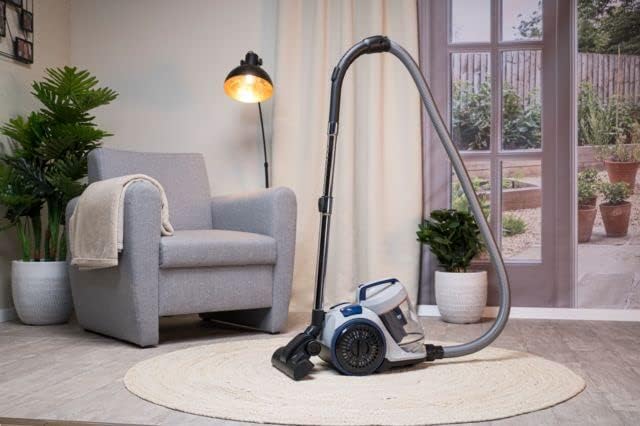
Image: The upholstery brush, designed for effective cleaning of fabric surfaces.
- Automatic Cable Rewind: After use, gently pull the power cord to activate the automatic cable rewind function. The cord will retract into the unit.
Pemeliharaan
Perawatan rutin memastikan kinerja optimal dan memperpanjang umur penyedot debu Anda.
Mengosongkan Tempat Sampah
The 2.5-liter dustbin should be emptied regularly, especially when the 'Max' fill line is reached, to maintain suction power.
- Putuskan Daya: Selalu cabut steker penyedot debu dari stopkontak sebelum melakukan perawatan apa pun.
- Singkirkan tempat sampah: Press the dustbin release button (if applicable) and lift the dustbin away from the main unit.
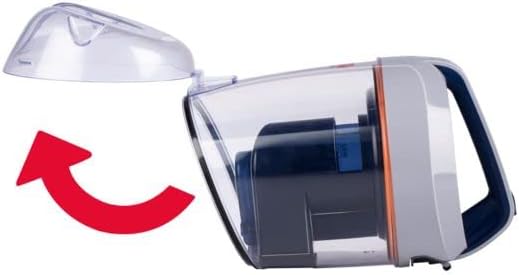
Image: Illustration showing how to detach the dustbin from the main vacuum unit.
- Isi Kosong: Position the dustbin over a waste bin. Open the bottom flap of the dustbin to release the collected dirt and debris.
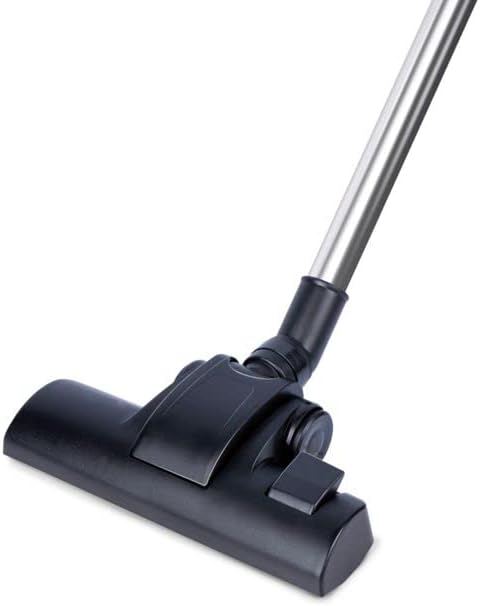
Image: The dustbin with its bottom flap open, ready to be emptied into a waste receptacle.
- Berkumpul kembali: Close the dustbin flap securely and reattach the dustbin to the vacuum cleaner until it locks into place.
Cleaning the HEPA 12 Filter
The HEPA 12 filter is washable and should be cleaned periodically to maintain filtration efficiency. The frequency depends on usage.
- Filter Akses: The HEPA filter is located within the dustbin assembly. Remove the dustbin as described above and locate the filter.
- Cuci Filter: Rinse the HEPA filter under cold running water until the water runs clear. Do not use detergents or hot water.
- Keringkan secara menyeluruh: Allow the filter to air dry completely for at least 24 hours before reinserting it into the vacuum cleaner. Do not use heat to dry the filter.
- Masukkan kembali Filter: Once completely dry, place the filter back into its housing within the dustbin and reattach the dustbin to the vacuum.
Penyelesaian Masalah
If you encounter issues with your vacuum cleaner, refer to the following common problems and solutions.
- Tidak Ada Daya:
- Periksa apakah kabel daya terpasang dengan benar ke stopkontak listrik yang berfungsi.
- Ensure the power button on the vacuum cleaner is pressed.
- Kehilangan Daya Hisap:
- Periksa apakah tempat sampah sudah penuh dan perlu dikosongkan.
- Inspect the HEPA filter for excessive dirt and clean it if necessary.
- Check the hose, telescopic tube, and floor nozzle for any blockages. Remove any obstructions carefully.
- Kebisingan yang Tidak Biasa:
- Turn off and unplug the vacuum. Check for any foreign objects caught in the brush roll or hose.
- Ensure all parts are correctly assembled and securely fastened.
Spesifikasi
| Nomor Model | DD2505 |
| Daya Keluaran | 800W |
| Jil.tage | 220-240 V AC, 50 / 60 Hz |
| Kapasitas Tempat Sampah | 2.5 liter |
| Jenis Filter | HEPA 12 (Washable) |
| Panjang Kabel | 5 meter |
| Radius Operasi | 7.5 meter |
| Tingkat Kebisingan | 80dB |
| Berat | 4.7 Kilogram |
| Dimensi (P x L x T) | Ukuran 38x27x32 cm |
| Aksesoris yang disertakan | Combibrush, Crevice Tool, Upholstery Tool |
| Automatic Cable Rewind | Ya |
Garansi dan Dukungan
This Dirt Devil DD2505 Bagless Vacuum Cleaner comes with a Garansi 2 tahun. For warranty claims, technical support, or service inquiries, please refer to the contact information provided with your purchase documentation or visit the official Dirt Devil websitus. Harap simpan bukti pembelian Anda untuk validasi garansi.


