Perkenalan
Thank you for choosing the Dirt Devil DD2502 Bagless Cyclonic Vacuum Cleaner. This appliance is designed for efficient and convenient cleaning of various floor types in your home. Featuring a powerful 700W motor, a HEPA 12 filter, and a 1.8-liter dustbin, it offers strong suction and helps maintain a cleaner air environment by trapping fine dust particles. This manual provides essential information for safe operation, assembly, maintenance, and troubleshooting to ensure optimal performance and longevity of your vacuum cleaner.
Petunjuk Keselamatan
Please read these safety instructions carefully before using the appliance and keep them for future reference. Incorrect use may result in electric shock, fire, or serious injury.
- Selalu pastikan voltage yang tertera pada label peringkat sesuai dengan volume listrik Andatage.
- Do not use the vacuum cleaner to pick up water or wet materials, hot ashes, lit cigarette butts, sharp objects, or flammable/combustible liquids.
- Jangan mengoperasikan alat dengan kabel atau steker yang rusak. Jika kabel daya rusak, kabel tersebut harus diganti oleh produsen, agen servisnya, atau orang yang memiliki kualifikasi serupa untuk menghindari bahaya.
- Peralatan ini tidak ditujukan untuk digunakan oleh orang (termasuk anak-anak) dengan keterbatasan fisik, sensorik, atau mental, atau kurang pengalaman dan pengetahuan, kecuali mereka telah diberi pengawasan atau petunjuk mengenai penggunaan peralatan oleh orang yang bertanggung jawab atas keselamatan mereka.
- Anak-anak harus diawasi untuk memastikan mereka tidak bermain-main dengan peralatan tersebut.
- Cabut peralatan dari stopkontak sebelum membersihkan atau melakukan perawatan.
- Jangan merendam penyedot debu di dalam air atau cairan lainnya.
- Jauhkan rambut, pakaian longgar, jari, dan semua bagian tubuh dari celah dan bagian yang bergerak.
- Gunakan hanya perlengkapan tambahan yang direkomendasikan pabrik pembuat.
- The appliance complies with European directives 2014/30/EC, 2014/35/EC, and 2011/65/EU.
Isi Paket
Carefully unpack your Dirt Devil DD2502 vacuum cleaner and check that all items are present and in good condition. The package should contain:
- Dirt Devil DD2502 Vacuum Cleaner Unit
- Selang Fleksibel
- Tabung Logam Teleskopik
- Combination Brush (for various floor types)
- Crevice Tool (for narrow spaces)
- Parquet Brush (for delicate hard floors)

Image: Dirt Devil DD2502 vacuum cleaner shown with its flexible hose, telescopic tube, and three main attachments: the combination brush, crevice tool, and parquet brush.
Pengaturan
Ikuti langkah-langkah berikut untuk merakit penyedot debu Anda sebelum penggunaan pertama:
- Pasang Selang Fleksibel: Masukkan ujung selang fleksibel ke dalam lubang hisap pada unit vakum utama hingga berbunyi klik dan terpasang dengan aman.
- Merakit Tabung Teleskopik: Connect the telescopic metal tube to the handle end of the flexible hose. Adjust the length of the telescopic tube to a comfortable height by pressing the release button and extending or retracting the tube.
- Attach the Desired Brush: Select the appropriate cleaning brush (combination brush, crevice tool, or parquet brush) and firmly attach it to the end of the telescopic tube.
- Sambungan Daya: Extend the power cord from the vacuum cleaner. Plug the power cord into a suitable electrical outlet (220-240V AC, 50/60 Hz).
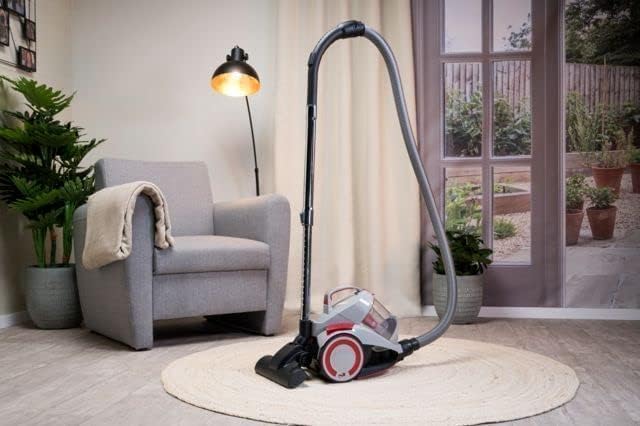
Image: The Dirt Devil DD2502 vacuum cleaner assembled with its hose, telescopic tube, and floor brush, positioned on a rug in a room.
Petunjuk Pengoperasian
Once assembled, your Dirt Devil DD2502 is ready for use.
- Daya Hidup/Mati: Tekan tombol daya yang terletak pada unit utama untuk menghidupkan atau mematikan penyedot debu.
- Using the Combination Brush: This brush is versatile for both hard floors and carpets. Use the foot pedal on the brush to switch between modes: bristles extended for hard floors, bristles retracted for carpets.
- Using the Crevice Tool: Attach the crevice tool for cleaning tight corners, edges, and narrow gaps, such as between sofa cushions or along skirting boards.
- Using the Parquet Brush: For delicate hard floors like parquet, laminate, or tiles, use the dedicated parquet brush to prevent scratches and ensure gentle yet effective cleaning.
- Pengguliran Ulang Kabel: After use, gently pull the power cord slightly to activate the automatic cable rewind system. The cord will retract into the unit.

Image: The combination brush, suitable for various floor types, attaches to the telescopic tube.
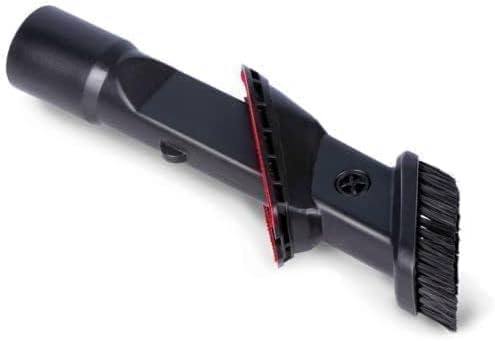
Image: The crevice tool, designed for reaching into tight spaces and corners.
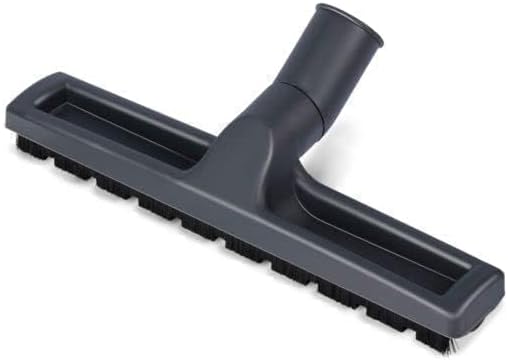
Image: The parquet brush, ideal for gentle cleaning of sensitive hard floors.
Pemeliharaan
Regular maintenance ensures your vacuum cleaner operates efficiently and prolongs its lifespan. Always unplug the appliance before performing any maintenance.
- Mengosongkan Tempat Sampah: The DD2502 features a 1.8-liter bagless dustbin. When the dustbin is full or suction power decreases, it's time to empty it. Press the release button to detach the dustbin from the main unit. Hold it over a waste bin and open the bottom flap to release the collected dirt. Close the flap and reattach the dustbin to the vacuum cleaner.
- Cleaning the HEPA 12 Filter: The HEPA 12 filter captures 99.5% of small dust particles and is washable. Locate the filter inside the dustbin assembly. Carefully remove it. Rinse the filter under cold running water until the water runs clear. Allow the filter to air dry completely for at least 24 hours before reinserting it into the vacuum cleaner. Do not use a dryer or direct heat.
- Cleaning the Pre-Motor Filter: Check and clean the pre-motor filter regularly, usually located before the HEPA filter. Tap it to remove loose dust or rinse if washable, ensuring it is completely dry before reassembly.
- Lampiran Pembersihan: Periodically check brushes and tools for tangled hair or debris. Remove any obstructions to maintain effective cleaning.

Image: The transparent dustbin of the DD2502, ready for emptying or filter access.
Penyelesaian Masalah
Jika Anda mengalami masalah dengan penyedot debu Anda, lihat masalah umum dan solusi berikut:
- Tidak Ada Daya:
- Periksa apakah kabel daya telah terpasang dengan benar ke stopkontak.
- Pastikan stopkontak berfungsi dengan baik dengan mengujinya menggunakan peralatan lain.
- Verify that the power button on the vacuum cleaner is pressed.
- Mengurangi Daya Hisap:
- Empty the dustbin if it is full.
- Clean or replace the HEPA 12 filter and pre-motor filter. Ensure they are completely dry before reinserting.
- Check the hose, telescopic tube, and attachments for any blockages. Carefully remove any obstructions.
- Ensure all connections (hose to unit, tube to hose, brush to tube) are secure.
- Kebisingan yang Tidak Biasa:
- Check for blockages in the hose or brush head that might be causing the motor to strain.
- Ensure the dustbin and filters are correctly installed.
- Debu Keluar dari Penyedot Debu:
- Check that the dustbin is properly sealed and latched.
- Inspect the HEPA filter for damage or incorrect installation.
Jika masalah berlanjut setelah mencoba solusi ini, hubungi dukungan pelanggan.
Spesifikasi
Technical details for the Dirt Devil DD2502 Bagless Cyclonic Vacuum Cleaner:
| Fitur | Spesifikasi |
|---|---|
| Nomor Model | DD2502 |
| Kekuatan | 700W |
| Jil.tage | 220-240 V AC, 50 / 60 Hz |
| Kapasitas Tempat Sampah | 1.8 liter |
| Jenis Filter | HEPA 12 (Washable) |
| Teknologi | Siklon Tunggal |
| Panjang Kabel Daya | 6 Meter |
| Radius Operasi | 9 Meter |
| Panjang Tabung | Tinggi 86cm |
| Berat | 4.5 Kilogram |
| Tingkat Kebisingan | 79dB |
| Fitur Khusus | Bagless, Automatic Cable Rewind |
| Komponen yang Termasuk | Combination brush, Crevice tool, Parquet brush |
Garansi dan Dukungan
Your Dirt Devil DD2502 vacuum cleaner comes with a warranty for spare parts for a period of 1 year from the date of purchase. Please retain your proof of purchase for any warranty claims.
For technical support, service, or questions regarding your product, please refer to the contact information provided on the Dirt Devil official website or your retailer's support channels. Do not attempt to repair the appliance yourself, as this may void the warranty and pose safety risks.


