Perkenalan
Terima kasih sudah membeliasing the THOMSON Sound Bar B206. This sound bar is designed to enhance your audio experience for television, music, and gaming, featuring multiple connectivity options and two wireless microphones for karaoke. This manual provides essential information for safe and efficient use of your device. Please read it thoroughly before operation and retain it for future reference.
Informasi Keselamatan
- Jangan biarkan perangkat terkena hujan, kelembapan, atau suhu ekstrem.
- Ensure proper ventilation around the sound bar to prevent overheating.
- Jangan membuka casing; serahkan semua servis kepada personel yang berkualifikasi.
- Gunakan hanya adaptor daya yang disediakan.
- Jauhkan perangkat dari medan magnet yang kuat.
- Avoid placing heavy objects on the sound bar.
Isi Paket
Verifikasi bahwa semua item yang tercantum di bawah ini disertakan dalam paket Anda:
- THOMSON Sound Bar (B206) x 1
- Kontrol Jarak Jauh x 1
- Mikrofon Nirkabel x 2
- Adaptor Daya x 1
- Kabel Audio x 1
- Coaxial Cable x 1
- Optical Fiber Cable x 1
- Wall Mounting Kit x 1 (includes padlocks, gel column, screws)
- Panduan Pengguna x 1

Gambar 1: Aksesori yang Termasuk
This image displays the complete set of items provided with your THOMSON Sound Bar B206, including the sound bar unit, remote control, two wireless microphones, power adapter, user manual, audio cable, coaxial cable, optical fiber cable, and wall mounting kit components.
Produk Selesaiview
Sound Bar Components
The THOMSON Sound Bar B206 features a sleek design with integrated controls and various input ports for versatile connectivity.

Figure 2: Sound Bar, Microphones, and Remote
This image shows the main sound bar unit, two wireless microphones, and the remote control, providing a complete view of the primary components.
Internal Speaker Design
The sound bar is equipped with four large dual drive units, delivering a maximum output power of 200 Watts for HiFi sound quality, including dual bass and clear mid-range frequencies for a 3D surround sound effect.

Figure 3: Internal Speaker Structure
This diagram illustrates the internal construction of the sound bar's speakers, emphasizing the dual drive units responsible for audio output, alongside the Bluetooth connectivity symbol.
Rear Panel Connections and Remote Control
The rear panel provides various input options, while the remote control offers full command over the sound bar's functions.

Figure 4: Rear Panel Ports and Remote Control
This image details the connectivity options on the sound bar's rear panel, including the power switch, HDMI ARC, power input, subwoofer output, coaxial, optical, and AUX inputs. The accompanying remote control is also shown, indicating various function buttons.
Pengaturan
1. Pilihan Penempatan
The THOMSON Sound Bar B206 can be placed on a desktop or mounted on a wall. A wall mounting kit is included for convenient installation.
- Penempatan Desktop: Place the sound bar on a stable, flat surface in front of your TV.
- Pemasangan di dinding: Use the provided wall mounting kit (padlocks, gel column, screws) to securely attach the sound bar to a wall below your TV. Ensure the wall material can support the weight of the sound bar.
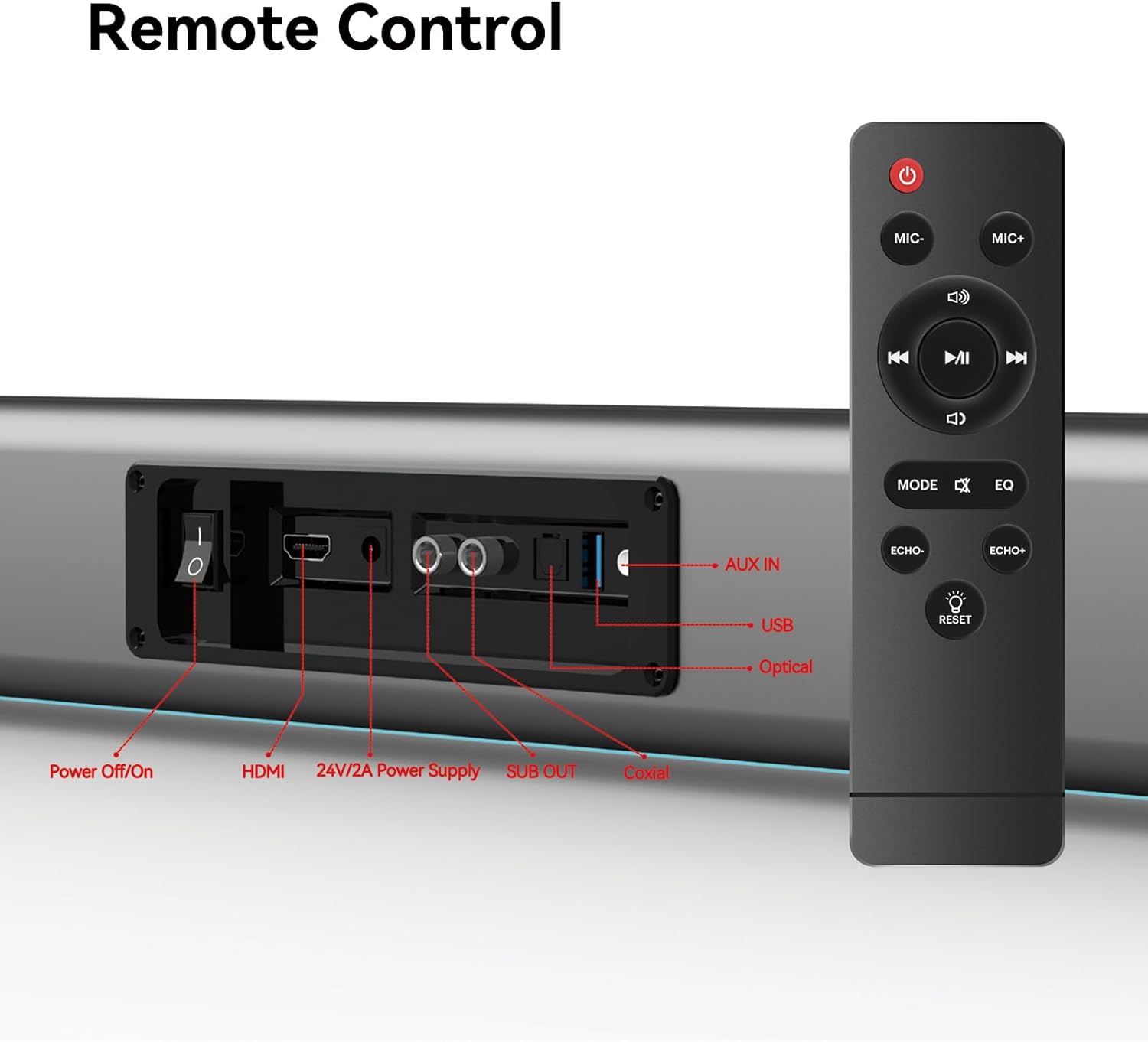
Figure 5: Placement Options (Wall Mount and Desktop)
This image illustrates the versatility of the sound bar's placement, showing it both mounted on a wall beneath a television and resting on a media console, highlighting the included wall mount kit for an elegant setup.
2. Menghubungkan ke Daya
- Connect the power adapter to the "24V/2A Power Supply" port on the sound bar's rear panel.
- Hubungkan adaptor daya ke stopkontak di dinding.
3. Koneksi Audio
Choose one of the following methods to connect the sound bar to your audio source (e.g., TV, smartphone, tablet, laptop):
- ARC HDMI:
Connect an HDMI cable (not included) from the HDMI ARC port on your TV to the HDMI port on the sound bar. Ensure your TV's HDMI ARC function is enabled in its settings.
- Optik:
Connect the provided optical fiber cable from your TV's optical output to the "Optical" port on the sound bar. Select "Optical" as the input source on the sound bar.
- AUX (3.5mm Audio Jack):
Connect the provided audio cable from your device's headphone jack or audio output to the "AUX IN" port on the sound bar. Select "AUX" as the input source.
- koaksial:
Connect the provided coaxial cable from your TV's coaxial output to the "Coaxial" port on the sound bar. Select "Coaxial" as the input source.
- Kabel USB:
Masukkan drive USB yang berisi audio files into the "USB" port. The sound bar will automatically switch to USB mode and begin playback.
- Bluetooth dapat digunakan untuk berbagai keperluan, seperti:
Refer to the "Bluetooth Pairing" section under Operating Instructions for detailed steps.
Petunjuk Pengoperasian
1. Daya Hidup/Mati
Tekan tombol Matikan/Hidupkan button on the sound bar's rear panel or the Kekuatan Gunakan tombol pada remote control untuk menghidupkan atau mematikan unit.
2. Pemilihan Sumber Input
Tekan tombol MODE button on the remote control to cycle through available input sources: HDMI ARC, Optical, AUX, Coaxial, USB, and Bluetooth. The LED display on the sound bar will indicate the currently selected mode.
3. Kontrol Volume
Gunakan Jilid + Dan Jilid - buttons on the remote control or the physical controls on the right side of the sound bar to adjust the volume. The sound bar supports 8 levels of bass and treble adjustment.
4. Mode EQ
The sound bar offers 5 Equalizer (EQ) modes to optimize audio for different content types. Press the EQ button on the remote control to switch between modes:
- Mode Film: Meningkatkan efek suara dan dialog sinematik.
- Mode Musik: Mengoptimalkan audio untuk pemutaran musik.
- Modus Berita: Clarifies spoken dialogue for news and talk shows.
- Additional modes may be available for specific audio profiles.

Figure 6: EQ Modes
This image illustrates the three primary equalizer modes (News, Movie, Music) available on the sound bar, demonstrating how each mode is tailored for different audio experiences.
5. Pemasangan Bluetooth
- Nyalakan soundbar dan pilih mode Bluetooth menggunakan MODE button on the remote. The LED display will show "BT" and flash, indicating pairing mode.
- Pada perangkat Anda (ponsel pintar, tablet, dll.), aktifkan Bluetooth dan cari perangkat yang tersedia.
- Select "THOMSON B206" from the list. Once connected, the sound bar's LED display will stop flashing.
6. Mikrofon Nirkabel
The sound bar comes with two wireless microphones for karaoke or vocal use.
- Ensure the microphones have fresh batteries (AAA, not included).
- Turn on the microphones. They should automatically pair with the sound bar.
- Gunakan mik+ Dan MIC- buttons on the remote to adjust microphone volume.
- Gunakan GEMA+ Dan GEMA- buttons to adjust the echo effect.

Figure 7: Karaoke Functionality
This image depicts two individuals enjoying a karaoke session, utilizing the THOMSON sound bar and its wireless microphones connected to a large display, showcasing the product's entertainment capabilities.
Penyelesaian Masalah
| Masalah | Kemungkinan Penyebab | Larutan |
|---|---|---|
| Tidak ada daya | Kabel daya tidak terhubung; stopkontak tidak aktif. | Pastikan kabel daya tersambung dengan aman. Periksa apakah stopkontak berfungsi. |
| Tidak ada suara | Sumber input yang dipilih salah; Volume terlalu rendah; Kabel tidak terhubung dengan benar. | Select the correct input source (HDMI, Optical, AUX, etc.). Increase volume. Check all audio cable connections. |
| Pemasangan Bluetooth gagal | Sound bar not in pairing mode; Device too far; Bluetooth disabled on device. | Ensure sound bar is in Bluetooth mode and flashing. Move device closer. Enable Bluetooth on your device. |
| Mikrofon tidak berfungsi | Microphone batteries low/dead; Microphones not turned on. | Replace microphone batteries. Ensure microphones are switched on. |
| Volume jumps too much with one press | This can be a characteristic of the sound bar's volume control sensitivity. | Adjust volume carefully. Consider using the TV's volume control if connected via HDMI ARC, as it may offer finer adjustments. |
Spesifikasi
| Fitur | Detil |
|---|---|
| Nama Model | THOMSON Sound Bar B206 |
| Jenis Pembicara | bilah suara |
| Daya Keluaran Maksimum Speaker | 200 Watt |
| Konfigurasi Saluran Suara Surround | 2.0 |
| Teknologi Konektivitas | Auxiliary, Bluetooth, Coaxial, HDMI ARC, Optical, USB |
| Teknologi Komunikasi Nirkabel | Bahasa Indonesia: Bluetooth |
| Metode Kontrol | Terpencil |
| Dimensi Produk | 37"Panjang x 3.35"Lebar x 2.9"T |
| Berat Barang | 8.63 pon |
| Bahan | Plastik |
| Sumber Daya | Listrik Kabel |
| Fitur Khusus | Mikrofon Nirkabel |
Pemeliharaan
- Pembersihan: Gunakan kain lembut dan kering untuk membersihkan permukaan sound bar. Jangan gunakan cairan pembersih atau bahan abrasif.
- Penyimpanan: Saat tidak digunakan dalam jangka waktu lama, simpan sound bar di tempat yang sejuk dan kering, jauh dari sinar matahari langsung dan suhu ekstrem.
- Perawatan Mikrofon: Remove batteries from the wireless microphones if they will not be used for a long time to prevent leakage.
Garansi dan Dukungan
THOMSON products are designed and manufactured to the highest quality standards. For warranty information and customer support, please refer to the warranty card included in your package or visit the official THOMSON websitus. Simpan struk pembelian Anda sebagai bukti pembelian.
Informasi Kepatuhan
This device complies with relevant regulations for electronic equipment. Any changes or modifications not expressly approved by the manufacturer could void the user's authority to operate the equipment.


