1. Informasi Keselamatan
PERINGATAN!
- The device may only be used with the supplied power adapter.
- The device is powered by electricity. Caution is advised. Improper use carries the risk of fire, electric shock, and even death.
- Failure to follow instructions can lead to incorrect installation, damaging the device or endangering the user's life.
- The desk frame must not be modified or rebuilt in any way.
- Disconnect the desk from the power supply before performing maintenance.
- Do not use the product before assembly is complete.
- Jangan gunakan benda tajam, seperti pisau atau gunting, saat membongkar kemasan.
- Assembly should be performed at a safe distance from furniture and other obstacles.
- Assembly should be performed out of reach of children, as some parts have sharp edges or may pose a choking hazard.
- Jangan gunakan meja untuk tujuan selain yang awalnya ditetapkan oleh produsen.
- Produk ini ditujukan untuk digunakan pada permukaan yang datar dan stabil.
- To prevent damage to the product and risk of injury, check the maximum load capacity of the product (70 kg) and do not exceed it.
- Do not place your entire body weight on the tabletop. The product is intended for use by one person.
- Do not place flammable materials near the device, as there is a risk of fire.
- To prevent damage, keep the product away from direct sunlight.
- It is recommended that the user retighten screws if they become loose.
- Do not disassemble any parts beyond the original installation procedures.
- For general cleaning and maintenance of the desk, use a soft cloth with a mild cleaning agent.
2. Pengaturan dan Perakitan
The MARK ADLER Leader 7.0 desk is designed for straightforward assembly. Please follow the detailed instructions provided in the separate assembly guide included with your product packaging.
2.1 Membongkar
- Carefully remove all components from the packaging. Avoid using sharp objects like knives or scissors directly on the packaging to prevent scratching or damaging the desk parts.
- Pastikan semua komponen yang tercantum dalam panduan perakitan ada dan tidak rusak.
2.2 Penempatan
- Choose a flat, stable, and level surface for the desk. Uneven surfaces can affect the desk's stability and electric mechanism.
- Ensure there is sufficient space around the desk for safe operation, especially when adjusting height, to avoid collisions with walls or other furniture.
- Keep the desk away from direct sunlight and sources of heat or moisture to prevent material damage.
2.3 Langkah Perakitan
- Refer to the dedicated assembly manual for step-by-step instructions.
- Ensure all connections are secure and screws are tightened appropriately.
- Do not connect the desk to power until assembly is fully completed and verified.

Figure 1: Desk Dimensions and Height Range

Figure 2: Desk in Sitting and Standing Positions
3. Petunjuk Pengoperasian
The MARK ADLER Leader 7.0 desk features an intuitive control panel for easy height adjustment and memory functions.
3.1 Panel Kontrol Selesaiview

Gambar 3: Panel Kontrol
Panel kontrol biasanya mencakup:
- Tampilan digital: Menunjukkan tinggi meja saat ini dalam sentimeter.
- Up (A) and Down (V) Buttons: Used to manually adjust the desk height.
- Tombol Memori (1, 2, 3): Store and recall preferred height settings.
- Set (S) Button: Used to save a height setting to a memory button.
3.2 Penyesuaian Tinggi
- Tekan dan tahan tombol Up (A) tombol untuk menaikkan meja.
- Tekan dan tahan tombol Turun (V) tombol untuk menurunkan meja.
- Release the button when the desired height is reached. The desk will move smoothly and quietly.
3.3 Mengatur Preset Memori
To save a specific height setting:
- Adjust the desk to your desired height using the Up (A) or Down (V) buttons.
- Tekan tombol Set (S) button. The display may flash or show 'S'.
- Within a few seconds, press one of the memory buttons (1, 2, atau 3) to save the current height to that position. The display may confirm the setting.
3.4 Menggunakan Pengaturan Memori
To recall a saved height setting:
- Cukup tekan tombol memori yang diinginkan (1, 2, atau 3). Meja akan otomatis bergerak ke ketinggian yang disimpan.
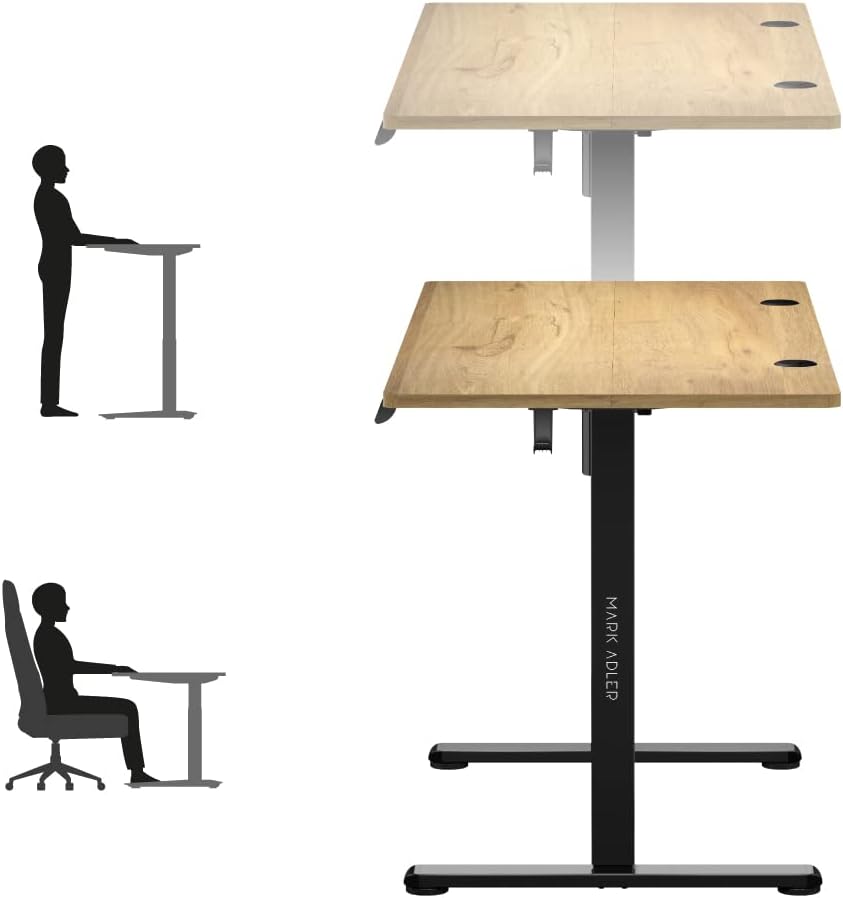
Figure 4: Ergonomic Use - Sitting and Standing
3.5 Manajemen Kabel
The desk includes integrated cable entries to help organize your workspace.

Figure 5: Cable Grommet
3.6 Headphone Hook
A convenient hook is provided for hanging headphones or other accessories.

Figure 6: Headphone Hook
4. Pemeliharaan
Proper maintenance ensures the longevity and safe operation of your MARK ADLER Leader 7.0 desk.
- Pembersihan: Untuk pembersihan umum, gunakan kain lembutampened with a mild cleaning agent. Avoid abrasive cleaners or harsh chemicals that could damage the surface.
- Pemutusan Daya: Always disconnect the desk from the power supply before performing any cleaning or maintenance tasks.
- Pengencangan Sekrup: Periodically check all screws and connections. If any feel loose, gently retighten them to ensure stability.
- Peduli lingkungan: Keep the desk away from direct sunlight, extreme temperatures, and high humidity to prevent material degradation.
- Tidak Ada Modifikasi: Do not attempt to modify or disassemble any parts of the desk frame or electric mechanism beyond the original installation procedures. Unauthorized modifications can void your warranty and pose safety risks.
5. Penyelesaian masalah
If you encounter any issues with your MARK ADLER Leader 7.0 desk, please refer to the following common troubleshooting steps:
5.1 Desk Not Moving
- Periksa Sambungan Daya: Pastikan kabel daya terpasang dengan aman ke meja dan ke stopkontak dinding yang berfungsi.
- Periksa Adaptor Daya: Verify that the power adapter is the one supplied with the desk and is functioning correctly.
- Mekanisme Reset: Some electric desks have a reset function. Consult your assembly guide or contact support for specific reset procedures if available.
5.2 Uneven Movement or Noise
- Periksa Hambatan: Ensure there are no objects obstructing the desk's movement path, either above or below the tabletop.
- Distribusi berat: Make sure the weight on the desk is evenly distributed and does not exceed the maximum load capacity of 70 kg.
- Sekrup longgar: Check and tighten any loose screws on the frame or tabletop connections.
5.3 Control Panel Not Responding
- Siklus Daya: Disconnect the power for 30 seconds, then reconnect it.
- Koneksi kabel: Ensure the control panel cable is securely connected to the desk's motor unit.
Jika langkah-langkah ini tidak menyelesaikan masalah, hubungi dukungan pelanggan untuk bantuan lebih lanjut.
6. Spesifikasi
| Fitur | Detil |
|---|---|
| Merek | TANDA ADLER |
| Nomor Model | Pemimpin 7.0 |
| Warna | Oak (top), Black (frame) |
| Dimensi Produk (P x L x T) | Ukuran 120x60x72-118cm |
| Bahan | Oak wood, Alloy steel, Metal |
| Fitur Khusus | Electric height adjustment |
| Berat Barang | 20.7 Kilogram |
| Kapasitas Beban Maksimum | 70 kg |
| Rentang Penyesuaian Ketinggian | 72cm sampai 118cm |
| Panel Kontrol | Digital display, 3 memory presets |
| Manajemen Kabel | 2 integrated cable entries |
7. Garansi dan Dukungan
7.1 Informasi Garansi
For detailed information regarding the product warranty, please refer to the warranty card included with your purchase or contact the retailer/manufacturer directly. Warranty terms typically cover manufacturing defects under normal use.
7.2 Dukungan Pelanggan
If you have any questions, require technical assistance, or need to report an issue that cannot be resolved using the troubleshooting guide, please contact MARK ADLER customer service or your point of purchase. Have your product model number (Leader 7.0) and purchase date ready when contacting support.


