Perkenalan
Thank you for choosing the Epson EB-L210SF projector. This manual provides essential information for the safe and efficient use of your projector. Please read it thoroughly before operating the device and keep it for future reference.
The Epson EB-L210SF is a 3LCD Full-HD projector designed for clear and vibrant image projection. It features a laser light source for long-lasting performance.
Informasi Keselamatan Penting
- Keamanan Laser: Do not look directly into the projector lens when the laser light source is active. Avoid direct eye exposure to the laser beam.
- Ventilasi: Ensure adequate ventilation around the projector. Do not block ventilation openings. Overheating can cause damage.
- Sumber Daya: Gunakan hanya catu daya yang ditentukan untuk proyektor ini.
- Penanganan: Tangani proyektor dengan hati-hati. Hindari menjatuhkannya atau membenturkannya dengan keras.
- Pembersihan: Cabut kabel daya sebelum membersihkan. Gunakan kain lembut dan kering. Jangan gunakan pembersih cair atau aerosol.
Pengaturan
1. Pembongkaran dan Penempatan
Carefully remove the projector and all accessories from the packaging. Place the projector on a stable, level surface. Ensure there is sufficient space around the projector for proper ventilation.

Gambar 1: Depan dan samping view of the Epson EB-L210SF projector, showing the lens and ventilation grilles.
2. Menghubungkan Daya
- Hubungkan kabel daya yang disediakan ke saluran masuk AC proyektor.
- Colokkan ujung kabel daya yang lain ke stopkontak yang diarde.
3. Menghubungkan Sumber Input
The projector supports various input sources. Connect your device (computer, Blu-ray player, etc.) to the appropriate port on the projector's rear panel.

Figure 2: Rear panel of the projector, displaying various input and output ports including HDMI, Computer (VGA), Video, USB, and Audio connections.
- HDMI: Connect an HDMI cable from your device to one of the HDMI ports (HDMI 1 or HDMI 2).
- Komputer (VGA): Connect a VGA cable from your computer to the Computer 1 or Computer 2 port. For audio, connect a separate audio cable to Audio 1 or Audio 2.
- Rekaman video: Connect composite video and audio cables to the Video and Audio (R/L) ports.
- Kabel USB: Use the USB-A port for connecting USB storage devices or the USB-B port for display over USB.
- LAN: Hubungkan kabel Ethernet untuk kontrol dan pemantauan jaringan.
4. Menyalakan Daya Awal dan Penyesuaian Gambar
- Press the power button on the projector or remote control to turn on the device. The power indicator will illuminate.
- Sesuaikan cincin fokus around the lens until the image is sharp and clear.
- Gunakan zoom lever (if available) to adjust the image size.
- Jika gambarnya berbentuk trapesium, gunakan koreksi keystone feature (manual or automatic) to square the image. Refer to the Operating section for details on menu navigation.
Mengoperasikan Proyektor
1. Panel Kontrol Berakhirview
The control panel on top of the projector allows access to various functions and settings.
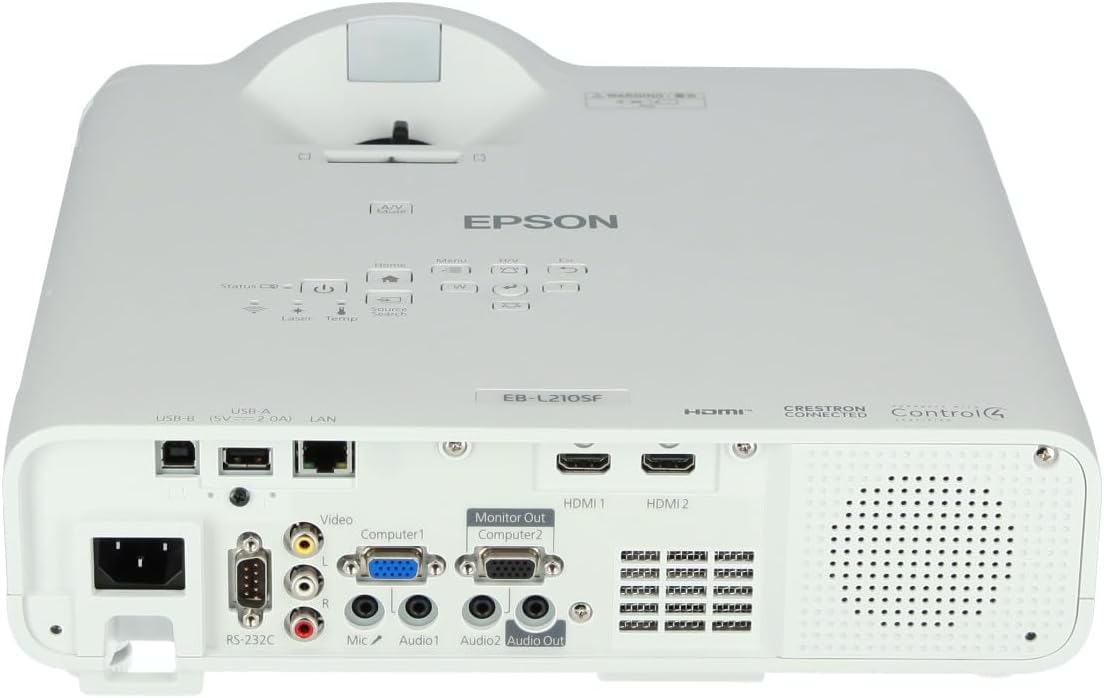
Gambar 3: Atas view of the projector, highlighting the control panel with buttons for power, menu, source selection, and navigation.
- Tombol Daya: Menghidupkan atau mematikan proyektor.
- Pencarian Sumber: Berputar melalui sumber masukan yang tersedia.
- Tombol Menu: Membuka menu tampilan di layar (OSD).
- Navigation Buttons (Arrow keys): Digunakan untuk menavigasi melalui pilihan menu.
- Tombol Masuk: Mengonfirmasi pilihan di menu.
- Esc Button: Keluar dari menu saat ini atau kembali ke layar sebelumnya.
- Tombol Home: Accesses the home screen or quick settings.
- Bisukan A/V: Temporarily mutes audio and blanks the screen.
2. Memilih Sumber Masukan
Tekan tombol Pencarian Sumber button on the control panel or remote control to cycle through the connected input sources (e.g., HDMI 1, HDMI 2, Computer 1, Video). The projector will automatically detect and display the active source.
3. Adjusting Image and Audio Settings
Tekan tombol Menu button to access the projector's on-screen display (OSD) menu. Use the navigation buttons to browse categories such as:
- Gambar: Adjust brightness, contrast, color, tint, sharpness, and color temperature.
- Sinyal: Configure input signal settings, aspect ratio, and overscan.
- Pengaturan: General projector settings like language, display options, and power management.
- Suara: Adjust volume, mute, and audio input selection.
Pilih opsi dan tekan Memasuki to modify its value. Press Menjauh untuk keluar dari menu.
Pemeliharaan
1. Membersihkan Proyektor
- Luar: Wipe the projector's exterior with a soft, dry, lint-free cloth. For stubborn dirt, dampen the cloth slightly with water, then wipe dry.
- Lensa: Gently wipe the lens with a lens cleaning cloth or lens paper. Avoid using abrasive materials or excessive force.
- Filter Udara: Regularly check and clean the air filter to prevent dust buildup, which can affect performance and cause overheating. Refer to the projector's on-screen menu for filter maintenance reminders.
2. Sumber Cahaya Laser
The Epson EB-L210SF uses a laser light source, which offers a long operational life and does not require lamp replacement. No user maintenance is typically required for the laser light source itself.
Penyelesaian Masalah
Jika Anda mengalami masalah dengan proyektor Anda, lihat masalah umum dan solusi berikut:
| Masalah | Kemungkinan Penyebab / Solusi |
|---|---|
| Tidak ada gambar yang diproyeksikan |
|
| Gambar buram atau tidak fokus |
|
| Gambar terdistorsi (berbentuk trapesium) |
|
| Tidak ada suara |
|
| Projector is not wireless | The Epson EB-L210SF is not inherently a wireless projector. Wireless functionality typically requires an optional external wireless adapter, which is sold separately. Please consult Epson's official website or your retailer for compatible wireless adapters. |
| Overheating warning (Temp indicator) |
|
Spesifikasi
| Fitur | Detil |
|---|---|
| Nomor Model | V11HA75080 |
| Resolusi Tampilan | 1920x1080 (HD Penuh) |
| Teknologi Konektivitas | HDMI, VGA, USB, LAN |
| Dimensi Produk | 11.81x11.81x11.81 inci |
| Berat Barang | 10.14 pon |
| Sumber Cahaya | Laser |
| Pabrikan | Epson |
| Penggunaan yang Direkomendasikan | Pemantauan |
| Fitur Khusus | Ringan |
| Baterai Diperlukan | 1 AAAA (for remote control, not included with projector unit) |
| Tanggal Pertama Tersedia | 14 Nopember 2023 |
Garansi dan Dukungan
Untuk informasi garansi lebih rinci, silakan merujuk pada kartu garansi yang disertakan dengan produk Anda atau kunjungi situs web resmi Epson websitus. Syarat dan ketentuan garansi dapat bervariasi berdasarkan wilayah.
For technical support, product registration, or to download the latest drivers and software, please visit the official Epson support website or contact Epson customer service in your region. Contact information can typically be found on the Epson weblokasi.


