1. Pendahuluan
This manual provides detailed instructions for the installation, operation, and maintenance of the Turing TP-MFD4A28 Smart Series 4MP IR Dome IP Camera. This camera features 4-megapixel resolution, TwilightVision technology for optimal low-light performance, Smart IR up to 30 meters (98 feet), and robust IP67 and IK10 ratings for outdoor and vandal-resistant use. It supports Power over Ethernet (PoE) and a 256GB MicroSD card for local storage.
Fitur utama meliputi:
- Max. 4MP (2688x1520) resolution at 30/25fps
- 2.8mm lensa tetap
- TwilightVision for optimal image clarity in low light
- Smart IR up to 30m (98ft) night vision
- Ketahanan terhadap cuaca IP67 dan ketahanan terhadap perusakan IK10
- Rentang Dinamis Lebar (WDR)
- Dukungan Power over Ethernet (PoE).
- Support for 256GB MicroSD card
- People and Vehicle Search capabilities when used with Turing Smart Series NVR and Turing Vision Cloud
2. Informasi Keselamatan
Please read these safety instructions carefully before using the product to prevent damage or injury.
- Catu Daya: Use only the specified power adapter (12V DC) or a compliant Power over Ethernet (PoE) switch/injector. Incorrect voltage may damage the camera.
- Instalasi: Ensure the camera is securely mounted to prevent it from falling. Professional installation is recommended for outdoor or high-altitude mounting.
- Lingkungan: Do not expose the camera to extreme temperatures, humidity, or corrosive environments beyond its IP67 rating. Avoid direct sunlight for prolonged periods.
- Pembersihan: Disconnect power before cleaning. Use a soft, dry cloth. Do not use strong detergents or solvents.
- Membongkar: Jangan mencoba membongkar atau memodifikasi kamera. Hal ini akan membatalkan garansi dan dapat menyebabkan kerusakan.
- Kabel: Protect network and power cables from being walked on or pinched, especially at plugs and the point where they exit the camera.
3. Isi Paket
Pastikan semua barang ada dan dalam kondisi baik saat membongkar kemasan:
- Turing TP-MFD4A28 IP Dome Camera
- Sekrup Pemasangan dan Sumbat Dinding
- Konektor Tahan Air untuk Kabel Ethernet
- Quick Start Guide / Instruction Manual (this document)
- Drill Template (may be included)
Note: A power adapter (12V DC) is not always included as the camera supports PoE. A PoE switch or injector is required for PoE power.
4. Produk Lebihview
The Turing TP-MFD4A28 is a compact dome-style IP camera designed for discreet surveillance. Its robust housing provides protection against weather and vandalism.
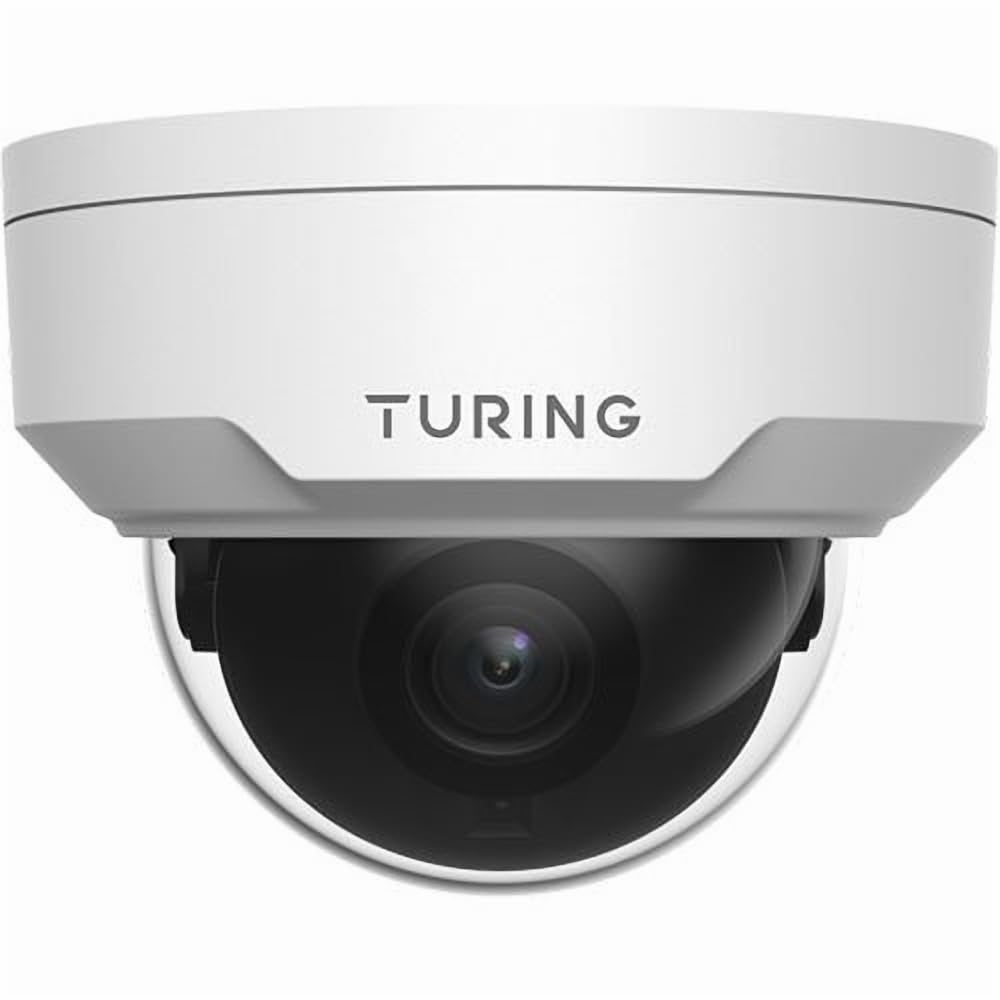
Gambar 4.1: Depan view of the Turing TP-MFD4A28 4MP IR Dome IP Camera, showing its white dome design and lens.
Komponen Utama:
- Dome Cover: Protective cover for the lens and IR LEDs.
- Lensa: 2.8mm fixed lens for a wide field of view.
- LED IR: Infrared illuminators for night vision.
- Slot Kartu MicroSD: Located internally, accessible by removing the dome cover.
- Tombol Reset: Located internally, used for factory reset.
- Pelabuhan Ethernet (RJ45): For network connection and Power over Ethernet (PoE).
- Input Daya (DC 12V): Optional power input if PoE is not used.
5. Pengaturan
5.1 Physical Installation (Wall Mount)
- Pilih Lokasi: Select a suitable wall-mount location that provides the desired viewing angle and is within range of your network cable.
- Siapkan Permukaan: Use the provided drill template (if available) to mark the screw holes on the wall. Drill pilot holes.
- Mount the Camera Base: Secure the camera's mounting base to the wall using the provided screws and wall plugs.
- Kabel Rute: Pass the Ethernet cable through the cable entry point on the mounting base.
5.2 Daya dan Koneksi Jaringan
- Koneksi Ethernet: Connect an Ethernet cable from your PoE switch/injector or network router to the camera's RJ45 port. Use the waterproof connector for outdoor installations.
- Daya (Opsional): If not using PoE, connect a 12V DC power adapter (not included) to the camera's power input.
- Verifikasi Daya: The camera's indicator light (if present) should illuminate, indicating power.
5.3 Pemasangan Kartu MicroSD
The camera supports up to a 256GB MicroSD card for local storage.
- Putuskan Daya: Ensure the camera is powered off before installing or removing the MicroSD card.
- Lepaskan Penutup Kubah: Carefully twist or unclip the outer dome cover to access the internal components.
- Masukkan Kartu MicroSD: Locate the MicroSD card slot and insert the card with the contacts facing down until it clicks into place.
- Replace Dome Cover: Securely reattach the dome cover, ensuring a watertight seal for IP67 protection.
- Format Kartu: After powering on, format the MicroSD card via the camera's web interface or connected NVR for proper operation.
5.4 Konfigurasi Awal
For initial setup and advanced configuration, access the camera via its web interface or connect it to a Turing Smart Series NVR or Turing Vision Cloud.
- Cari Alamat IP: Use a network scanner tool or your NVR to discover the camera's IP address on your local network.
- Mengakses Web Antarmuka: Buka sebuah web Buka browser dan masukkan alamat IP kamera. Masuk menggunakan kredensial default (lihat Panduan Memulai Cepat untuk nama pengguna/kata sandi default).
- Ubah Kata Sandi Default: Demi keamanan, segera ubah kata sandi default saat pertama kali masuk.
- Pengaturan Jaringan: Configure network settings (e.g., static IP, DNS) if required by your network environment.
- Pengaturan Waktu: Set the correct date and time for accurate recording timestamps.
6. Operasi
6.1 Langsung View dan Rekaman
Access the live video feed through your NVR, Turing Vision Cloud, or the camera's web interface. You can initiate manual recordings or configure scheduled/motion-triggered recordings.
- Resolusi: The camera supports up to 4MP (2688x1520) resolution. Adjust settings as needed for bandwidth and storage.
- Kecepatan Bingkai: Records at 30/25 frames per second for smooth video.
6.2 Night Vision (Smart IR)
The camera automatically switches to night vision mode in low-light conditions, utilizing its Smart IR LEDs to provide clear black-and-white video up to 30 meters (98 feet). TwilightVision technology enhances low-light performance before IR activation.
6.3 Rentang Dinamis Lebar (WDR)
WDR technology helps balance areas of high contrast in the image, ensuring details are visible in both bright and dark regions simultaneously. This is particularly useful in scenes with strong backlighting.
6.4 Motion Detection and Analytics
Configure motion detection zones and sensitivity via the camera's web interface or NVR. When integrated with a Turing Smart Series NVR or Turing Vision Cloud, the camera supports advanced analytics like People and Vehicle Search.
- Jenis Lansiran: Motion Only alerts are supported.
- Konfigurasi: Set up email notifications or NVR alarms for detected events.
7. Pemeliharaan
7.1 Membersihkan Kamera
Pembersihan rutin membantu menjaga kualitas gambar tetap optimal.
- Gently wipe the dome cover and lens with a soft, lint-free cloth.
- Untuk kotoran yang membandel, gunakan kain yang dilap dengan lembut.ampDibersihkan dengan air. Hindari pembersih abrasif.
- Ensure no moisture enters the camera housing.
7.2 Pembaruan Firmware
Periksa Turing secara berkala website or your NVR system for available firmware updates. Firmware updates can improve performance, add new features, and enhance security. Follow the provided instructions carefully when performing updates.
7.3 Manajemen Kartu MicroSD
If using a MicroSD card for recording, it is recommended to format it periodically (e.g., monthly) to maintain performance and prevent data corruption. Back up any important recordings before formatting.
8. Penyelesaian masalah
| Masalah | Kemungkinan Penyebab | Larutan |
|---|---|---|
| Tidak Ada Daya / Kamera Tidak Menyala |
|
|
| Tidak Ada Umpan Video |
|
|
| Kualitas Gambar Buruk |
|
|
| MicroSD Card Not Recording |
|
|
9. Spesifikasi
| Nomor Model | TP-MFD4A28 |
| Resolusi Diam Efektif | 4MP (2688x1520) |
| Lensa | 2.8mm Lensa Tetap |
| Kecepatan Bingkai | 30 detik |
| Rentang Penglihatan Malam | Up to 30m (98.43 Feet) with Smart IR |
| Teknologi Cahaya Rendah | TwilightVision |
| Penilaian Perlindungan Internasional | IP67 (Tahan Cuaca) |
| Perlawanan Vandalisme | IK10 |
| Rentang Dinamis Lebar (WDR) | Ya |
| Sumber Daya | PoE (Power over Ethernet) atau 12V DC |
| Teknologi Konektivitas | Berkabel (Ethernet) |
| Dukungan Kartu MicroSD | Hingga 256 GB |
| Jenis Pemasangan | Dudukan Dinding |
| Faktor Bentuk | Kubah |
| Dimensi (P x L x T) | 4.3x4.3x3.2 inci |
| Berat Barang | 14.9 ons (0.93 pon) |
| Warna | Putih |
| Jenis peringatan | Hanya Gerakan |
| Teknologi Sensor Foto | Bahasa Indonesia: CMOS |
10. Garansi dan Dukungan
Turing products are covered by a manufacturer's warranty. Please refer to the official Turing websitus atau dokumentasi pembelian Anda untuk syarat dan ketentuan garansi tertentu.
For technical support, troubleshooting assistance, or warranty claims, please contact Turing customer service through their official websitus atau informasi kontak yang diberikan bersama pembelian Anda.
Sumber Daya Daring:
- Turing Resmi Weblokasi: www.turing.com
- Support Portal: (Check Turing web(Situs web untuk tautan dukungan spesifik)


