Perkenalan
Welcome to the user manual for your boAt Airdopes Bliss ANC True Wireless Stereo (TWS) Earbuds. This guide provides detailed instructions on how to set up, operate, maintain, and troubleshoot your earbuds to ensure optimal performance.
Apa yang ada di dalam kotak
- 1 X Earbud TWS
- 1 X Casing Pengisi Daya
- 2 X Additional Earbuds (pairs of ear tips)
- 1 X USB Pengisian Kabel
- 1 X Panduan Pengguna
Produk Selesaiview
The boAt Airdopes Bliss ANC earbuds are designed for an immersive audio experience with Active Noise Cancellation (ANC) up to 32dB. They feature a long playback time, quick charging, and a low-latency BEAST Mode for gaming.

Image: boAt Airdopes Bliss ANC earbuds in their charging case.
Pengaturan
1. Mengisi Daya Earbud dan Casing
Sebelum penggunaan pertama, isi daya earbud dan casing pengisi daya hingga penuh.
- Connect the USB charging cable to the Type-C port on the charging case and to a power source.
- Lampu indikator pada casing akan menunjukkan status pengisian daya.
- Setelah terisi penuh, lepaskan kabelnya.

Image: ASAP Charge feature, indicating 10 minutes of charge provides 180 minutes of playback.
The earbuds support ASAP Charging, providing 180 minutes of playback with just 10 minutes of charge. A full charge offers up to 42 hours of total playback time (earbuds + case).

Image: Visual representation of up to 42 hours of total playback time.
2. Initial Pairing (IWP™ Technology)
- Buka tutup wadah pengisi daya. Earbud akan menyala secara otomatis dan masuk ke mode berpasangan.
- On your device (phone, tablet, etc.), enable Bluetooth.
- Pencarian untuk "Airdopes Bliss ANC" in the list of available Bluetooth devices.
- Select "Airdopes Bliss ANC" to connect. Once connected, you will hear an audio prompt.

Image: IWP Technology showing the earbuds connecting to a smartphone upon opening the case.
IWP™ (Insta Wake N' Pair) Technology allows the earbuds to connect to your previously paired device as soon as you open the case lid.
3. Mengenakan Earbud
- Choose the ear tips that provide the most comfortable and secure fit.
- Insert the earbuds into your ears and gently twist them to ensure a snug seal for optimal sound and ANC performance.
Petunjuk Pengoperasian
Daya Hidup/Mati
- Nyalakan: Open the charging case lid, or long-press the touch control on both earbuds for 3 seconds.
- Matikan: Place the earbuds back into the charging case and close the lid, or long-press the touch control on both earbuds for 5 seconds.
Kontrol Sentuh
The Airdopes Bliss ANC features intuitive touch controls on each earbud.
| Fungsi | Tindakan |
|---|---|
| Putar/Jeda Musik | Ketuk satu kali di salah satu earbud |
| Lagu Berikutnya | Ketuk dua kali pada earbud kanan |
| Trek Sebelumnya | Ketuk dua kali pada earbud kiri |
| Menjawab/Mengakhiri Panggilan | Ketuk satu kali di salah satu earbud |
| Tolak Panggilan | Long press on either earbud for 2 seconds |
| Aktifkan Asisten Suara | Ketuk tiga kali pada salah satu earbud |
| Beralih Mode ANC/Transparansi | Long press on the left earbud for 2 seconds |
| Toggle BEAST Mode | Long press on the right earbud for 2 seconds |
Pembatalan Kebisingan Aktif (ANC)
The earbuds feature Active Noise Cancellation up to 32dB, reducing ambient noise for a focused listening experience. Long press the left earbud for 2 seconds to cycle between ANC On, Transparency Mode, and ANC Off.

Image: Representation of Active Noise Cancellation functionality.
BEAST Mode (Low Latency Gaming)
Activate BEAST Mode for a low-latency audio experience (60ms), ideal for gaming. Long press the right earbud for 2 seconds to toggle BEAST Mode On/Off.
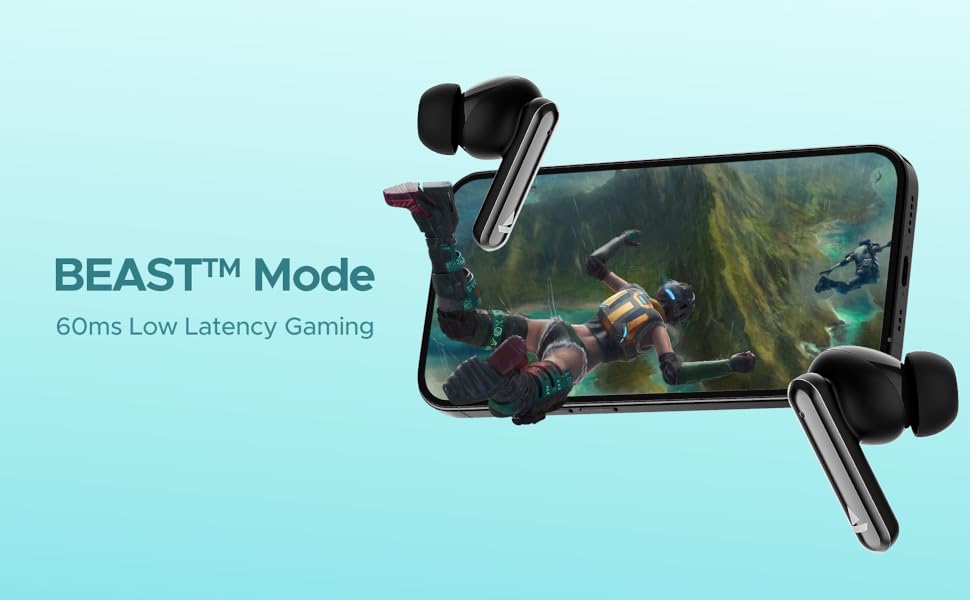
Image: Visual depicting the BEAST Mode for low-latency gaming.
ENx™ Technology (Quad Mics)
The earbuds are equipped with ENx™ Technology and Quad Mics for clear voice calls, ensuring your voice is heard clearly even in noisy environments.

Image: Diagram showing the internal components related to ENx Technology and Quad Mics.
Pemeliharaan
Pembersihan
- Bersihkan earbud dan casing pengisi daya secara teratur dengan kain yang lembut, kering, dan tidak berbulu.
- Lepaskan ujung telinga dan bersihkan dengan sabun lembut dan air, lalu keringkan sepenuhnya sebelum dipasang kembali.
- Pastikan kontak pengisian daya pada kedua earbud dan wadahnya bebas dari debu dan kotoran.
- Jangan gunakan pembersih atau pelarut yang bersifat abrasif.
Penyimpanan
- Bila tidak digunakan, selalu simpan earbud dalam wadah pengisi daya untuk melindunginya dan menjaganya tetap terisi daya.
- Simpan di tempat sejuk dan kering, jauhkan dari suhu ekstrem dan sinar matahari langsung.
Perawatan Baterai
- Hindari mengosongkan baterai sepenuhnya secara sering.
- Isi daya earbud dan wadahnya secara teratur, meskipun tidak sering digunakan, untuk menjaga kesehatan baterai.

Image: Earbuds and case with water droplets, illustrating IPX5 splash and sweat resistance. While resistant, avoid submerging the device.
Penyelesaian Masalah
Earbud Tidak Dipasangkan
- Pastikan kedua earbud terisi dayanya.
- Letakkan kembali kedua earbud ke dalam wadah pengisi daya, tutup, tunggu beberapa detik, lalu buka kembali tutupnya.
- Matikan Bluetooth di perangkat Anda, lalu hidupkan kembali dan coba pasangkan lagi.
- Jika masalah berlanjut, coba setel ulang earbud (lihat petunjuk produsen). website for specific reset instructions if not provided here).
Tidak Ada Suara atau Volume Rendah
- Periksa level volume pada perangkat yang terhubung dan pada earbud Anda.
- Pastikan earbud terpasang dengan benar di telinga Anda dan ujung telinga memberikan segel yang baik.
- Bersihkan segala kotoran dari speaker earbud.
- Sambungkan kembali earbud ke perangkat Anda.
Masalah Pengisian Daya
- Pastikan kabel pengisian daya tersambung dengan aman ke casing dan sumber daya.
- Cobalah kabel pengisi daya atau adaptor daya yang lain.
- Bersihkan kontak pengisian daya pada earbud dan bagian dalam casing.
Spesifikasi
| Fitur | Detil |
|---|---|
| Nama Model | Airdopes Bliss ANC |
| Teknologi Konektivitas | Bahasa Indonesia: Bluetooth |
| Teknologi Komunikasi Nirkabel | Bahasa Indonesia: Bluetooth |
| Peredam Kebisingan Aktif | Hingga 32 dB |
| Waktu Pemutaran Ulang | Up to 42 Hours (total with case) |
| ASAP Charging | 10 mins charge = 180 mins playtime |
| Latensi Mode BEAST | 60 md |
| Teknologi Mikrofon | ENx Technology with Quad Mics |
| Metode Kontrol | Menyentuh |
| Peringkat Tahan Air | IPX5 (Tahan Percikan Air & Keringat) |
| Jenis Baterai | Polimer Litium |
| Berat Barang | 50 gram |
| Dimensi Produk | Ukuran 5.9x4.9x2.6 cm |
| Komponen yang Termasuk | 1 X TWS Earbuds, 2 X Additional Earbuds, Cable, User Manual |
Garansi dan Dukungan
For warranty information and customer support, please refer to the official boAt websitus web atau hubungi layanan pelanggan mereka. Simpan struk pembelian Anda untuk klaim garansi.


