1. Pendahuluan
The MINIX RIC SR35-4 is a fanless industrial Android player designed for reliable, high-performance operation in a wide range of commercial and industrial applications. This device is ideal for digital signage, point-of-sale (POS) systems, interactive kiosks, menu boards, corporate lobby information displays, and various industrial control scenarios. Its robust design and comprehensive connectivity options ensure stable and efficient performance in demanding environments.
This manual provides detailed instructions for setting up, operating, maintaining, and troubleshooting your MINIX RIC SR35-4 player. Please read this manual thoroughly before using the device to ensure proper installation and functionality.

Figure 1: MINIX RIC SR35-4 Fanless Industrial Android Player
2. Isi Paket
Verify that all items listed below are included in your package. If any items are missing or damaged, please contact your retailer or MINIX support.
- MINIX RIC SR35-4 Industrial Android Player
- 12V/3A Power Adapter (with US/EU/UK pin options)
- Panduan Pengguna
3. Produk Lebihview
3.1 Panel Depan I/O

Gambar 2: Tata Letak Panel Depan
- COM Ports (RS-232): 6 x COM ports for connecting industrial serial devices.
- Port USB 2.0: 2 x USB 2.0 ports for connecting peripherals such as keyboards, mice, or barcode scanners.
- Tombol Daya: Used to power the device on or off.
3.2 Panel Belakang I/O
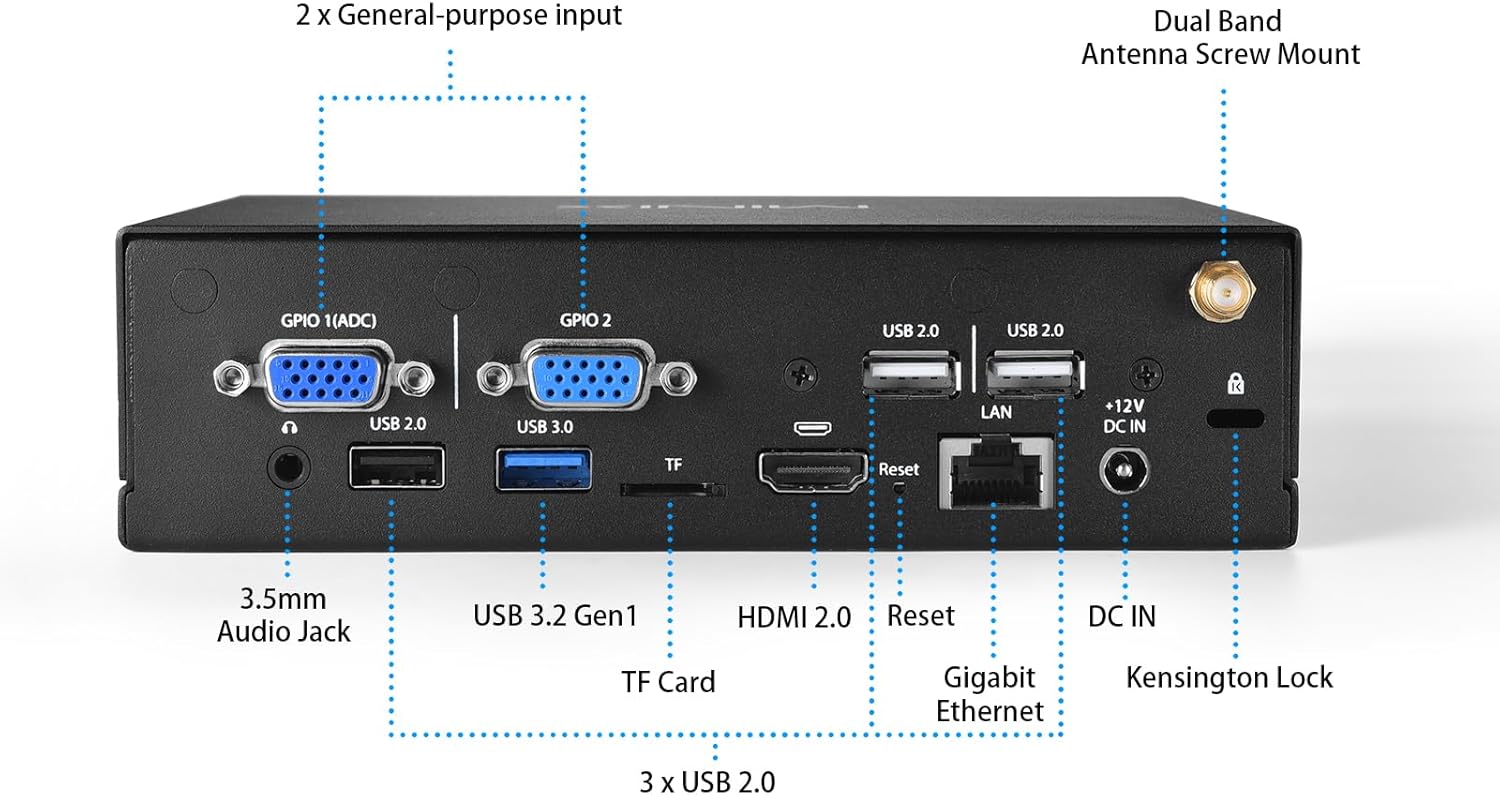
Gambar 3: Tata Letak Panel Belakang
- Pelabuhan GPIO: 2 x General Purpose Input/Output ports for custom industrial control.
- Port USB 2.0: 3 x USB 2.0 ports for additional peripheral connections.
- Port USB 3.0: 1 x USB 3.0 port for high-speed data transfer.
- Slot TF: For inserting a TF (MicroSD) card to expand storage.
- Port LAN: Gigabit Ethernet (10/100/1000 Mb/s) for wired network connection.
- Port HDMI 2.0: For connecting to a 4K display at 60Hz.
- 3.5mm Audio Jack: Untuk keluaran audio.
- DC-In Power Connector: For connecting the 12V/3A power adapter.
- Kensington Lock Slot: For securing the device physically.
- Dual Band Antenna Screw Mount: For attaching external Wi-Fi/Bluetooth antennas.
3.3 Internal I/O and Components

Figure 4: Internal Motherboard View
- Speaker Pin Header: 1 x 4-pin header for connecting an internal speaker (4Ω/15W or 8Ω/5W).
- MIPI DSI Pin Header: For connecting a MIPI DSI display.
- Slot SIM: For inserting a SIM card when using an optional 4G/5G module.
- Internal USB 2.0 Pin Headers: 7 x USB 2.0 ports available via pin headers for internal connections.
- RJ11 Cash Register Pin Header: For connecting to a cash register.
- M.2 2242/3042 Key-B Slot: For installing an optional 4G/5G mobile network module.
- LVDS Pin Header: For connecting an LVDS display.
- EDP Pin Header: For connecting an EDP display.
4. Petunjuk Penyiapan
Follow these steps to set up your MINIX RIC SR35-4 player.
- Hubungkan Daya: Connect the provided 12V/3A power adapter to the DC-In port on the rear panel of the device, then plug the adapter into a power outlet.
- Sambungkan Layar: Connect your display device to the HDMI 2.0 port on the rear panel. For LVDS, EDP, or MIPI DSI displays, connect them to the respective pin headers internally. The device supports dual display configurations such as HDMI+LVDS, HDMI+EDP, EDP+LVDS, or EDP+MIPI.
- Hubungkan Periferal: Connect your USB devices (keyboard, mouse, barcode scanner, etc.) to the available USB 2.0 and USB 3.0 ports on the front and rear panels. Connect any RS-232 serial devices to the COM ports on the front panel.
- Koneksi Jaringan: For a wired network, connect an Ethernet cable to the LAN port on the rear panel. For wireless connectivity, ensure the external Wi-Fi/Bluetooth antennas are securely attached to the screw mounts on the rear panel.
- Optional 4G/5G Module (if applicable): If you plan to use a 4G/5G mobile network, install a compatible M.2 2242/3042 Key-B module into the internal M.2 slot and insert a SIM card into the internal SIM slot. Refer to the module's specific installation guide for detailed steps.
5. Petunjuk Pengoperasian
5.1 Daya Hidup/Mati
- Nyalakan: Press the power button on the front panel. The device will boot up automatically.
- Matikan Daya: Press and hold the power button for a few seconds until the power-off options appear on the screen (if using Android), then select 'Power Off'. Alternatively, a short press may initiate a graceful shutdown depending on OS configuration. For a forced shutdown, press and hold the power button for approximately 10 seconds.
- Nyala Otomatis: The device supports an auto power-on feature, which can be configured in the system settings to automatically power on when electricity is supplied.
- Wake On LAN (WOL): The device supports Wake On LAN, allowing it to be powered on remotely via the network. This feature may require configuration in the system BIOS or OS settings.
Sistem Operasi 5.2
The MINIX RIC SR35-4 comes with pre-rooted firmware and supports Android 11 and Linux operating systems. Basic navigation and application management will depend on the specific OS installed and its configuration.
5.3 Konfigurasi Layar Ganda
The player supports simultaneous output to two displays using various combinations:
- HDMI + LVDS
- HDMI + EDP
- EDP + LVDS
- EDP + MIPI
Configuration for extended or mirrored display modes can typically be managed within the operating system's display settings.
5.4 Konektivitas Jaringan
- Wired LAN: Connect an Ethernet cable to the LAN port for a stable wired network connection.
- Wi-Fi/Bluetooth: The onboard module provides wireless connectivity. Configure Wi-Fi settings through the operating system's network menu.
- 4G/5G Mobile Network (Optional): If an optional module is installed, configure mobile data settings via the operating system.
6. Pemeliharaan
6.1 Pembersihan
To maintain optimal performance and longevity, keep the device clean. Use a soft, dry cloth to wipe the exterior. Avoid using liquid cleaners or sprays directly on the device. Ensure no dust accumulates in the ventilation areas.
6.2 Kondisi Lingkungan
The MINIX RIC SR35-4 is designed for industrial use with specific environmental tolerances:
- Suhu Operasional: -10°C hingga 50°C (14°F hingga 122°F)
- Suhu Penyimpanan: -20 ° C sampai 70 ° C (-4 ° F sampai 158 ° F)
- Kelembaban: 10% hingga 90% (tanpa kondensasi)
Operating the device outside these ranges may affect performance and reliability.
6.3 Pembaruan Firmware
Periodically check the official MINIX website for firmware updates. Keeping your device's firmware up-to-date ensures optimal performance, security, and access to new features. Follow the instructions provided with the firmware update package carefully.
7. Penyelesaian masalah
If you encounter issues with your MINIX RIC SR35-4, refer to the following common troubleshooting steps:
- Tidak Ada Daya: Ensure the power adapter is securely connected to both the device and a working power outlet. Verify the power outlet is active. Try a different power adapter if available and compatible.
- Tidak Ada Keluaran Tampilan: Check the HDMI cable connection to both the device and the display. Ensure the display is powered on and set to the correct input source. Try a different HDMI cable or display. If using internal display headers (LVDS, EDP, MIPI DSI), verify connections and configurations.
- Masalah Koneksi Jaringan: For wired LAN, check the Ethernet cable and router/switch status. For Wi-Fi, ensure antennas are connected, Wi-Fi is enabled in the OS, and the correct network is selected with the correct password. For 4G/5G, ensure the module is correctly installed, SIM card is active, and mobile data is enabled in the OS.
- Peripheral Not Recognized: Try connecting the peripheral to a different USB or COM port. Ensure the peripheral has any necessary drivers installed (if required by the OS). Restart the device.
- Sistem Tidak Responsif: If the device becomes unresponsive, perform a forced shutdown by pressing and holding the power button for approximately 10 seconds. Then, power it back on.
If the problem persists after trying these steps, please contact MINIX support.
8. Spesifikasi Teknis
| Fitur | Spesifikasi |
|---|---|
| Merek | MINIX |
| Nomor Model | SR35-4A |
| Prosesor | Rockchip RK3568 Quad Cortex-A55 |
| Grafik | GPU Mali-G52 |
| Ingatan | Memori LPDDR4 4GB |
| Penyimpanan | Memori eMMC 64 5.1GB |
| Sistem Operasi | Android 11, Linux |
| Keluaran Video | 1 x HDMI 2.0 (4K@60Hz), 1 x LVDS (by pin header, 4K@30Hz), 1 x EDP (by pin header, 1080p@60Hz), 1 x MIPI DSI (by pin header) |
| Dukungan Layar Ganda | HDMI+LVDS, HDMI+EDP, EDP+LVDS, EDP+MIPI |
| Jaringan | Gigabit (10/100/1000 Mb/s) LAN, Onboard Wi-Fi/BT module, Optional 4G/5G via M.2 slot |
| Suara | 1 x 3.5mm Audio Jack, 1 x Speaker by pin header |
| Panel Depan I / O | 6 x COM Ports (RS-232), 2 x USB 2.0 |
| Panel Belakang I/O | 2 x GPIO Ports, 3 x USB 2.0, 1 x USB 3.0, 1 x TF slot, 1 x LAN port, 1 x HDMI 2.0 port, 1 x 3.5mm audio jack, 1 x DC-In Power Connector |
| masukan/keluaran internal | 1 x Speaker by pin header, 1 x MIPI DSI (by pin header), 1 x SIM Slot, 7 x USB 2.0 (by pin header), 1 x RJ11 cash register by pin header, 1 x M.2 2242/3042 Key-B for 4G/5G |
| Catu Daya | Adaptor Daya 12V/3A |
| Suhu Operasional | -10°C ~ 50°C |
| Suhu Penyimpanan | -20°C ~ 70°C |
| Kelembaban | 10%~90% (tanpa kondensasi) |
| Ukuran | 6.42 x 5 x 2 inci (16.3 x 12.7 x 5.08 cm) |
| Berat | 1.76 pon (0.8 kg) |
9. Garansi dan Dukungan
9.1 Informasi Garansi
MINIX products are designed for reliability and durability. This product comes with a standard manufacturer's warranty. Please refer to the warranty card included in your package or visit the official MINIX websitus untuk mengetahui syarat dan ketentuan garansi secara terperinci.
9.2 Dukungan Pelanggan
For technical assistance, product inquiries, or maintenance service, please use the following methods:
- Dukungan Amazon: If purchased through Amazon, log in to your Amazon account, navigate to "Your Account" > "Your Orders", and select "Ask Product Question" for this item.
- Resmi Weblokasi: Visit the official MINIX website for offline maintenance service, FAQs, and additional support resources.


