1. Pendahuluan
Thank you for choosing the SILENTWARE Air 1000 Black ATX Midi Tower PC Case. This manual provides essential information for the proper installation, operation, and maintenance of your new PC case. Please read this manual thoroughly before beginning the assembly process to ensure a smooth and successful build.
2. Informasi Keselamatan
- Selalu cabut catu daya dari stopkontak sebelum memasang atau melepas komponen apa pun di dalam casing PC.
- Tangani komponen dengan hati-hati untuk menghindari kerusakan akibat pelepasan muatan elektrostatik (ESD). Pertimbangkan untuk menggunakan gelang anti-statis.
- Be cautious of sharp edges inside the case.
- Jangan mencoba memodifikasi casing atau komponennya, karena hal ini dapat membatalkan garansi Anda dan menimbulkan risiko keselamatan.
- Jauhkan casing dari air, kelembapan, dan suhu ekstrem.
3. Isi Paket
Harap verifikasi bahwa semua item ada dalam paket Anda:
- SILENTWARE Air 1000 Black ATX Midi Tower PC Case
- Pre-installed 4x 120mm ARGB Fans
- Accessory box (screws, cable ties, standoffs, etc.)
- User Manual (dokumen ini)
4. Produk Lebihview
The SILENTWARE Air 1000 is an ATX Midi Tower PC case designed for optimal airflow and component compatibility. It features a mesh front panel for maximum ventilation and a tempered glass side panel to showcase your build.


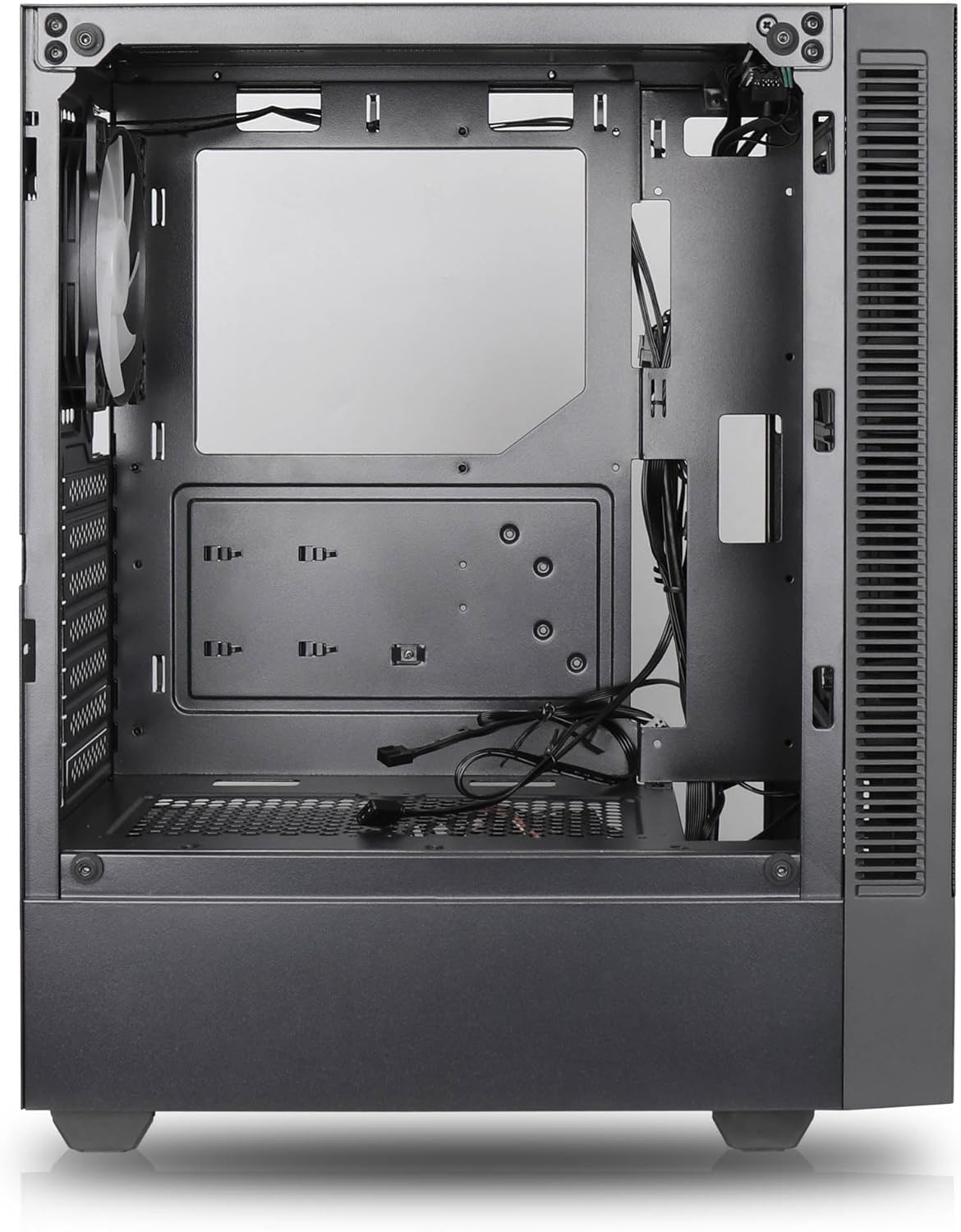

Fitur Utama:
- Aliran Udara Maksimum: Large mesh front panel and four pre-installed 140mm A-RGB fans with hydraulic bearings ensure excellent ventilation.
- Easy PC Building: Thoughtful design with daisy-chain connections simplifies installation, eliminating the need for additional adapters or controllers.
- Desain Berkualitas Tinggi: Genuine tempered glass side panel showcases installed components and provides a minimalist, premium aesthetic.
- Flexible Lighting and Control: 3-pin A-RGB fans and 4-pin fan control allow for impressive lighting effects and easy adjustment of fan speed and curves directly from the motherboard.
- Powerful Component Compatibility: Supports GPUs up to 400mm long, radiators up to 360mm (front and top) and 140mm (rear), and space for up to 4 fans.
- Compact Case with Ample Space: Midi tower format accommodates E-ATX, ATX, mATX, and ITX motherboards, up to two 2.5" SSDs, two 3.5" HDDs, and ATX power supplies.
5. Panduan Instalasi
Follow these steps for component installation. Refer to your individual component manuals for specific instructions.
5.1. Mempersiapkan Kasus
- Letakkan wadah tersebut di atas permukaan yang datar dan stabil.
- Carefully remove the tempered glass side panel by unscrewing the thumb screws and gently pulling it away. Set it aside on a soft, non-abrasive surface.
- Remove the solid right side panel by unscrewing the thumb screws and sliding it backward.
5.2. Instalasi Motherboard
- Pasang pelindung I/O ke lubang belakang casing.
- Ensure the correct standoffs are installed for your motherboard form factor (E-ATX, ATX, mATX, ITX). Adjust or add standoffs as needed.
- Letakkan motherboard Anda dengan hati-hati di atas penyangga, sejajarkan lubang sekrupnya.
- Kencangkan motherboard dengan sekrup yang disediakan. Jangan terlalu mengencangkan.
5.3. Instalasi Unit Catu Daya (PSU)
- Letakkan PSU di kompartemen khusus di bagian belakang bawah casing.
- Ensure the PSU fan faces downwards (if the case has a bottom vent) or upwards, depending on your cooling preference.
- Secure the PSU to the case with the provided screws from the rear.
5.4. Instalasi Drive Penyimpanan
SSD 2.5 inci:
- Locate the 2.5" drive mounts (typically behind the motherboard tray).
- Secure the SSDs using the provided screws.
HDD 3.5 inci:
- Locate the 3.5" drive cages (usually near the PSU shroud).
- Slide the HDDs into the drive trays and secure them with screws or tool-less mechanisms if available.
5.5. Instalasi Kartu Grafis (GPU)
- Lepaskan penutup slot PCIe yang diperlukan dari bagian belakang casing.
- Align your GPU with the PCIe slot on the motherboard and press firmly until it clicks into place.
- Secure the GPU to the case with screws.
5.6. Manajemen Kabel
Manfaatkan lubang pengarah kabel dan titik pengikat di belakang baki motherboard untuk mengatur kabel. Ini meningkatkan aliran udara dan estetika.
6. Operasi
6.1. Menghidupkan
After all components are installed and cables are connected, reattach the side panels. Connect the power cable to the PSU and a wall outlet, then press the power button on the top I/O panel of the case.
6.2. Kontrol Kipas ARGB
The pre-installed ARGB fans feature 3-pin ARGB connectors for lighting control and 4-pin connectors for fan speed control. These can be connected directly to compatible headers on your motherboard. Use your motherboard's software or BIOS settings to customize lighting effects and fan curves.
7. Pemeliharaan
7.1. Pembersihan
- Regularly clean dust filters (if present) to maintain optimal airflow.
- Use a can of compressed air to remove dust from inside the case and components.
- Bersihkan permukaan luar dengan kain lembut dan kering.amp kain. Hindari bahan kimia keras.
- Untuk panel kaca tempered, gunakan pembersih kaca dan kain mikrofiber.
8. Penyelesaian masalah
- PC not powering on: Check all power connections, including the 24-pin motherboard power, 8-pin CPU power, and GPU power cables. Ensure the PSU switch is in the 'ON' position.
- Fans not spinning/RGB not working: Verify that fan and ARGB headers are correctly connected to the motherboard. Check motherboard software for fan speed and lighting control settings.
- Terlalu panas: Ensure proper airflow by checking fan orientation and cleaning dust filters. Verify CPU cooler and GPU cooler are properly seated.
- Tidak ada tampilan: Confirm the monitor cable is connected to the graphics card (not the motherboard integrated graphics, unless you are using integrated graphics). Reseat the graphics card and RAM modules.
9. Spesifikasi
| Fitur | Spesifikasi |
|---|---|
| Merek | SILENTWARE |
| Nama Model | Silentware Flow 100 ARGB |
| Nomor Model Barang | ALIRAN100 |
| ASIN | B0CB8CZ5GF |
| Warna | Hitam |
| Jenis Kasus | Menara Tengah |
| Bahan | Kaca Tempered |
| Kompatibilitas Papan Induk | ATX, Micro ATX, Mini ITX |
| Perangkat yang Kompatibel | ATX, mATX, ITX motherboards, GPUs up to 325mm, radiators up to 360mm, 2.5" and 3.5" storage drives |
| Penggunaan yang Direkomendasikan | Permainan |
| Metode Pendinginan | Udara |
| Kipas yang sudah terpasang sebelumnya | 4 kipas ARGB 120mm |
| Ukuran Kipas | 140 Millimeters (Note: Product description mentions 140mm fans, while pre-installed are 120mm. Please verify with product packaging.) |
| Jenis Pemasangan Catu Daya | Dudukan Bawah |
| Panjang GPU Maks | ukuran 400mm |
| Radiator Support (Front/Top) | Hingga 360mm |
| Dukungan Radiator (Belakang) | Hingga 140mm |
| Ruang Penggerak 2.5 inci | Hingga 2 |
| Ruang Penggerak 3.5 inci | Hingga 2 |
10. Garansi dan Dukungan
For warranty information and technical support, please refer to the official SILENTWARE website or contact your retailer. Specific details regarding spare parts availability and software updates are not available in the provided product information.