1. Pendahuluan
This manual provides essential information for the safe and efficient operation of your THOMSON 40FD2S13 40 Inch LED Full HD Easy TV. Please read it thoroughly before using the television and retain it for future reference.
Your THOMSON Easy TV is designed for straightforward entertainment, featuring a Full HD display, multiple connectivity options, and a triple tuner for versatile signal reception.

Gambar: Depan view of the THOMSON 40FD2S13 40 Inch LED Full HD Easy TV, showcasinberkat tampilan dan desainnya yang ramping.
2. Informasi Keselamatan
Selalu ikuti tindakan pencegahan keselamatan dasar saat menggunakan televisi ini untuk mengurangi risiko kebakaran, sengatan listrik, dan cedera.
- Jangan biarkan TV terkena hujan atau lembab.
- Jangan membuka kabinet; serahkan semua perbaikan kepada personel yang berkualifikasi.
- Pastikan ventilasi yang baik di sekitar TV.
- Jauhkan TV dari sinar matahari langsung dan sumber panas.
- Cabut TV saat terjadi badai petir atau saat tidak digunakan dalam jangka waktu lama.
- Position the TV on a stable, level surface or securely wall-mount it.
3. Isi Paket
Verifikasi bahwa semua item ada dalam paket:
- THOMSON 40FD2S13 40 Inch LED Full HD Easy TV
- Kontrol Jarak Jauh
- Kabel listrik
- User Manual (dokumen ini)
- Dudukan TV (jika ada, periksa kemasan)
- Sekrup untuk dudukan TV (jika ada)
4. Pengaturan
4.1 Memasang Dudukan TV
If you are not wall-mounting the television, attach the included stands to the bottom of the TV. Ensure the stands are securely fastened with the provided screws to prevent the TV from tipping.

Image: Diagram showing the dimensions of the THOMSON 40FD2S13 TV, including stand measurements, to assist with placement.
4.2 Pemasangan di Dinding
For wall mounting, use a VESA-compatible wall mount kit (not included) that matches the TV's specifications. Follow the instructions provided with your wall mount kit carefully. Ensure the wall can support the weight of the TV.
4.3 Menghubungkan Periferal
Your THOMSON TV offers various connection ports for external devices. Refer to the image below for port locations and types.
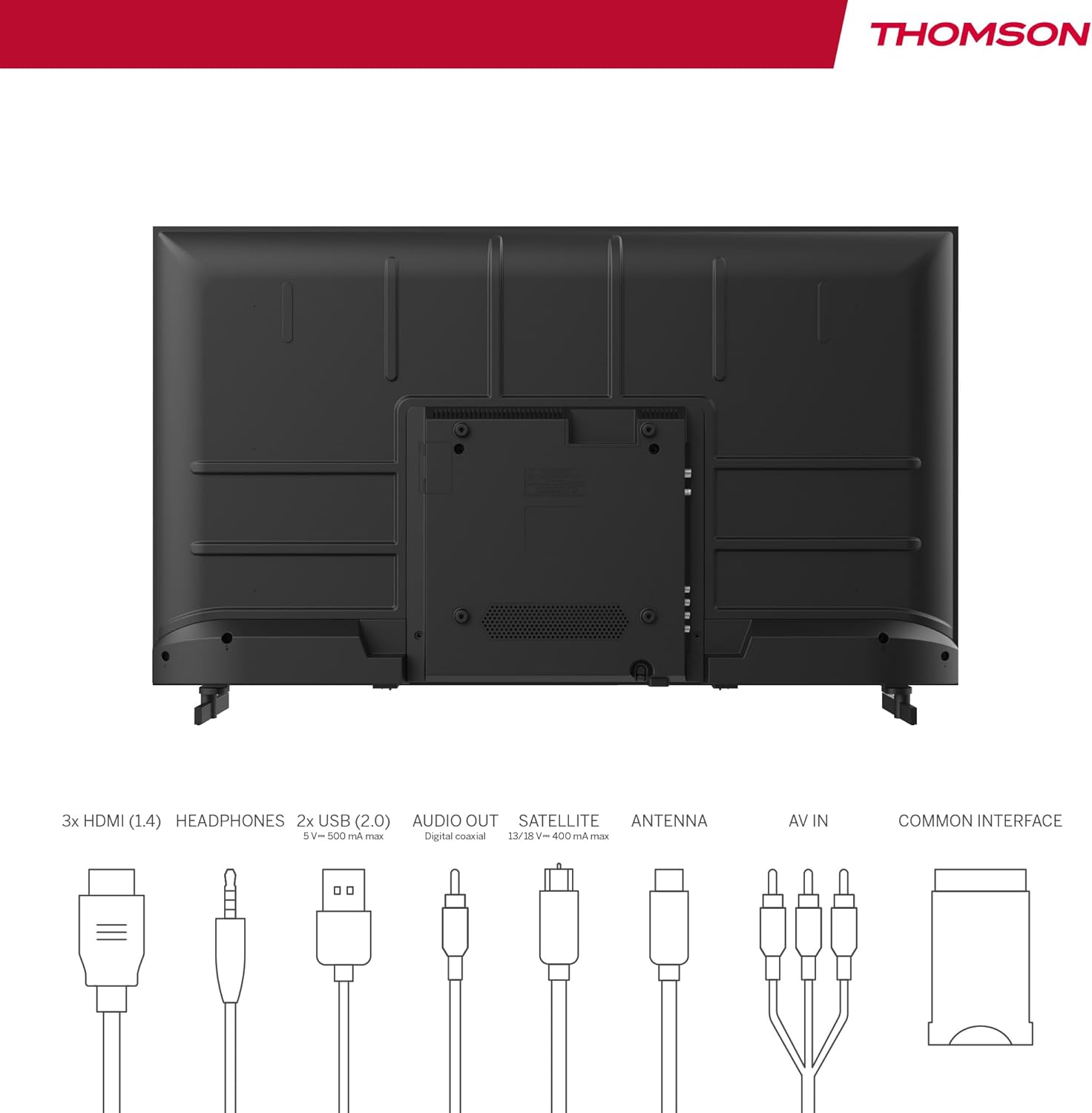
Image: Rear panel of the THOMSON 40FD2S13 TV, illustrating the location of all input and output ports, including HDMI, USB, Audio Out, Satellite, Antenna, AV IN, and Common Interface.
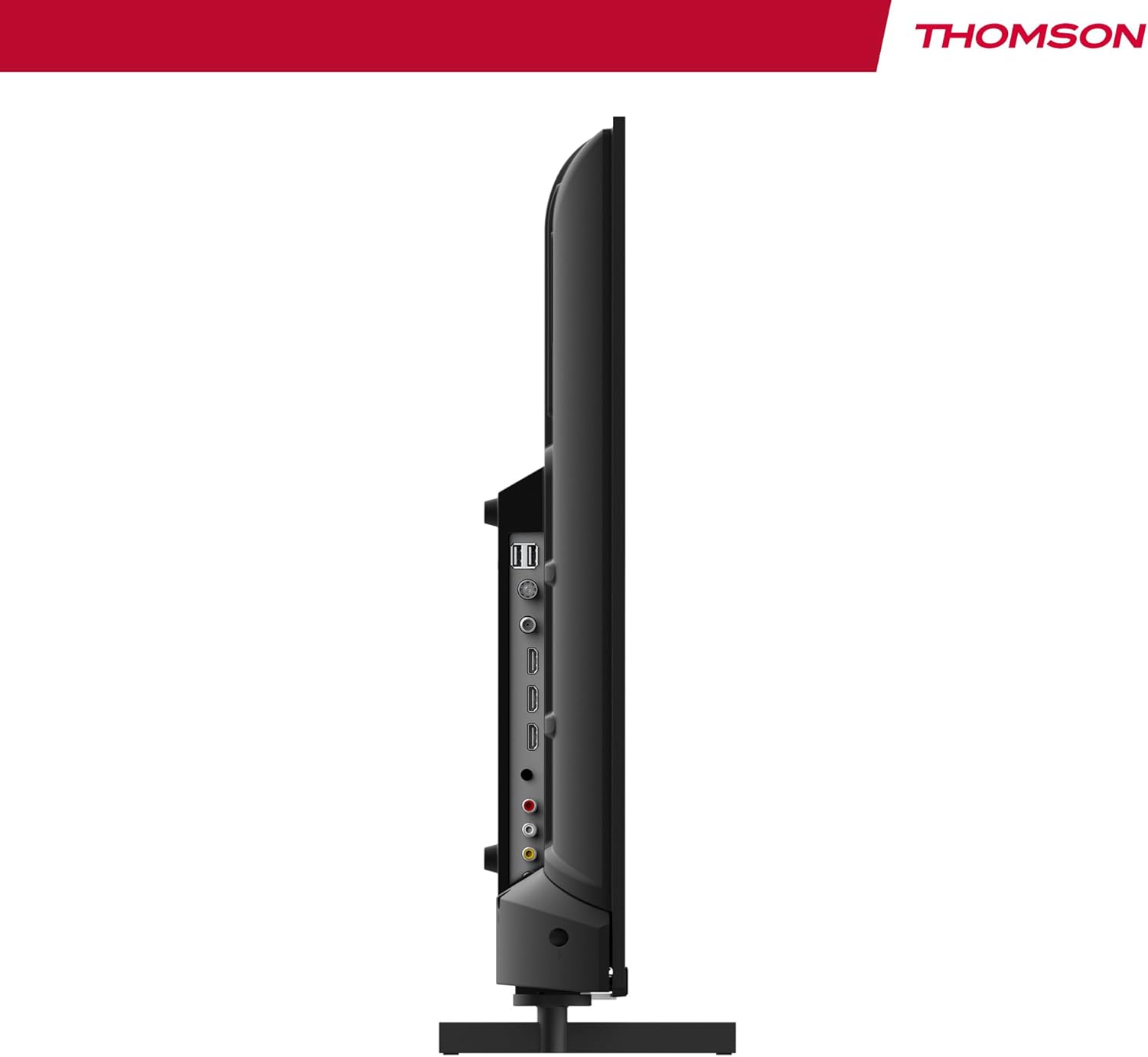
Gambar: Samping view of the THOMSON 40FD2S13 TV, highlighting the conveniently located side ports for easy access.
- HDMI (x3): Hubungkan pemutar Blu-ray, konsol game, set-top box, atau perangkat lain yang mendukung HDMI.
- USB (x2): Hubungkan perangkat penyimpanan USB untuk pemutaran media.
- Masuk: Hubungkan perangkat lama menggunakan kabel video komposit dan audio stereo.
- Headphone: Hubungkan headphone untuk mendengarkan secara pribadi.
- Keluaran Audio Digital: Hubungkan ke sistem audio eksternal untuk suara yang lebih baik.
- Antenna (DVB-T2): Connect a terrestrial antenna for digital broadcast reception.
- Satelit (DVB-S2): Connect a satellite dish for satellite broadcast reception.
- Slot CI+: Insert a Conditional Access Module (CAM) and smart card for encrypted channels.
4.4 Sambungan Daya
After connecting all necessary cables, plug the power cable into the TV's power input and then into a wall outlet. The TV will enter standby mode.
5. Mengoperasikan TV
5.1 Kontrol Jarak Jauh
The included remote control allows you to access all TV functions. It features backlit buttons for easy navigation in dim lighting.

Image: The THOMSON TV remote control, highlighting its ergonomic design and backlit buttons for convenient use.
- Tombol Daya: Menghidupkan/mematikan TV atau ke mode siaga.
- Tombol Angka: Pilih saluran secara langsung.
- Volumenya +/-: Sesuaikan tingkat volume.
- Saluran +/-: Change channels sequentially.
- Tombol Menu: Akses menu utama untuk pengaturan.
- Tombol Navigasi (Atas/Bawah/Kiri/Kanan/OK): Telusuri menu dan konfirmasi pilihan.
- Tombol Sumber: Select input sources (HDMI, AV, Tuner).
- Tombol INFO: Display current channel information.
- GUIDE Button: Access the Electronic Program Guide (EPG).
- Tombol REC: Initiate recording to a connected USB storage device (if supported and configured).
5.2 Pengaturan Awal dan Pemindaian Saluran
Upon first power-on, the TV will guide you through the initial setup process, including language selection, country, and channel scanning. Select your preferred reception type (Antenna, Cable, or Satellite) and follow the on-screen instructions to scan for available channels.

Image: Close-up of the TV's tuner inputs, indicating compatibility with DVB-T2 (terrestrial antenna), DVB-C (cable), and DVB-S2 (satellite) signals.
5.3 Pemutar Media
Connect a USB storage device to one of the USB ports to access photos, music, videos, and text files directly on your TV. Use the remote control to navigate the media player interface.
5.4 Fitur Khusus
- Panduan Program Elektronik (EPG): View upcoming program schedules and set reminders.
- Waktu Tunda: Pause live TV broadcasts (requires a connected USB storage device).
- Kontrol Orang Tua: Set restrictions on channels or programs based on age ratings.
- Modus Hotel: Configure specific settings for use in hotel environments, such as default volume and input source.
- Audio Dolbi: Experience enhanced sound quality with Dolby Audio technology.

Image: A family enjoying content on the THOMSON TV, with the Dolby Audio logo indicating superior sound experience.
6. Pemeliharaan
To ensure the longevity and optimal performance of your THOMSON TV, follow these maintenance guidelines:
- Membersihkan Layar: Usap layar secara perlahan dengan kain lembut dan bebas serat. Untuk noda membandel, usap layar dengan lembut.ampBilas kain dengan air atau pembersih layar khusus. Jangan pernah menyemprotkan cairan langsung ke layar.
- Membersihkan Kabinet: Gunakan kain lembut dan kering untuk membersihkan lemari TV. Hindari penggunaan pembersih abrasif atau pelarut.
- Ventilasi: Pastikan lubang ventilasi di bagian belakang TV tidak terhalang.
- Kabel Daya: Periksa kabel daya secara berkala untuk mengetahui adanya kerusakan. Jika rusak, hubungi layanan pelanggan untuk penggantian.
7. Penyelesaian masalah
If you encounter issues with your TV, consult the following common troubleshooting steps before contacting customer support.
| Masalah | Kemungkinan Penyebab | Larutan |
|---|---|---|
| Tidak ada daya | Kabel daya tidak tersambung; stopkontak tidak berfungsi. | Ensure the power cord is securely plugged into the TV and a working wall outlet. Check the power switch on the TV (if present). |
| Tidak ada gambar, tetapi ada suara | Sumber input yang dipilih salah; masalah lampu latar. | Press the "Source" button on the remote to select the correct input. Try adjusting brightness/contrast settings. |
| Tidak ada suara, tetapi gambar ada | Volume dimatikan atau terlalu rendah; pengaturan output audio tidak tepat. | Press the "Volume +" button or unmute the TV. Check audio output settings in the TV menu. |
| Kontrol jarak jauh tidak berfungsi | Baterai sudah habis atau terpasang tidak benar; ada penghalang antara remote dan TV. | Replace batteries with new ones, ensuring correct polarity. Remove any obstructions. Point the remote directly at the TV's IR sensor. |
| Poor picture quality / No signal | Antenna/cable/satellite connection loose or damaged; incorrect tuner settings. | Check all antenna/cable/satellite connections. Perform a channel scan again. Ensure the correct tuner input is selected. |
8. Spesifikasi
| Fitur | Detil |
|---|---|
| Merek | Bahasa Indonesia: TOMSON |
| Model | 40FD2S13 |
| Ukuran Layar | 40 Inci (101 cm) |
| Teknologi Tampilan | DIPIMPIN |
| Resolusi | 1920x1080 (HD Penuh) |
| Tingkat Penyegaran | 60Hz |
| Teknologi Penyetel | DVB-C, DVB-S2, DVB-T2 |
| Port HDMI | 3 |
| Port USB | 2 |
| Antarmuka Lainnya | AV IN, Headphone, Digital Audio Out, CI+ Slot |
| Dekode Audio | DD (Dolby Digital) |
| Konfigurasi Speaker | Suara Sekitar 2.0 |
| Jil.tage | 230 Volt |
| Kelas Efisiensi Energi | E |
| Dimensi Produk (W x H x D) | 72 x 42 x 8.2 cm (without stand, approx.) |
| Berat | 6.9 kg (perkiraan) |
9. Informasi Garansi
Your THOMSON 40FD2S13 TV comes with a Garansi 3 tahun from the date of purchase. This warranty covers manufacturing defects and ensures that your product meets high-quality standards. Please retain your proof of purchase for warranty claims.
For detailed warranty terms and conditions, please refer to the warranty card included with your product or visit the official THOMSON weblokasi.
10. Dukungan Pelanggan
If you require further assistance, have questions not covered in this manual, or need technical support, please contact THOMSON customer service.
- Dukungan online: Visit the official THOMSON support websitus untuk FAQ, panduan pemecahan masalah, dan formulir kontak.
- Dukungan Telepon: Refer to your product packaging or the THOMSON websitus untuk nomor kontak layanan pelanggan regional.
When contacting support, please have your TV model number (40FD2S13) and serial number ready.


