1. Pendahuluan
The ATOMSTACK A6 Pro is a high-performance laser engraving and cutting machine designed for precision and ease of use.Featuring a 6W ultra-high performance laser module and advanced blue-ray laser point compression technology,it offers exceptional cutting ability and fine engraving detail. Its integrated design ensures quick setup,making it suitable for various creative and professional applications.

Gambar 1.1: The ATOMSTACK A6 Pro Laser Engraving Machine, showcasinberkat desainnya yang ringkas dan terintegrasi.
2. Informasi dan Peringatan Keselamatan
PERINGATAN: Laser engraving machines emit powerful laser radiation. Improper use can cause serious injury, including eye damage and skin burns.Always adhere to the following safety guidelines:
- Perlindungan Mata: Always wear appropriate laser safety goggles when operating the machine. Never look directly into the laser beam or its reflection.
- Ventilasi: Operate the machine in a well-ventilated area to dissipate fumes and smoke produced during engraving and cutting. Consider an exhaust system.
- Bahaya Kebakaran: Pemrosesan laser dapat menyulut bahan yang mudah terbakar. Jangan tinggalkan mesin tanpa pengawasan selama pengoperasian. Sediakan alat pemadam api di dekatnya.
- Kompatibilitas Bahan: Only engrave or cut materials specified as safe for laser processing. Avoid materials that produce toxic fumes or can easily ignite.
- Anak-anak dan Hewan Peliharaan: Jauhkan anak-anak dan hewan peliharaan dari mesin selama pengoperasian.
- Catu Daya: Use only the specified power adapter (AC 24V 5A) for the machine.
- Pemberhentian darurat: Biasakan diri Anda dengan lokasi dan pengoperasian tombol berhenti darurat.

Gambar 2.1: Product information label including critical safety warnings regarding direct or scattered radiation.
3. Pengaturan dan Instalasi
The ATOMSTACK A6 Pro is designed for minimal setup, allowing you to start working quickly.
3.1 Membongkar
- Keluarkan mesin dan semua komponen dari kemasan dengan hati-hati.
- Verify that all parts are present according to the packing list (refer to your product's specific packing list).

Gambar 3.1: The ATOMSTACK A6 Pro is designed for immediate use upon unboxing, requiring no complex assembly.
3.2 Penempatan dan Koneksi Awal
- Place the machine on a stable, level, and non-flammable surface. Ensure adequate space around the machine for ventilation and operation.
- Hubungkan adaptor daya ke mesin dan kemudian ke stopkontak yang sesuai.
- Ensure the laser module is securely seated and the tank chain bundling for cables is properly aligned to prevent tangling.

Gambar 3.2: The tank chain bundling system ensures smooth and tangle-free cable operation, enhancing machine longevity.
4. Petunjuk Pengoperasian
The ATOMSTACK A6 Pro offers versatile engraving and cutting capabilities.
4.1 Instalasi dan Koneksi Perangkat Lunak
The ATOMSTACK A6 Pro is compatible with Atomstack's self-developed PC software and supports various control methods.
- Download and install the latest version of Atomstack's PC software from the official website or use the provided mobile application.
- Connect the machine to your computer via USB or Wi-Fi (if supported by your model). For mobile app control, connect your device to the machine's hotspot.
- Ensure the software recognizes the machine before proceeding.
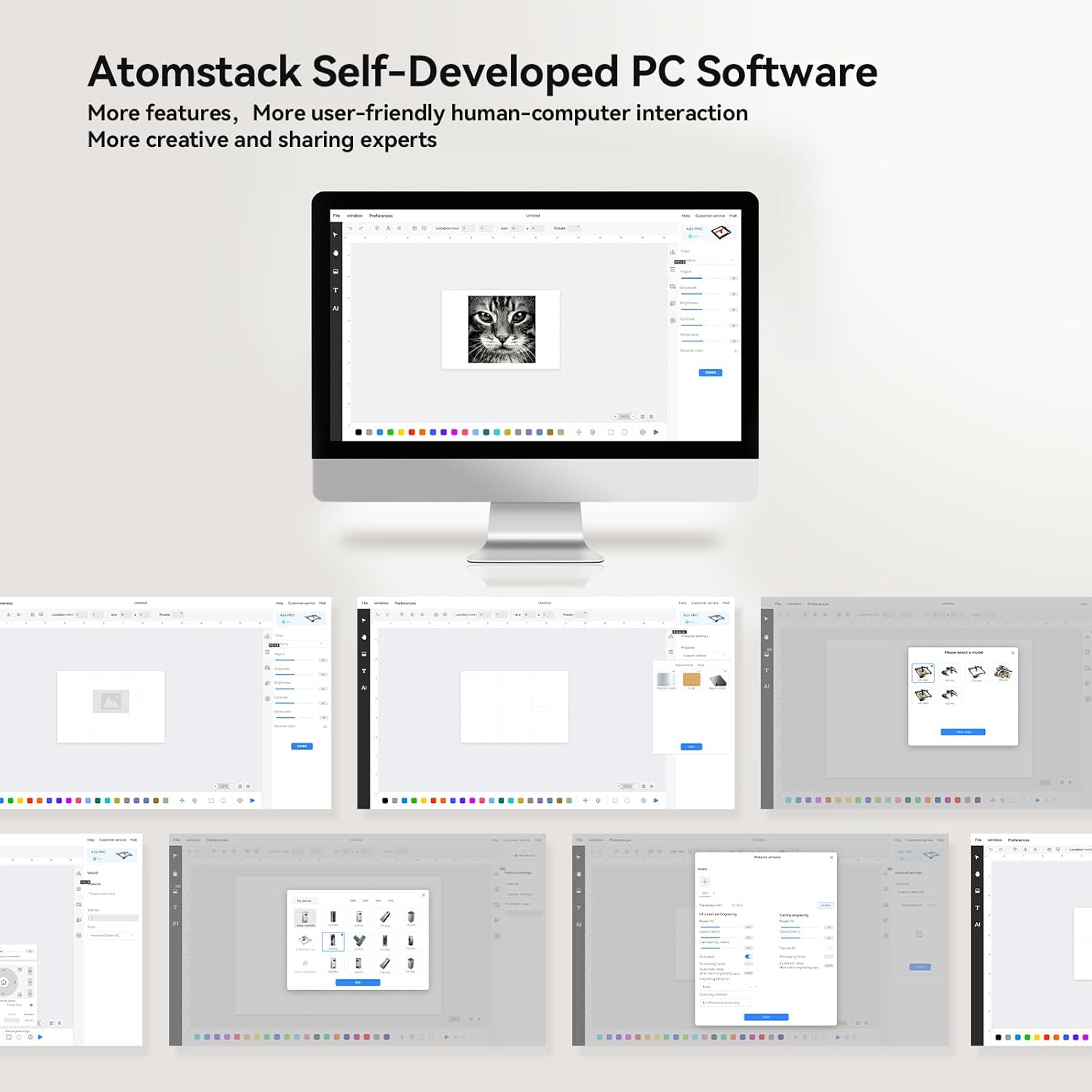
Gambar 4.1: Lebihview of the Atomstack self-developed PC software, designed for user-friendly interaction and creative projects.
4.2 Memfokuskan Laser
The A6 Pro features a fixed focusing design for quick and accurate focusing.
- Place your material on the engraving bed.
- Adjust the laser module height according to the material thickness until the laser spot is at its smallest and sharpest point. This typically takes less than 10 seconds.
- For precise positioning, utilize the cross-positioning system for visual edge finding and object alignment.

Gambar 4.2: The cross-positioning system aids in precise and horizontal engraving, allowing for quick and accurate focusing.
4.3 Pengukiran dan Pemotongan
The A6 Pro is capable of engraving and cutting various materials with high precision.
- Persiapan Bahan: Ensure your material is clean and securely placed on the engraving bed.
- Design Import: Impor atau buat desain Anda dalam perangkat lunak.
- Pengaturan Parameter: Adjust laser power, speed, and passes based on the material type and desired outcome. The 6W laser can cut through 3mm poplar wood, 3mm black acrylic, 3mm poplar plywood, and laser vinyl.
- Mulai Operasi: Jalankan proses pengukiran atau pemotongan melalui perangkat lunak. Pantau mesin dengan saksama selama pengoperasian.

Gambar 4.3: The ATOMSTACK A6 Pro is suitable for engraving and cutting a variety of materials including basswood, acrylic, pine wood, paulownia, bamboo, and leather.

Gambar 4.4: The A6 Pro demonstrates significantly faster engraving speeds compared to traditional frame machines, enhancing work efficiency.
5. Pemeliharaan
Regular maintenance ensures the longevity and optimal performance of your ATOMSTACK A6 Pro.
- Laser Module Cleaning: The non-clogging laser module is designed to resist lens pollution. However, periodic inspection and gentle cleaning of the laser lens with a suitable optical cleaner and lint-free cloth are recommended to maintain optimal laser performance.
- Pembersihan Rel: Keep the X-axis metal double guide rails clean and free of dust and debris to ensure smooth and precise movement.
- Pembersihan Umum: Wipe down the machine's exterior with a soft, dry cloth. Avoid using abrasive cleaners or solvents.
- Pemeriksaan Kabel: Periodically check the tank chain bundled cables for any signs of wear or damage.
6. Penyelesaian masalah
This section addresses common issues you might encounter with your ATOMSTACK A6 Pro.
| Masalah | Kemungkinan Penyebab | Larutan |
|---|---|---|
| Mesin tidak menyala. | Power cable not connected; faulty power adapter; power switch off. | Ensure power cable is securely connected. Check power outlet. Verify power switch is in the ON position. |
| Laser tidak menyala atau lemah. | Laser module not properly focused; dirty lens; incorrect software settings; laser module malfunction. | Re-focus the laser. Clean the laser lens. Check laser power settings in software. Contact support if issue persists. |
| Engraving/cutting results are inaccurate or distorted. | Loose belts/rails; material not flat; incorrect software settings; vibrations. | Check for any loose components or debris on the guide rails. Ensure material is flat and secured. Verify design and parameter settings in software. Minimize external vibrations. |
| Software not connecting to machine. | Incorrect USB port; driver issues; Wi-Fi connection problems. | Try a different USB port. Reinstall drivers. For Wi-Fi, ensure you are connected to the machine's hotspot. Restart both machine and computer/device. |
7. Spesifikasi
| Fitur | Detil |
|---|---|
| Model | A6 Pro |
| Merek | Tumpukan ATOM |
| Kekuatan Laser | 6W (Optical Output) |
| Ukuran Titik Laser | 0.05 x 0.05 mm (Ultra-fine) |
| Area Ukiran | Ukuran: 370x310mm |
| Presisi Mekanik | Hingga 0.02 mm |
| Kecepatan Ukiran Maksimum | 600 mm/detik |
| Masukan Daya | Tegangan AC24V 5A |
| Dimensi Produk | Ukuran 60x60x17 cm |
| Berat Barang | 8.26 kg |
| Papan induk | Self-developed 32-bit ESP32 motherboard |
| Supported Materials (Cutting) | 3mm Poplar Wood, 3mm Black Acrylic, 3mm Poplar Plywood, Laser Vinyl |
| Supported Materials (Engraving) | Basswood, Acrylic, Pine wood, Paulownia, Bamboo, Leather, etc. |

Gambar 7.1: The ATOMSTACK A6 Pro features an upgraded self-developed 32-bit motherboard for faster data processing.
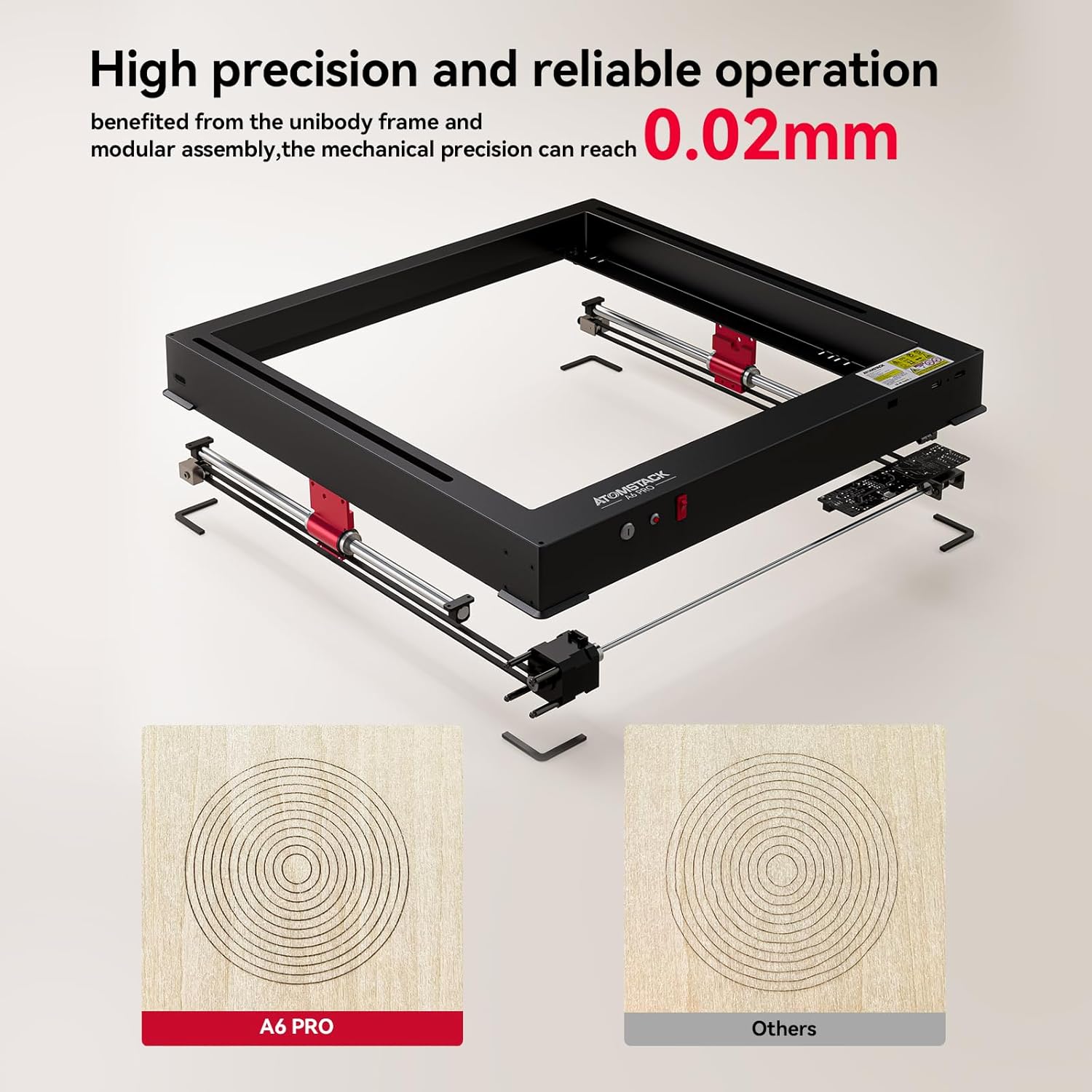
Gambar 7.2: The unibody frame and modular assembly contribute to a mechanical precision of up to 0.02mm.
8. Garansi dan Dukungan
ATOMSTACK provides customer support and warranty services for its products.
- Informasi Garansi: Please refer to the warranty card included with your product or visit the official ATOMSTACK websitus untuk mengetahui syarat dan ketentuan garansi secara terperinci.
- Dukungan Teknis: For technical assistance, troubleshooting beyond this manual, or spare parts inquiries, please contact ATOMSTACK customer support.
- Email Kontak: dukungan@atomstack.com
- Pabrikan: Shenzhen Atomstack Technologies Co., Ltd.
- Alamat: 17th Floor, Building 3A, Phase II, Intelligent Park, No.76.Baohe Avenue, Baolong Street, Longgang Dist., Shenzhen, 518172China.


