1. Pendahuluan
This manual provides essential information for the safe and efficient installation, operation, and maintenance of your KOLINK Regulator Series 850W Power Supply Unit (PSU). Please read this manual thoroughly before installation and retain it for future reference. This PSU is designed to provide stable and reliable power to your computer system, adhering to ATX 3.0 and PCIe 5.0 standards.
Informasi Keselamatan
- Always disconnect the power cord from the wall outlet before installing, removing, or cleaning the PSU.
- Jangan membuka PSU casing. Volume tinggitagTerdapat elektroda di dalamnya, yang dapat menyebabkan sengatan listrik.
- Pastikan PSU dipasang di area yang berventilasi baik.
- Use only the modular cables provided with this PSU. Using incompatible cables may damage your system.
- Produk ini dirancang untuk penggunaan di dalam ruangan saja.
2. Isi Paket
Verifikasi bahwa semua item yang tercantum di bawah ini ada dalam kemasan produk Anda:
- KOLINK Regulator Series 850W Power Supply Unit
- Modular Cable Set (including 24-pin ATX, 4+4 pin CPU, 6+2 pin PCIe, 12VHPWR, SATA, and Peripheral cables)
- Kabel Daya AC
- Sekrup Pemasangan
- User Manual (dokumen ini)
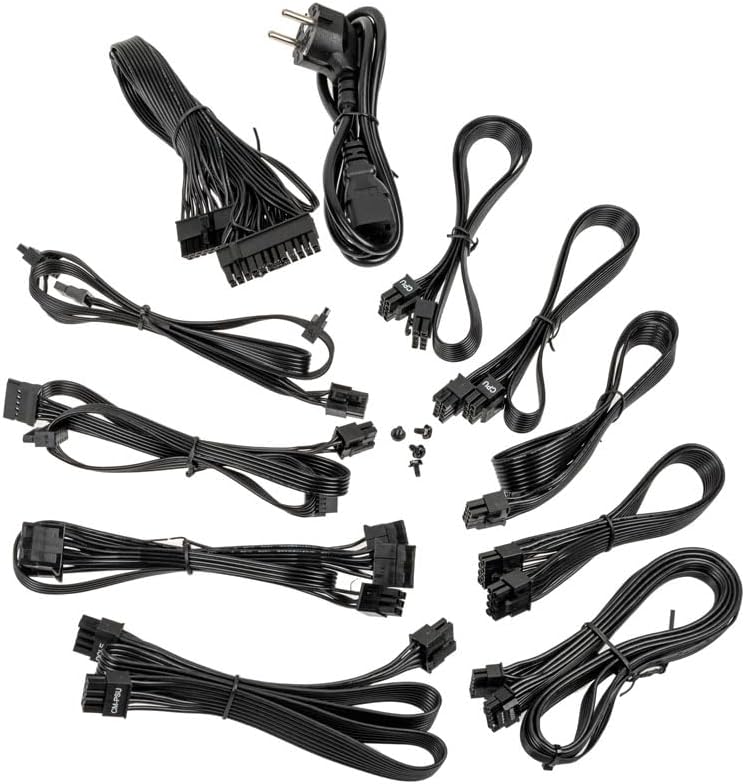
Image: A collection of all modular cables supplied with the Kolink Regulator PSU, including 24-pin ATX, CPU, PCIe, 12VHPWR, and SATA power cables.
3. Fitur Utama
The KOLINK Regulator Series 850W PSU incorporates advanced features for optimal performance and reliability:
- ATX 3.0 & PCIe 5.0 Siap: Designed to meet the latest ATX 3.0 standard with native PCIe 5.0 support, including a 12VHPWR 600W cable for modern graphics cards.
- Bersertifikat Emas 80 PLUS: Achieves up to 90% efficiency at half load, reducing energy consumption and heat generation.
- Desain Modular Sepenuhnya: Allows for custom cable management by connecting only the necessary cables, improving airflow and aesthetics.
- Kapasitor 100% Jepang: Utilizes high-quality Japanese capacitors for enhanced durability, stability, and long-term reliability.
- Switchable Semi-Fanless Mode: Features a 120mm Fluid Dynamic Bearing (FDB) fan that can operate in a semi-fanless mode, reducing fan speeds or stopping the fan entirely at lower loads for quieter operation.
- Multi-Protection Circuitry: Integrated safeguards protect your components from over-voltage, di bawah volumetage, over-power, short-circuit, and over-temperature conditions.
- Faktor Bentuk Ringkas: Designed to fit a wide range of PC cases with its optimized dimensions.

Image: A close-up of the fully modular cable connection ports on the Kolink Regulator PSU, labeled for Motherboard, SATA, CPU/PCIe, and 12VHPWR.

Gambar: Detail view of the 120mm Fluid Dynamic Bearing fan within the Kolink Regulator PSU, highlighting its switchable semi-fanless operation for quieter performance at low loads.

Image: An internal perspective of the Kolink Regulator PSU, emphasizing the high-quality 100% Japanese capacitors used for enhanced reliability and performance.

Image: The Kolink Regulator PSU, illustrating its robust multi-protection circuitry designed to safeguard connected components.
4. Pengaturan dan Instalasi
Daftar Periksa Pra-Instalasi
- Ensure your computer case is compatible with ATX PSUs.
- Verify that your motherboard and other components require 850W or less power.
- Gather necessary tools: screwdriver, zip ties (for cable management).
Langkah-langkah Instalasi
- Siapkan Sistem Anda: Disconnect the computer from the power outlet. Open your computer case to access the PSU mounting area. If replacing an old PSU, remove it first.
- Pasang PSU: Carefully slide the KOLINK Regulator PSU into the designated PSU bay in your computer case. Ensure the fan is oriented correctly (typically facing downwards or inwards, depending on case design). Secure the PSU with the provided mounting screws from the rear of the case.
- Hubungkan Kabel Modular: Identify the necessary cables for your components. Connect the modular cables to the corresponding ports on the PSU first, then route them to your components. Refer to the labels on the PSU for correct port identification.
- Daya Motherboard: Hubungkan kabel ATX 24-pin ke motherboard Anda.
- Daya CPU: Connect the 4+4 pin CPU cable(s) to your motherboard's CPU power connector(s).
- Daya PCIe: For graphics cards, use the 6+2 pin PCIe cables. For modern GPUs requiring 12VHPWR, use the dedicated 12VHPWR 600W cable. Ensure all connectors are fully seated.
- Daya SATA: Hubungkan kabel daya SATA ke SSD, HDD, dan drive optik Anda.
- Peripheral Power: Use peripheral (Molex) cables for any other components requiring them.
- Manajemen Kabel: Route cables neatly to improve airflow and aesthetics. Use zip ties or cable straps to secure them.
- Tutup Kasus: Once all connections are secure and verified, close your computer case.

Gambar: Sudut view of the Kolink Regulator 850W Power Supply Unit, showcasing hitamnya casing and fan grille, ready for installation.
5. Petunjuk Pengoperasian
- Hubungkan Daya AC: Plug the provided AC power cord into the PSU's power inlet and then into a wall outlet or surge protector.
- Power On PSU: Locate the power switch on the rear of the PSU (next to the AC inlet) and flip it to the 'I' (On) position.
- Nyalakan Komputer: Tekan tombol daya pada casing komputer Anda untuk memulai sistem.
Semi-Fanless Mode Operation
The KOLINK Regulator PSU features a semi-fanless mode. This means the 120mm FDB fan will remain off or spin at very low RPMs during low system loads to minimize noise. As the system load increases and the internal temperature rises, the fan will automatically activate and adjust its speed to maintain optimal cooling. This operation is normal and contributes to a quieter computing experience.
6. Pemeliharaan
Proper maintenance ensures the longevity and optimal performance of your PSU.
- Jaga Ventilasi Tetap Bersih: Ensure that the PSU's intake and exhaust vents are not obstructed by dust, cables, or other objects. Good airflow is crucial for cooling.
- Pembersihan Debu: Periodically clean dust from the PSU's exterior and fan grille using compressed air. Jangan membuka PSU casing.
- Kondisi Lingkungan: Operasikan PSU dalam rentang suhu dan kelembapan yang disarankan. Hindari kondisi ekstrem.
7. Penyelesaian masalah
If you encounter issues with your KOLINK Regulator PSU, refer to the following common problems and solutions:
| Masalah | Kemungkinan Penyebab | Larutan |
|---|---|---|
| Sistem tidak menyala. | PSU power switch off, AC cable loose, faulty wall outlet. | Ensure PSU switch is 'On'. Check AC power cable connection. Test wall outlet with another device. Verify all modular cables are securely connected. |
| Sistem menyala tetapi mati tiba-tiba. | Overload, overheating, loose connections, component fault. | Pastikan seluruh sistem airtage does not exceed 850W. Check for proper airflow. Verify all modular cables are fully seated. If problem persists, test components individually. |
| Kipas PSU tidak berputar. | Semi-fanless mode active, low system load. | This is normal operation in semi-fanless mode. The fan will activate under higher loads. If the fan never spins even under heavy load, contact support. |
| Suara aneh dari catu daya (PSU). | Loose screws, fan obstruction, coil whine. | Check PSU mounting screws. Ensure no cables or debris are obstructing the fan. Minor coil whine can be normal; if excessive, contact support. |
If troubleshooting steps do not resolve the issue, please contact KOLINK customer support.
8. Spesifikasi
Detailed technical specifications for the KOLINK Regulator Series 850W PSU:
| Fitur | Spesifikasi |
|---|---|
| Nomor Model | KL-R850FG |
| Keluaran Wattage | 850 Watt |
| Peringkat Efisiensi | 80 PLUS Emas |
| Faktor Bentuk | ATX |
| Desain Catu Daya | Sepenuhnya Modular |
| Metode Pendinginan | Air (120mm FDB fan with semi-fanless mode) |
| Kapasitor | Kapasitor 100% Jepang |
| Jenis Konektor | 12VHPWR, 24-pin ATX, 4+4 pin CPU, 6+2 pin PCIe, SATA, Peripheral |
| Dimensi Produk (P x L x T) | 11.61x8.46x4.33 inci |
| Berat Barang | 5.5 pon |
| Perangkat yang Kompatibel | Gaming PC with ATX motherboard and high-end graphics card |

Image: The rear panel of the Kolink Regulator PSU, displaying the electrical specifications label, power input, and on/off switch.
9. Garansi dan Dukungan
Informasi Garansi
KOLINK products are manufactured to the highest quality standards. This PSU is covered by a manufacturer's warranty against defects in materials and workmanship. The specific warranty period may vary by region and retailer. Please retain your proof of purchase for warranty claims.
Dukungan Pelanggan
For technical assistance, warranty inquiries, or further information, please visit the official KOLINK website or contact your local retailer. You can often find support resources, FAQs, and contact details on the manufacturer's weblokasi: www.kolink.eu