Perkenalan
Welcome to the user manual for your Infinity Smartwatch, Model NX 10. This device is designed to enhance your daily life with advanced fitness tracking, communication features, and smart notifications. Featuring a vibrant 1.43" AMOLED screen and robust IP68 water resistance, your smartwatch is built for both everyday use and active lifestyles. Please read this manual carefully to ensure proper operation and maintenance of your device.

Figure 1: Infinity Smartwatch NX 10. This image shows the smartwatch from an angled perspective, highlighting its round AMOLED display, black silicone strap, and two side buttons.
Pengaturan
1. Unboxing dan Biaya Awal
Upon unboxing, ensure all components are present: the Infinity Smartwatch NX 10 and the charging cable.
- Hubungkan kabel pengisi daya magnetik ke titik pengisian daya di bagian belakang jam tangan pintar.
- Colokkan ujung kabel USB ke adaptor daya USB standar (tidak disertakan) atau port USB komputer.
- The watch display will show a charging indicator. Fully charge the device before first use, which typically takes approximately 2 hours.

Figure 2: Smartwatch charging. The image illustrates the smartwatch being charged magnetically, with a green lightning bolt icon on the screen indicating charging status and a "400mAh Battery Capacity" label.
2. Instalasi dan Pemasangan Aplikasi
To unlock the full potential of your Infinity Smartwatch, download and install the companion application, Cocok untuk Cloud Pro, di ponsel pintar Anda.
- Scan the QR code provided in the quick start guide (if available) or search for "Fit Cloud Pro" in your smartphone's app store (Google Play Store for Android, Apple App Store for iOS).
- Instal aplikasinya.
- Open the Fit Cloud Pro app and follow the on-screen instructions to create an account or log in.
- Pastikan Bluetooth diaktifkan di ponsel cerdas Anda.
- In the app, navigate to the device pairing section and search for your smartwatch (e.g., "NX 10" or similar Bluetooth name).
- Select your smartwatch from the list to initiate pairing. Confirm the pairing request on both your phone and the smartwatch if prompted.
- Once paired, the app will synchronize data with your smartwatch, and you can customize settings.
Petunjuk Pengoperasian
1. Navigasi Dasar
- Layar sentuh: Swipe left/right to navigate between main screens (e.g., activity, heart rate, weather). Swipe up/down to access quick settings or notifications. Tap to select an option.
- Tombol Samping: The top button typically acts as a power button (long press) or a back/home button (short press). The bottom button may be customizable or provide quick access to sports modes.

Figure 3: 1.43" AMOLED Screen. This image highlights the vibrant display of the smartwatch, showing a detailed watch face with various data points like time, date, steps, and heart rate.
2. Membuat dan Menjawab Panggilan
Your Infinity Smartwatch supports Bluetooth calling, allowing you to make and receive calls directly from your wrist when connected to your smartphone.
- Untuk Menelepon: Access the dialer or contacts list on your smartwatch. You can dial a number directly or select a contact to call.
- Untuk Menjawab Panggilan: When a call comes in, the smartwatch will display the caller ID. Tap the green answer icon to accept the call or the red icon to decline.

Figure 4: Stay Connected On The Go. This image shows a user interacting with the smartwatch to make a call, illustrating the microphone, dialing, call records, and contacts features.
3. Pelacakan Kebugaran dan Kesehatan
The smartwatch is equipped with multiple sensors to monitor your health and fitness activities.
- Alat pengukur langkah: Automatically tracks your steps, distance, and calories burned throughout the day.
- Pemantauan Denyut Jantung: Provides real-time heart rate data. Access this feature from the main menu or set up continuous monitoring in the app.
- Pemantauan Tekanan Darah: Offers blood pressure readings. For accurate results, ensure the watch is worn correctly and remain still during measurement. Note: This feature is for reference only and should not be used for medical diagnosis.
- Pemantauan Tidur: Melacak pola tidur Anda, termasuk tidur nyenyak, tidur ringan, dan waktu terjaga. View detailed analysis in the Fit Cloud Pro app.
- Mode Olahraga: Supports over 100 sports modes, including running, cycling, swimming, and more. Select your desired activity to track specific metrics.

Figure 5: Track Every Move. This image displays the smartwatch tracking a swimming activity, with additional visuals of rock climbing and cycling, indicating its multi-sport tracking capabilities.

Figure 6: More than 110 sports modes. This image shows a variety of colorful icons representing different sports activities supported by the smartwatch, overlaid on a background of a person cycling.
4. Kustomisasi
Personalize your smartwatch experience through the Fit Cloud Pro app.
- Tampilan Jam: Choose from a wide range of pre-installed watch faces or download new ones via the app. You can also create custom watch faces using your own photos.
- Pemberitahuan: Configure which app notifications you wish to receive on your smartwatch (e.g., calls, SMS, social media alerts).
- Alarm & Pengingat: Set alarms, sedentary reminders, and hydration reminders through the app.
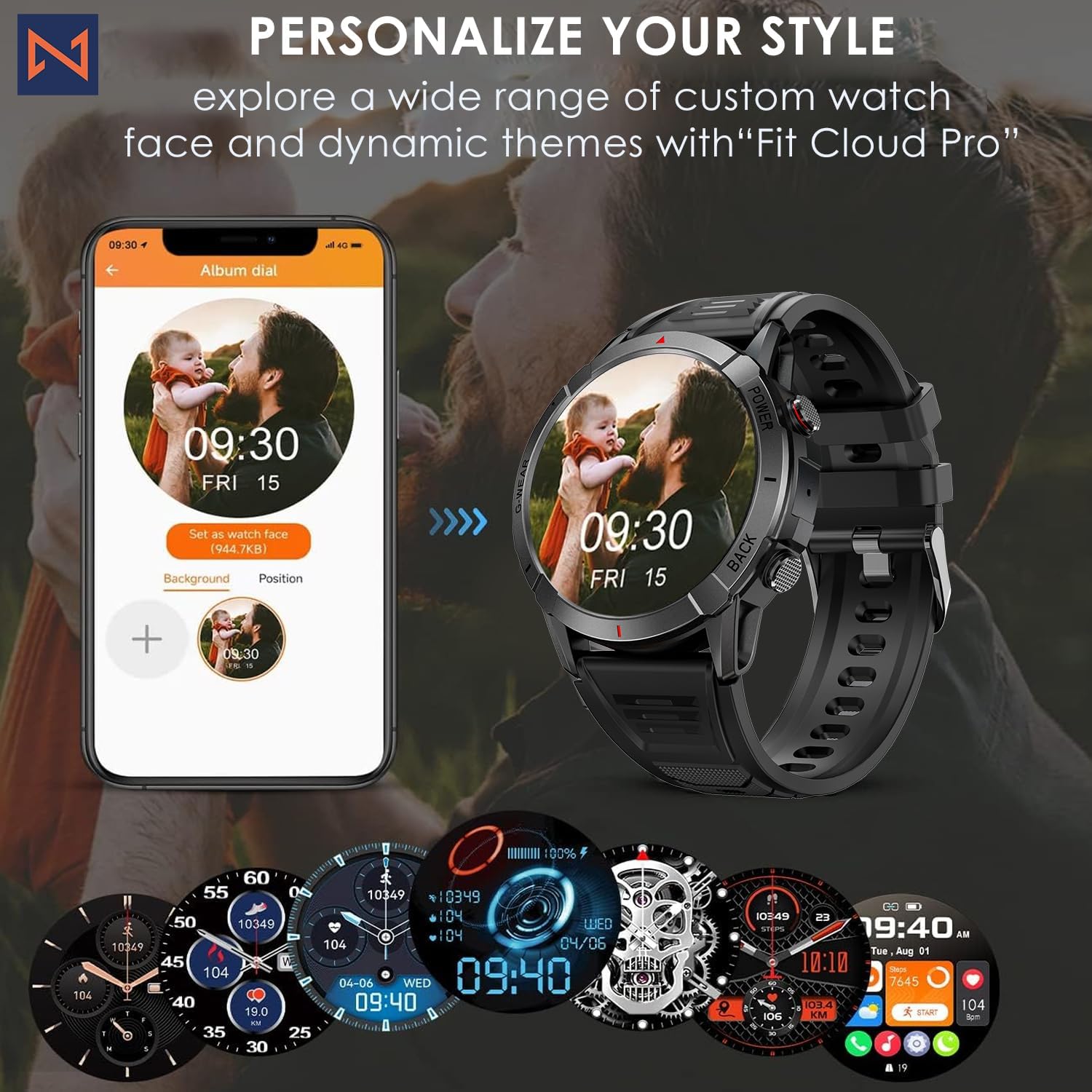
Figure 7: Personalize Your Style. This image demonstrates how to customize watch faces using the "Fit Cloud Pro" app, showing various digital and analog watch face options.
Pemeliharaan
1. Membersihkan Smartwatch Anda
Pembersihan rutin membantu menjaga tampilan dan fungsionalitas perangkat Anda.
- Bersihkan layar dan badan dengan kain lembut dan tidak berbulu.
- Untuk noda membandel, dampBasahi kain sedikit dengan air. Hindari penggunaan bahan kimia keras atau bahan abrasif.
- Clean the charging contacts periodically to ensure proper connection.
2. Tahan Air (IP68)
Your Infinity Smartwatch is rated IP68, meaning it is resistant to dust and can withstand immersion in water up to 1.5 meters for up to 30 minutes.
- Cocok untuk penggunaan sehari-hari, mencuci tangan, dan hujan ringan.
- Avoid prolonged immersion, hot water, steam, or high-pressure water jets (e.g., showering, sauna, diving).
- If the watch gets wet, dry it thoroughly before charging or operating buttons.

Figure 8: Engineered for Adventure. This image highlights the smartwatch's durability features, including waterproof, dustproof, anti-magnetic, and shockproof capabilities, with corresponding icons.
3. Perawatan Baterai
- Untuk memperpanjang masa pakai baterai, hindari suhu ekstrem.
- Charge the watch regularly; avoid letting the battery completely drain for extended periods.
- Gunakan hanya kabel pengisi daya yang disediakan.
Penyelesaian Masalah
| Masalah | Solusi yang mungkin |
|---|---|
| Jam tangan tidak menyala | Pastikan jam tangan terisi penuh. Sambungkan ke pengisi daya dan tunggu beberapa menit sebelum mencoba menyalakannya. |
| Tidak dapat dipasangkan dengan ponsel pintar |
|
| Data kesehatan yang tidak akurat |
|
| Pemberitahuan tidak diterima |
|
| Daya tahan baterai pendek |
|
Spesifikasi
| Fitur | Detil |
|---|---|
| Nomor Model | NX10 adalah motor yang paling banyak diminati di dunia. |
| Menampilkan | 1.43" AMOLED Screen |
| Resolusi Tampilan | Format HD 466x466 |
| Kapasitas Baterai | Polimer Litium 400 mAh |
| Tahan Air | Tingkat IP68 |
| Konektivitas | Bahasa Indonesia: Bluetooth |
| Sistem Operasi | Android (kompatibel dengan iOS) |
| Bahan Tali | 22mm Silicon Belt |
| Materi Tampilan | Paduan Seng |
| Berat Barang | 1.76 ons |
| Kapasitas Penyimpanan Memori | 128MB |
Garansi dan Dukungan
For warranty information and technical support, please refer to the documentation included with your purchase or visit the official Infinity weblokasi.
Manufacturer: Infiniity
For further assistance, you may contact Infiniity customer service through the contact information provided on their official website or within the Fit Cloud Pro application.


