1. Pendahuluan
Thank you for choosing the techno line WT2600 Digital Calendar. This device provides accurate time, date, indoor temperature, and humidity readings, along with alarm functions. This manual will guide you through the setup, operation, and maintenance of your new digital calendar.
2. Informasi Keselamatan
- Jangan biarkan perangkat terkena suhu ekstrem, sinar matahari langsung, atau kelembapan tinggi.
- Hindari menjatuhkan perangkat atau membenturkannya dengan kuat.
- Jangan mencoba membongkar atau memperbaiki unit sendiri. Hubungi teknisi servis yang berkualifikasi.
- Buang baterai bekas secara bertanggung jawab sesuai dengan peraturan setempat.
- Jauhkan perangkat dari jangkauan anak-anak.
3. Isi Paket
Harap periksa apakah semua item ada dalam paket Anda:
- techno line WT2600 Digital Calendar Unit
- User Manual (dokumen ini)
- Batteries (may be included depending on region)
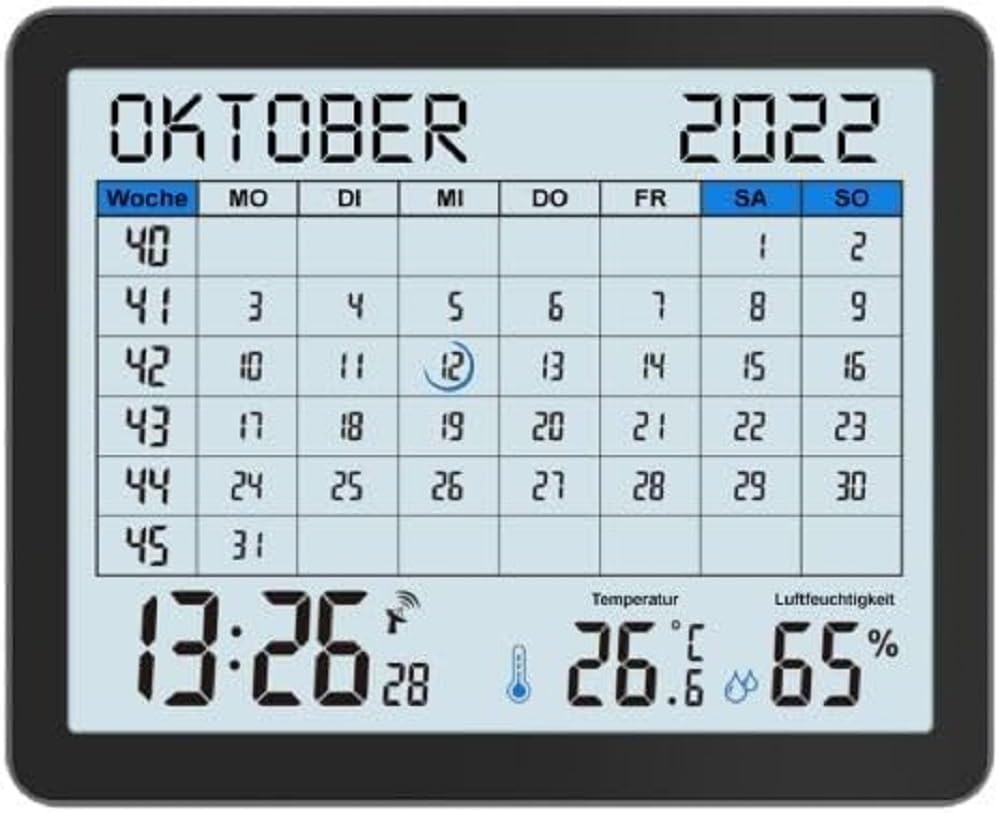
Image of the techno line WT2600 Digital Calendar packaging, showing the device and its key features.
4. Fitur Produk
The techno line WT2600 Digital Calendar offers the following key features:
- DCF-77 Radio-Controlled Clock: Automatic time synchronization for precise timekeeping, with an option for manual setting.
- 12/24 Hour Time Display: Select your preferred time format.
- Tampilan Kalender: Shows the current date, day of the week, and month.
- 7-Language Month Display: Choose from seven languages for the month display.
- Tampilan Suhu Dalam Ruangan: Shows indoor temperature in Celsius (°C) or Fahrenheit (°F).
- Tampilan Kelembapan Dalam Ruangan: Displays the current indoor humidity level.
- MIN/MAX Display: Records and displays the minimum and maximum temperature and humidity values.
- Alarm Ganda dengan Fungsi Tunda: Set two independent alarms with a convenient snooze function.
- Indikator Baterai Lemah: Memberi tahu Anda saat baterai perlu diganti.
- Penempatan Serbaguna: Designed for both wall mounting and table standing.

Depan view of the techno line WT2600 Digital Calendar display, showing the calendar grid, current time, temperature, and humidity.
5. Pengaturan
5.1 Pemasangan Baterai
- Temukan tempat baterai di bagian belakang unit.
- Buka penutup ruang baterai.
- Insert the required batteries (e.g., 2 x AAA, not specified in data, common for such devices) according to the polarity markings (+ and -).
- Tutup penutup ruang baterai dengan rapat.
5.2 Initial Power On and DCF-77 Signal Reception
Upon battery insertion, the device will power on and automatically begin searching for the DCF-77 radio signal. This process may take several minutes. For optimal reception, place the unit near a window and away from electronic interference.
- A signal icon (e.g., an antenna symbol) will flash during signal search.
- Once the signal is received, the time and date will be set automatically, and the signal icon will become solid.
- If no signal is received after 10-15 minutes, try repositioning the unit.
5.3 Pengaturan Waktu dan Tanggal Manual
If automatic synchronization is not desired or unsuccessful, you can set the time and date manually.
- Press and hold the 'SET' button (or similar, refer to device buttons) for a few seconds to enter manual setting mode.
- Gunakan tombol '+' atau '-' untuk menyesuaikan nilai yang berkedip (misalnya, jam, menit, tahun, bulan, hari).
- Press 'SET' again to confirm the current setting and move to the next adjustable parameter.
- Ulangi hingga semua pengaturan selesai.
5.4 Pengaturan Bahasa
To change the display language for the month:
- Enter the setting mode (e.g., by pressing 'SET').
- Navigate through the settings until the language option appears.
- Use the '+' or '-' buttons to cycle through the available 7 languages.
- Konfirmasikan pilihan Anda.
6. Operasi
6.1 Viewing Time, Date, Temperature, and Humidity
The main display continuously shows the current time, date, indoor temperature, and indoor humidity. You can switch between 12-hour and 24-hour time formats by pressing a dedicated button (e.g., '12/24H' or 'MODE').
6.2 Mengatur Alarm
The device features two independent alarms.
- Press the 'ALARM' button (or similar) to view Alarm 1 kali.
- Press and hold 'ALARM' to enter Alarm 1 setting mode.
- Use '+' or '-' to adjust the hour and minute, pressing 'ALARM' to confirm each.
- Repeat for Alarm 2.
- To activate/deactivate an alarm, press 'ALARM' repeatedly until the alarm icon appears/disappears.
6.3 Menggunakan Snooze
When an alarm sounds, press the 'SNOOZE' button (or similar, often a large button on top) to temporarily silence the alarm. The alarm will sound again after a few minutes (typically 5-10 minutes). To stop the alarm completely, press any other button.
6.4 MIN/MAX Display Function
The device records the minimum and maximum temperature and humidity values since the last reset.
- Press the 'MIN/MAX' button (or similar) once to view the maximum recorded values.
- Tekan lagi untuk view the minimum recorded values.
- To reset the MIN/MAX records, press and hold the 'MIN/MAX' button while viewing catatan.

Close-up of the techno line WT2600 Digital Calendar display, highlighting the time, temperature, and humidity readings.
7. Pemeliharaan
7.1 Pembersihan
Usap perangkat dengan lembut, damp Jangan gunakan pembersih abrasif atau pelarut, karena dapat merusak layar atau komponen lainnya.asing.
7.2 Penggantian Baterai
When the low battery indicator appears on the display, replace all batteries with new ones of the same type. Follow the battery installation steps in Section 5.1.
8. Penyelesaian masalah
- Tidak Ada Tampilan: Periksa polaritas baterai dan pastikan baterai dalam kondisi baru.
- Waktu/Tanggal Salah: Ensure the DCF-77 signal icon is solid. If not, reposition the unit or set the time manually (Section 5.3). Check your time zone setting if applicable (not explicitly mentioned in data, but common).
- Temperature/Humidity Readings Seem Inaccurate: Ensure the unit is placed in a location with good air circulation, away from direct heat sources or drafts. Allow some time for readings to stabilize after initial setup or relocation.
- Alarm Tidak Berbunyi: Verify that the alarm is activated (alarm icon displayed) and the alarm time is set correctly.
9. Spesifikasi
| Fitur | Spesifikasi |
|---|---|
| Nomor Model | WT2600 |
| Dimensi (P x L x T) | Ukuran 17.3x3.81x14 cm |
| Berat | 380 gram |
| Warna | Hitam |
| Bahan | Plastik |
| Sumber Daya | Bertenaga baterai |
| Jenis Tampilan | Digital |
| Penggunaan Dalam/Luar Ruangan | Dalam |
10. Garansi dan Dukungan
Information regarding product warranty and customer support was not available in the provided product data. Please refer to the retailer or manufacturer's official website for details on warranty coverage and support options.


