1. Pendahuluan
Thank you for choosing AMAFACE C01-purple Bluetooth Headphones. These wireless earbuds are designed for comfort and performance, featuring an open-back design, long battery life, and intuitive controls, making them ideal for sports and daily use. This manual provides detailed instructions to help you get the most out of your new headphones.
2. Apa yang ada di dalam kotak
- AMAFACE C01-purple Bluetooth Headphones (Left and Right Earbuds)
- Kotak Pengisian Daya
- Kabel Pengisian Daya USB-C
- Panduan Pengguna

Image: The AMAFACE C01-purple Bluetooth Headphones, including both earbuds and their transparent charging case, as they appear when unboxed.
3. Pengaturan
3.1 Mengisi Daya Headphone
Before first use, fully charge the headphones and charging case. Place the earbuds into the charging case. Connect the USB-C cable to the charging port on the case and the other end to a USB power source. The smart LED indicators on the charging case will illuminate to show charging status and battery level.
- Waktu Putar Penyumbat Telinga: Hingga 5 jam dengan sekali pengisian daya.
- Total Waktu Bermain dengan Casing Pengisian Daya: Hingga 25 jam.
- Waktu Pengisian: Kurang lebih 2 jam untuk charge penuh.

Image: The earbuds and charging case, highlighting the 25-hour total battery life and 5-hour single charge playtime.

Image: A visual representation of the charging case and earbuds, illustrating the 25 hours of total battery life and 5 hours of single charge playtime.
3.2 Pemasangan Bluetooth
The headphones feature automatic connection for seamless pairing.
- Pastikan earbud berada di dalam wadah pengisi daya dan wadahnya terbuka.
- Pada perangkat Anda (ponsel pintar, tablet, dll.), buka pengaturan Bluetooth.
- Pencarian untuk new devices and select "C01" from the list.
- Once connected, the earbuds are ready for use. They will automatically reconnect to the last paired device when removed from the case.

Image: A visual guide demonstrating the one-step auto-pairing process with a smartphone's Bluetooth settings, showing "C01" as a connected device.
3.3 Mengenakan Headphone
The AMAFACE C01-purple headphones are designed with an earhook for a secure and comfortable fit, especially during physical activity. They rest gently on top of your ears, providing an open-back listening experience.

Image: A woman wearing the AMAFACE C01-purple headphones, illustrating their ergonomic earhook design suitable for sports and active use.

Image: A diagram illustrating the correct placement of the left and right earbuds, and demonstrating correct and incorrect wearing methods for optimal fit and sound.
4. Petunjuk Pengoperasian
4.1 Kontrol Sentuh
The AMAFACE C01-purple headphones feature intuitive touch controls on each earbud for easy management of audio playback and calls.
| Tindakan | Fungsi |
|---|---|
| 1x Ketuk | Putar/Jeda, Jawab Panggilan |
| 2x Tap (Left Earbud) | Volume Turun |
| 2x Tap (Right Earbud) | Volume Naik |
| 3x Ketuk | Previous/Next Track (depending on earbud) |
| Tekan lama 2s | Tolak Panggilan, Aktifkan Asisten Suara |
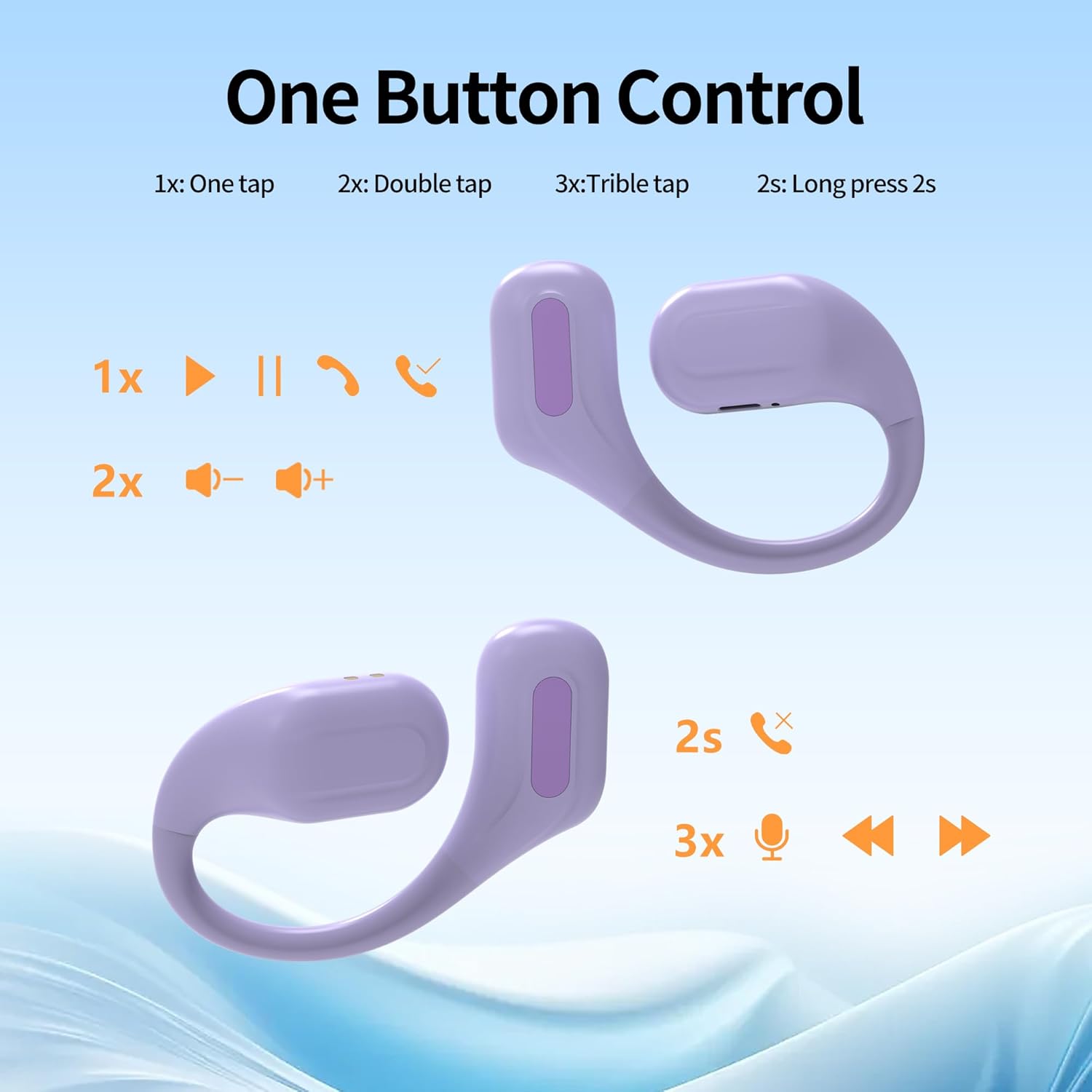
Image: A diagram illustrating the various touch control functions for the earbuds, including single tap, double tap, triple tap, and long press actions.

Gambar: Sebuah overview of the simple touch controls, highlighting features like Bluetooth 5.3, intelligent chips, binaural/single ear use, IPX5 waterproof rating, automatic pairing, call answering, and up to 22 hours of battery life.
4.2 Fitur Utama
- Desain Belakang Terbuka: Allows you to remain aware of your surroundings while enjoying audio, enhancing safety during outdoor activities.
- Suara Stereo HiFi: Equipped with 10mm composite membrane speaker drivers for pure, balanced audio and deep, resonant bass.
- IPX6 Sweat-Resistant: Designed to withstand sweat and rain, making them suitable for intense workouts and outdoor use.
- Built-in Cool Lights: The charging case features smart LED lights that flash in multiple colors when turned on, adding a unique visual element.
- Teknologi Bluetooth 5.3: Provides stable and fast wireless connectivity.

Image: The charging case showcasing its built-in cool lights, which offer 5 types of light switching and indicate the battery status for the earbuds.

Image: A visual representation emphasizing the deep and powerful bass capabilities of the AMAFACE C01-purple headphones, with miniature figures enjoying music.

Image: A woman wearing the open-ear design headphones, highlighting the "Open-Ear Design" and "Born for Sports!" slogans, indicating a new way of hearing.

Image: The earbuds being splashed with water, illustrating their IPX5 sweat-resistant feature which protects internal components from damage.

Image: A close-up of the earbud's internal components, emphasizing the "Latest Bluetooth 5.3 Technology" for lightning-fast connectivity and seamless streaming.

Image: Four panels showing individuals using the headphones in different settings, illustrating benefits such as game mode support, not missing important notices, awareness of surroundings during exercise, and ability to talk while listening to music.
4.3 Video Produk Resmi
Video: An official product video demonstrating the unboxing, features, and usage of the AMAFACE C01 Sport Earbuds, including the changing LED lights of the charging case.
5. Pemeliharaan
To ensure the longevity and optimal performance of your AMAFACE C01-purple headphones, follow these maintenance guidelines:
- Pembersihan: Usaplah earbud dan wadah pengisi daya dengan lembut menggunakan kain lembut, kering, dan bebas serat. Jangan gunakan bahan kimia keras atau bahan abrasif.
- Paparan Air: While the headphones are IPX6 sweat-resistant, avoid submerging them in water or exposing them to strong jets of water. Dry them thoroughly if they get wet.
- Penyimpanan: Saat tidak digunakan, simpan headphone di dalam wadah pengisi dayanya untuk melindunginya dari debu dan kerusakan. Simpan di tempat yang sejuk dan kering, jauhkan dari suhu ekstrem.
- Pengisian daya: Gunakan hanya kabel USB-C yang disediakan atau kabel setara yang bersertifikat untuk pengisian daya.
6. Penyelesaian masalah
Jika Anda mengalami masalah dengan headphone Anda, cobalah solusi berikut:
| Masalah | Larutan |
|---|---|
| Headphone tidak dapat dipasangkan | Ensure Bluetooth is enabled on your device. Place earbuds back in the case, close, then open to re-enter pairing mode. Forget "C01" from your device's Bluetooth list and try pairing again. Ensure earbuds are charged. |
| Tidak ada suara dari satu earbud | Check if both earbuds are charged. Place both earbuds back in the charging case, close the lid, wait a few seconds, then open the lid and try again. |
| Casing pengisi daya tidak mengisi daya | Ensure the USB-C cable is securely connected to both the case and the power source. Try a different USB port or power adapter. |
| Volume rendah atau kualitas suara buruk | Adjust the volume on both your device and the earbuds. Ensure earbuds are clean and free of debris. Check for any obstructions on the speaker grilles. |
| Koneksi terputus-putus | Ensure your device is within the Bluetooth range (approximately 10 meters). Avoid obstacles between your device and the headphones. Reduce interference from other wireless devices. |
7. Spesifikasi
| Fitur | Detil |
|---|---|
| Nama Model | C01-purple |
| Merek | Amaface |
| Teknologi Konektivitas | Nirkabel (Bluetooth 5.3) |
| Penempatan Telinga | On Ear (Earhook) |
| Tingkat Tahan Air | Tahan Air IPX6 |
| Daya Tahan Baterai (Earbud) | Hingga 5 jam |
| Total Waktu Bermain (dengan Casing) | Hingga 25 jam |
| Waktu Pengisian Daya | Sekitar 2 jam |
| Jenis Kontrol | Kontrol Sentuh |
| Jenis Penggerak Audio | Driver Dinamis (10mm) |
| Berat Barang | 6 Gram (setiap earbud) |
| Rentang Frekuensi | 20 Hz - 20,000 Hz |
| Impedansi | Tegangan 32 ohm |
8. Garansi dan Dukungan
AMAFACE products are manufactured to the highest quality standards. For any questions, technical support, or warranty claims, please refer to the contact information provided with your purchase or visit the official AMAFACE store on Amazon: AMAFACE Amazon Store.


