1. Pendahuluan
Thank you for choosing the Baseus AeQur G10 TWS Earphones. This manual provides detailed instructions on how to set up, operate, maintain, and troubleshoot your new earphones. Please read this manual thoroughly before using the product to ensure optimal performance and longevity.
2. Isi Paket
Carefully unpack the box and ensure all items listed below are present and in good condition. If any items are missing or damaged, please contact your retailer.
- Baseus AeQur G10 TWS Earphones (Left and Right)
- Kotak Pengisian Daya
- USB-A/USB-C Wireless Dongle
- Kabel Pengisian Daya USB-C
- Berbagai Ukuran Ujung Telinga
- User Manual (dokumen ini)

Image 2.1: Complete package contents of the Baseus AeQur G10 TWS Earphones.
3. Produk Lebihview
Familiarize yourself with the components of your Baseus AeQur G10 TWS Earphones.
3.1 Earphone
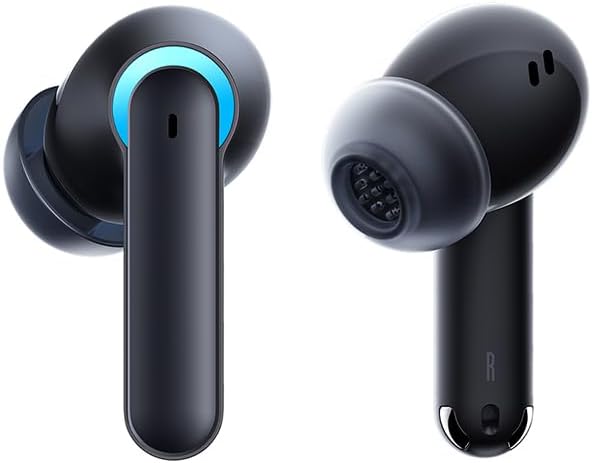
Image 3.1: Left and Right Baseus AeQur G10 Earphones. Each earphone features a touch control area, microphone, and charging contacts.
3.2 Tempat Pengisian Daya

Image 3.2: Baseus AeQur G10 Earphones in their charging case with the lid open. The case has charging slots for each earphone and an LED indicator for battery status.
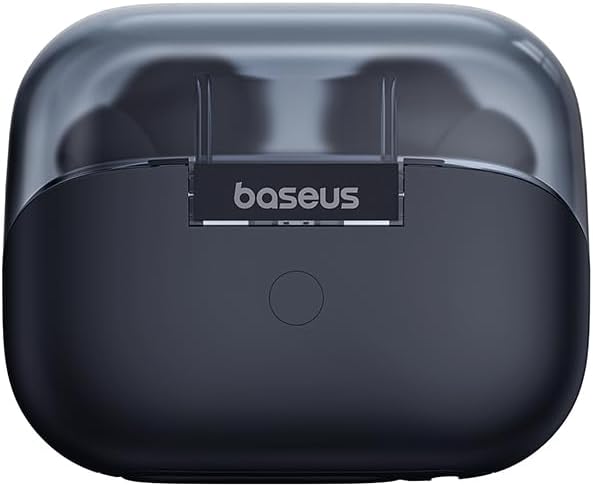
Gambar 3.3: Belakang view of the Baseus AeQur G10 charging case, displaying the Baseus brand logo and a USB-C charging port (not explicitly visible but implied by common design).
3.3 USB-A/USB-C Wireless Dongle
The included wireless dongle allows for low-latency connection to various devices, including PCs, laptops, gaming consoles, and mobile devices.

Image 3.4: Compatibility diagram for the Baseus AeQur G10, illustrating connections to Type-C Androids & Tablets, Type-C/USB-A PCs & Laptops, PS5/PS4/Switch, Steam Deck, and VR devices.
4. Pengaturan
4.1 Pengisian Awal
- Tempatkan kedua earphone ke dalam wadah pengisi daya.
- Connect the USB-C charging cable to the charging port on the case and the other end to a USB power source (e.g., computer USB port, wall adapter).
- The LED indicator on the case will show charging status. A full charge typically takes approximately 1.5 hours for the earphones and 2 hours for the case.
4.2 Memasangkan dengan Perangkat Bluetooth
- Ensure the earphones are in the charging case and the case has sufficient charge.
- Open the charging case lid. The earphones will automatically enter pairing mode (indicated by a flashing LED on the earphones or case).
- Pada perangkat Anda (smartphone, tablet, laptop), aktifkan Bluetooth dan cari perangkat baru.
- Select "Baseus AeQur G10" from the list of available devices.
- Once connected, the LED indicator will stop flashing, and you will hear a confirmation tone.
4.3 Connecting via USB Wireless Dongle
- Insert the USB-A or USB-C end of the wireless dongle into the corresponding port on your device (PC, laptop, gaming console).
- Pastikan earphone berada di dalam wadah pengisi daya dan penutupnya terbuka.
- The earphones will automatically attempt to connect to the dongle. The dongle's LED indicator will show connection status.
- Once connected, the LED on the dongle will become solid, and you will hear a confirmation tone from the earphones.
5. Petunjuk Pengoperasian
5.1 Daya Hidup/Mati
- Nyalakan: Open the charging case lid, or take the earphones out of the case. They will power on automatically.
- Matikan: Place the earphones back into the charging case and close the lid. They will power off automatically and begin charging.
5.2 Mengenakan Earphone
- Identify the 'L' (left) and 'R' (right) markings on each earphone.
- Masukkan earphone dengan lembut ke dalam saluran telinga Anda.
- Rotate them slightly to find a comfortable and secure fit. Choose the appropriate ear tip size for optimal sound quality and comfort.
5.3 Kontrol Sentuh
The Baseus AeQur G10 earphones feature touch-sensitive controls on each earbud. The specific functions may vary slightly depending on the device and application.
| Tindakan | Fungsi |
|---|---|
| Ketukan Tunggal (L/R) | Putar/Jeda musik, Jawab/Akhiri panggilan |
| Ketuk Dua Kali (L) | Trek Sebelumnya |
| Ketuk Dua Kali (R) | Lagu Berikutnya |
| Ketuk Tiga Kali (Kiri/Kanan) | Aktifkan Asisten Suara |
| Tekan Lama (Kiri/Kanan, 2d) | Tolak Panggilan |
| Tekan Lama (Kiri/Kanan, 3d) | Toggle Gaming/Music Mode (if applicable) |
6. Pemeliharaan
6.1 Pembersihan
- Gunakan kain lembut, kering, dan bebas serat untuk membersihkan earphone dan wadah pengisi daya.
- For earwax or debris in the ear tips, gently remove the ear tips and clean them with a cotton swab lightly dampened with rubbing alcohol. Ensure they are completely dry before reattaching.
- Jangan gunakan pembersih abrasif, pelarut, atau semprotan aerosol.
6.2 Penyimpanan
- Selalu simpan earphone di dalam wadah pengisi dayanya saat tidak digunakan untuk melindunginya dan menjaga agar tetap terisi daya.
- Simpan di tempat sejuk dan kering, jauhkan dari suhu ekstrem dan sinar matahari langsung.
6.3 Perawatan Baterai
- Charge the earphones and case regularly, even if not used frequently, to maintain battery health.
- Avoid fully discharging the batteries for extended periods.
7. Penyelesaian masalah
If you encounter issues with your Baseus AeQur G10 earphones, refer to the following common solutions:
7.1 Tidak Ada Suara atau Koneksi Terputus-putus
- Ensure earphones are charged and properly connected to your device (Bluetooth or dongle).
- Periksa level volume pada earphone dan perangkat yang terhubung.
- Move closer to your device to avoid interference or range issues.
- Try disconnecting and re-connecting the earphones.
- For Bluetooth, forget the device on your phone and re-pair.
- For dongle, unplug and re-plug the dongle.
7.2 Earphone Tidak Mengisi Daya
- Pastikan kabel pengisian daya tersambung dengan aman ke casing dan sumber daya.
- Pastikan sumber daya aktif.
- Clean the charging contacts on both the earphones and inside the case with a dry cotton swab.
- Cobalah kabel pengisi daya atau adaptor daya yang lain.
7.3 Only One Earphone Working
- Place both earphones back into the charging case, close the lid, wait a few seconds, then open the lid and take them out again.
- Pastikan kedua earphone terisi daya.
- Cobalah untuk mengatur ulang earphone (lihat petunjuk dari produsen). web(Lihat situs web untuk petunjuk pengaturan ulang spesifik jika diperlukan).
8. Spesifikasi
Key technical specifications for the Baseus AeQur G10 TWS Earphones:
| Fitur | Spesifikasi |
|---|---|
| Nama Model | A00055400111-00 |
| Merek | Dasar |
| Warna | Hitam |
| Penempatan Telinga | Di Telinga |
| Faktor Bentuk | Di Telinga |
| Teknologi Konektivitas | Nirkabel (Bluetooth) |
| Teknologi Komunikasi Nirkabel | Bahasa Indonesia: Bluetooth |
| Baterai | Diperlukan 1 baterai Lithium Ion (termasuk) |
| Dimensi Produk | Ukuran 10x5x1.27 cm |
| Berat Barang | 220 gram |
| Pabrikan | Dasar |
| Penggunaan Khusus | Bepergian |
9. Garansi dan Dukungan
Baseus products are designed and manufactured to the highest quality standards. For information regarding warranty coverage, technical support, or service, please refer to the warranty card included with your product or visit the official Baseus websitus. Simpan bukti pembelian Anda untuk klaim garansi.
For further assistance, you may contact Baseus customer support through their official channels.


