1. Pendahuluan
This manual provides detailed instructions for the installation, operation, and maintenance of your Jennov JS7015 5MP Dual-Band Wi-Fi Outdoor Security Camera. Please read this manual thoroughly before using the product to ensure correct usage and optimal performance.

Figure 1: Jennov JS7015 Outdoor Security Camera
The Jennov JS7015 is a 5-megapixel outdoor security camera featuring dual-band Wi-Fi connectivity (2.4GHz and 5GHz). It offers 360-degree viewing capabilities, PIR human detection, auto-tracking, 24/7 recording, and two-way audio for comprehensive outdoor surveillance.
2. Isi Paket
Mohon periksa isi paket setelah diterima. Jika ada barang yang hilang atau rusak, hubungi layanan pelanggan.
- Jennov JS7015 5MP Dual-Band Wi-Fi Outdoor Security Camera
- Adaptor Daya
- Sekrup dan Jangkar Pemasangan
- User Manual (dokumen ini)
3. Produk Lebihview
Familiarize yourself with the camera's components.

Figure 2: Camera Pan and Tilt Mechanism
The camera features a motorized pan and tilt mechanism, allowing for a 355° horizontal rotation (pan) and a 60° vertical rotation (tilt). This enables comprehensive coverage of the surveillance area. The camera body houses the lens, infrared LEDs, white light LEDs, microphone, and speaker. Two external antennas provide enhanced Wi-Fi signal reception.
- Lensa Kamera: Merekam video footage.
- LED inframerah: Memberikan penerangan untuk penglihatan malam hitam putih.
- LED Cahaya Putih: Provide illumination for color night vision and act as a spotlight.
- Mikropon: Merekam audio untuk komunikasi dua arah dan perekaman.
- Pembicara: Menghasilkan output audio untuk komunikasi dua arah dan alarm.
- Antena: Untuk konektivitas Wi-Fi.
- Pelabuhan Daya: Terhubung ke adaptor daya.
- Tombol Reset: Used to reset the camera to factory settings (usually located near the SD card slot or under a cover).
- Slot Kartu SD: Untuk penyimpanan video lokal (mendukung hingga 128GB, tidak termasuk).
4. Panduan Pengaturan
4.1 Instalasi Fisik
The camera is designed for outdoor use and is IP66 waterproof. Choose a suitable location for mounting, ensuring a clear view of the area you wish to monitor and proximity to a power source.
- Tandai Posisi Pengeboran: Gunakan templat pemasangan (jika tersedia) atau alas kamera untuk menandai lubang sekrup di dinding.
- Lubang Bor: Drill holes at the marked positions. Insert wall anchors if mounting on masonry.
- Kamera Aman: Attach the camera base to the wall using the provided screws.
- Sesuaikan Sudut: Loosen the adjustment screws (if any) to position the camera for optimal coverage before tightening.

Gambar 3: Desain Tahan Air IP66
The camera is built with waterproof materials and has an IP66 rating, making it suitable for outdoor installation and resistant to dust and water jets.
4.2 Sambungan Daya
Connect the provided power adapter to the camera's power port and then plug it into a power outlet. The camera will power on and initiate its startup sequence.
4.3 Mengunduh Aplikasi dan Pendaftaran Akun
The Jennov JS7015 camera uses the EseeCloud application for remote access and control.
- Unduh Aplikasi: Pencarian untuk "EseeCloud" in your smartphone's app store (Google Play Store for Android or Apple App Store for iOS) and download the application.
- Daftarkan Akun: Open the EseeCloud app and follow the on-screen instructions to register a new account using your email address or phone number.
4.4 Menambahkan Kamera ke Aplikasi
Ensure your smartphone is connected to the same Wi-Fi network (2.4GHz or 5GHz) that you intend to connect the camera to.
- Buka Aplikasi: Launch the EseeCloud app and log in.
- Tambahkan Perangkat: Ketuk ikon "+" atau opsi "Tambahkan Perangkat".
- Pilih Jenis Perangkat: Choose "Wi-Fi Camera" or similar option.
- Pindai kode QR: The app may prompt you to scan a QR code located on the camera or its packaging.
- Konfigurasi Wi-Fi: Follow the app's instructions to enter your Wi-Fi network name (SSID) and password. The camera supports both 2.4GHz and 5GHz Wi-Fi bands.
- Menghubungkan: The camera will attempt to connect to your Wi-Fi network. Once connected, it will appear in your device list within the app.
- Setel Kata Sandi: Create a strong password for your camera for security purposes.
5. Petunjuk Pengoperasian
5.1 Langsung View dan Kontrol Pan/Tilt
From the EseeCloud app, select your camera to access the live view.
- Umpan Langsung: View real-time video from your camera.
- Geser/Miring: Use the directional controls within the app to remotely adjust the camera's horizontal (pan) and vertical (tilt) angles.
5.2 Pelacakan Otomatis
Kamera dapat secara otomatis melacak objek bergerak dalam bidangnya view.

Gambar 4: Pelacakan Otomatis dalam Aksi
Enable the auto-tracking feature in the app settings. The camera will then detect and follow moving targets until they leave the camera's view.
5.3 Deteksi Gerak dan Alarm
The camera features advanced PIR (Passive Infrared) human detection to minimize false alarms.

Figure 5: PIR Human Detection and Alarm Options
When a human thermal profile is detected, the camera can trigger various alarms.
- Deteksi PIR: Activates recording and sends notifications when a human is detected.
- Alarm Suara: Configure the camera to emit a siren sound upon detection.
- Spotlight Alarm: The integrated spotlight can be activated to deter intruders.
- Pemberitahuan: Receive instant alerts on your smartphone via the EseeCloud app.
5.4 Audio Dua Arah
Berkomunikasi langsung dengan individu di dekat kamera menggunakan mikrofon dan speaker internal.

Gambar 6: Komunikasi Audio Dua Arah
Tap the microphone icon in the app to speak, and listen through the camera's speaker. This feature is useful for interacting with visitors or deterring unwanted guests.
5.5 Perekaman dan Penyimpanan
The camera supports continuous 24/7 recording and offers flexible storage options.
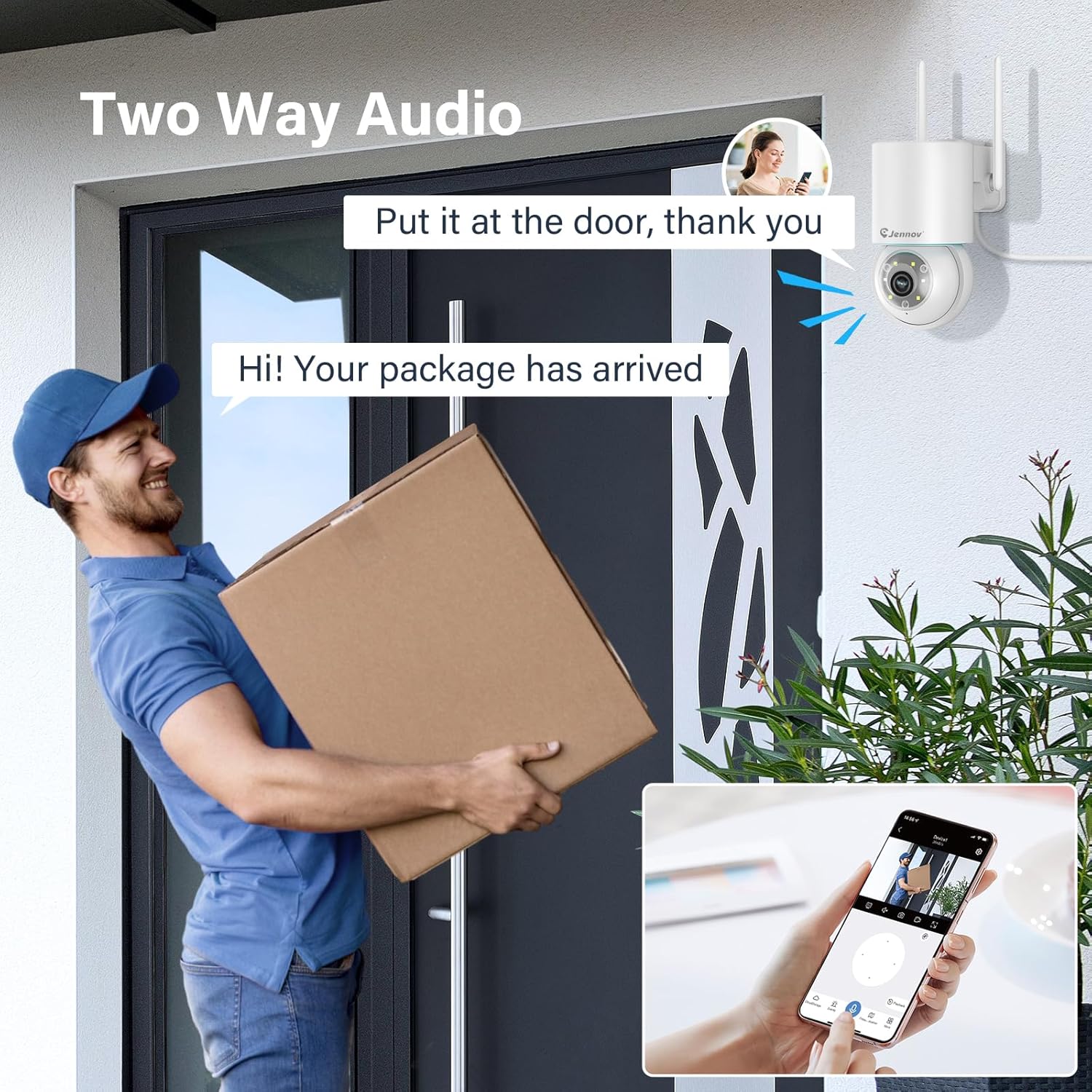
Figure 7: 24/7 Recording and Storage Options
Akses rekaman footagmelalui fungsi pemutaran di aplikasi.
- Rekaman 24/7: The camera can continuously record footage, ensuring no vital moments are missed.
- Penyimpanan Lokal: Insert a microSD card (up to 128GB, not included) into the camera's SD card slot for local storage.
- Penyimpanan Awan: Optional cloud storage service is available, often with a free trial period (e.g., 7 days). This provides off-site backup of your recordings.
5.6 Mode Penglihatan Malam
The camera offers three night vision modes for clear visibility in low-light conditions.

Figure 8: 5MP Color Night Vision
The camera provides clear night vision up to 65 feet (20 meters) with 5MP resolution.
- Mode Warna Penuh: Utilizes white LEDs to provide full-color video at night.
- Black and White Mode: Uses infrared LEDs for traditional black and white night vision.
- Mode Cerdas: Automatically switches between black and white and full color based on detected motion or light conditions.
You can switch between these modes within the EseeCloud mobile application.
5.7 Customized Detection Area
Tentukan area tertentu dalam kamera view di mana deteksi gerakan harus diaktifkan.

Figure 9: Customized Detection Area Settings
This feature helps reduce unwanted alerts by focusing detection on critical zones. The app typically offers "Area mode" and "Cordon mode" for defining these zones.
6. Pemeliharaan
- Pembersihan: Bersihkan lensa kamera secara teratur dengan kain lembut dan kering untuk memastikan kualitas gambar yang jernih. Jangan gunakan bahan kimia keras.
- Pembaruan Firmware: Check the EseeCloud app periodically for available firmware updates. Keeping your camera's firmware updated ensures optimal performance and security.
- Manajemen Kartu SD: If using local storage, periodically check the SD card's status in the app. Format the card as needed to maintain recording efficiency.
- Catu Daya: Pastikan adaptor daya dan kabel tidak rusak dan terhubung dengan benar.
7. Penyelesaian masalah
- Kamera Offline:
- Periksa kekuatan sinyal Wi-Fi.
- Pastikan kamera dihidupkan.
- Mulai ulang kamera dan router Wi-Fi Anda.
- If using 5GHz Wi-Fi, ensure your router supports it and the camera is connected to the correct band.
- Try re-adding the camera to the EseeCloud app.
- Kualitas Gambar Buruk:
- Bersihkan lensa kamera.
- Ensure sufficient lighting, especially at night.
- Periksa kecepatan koneksi internet Anda.
- Deteksi Gerakan Tidak Berfungsi:
- Verify motion detection settings in the app are enabled.
- Sesuaikan sensitivitas deteksi.
- Pastikan tidak ada penghalang yang menghalangi kamera. view.
- Check if detection areas are correctly configured.
- Masalah Audio Dua Arah:
- Ensure microphone and speaker permissions are granted to the EseeCloud app on your smartphone.
- Periksa pengaturan volume baik di aplikasi maupun di ponsel Anda.
- Ensure there are no physical obstructions blocking the camera's microphone or speaker.
- Cannot Access SD Card Recordings:
- Pastikan kartu SD terpasang dengan benar.
- Check if the SD card is formatted correctly (usually FAT32).
- Verify that continuous recording or event recording to SD card is enabled in the app.
- The SD card might be full; consider formatting it or replacing it.
8. Spesifikasi
| Fitur | Spesifikasi |
|---|---|
| Nomor Model | JS7015 |
| Merek | Jennov |
| Resolusi | 5 Megapixel (1920p video recording) |
| Sudut Pan / Tilt | Pan 355 °, Miringkan 60 ° |
| Penglihatan Malam | Color Night Vision, Black & White Night Vision, Smart Mode (up to 65ft/20m) |
| Konektivitas Wi-Fi | Dual-Band (2.4GHz / 5GHz) |
| Suara | Audio Dua Arah (Mikrofon & Speaker Internal) |
| Deteksi Gerak | PIR Human Detection, Auto Tracking |
| Opsi Penyimpanan | Kartu MicroSD (hingga 128GB), Penyimpanan Cloud |
| Peringkat Tahan Air | Tingkat IP66 |
| Masukan Daya | 5 Volt |
| Konsumsi Daya | 24 Watt |
| Dimensi (P x L x T) | Ukuran 12x8x16 cm |
| Bahan | Plastik |
| Jenis Pemasangan | Dudukan Dinding |
| Perangkat yang Kompatibel | Smartphone, Tablet, Computer |
| Aplikasi Kontrol | EseeCloud |
9. Garansi dan Dukungan
For warranty information and technical support, please refer to the warranty card included with your product or visit the official Jennov weblokasi.
- Pelayanan pelanggan: Contact Jennov customer support for assistance with product issues, technical questions, or warranty claims.
- Sumber Daya Daring: Check the Jennov websitus untuk FAQ, manual terkini, dan unduhan perangkat lunak.


