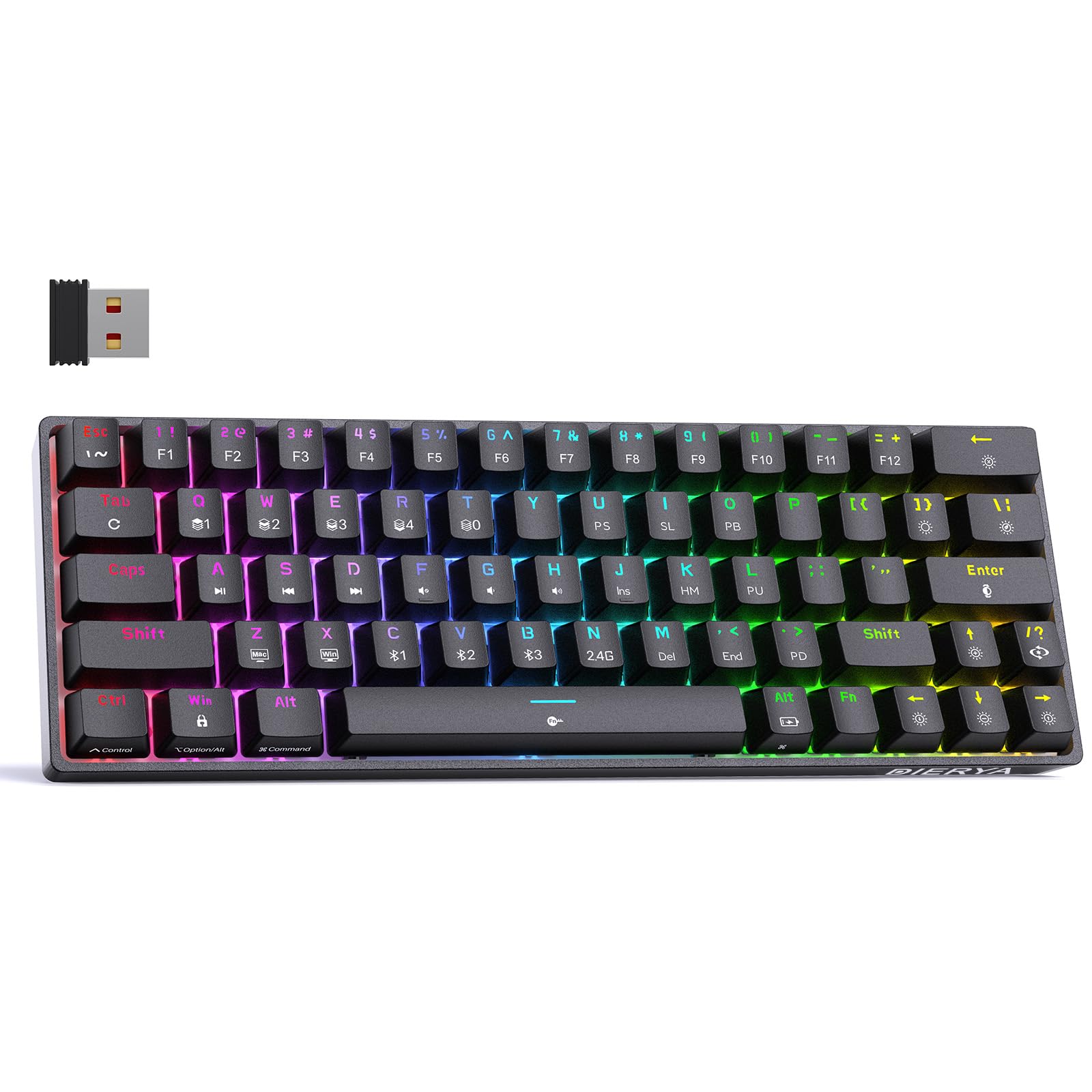
Thank you for choosing the DIERYA DK63 60% Wireless Mechanical Gaming Keyboard. This compact 63-key keyboard offers versatile connectivity options, vibrant RGB backlighting, and durable mechanical switches for an enhanced typing and gaming experience. This manual provides detailed instructions to help you set up, operate, and maintain your keyboard.
Isi Paket
DIERYA DK63 Wireless Mechanical Keyboard (1)
2.4G Receiver (hidden in the fuselage) (1)
Penarik Keycap (1)
Kabel USB (1)
Panduan Pengguna (1)
Produk Selesaiview
The DIERYA DK63 is a compact 60% mechanical keyboard designed for efficiency and performance. It features 63 keys, including directional keys, and utilizes an "FN" key for full functionality, maximizing desktop space. The keyboard is equipped with Blue Switches, providing tactile feedback and a distinct click sound, ideal for typists. It supports three connection modes: 2.4G wireless, Bluetooth 5.0, and wired USB-C, allowing seamless switching between various devices. A high-capacity 3000mAh battery ensures extended usage, and the rich RGB dynamic lighting system offers 18 modes and 16.8 million customizable colors.
Image: The DIERYA DK63 keyboard showcasinberkat tata letaknya yang ringkas 60% dan pencahayaan latar RGB yang cerah.
Petunjuk Pengaturan
1. Koneksi Kabel
Connect the provided USB-C cable to the keyboard's USB-C port and the other end to your computer's USB port. The keyboard will automatically connect and begin charging.
Image: Close-up of the keyboard's USB-C port and the included Type-C data cable for wired connection and charging.
2. Koneksi Nirkabel 2.4G
Locate the 2.4G USB receiver, typically stored in a compartment on the underside of the keyboard.
Hubungkan penerima 2.4G ke port USB yang tersedia di komputer Anda.
Flip the connection switch on the keyboard to the "2.4G" position.
Tekan FN + N. The 2.4G indicator light will illuminate, indicating a successful connection.
Image: The underside of the keyboard showing the 2.4G dongle storage area and the connection mode switch.
Video: DIERYA DK63 Operation Guide, demonstrating 2.4G and Bluetooth connection steps, FN key usage, and RGB lighting adjustments.
3. Koneksi Bluetooth
Flip the connection switch on the keyboard to the "Bluetooth" position.
Pada perangkat Anda (komputer, tablet, telepon pintar), aktifkan Bluetooth dan cari perangkat yang tersedia.
The keyboard will appear as "DIERYA DK63-1", "DIERYA DK63-2", or "DIERYA DK63-3". Select one to pair.
To switch between Bluetooth channels (BT1, BT2, BT3), press FN + C, FN + V, atau FN + B masing-masing.
Petunjuk Pengoperasian
FN Key Usage
Itu FN key is essential for accessing secondary functions on the compact DK63 keyboard. Hold down the FN key and press the desired key to activate its secondary function.
Image: The keyboard displaying various RGB lighting effects and key combinations for adjusting them.
Video: DIERYA DK63 Operation Guide, demonstrating 2.4G and Bluetooth connection steps, FN key usage, and RGB lighting adjustments.
Pemeliharaan
To ensure the longevity and optimal performance of your DIERYA DK63 keyboard, follow these maintenance guidelines:
Pembersihan: Gunakan kain lembut dan bebas serat untuk sedikit membersihkannya.ampened with water or a mild cleaning solution to wipe the keycaps and keyboard surface. Avoid excessive moisture. For deeper cleaning, use the provided keycap puller to remove keycaps and clean underneath with compressed air.
Penyimpanan: Simpan keyboard di tempat yang sejuk dan kering, jauhkan dari sinar matahari langsung dan suhu ekstrem.
Perawatan Baterai: To prolong battery life, avoid fully discharging the keyboard frequently. Charge it when the battery reminder indicates low power.
Image: The DIERYA DK63 keyboard with a keycap puller, illustrating how to remove keycaps for cleaning or switch replacement.
Penyelesaian Masalah
Masalah
Solusi yang mungkin
Keyboard tidak terhubung melalui 2.4G.
Ensure the 2.4G receiver is securely plugged into a USB port and the keyboard switch is set to "2.4G". Press FN + N untuk membangun kembali koneksi.
Masalah koneksi Bluetooth.
Ensure the keyboard switch is set to "Bluetooth". On your device, forget the keyboard and attempt to re-pair. Try switching Bluetooth channels using FN + C/V/B. Ensure the keyboard is charged.
Lampu RGB tidak berfungsi atau macet.
Tekan FN + Spasi mundur to toggle lights. Try switching lighting modes with FN+/?. If issues persist, perform a factory reset by holding FN + Tab.
Tombol tidak merespons.
Check if the keyboard is locked (FN + Spasi). Ensure the correct system layout (Windows/Mac) is selected (FN + Z/X). Recharge the battery if in wireless mode. Try a wired connection.
Spesifikasi
Nomor Model: T63
Tata Letak: 60% (63-keys)
Jenis saklar: Blue Switch (Tactile & Clicky)
Konektivitas: 2.4GHZ Wireless, Bluetooth 5.0, USB-C Wired
Kapasitas Baterai: 3000 mAh
Lampu latar RGB: 18 modes, 16.8 million colors
Kesesuaian: Windows 11/10/8/7/XP, Mac OS, Vista, Linux
Dimensi Produk: 11.53"P x 3.98"L x 1.65"T
Berat Barang: 1.41 pon
Image: Visual representation of the DIERYA DK63's ultra-compact 63-key layout and dimensions.
Video: DIERYA DK63 Switch Sound Comparison, demonstrating the sound profiles of Red (linear) and Blue (clicky) switches.
Garansi dan Dukungan
DIERYA is committed to your satisfaction. If you encounter any issues with your DK63 keyboard, please do not hesitate to contact us. Our customer support team is available to assist you with troubleshooting, warranty claims, and any product-related inquiries.
Untuk dukungan, silakan kunjungi DIERYA Store on Amazon atau lihat informasi kontak yang diberikan bersama pembelian Anda.
Dokumen Terkait - DK63
Manual Keyboard Mekanik DIERYA DK61SE Buku panduan pengguna untuk keyboard mekanik DIERYA DK61SE 60%, yang merinci fungsi, pintasan, dan informasi kontak.
Panduan Pengguna Keyboard Gaming Mekanik Nirkabel DIERYA DK63 Panduan pengguna lengkap untuk Keyboard Gaming Mekanik Nirkabel DIERYA DK63. Panduan ini mencakup spesifikasi produk, konektivitas nirkabel Bluetooth dan 2.4G, dan lain-lain.file management, multimedia controls, RGB lighting customization, and toggle switch operations.
Panduan Pengguna Keyboard Mekanik DIERYA DK63 Panduan lengkap untuk keyboard mekanik DIERYA DK63, mencakup mode koneksi, pencahayaan RGB, tombol multimedia, fungsi pintasan, dan mode gaming. Pelajari cara menyesuaikan pengalaman keyboard Anda.
Panduan Fungsi Keyboard Mekanik DIERYA DK 61SE Explore the full functionality of your DIERYA DK 61SE mechanical keyboard with this comprehensive manual. Learn about all FN key combinations for multimedia, system controls, lighting adjustments, and special features. Includes product specifications and support contact.