1. Petunjuk Keselamatan Penting
PERINGATAN: Do not use this appliance near water. Exercise extreme caution during use to prevent injury. Always ensure your hands are dry before handling the trimmer or charger.
- Baca semua petunjuk sebelum menggunakan alat ini.
- Jauhkan alat ini dari jangkauan anak-anak.
- Jangan merendam alat dalam air atau cairan lainnya.
- Jangan gunakan alat jika rusak atau tidak berfungsi.
- Gunakan hanya pengisi daya yang disertakan dengan alat tersebut.
- Cabut alat tersebut sebelum membersihkan.
2. Produk Lebihview
2.1 Komponen
The Rowenta TN1603 Cordless Beard Trimmer comes with the following components:
- Tubuh Pemangkas
- Multiple Comb Attachments (for various cutting lengths)
- Kepala Pencukur Foil
- Kabel Pengisian Daya (USB)
- Sikat Pembersih
- Botol Minyak Pelumas
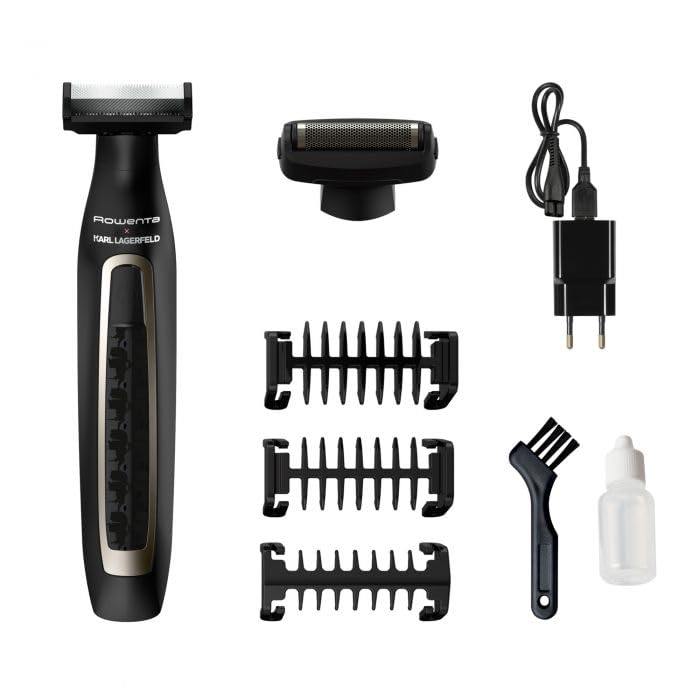
Image 2.1: The Rowenta TN1603 trimmer shown with all included accessories, including various comb attachments, a foil shaver head, charging cable, cleaning brush, and oil bottle.
2.2 Fitur Utama
- Operasi Tanpa Kabel: Memberikan fleksibilitas dan kemudahan penggunaan tanpa harus terikat pada stopkontak.
- Pisau yang Mengasah Sendiri: Ensures long-lasting sharpness and consistent cutting performance.
- 120-Minute Battery Life: Menawarkan penggunaan jangka panjang dengan sekali pengisian daya.
- Pisau Baja Tahan Karat: Durable and precise for effective trimming.
- Beberapa Lampiran: Includes various comb guides and a foil shaver head for versatile grooming.
3. Pengaturan
3.1 Mengisi Daya Pemangkas
- Pastikan pemangkas dimatikan.
- Hubungkan kabel pengisi daya ke port pengisian daya pada alat pemangkas.
- Plug the USB end of the charging cable into a compatible USB power adapter (not included) or a USB port.
- The charging indicator light will illuminate (typically green) to show that the trimmer is charging.
- Allow approximately 120 minutes for a full charge. The indicator light may change or turn off when fully charged.

Gambar 3.1: Close-up view of the Rowenta TN1603 trimmer's power button and charging indicator light, which glows green when charging.
3.2 Memasang dan Melepas Aksesoris
- Ensure the trimmer is switched off before attaching or detaching any accessories.
- To attach a comb attachment: Align the comb with the trimmer head and gently push it down until it clicks into place.
- To detach a comb attachment: Tarik sisir perlahan ke atas dari kepala alat cukur.
- To attach the foil shaver head: Align the foil head with the trimmer body and push it firmly until it locks.
- To detach the foil shaver head: Press the release buttons (if present) on the sides of the head and pull it away from the body.

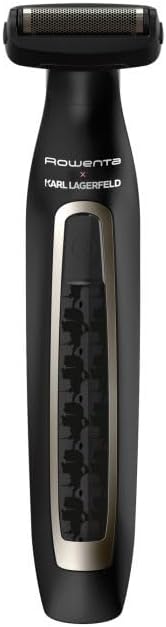
Image 3.2: The Rowenta TN1603 trimmer shown with a comb attachment (left) and with the foil shaver head attached (right).
4. Petunjuk Pengoperasian
4.1 Pemangkasan Dasar
- Pastikan pemangkas terisi penuh.
- Attach the desired comb attachment for your preferred hair length.
- Tekan tombol daya untuk menghidupkan pemangkas.
- Pegang alat pemangkas dengan mata pisau menghadap area yang akan dipangkas.
- Gerakkan alat pemotong berlawanan arah dengan pertumbuhan rambut untuk hasil terbaik.
- Setelah digunakan, tekan tombol daya untuk mematikan alat cukur.
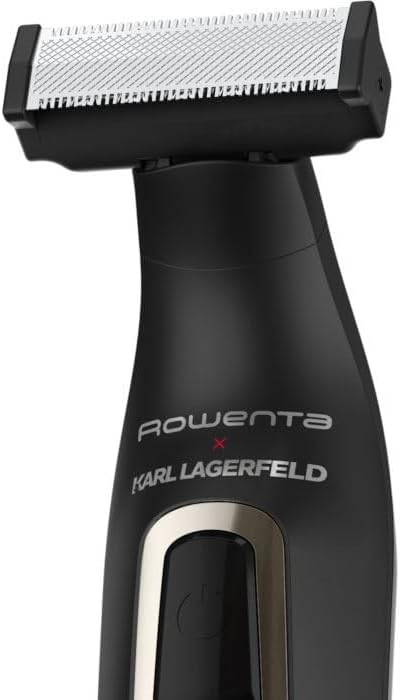
Gambar 4.1: Close-up view of the Rowenta TN1603 trimmer head, showing the self-sharpening stainless steel blades.
4.2 Menggunakan Kepala Pencukur Foil
- Ensure the trimmer is switched off and the foil shaver head is securely attached.
- Nyalakan pemangkas.
- Gently press the foil shaver head against your skin and move it in short, circular motions or straight lines.
- This head is designed for a close shave on smaller areas or for finishing edges.
- Setelah digunakan, matikan pemangkas.
5. Pemeliharaan
5.1 Pembersihan
- Always ensure the trimmer is switched off and unplugged before cleaning.
- Remove any comb attachments or the foil shaver head.
- Gunakan sikat pembersih yang disediakan untuk membersihkan potongan rambut dari mata pisau dan bagian dalam kepala alat cukur.
- The blades can be rinsed under running water. Ensure they are completely dry before reattaching or storing.
- Usap badan trimmer dengan adamp cloth. Do not use abrasive cleaners or immerse the body in water.
5.2 Pelumasan
- After cleaning and drying the blades, apply 1-2 drops of the lubricating oil (provided) to the blades.
- Nyalakan alat pemangkas selama beberapa detik agar oli dapat terdistribusi secara merata.
- Wipe off any excess oil. Regular lubrication helps maintain blade performance and longevity.
5.3 Penyimpanan
Store the trimmer and its accessories in a cool, dry place, away from direct sunlight and moisture. Ensure the trimmer is clean and dry before storing.
6. Penyelesaian masalah
| Masalah | Kemungkinan Penyebab | Larutan |
|---|---|---|
| Pemangkas tidak menyala. | Baterai habis. | Isi daya alat pemangkas hingga penuh. |
| Kinerja pemangkasan yang buruk. | Pisau-pisau tersebut kotor atau tidak dilumasi. | Clean and lubricate the blades as per maintenance instructions. |
| Pemangkas mengeluarkan suara yang tidak biasa. | Hair caught in blades or lack of lubrication. | Clean the blades thoroughly and apply lubricating oil. If the issue persists, contact customer support. |
| Baterai tidak mengisi daya. | Kabel pengisi daya atau adaptor rusak; koneksi buruk. | Ensure the charging cable is securely connected. Try a different USB power adapter. |
7. Spesifikasi Teknis
- Nomor Model: TN1603
- Sumber Daya: Bertenaga Baterai (Dapat Diisi Ulang)
- Daya Tahan Baterai: Hingga 120 menit
- Bahan Pisau: Baja tahan karat
- Fitur Khusus: Cordless, Self-sharpening
- Warna: Hitam
- Dimensi Produk (P x L x T): 31.5 x 23.5 x 24.8 cm (Note: These dimensions seem unusually large for a trimmer, likely packaging dimensions. Please refer to product packaging for exact device dimensions.)
8. Garansi dan Dukungan
This Rowenta product is covered by a manufacturer's warranty. Please refer to the warranty card included in your product packaging for specific terms and conditions, including warranty duration and coverage details.
For technical support, spare parts, or service inquiries, please visit the official Rowenta website or contact their customer service department. Contact information can typically be found on the Rowenta websitus atau dalam dokumentasi produk Anda.


