Perkenalan
Welcome to the iRobot Roomba i1 (1152) Robot Vacuum user manual. This guide provides essential information for setting up, operating, maintaining, and troubleshooting your robot vacuum. The Roomba i1 is designed to efficiently clean hard floors and carpets, utilizing Wi-Fi connected mapping technology to navigate your home.
Informasi Keselamatan Penting
Before using your Roomba i1 robot vacuum, please read all safety instructions carefully. Failure to follow these instructions may result in electric shock, fire, or serious injury.
- Peralatan ini dapat digunakan oleh anak-anak berusia 8 tahun ke atas dan orang-orang dengan keterbatasan fisik, sensorik, atau mental atau kurang pengalaman dan pengetahuan jika mereka telah diberi pengawasan atau petunjuk mengenai penggunaan peralatan secara aman dan memahami bahayanya.
- Children should not play with the appliance. Cleaning and user maintenance shall not be made by children without supervision.
- Gunakan hanya seperti yang dijelaskan dalam manual ini.
- Jangan gunakan di luar ruangan atau pada permukaan basah.
- Jangan biarkan digunakan sebagai mainan. Perhatian yang cermat diperlukan saat digunakan oleh atau di dekat anak-anak.
- Jangan gunakan dengan kabel atau steker yang rusak. Jika alat tidak berfungsi sebagaimana mestinya, terjatuh, rusak, ditinggalkan di luar ruangan, atau tercebur ke air, kembalikan ke pusat layanan.
- Jangan menarik atau membawa dengan kabel, menggunakan kabel sebagai pegangan, menutup pintu dengan kabel, atau menarik kabel di sekitar tepi atau sudut yang tajam. Jangan menjalankan alat di atas kabel. Jauhkan kabel dari permukaan yang panas.
- Jangan mencabut dengan menarik kabelnya. Untuk mencabut, pegang stekernya, bukan kabelnya.
- Jangan memegang steker atau peralatan dengan tangan basah.
- Jangan masukkan benda apa pun ke dalam lubang. Jangan gunakan jika lubang tersumbat; jauhkan dari debu, serat, rambut, dan apa pun yang dapat mengurangi aliran udara.
- Jauhkan rambut, pakaian longgar, jari, dan semua bagian tubuh dari celah dan bagian yang bergerak.
- Jangan mengambil apa pun yang terbakar atau berasap, seperti rokok, korek api, atau abu panas.
- Jangan gunakan untuk mengambil cairan yang mudah terbakar, seperti bensin, atau gunakan di area di mana cairan tersebut mungkin ada.
- Jangan gunakan tanpa kantong debu dan/atau filter yang terpasang.
- Mencegah start yang tidak disengaja. Pastikan sakelar dalam posisi mati sebelum menghubungkan ke unit baterai, mengambil atau membawa alat.
- Isi ulang daya hanya dengan pengisi daya yang ditentukan oleh produsen. Pengisi daya yang cocok untuk satu jenis baterai dapat menimbulkan risiko kebakaran jika digunakan dengan baterai lain.
- Gunakan peralatan hanya dengan baterai yang telah ditentukan. Penggunaan baterai lain dapat menimbulkan risiko cedera dan kebakaran.
- Bila baterai tidak digunakan, jauhkan dari benda logam lain, seperti klip kertas, koin, kunci, paku, sekrup, atau benda logam kecil lainnya, yang dapat membuat sambungan dari satu terminal ke terminal lainnya. Hubungan arus pendek pada terminal baterai dapat menyebabkan luka bakar atau kebakaran.
- Dalam kondisi yang tidak diinginkan, cairan dapat keluar dari baterai; hindari kontak. Jika terjadi kontak secara tidak sengaja, bilas dengan air. Jika cairan mengenai mata, segera cari bantuan medis. Cairan yang keluar dari baterai dapat menyebabkan iritasi atau luka bakar.
- Jangan gunakan baterai atau peralatan yang rusak atau dimodifikasi. Baterai yang rusak atau dimodifikasi dapat menunjukkan perilaku yang tidak terduga yang mengakibatkan kebakaran, ledakan, atau risiko cedera.
- Jangan memaparkan unit baterai atau peralatan ke api atau suhu yang berlebihan. Paparan api atau suhu di atas 130°C (265°F) dapat menyebabkan ledakan.
- Ikuti semua petunjuk pengisian daya dan jangan mengisi daya baterai atau peralatan di luar kisaran suhu yang ditentukan dalam petunjuk. Pengisian daya yang tidak tepat atau pada suhu di luar kisaran yang ditentukan dapat merusak baterai dan meningkatkan risiko kebakaran.
- Servislah produk tersebut oleh teknisi ahli yang hanya menggunakan suku cadang pengganti yang sama. Hal ini akan memastikan keamanan produk tetap terjaga.
- Jangan memodifikasi atau mencoba memperbaiki peralatan atau baterai (sebagaimana berlaku) kecuali sebagaimana ditunjukkan dalam petunjuk penggunaan dan perawatan.
Isi Paket
Verify that all original components are included in your package:
- Robot Penyedot Debu iRobot Roomba i1
- Stasiun Pengisian Basis Rumah
- Kabel Listrik
- 1 Baterai Lithium Ion (sudah terpasang)
- Sikat Samping
- Filter (Cloth Type)
- Sikat Karet Multi-Permukaan Ganda
Pengaturan
Follow these steps to set up your Roomba i1 robot vacuum for first use:
- Pilih Lokasi untuk Markas Utama: Place the Home Base charging station against a wall in an open, uncluttered area. Ensure there is at least 1.5 feet (0.5 meters) of clear space on each side of the Home Base and 4 feet (1.2 meters) in front of it.
- Hubungkan Kabel Listrik: Plug the line cord into the Home Base and then into a wall outlet. Ensure the Home Base is powered on.
- Mengisi Daya Robot: Place your Roomba i1 onto the Home Base. The robot will emit a tone to confirm it is properly docked and charging. Allow the robot to charge for at least 3 hours before its first cleaning mission. The light ring around the CLEAN button will pulse white while charging and turn solid white when fully charged.
- Unduh Aplikasi iRobot Home: For full functionality, download the iRobot Home App on your smartphone or tablet. The app will guide you through connecting your robot to your Wi-Fi network and setting up cleaning schedules.
- Hubungkan ke Wi-Fi: Follow the in-app instructions to connect your Roomba i1 to your home Wi-Fi network. This enables smart features like mapping, scheduling, and integration with voice assistants.

Operating Your Roomba i1
Your Roomba i1 is designed for intelligent and efficient cleaning. Here's how to operate it:
Memulai Pekerjaan Pembersihan
- Menggunakan Tombol BERSIHKAN: Press the large CLEAN button on top of the robot once to wake it up, then press it again to start a cleaning cycle.
- Menggunakan Aplikasi iRobot Home: Open the app and tap the "CLEAN" button to start a cleaning job from anywhere. You can also schedule cleaning times and customize cleaning preferences through the app.
- Kontrol Suara: The Roomba i1 is compatible with Google Home. Once connected via the iRobot Home App, you can use voice commands like "Hey Google, ask Roomba to start cleaning."
Fitur Pembersihan
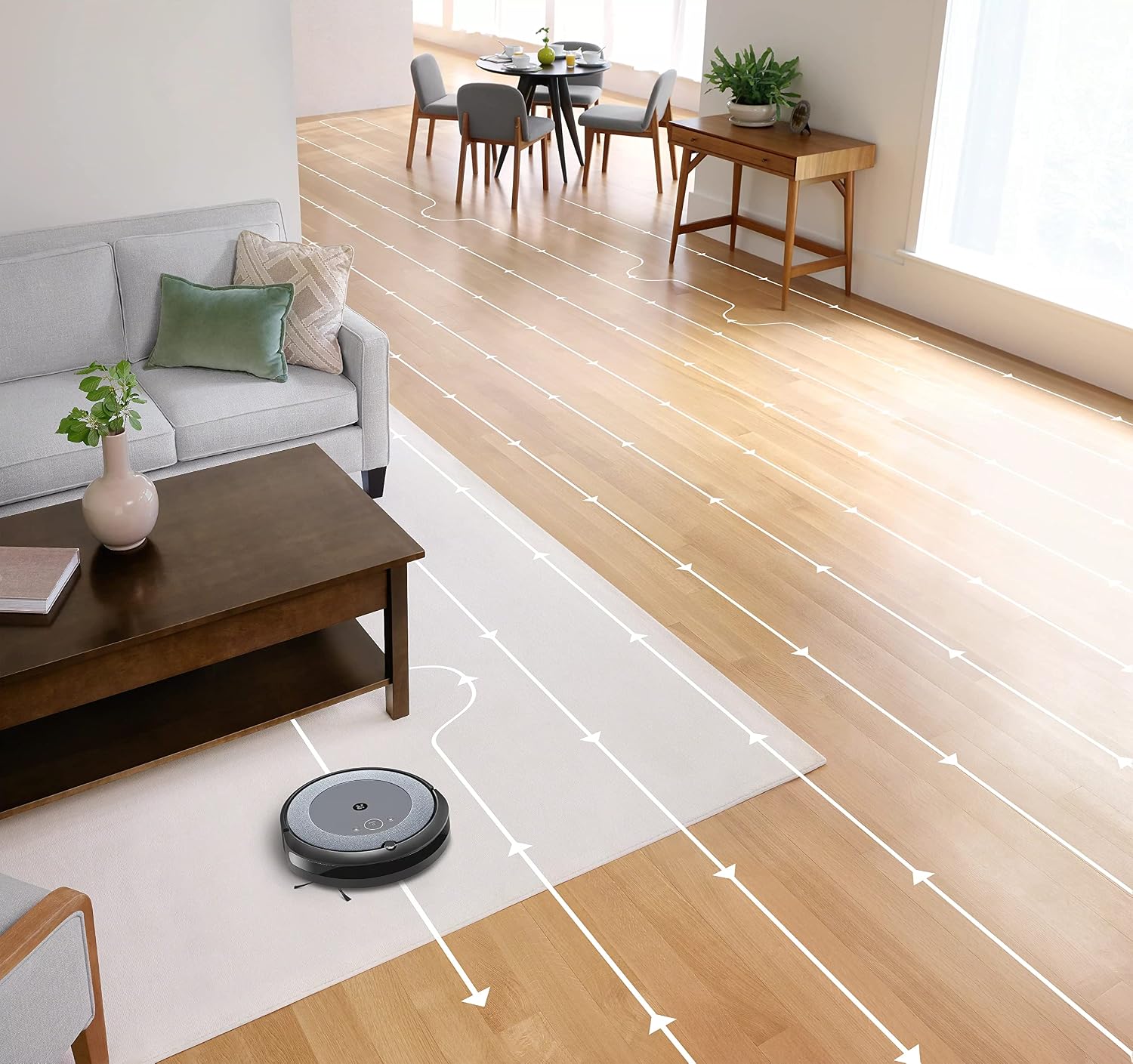
- Navigasi Cerdas: The robot cleans in neat, efficient rows, adapting to different floor types including carpets and hard floors.
- Sikat Karet Ganda Multi-Permukaan: These brushes are designed to prevent tangles with pet hair and effectively pick up dirt and debris from various surfaces.
- Teknologi Deteksi Kotoran™: The robot uses acoustic and optical sensors to find dirtier areas and spends more time cleaning them.
- Automatic Dirt Disposal (with compatible Clean Base): If you have a compatible Clean Base (sold separately), the robot will automatically empty its dustbin into an enclosed bag, allowing for weeks of hands-free cleaning.


Pemeliharaan
Regular maintenance ensures your Roomba i1 operates at peak performance. Always turn off the robot and disconnect it from the Home Base before performing any maintenance.
Mengosongkan Tempat Sampah
- Tekan tombol pelepas tempat sampah dan tarik keluar tempat sampah tersebut.
- Buka pintu tempat sampah dan buang sampah ke dalam tong sampah.
- Tap the bin against the trash can to dislodge any trapped debris.
Cleaning the Filter (Cloth Type)
- Lepaskan filter dari tempat sampah.
- Tap the filter against a trash can to remove debris. Do not wash the filter.
- Replace the filter every 2 months, or more frequently if you have pets.
Membersihkan Kuas
- Pinch the yellow brush release tabs to lift the brush frame.
- Remove the brushes and remove any hair or debris wrapped around them or trapped beneath the yellow caps.
- Reinstall the brushes, ensuring they click into place.
Membersihkan Sikat Samping
- Use a coin or small screwdriver to remove the screw holding the side brush.
- Remove the side brush and clean any hair or debris from the brush and its post.
- Pasang kembali sikat samping dan kencangkan sekrupnya.
Membersihkan Sensor dan Kontak Pengisian Daya
- Wipe the charging contacts on the robot and Home Base with a clean, dry cloth.
- Wipe the cliff sensors (located on the bottom of the robot) and the front bumper sensor window with a clean, dry cloth.
Penyelesaian Masalah
If your Roomba i1 encounters an issue, the robot will play an audible alert and the light ring around the CLEAN button will flash. Consult the iRobot Home App for specific error messages and solutions.
Masalah Umum dan Solusinya:
- Robot tidak mengisi daya: Ensure the Home Base is plugged in and the robot is properly docked. Clean the charging contacts on both the robot and Home Base.
- Robot stuck or trapped: Clear obstacles from the robot's path. If it frequently gets stuck in the same area, consider using Virtual Wall Barriers (sold separately) or adjusting furniture.
- Kinerja pembersihan yang buruk: Empty the dust bin, clean or replace the filter, and clean the main brushes and side brush. Ensure the robot's sensors are clean.
- Robot tidak terhubung ke Wi-Fi: Ensure your Wi-Fi router is on and within range. Restart your router and the robot. Follow the Wi-Fi setup instructions in the iRobot Home App again.
- Robot mengeluarkan suara-suara yang tidak biasa: Check the brushes and wheels for any trapped debris or hair. Clean them thoroughly.
For more detailed troubleshooting, refer to the iRobot Home App or the iRobot support weblokasi.
Spesifikasi
| Merek | sayaRobot |
| Nama Model | Roomba i1 (1152) |
| Fitur Khusus | Smart, Wi-Fi Connected Mapping |
| Warna | Hitam/Abu-abu |
| Komponen yang Termasuk | Robot Vacuum, Home Base, Line Cord, Battery, Side Brush, Filter, Dual Multi-Surface Rubber Brushes |
| Jenis Filter | Kain |
| Sumber Daya | Bertenaga Baterai |
| Baterai | 1 baterai Lithium Ion (termasuk) |
| Metode Kontrol | Aplikasi |
| Perangkat yang Kompatibel | Beranda Google |
| Faktor Bentuk | Robotik |
| Dimensi Produk | 13.5x3.6x13.4 inci |
| Berat Barang | 13.2 pon |
| Rekomendasi Permukaan | Karpet, Lantai Keras |
| UPC | 657768820809 |
| ASIN | B0CPQ3RVDK |
Garansi dan Dukungan
This product is sold as a renewed item. Please refer to the specific warranty terms provided by the seller or Amazon Renewed at the time of purchase. For technical support, troubleshooting assistance, or to purchase replacement parts, please visit the official iRobot support website or contact iRobot customer service. You can also find helpful resources within the iRobot Home App.
Dukungan online: www.irobot.com/support


