1. Produk Lebihview
The Keyscaper Star Wars Darth Vader Wireless Mouse is designed for comfort and precision, featuring a distinctive Darth Vader color block design. This wireless mouse connects via a USB nano-receiver and is powered by two AAA batteries. It offers laser-optical precision and an auto-sleep function to maximize battery life.

Figure 1: Keyscaper Star Wars Darth Vader Wireless Mouse
Fitur Utama:
- Officially licensed Star Wars product.
- Easy plug & play functionality via included USB nano-receiver.
- Laser-optical precision for accurate and responsive tracking.
- Auto-sleep feature to conserve battery power.
- Durable full-color printed logo.
2. Petunjuk Penyiapan
2.1 Apa yang ada di dalam kotak
- Keyscaper Star Wars Darth Vader Wireless Mouse
- Penerima nano USB
- 2 baterai AAA (sudah terpasang atau dijual terpisah)
2.2 Pemasangan Baterai
- Temukan penutup kompartemen baterai di bagian bawah mouse.
- Geser atau angkat penutupnya perlahan untuk membuka kompartemen.
- Masukkan dua baterai AAA, pastikan polaritasnya benar (+/-) seperti yang tertera di dalam kompartemen.
- Pasang kembali penutup ruang baterai hingga terkunci dengan aman di tempatnya.

Figure 2: Mouse components and battery installation
2.3 Connecting the USB Nano-Receiver
- Locate the USB nano-receiver, typically stored within a slot in the battery compartment for convenience.
- Remove the nano-receiver from its storage slot.
- Plug the USB nano-receiver into an available USB-A port on your computer or laptop.
- Komputer Anda akan secara otomatis mendeteksi dan menginstal driver yang diperlukan. Proses ini mungkin membutuhkan beberapa saat.

Figure 3: USB nano-receiver storage
2.4 Menghidupkan/Mematikan
- On the underside of the mouse, locate the ON/OFF switch.
- Slide the switch to the "ON" position to activate the mouse.
- To conserve battery life when not in use, slide the switch to the "OFF" position.
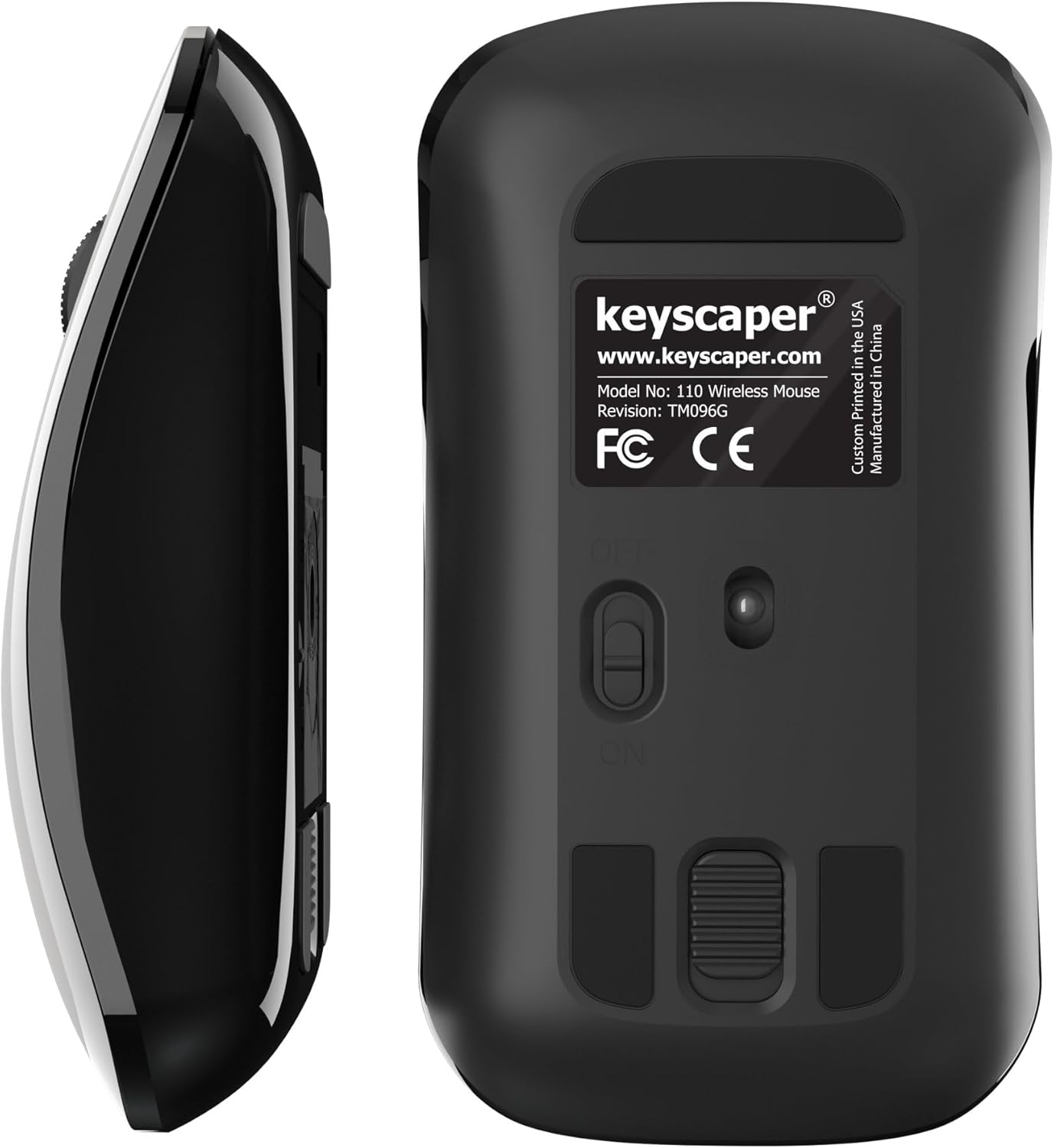
Figure 4: Underside of the mouse
3. Petunjuk Pengoperasian
3.1 Penggunaan Dasar
- Klik kiri: Press the left button for primary actions (selecting, opening).
- Klik kanan: Press the right button for secondary actions (context menus).
- Roda Gulir: Putar roda ke atas atau ke bawah untuk menggulir dokumen atau web halaman. Tekan roda gulir untuk fungsi klik tengah (misalnya, membuka tautan di tab baru).
3.2 Fungsi Tidur Otomatis
The mouse is equipped with an auto-sleep feature. If inactive for a period, it will enter a low-power sleep mode to save battery. To wake the mouse, simply move it or click any button.
4. Pemeliharaan
4.1 Penggantian Baterai
When the mouse performance degrades or it stops responding, it's time to replace the AAA batteries. Follow the steps in Section 2.2 for battery installation.
4.2 Pembersihan
Untuk menjaga kinerja optimal, bersihkan mouse Anda secara berkala:
- Ensure the mouse is turned OFF.
- Gunakan kain yang lembut dan tidak berbulu secara tipis dampdibersihkan dengan air atau larutan pembersih ringan untuk membersihkan bagian luar.
- Hindari masuknya uap air ke dalam celah mana pun.
- Use a dry cotton swab to gently clean the optical sensor on the underside.
5. Penyelesaian masalah
5.1 Mouse Tidak Merespons
- Pastikan mouse dihidupkan.
- Periksa baterai. Ganti jika daya baterai lemah atau habis.
- Verify that the USB nano-receiver is securely plugged into a working USB-A port on your computer. Try a different USB port if necessary.
- Move the mouse closer to the USB nano-receiver to rule out range issues.
- Hidupkan ulang komputer Anda.
5.2 Pergerakan Kursor yang Tidak Teratur
- Bersihkan sensor optik di bagian bawah mouse (lihat Bagian 4.2).
- Ensure you are using the mouse on a suitable surface. Highly reflective or uneven surfaces may cause issues. A mouse pad is recommended for best performance.
6. Spesifikasi
- Nomor Model: 110WL
- Dimensi Produk: 2x1x0.1 inci
- Berat Barang: 4 ons
- Teknologi Konektivitas: Radio Frequency (via USB nano-receiver)
- Teknologi Deteksi Gerakan: Optik
- Baterai: 2 baterai AAA (termasuk)
- Warna: Darth Vader (Color Block)
- Pabrikan: Dongguan Togran Electronic Technology Co, Ltd.
7. Garansi dan Dukungan
For warranty information or technical support, please refer to the official Keyscaper websitus web atau hubungi layanan pelanggan mereka. Simpan struk pembelian Anda untuk klaim garansi.
This product is designed and printed by Keyscaper in Tualatin, Oregon, USA, and manufactured by Dongguan Togran Electronic Technology Co, Ltd.
