Perkenalan
Welcome to the user manual for your new Infinix Smart 8 smartphone. This guide provides essential information on setting up, operating, maintaining, and troubleshooting your device. The Infinix Smart 8 is designed for efficient performance, featuring a G36 processor, 4GB RAM, 64GB internal storage, a 50MP main camera, and a long-lasting 5000 mAh battery. Please read this manual thoroughly to ensure optimal use of your device.
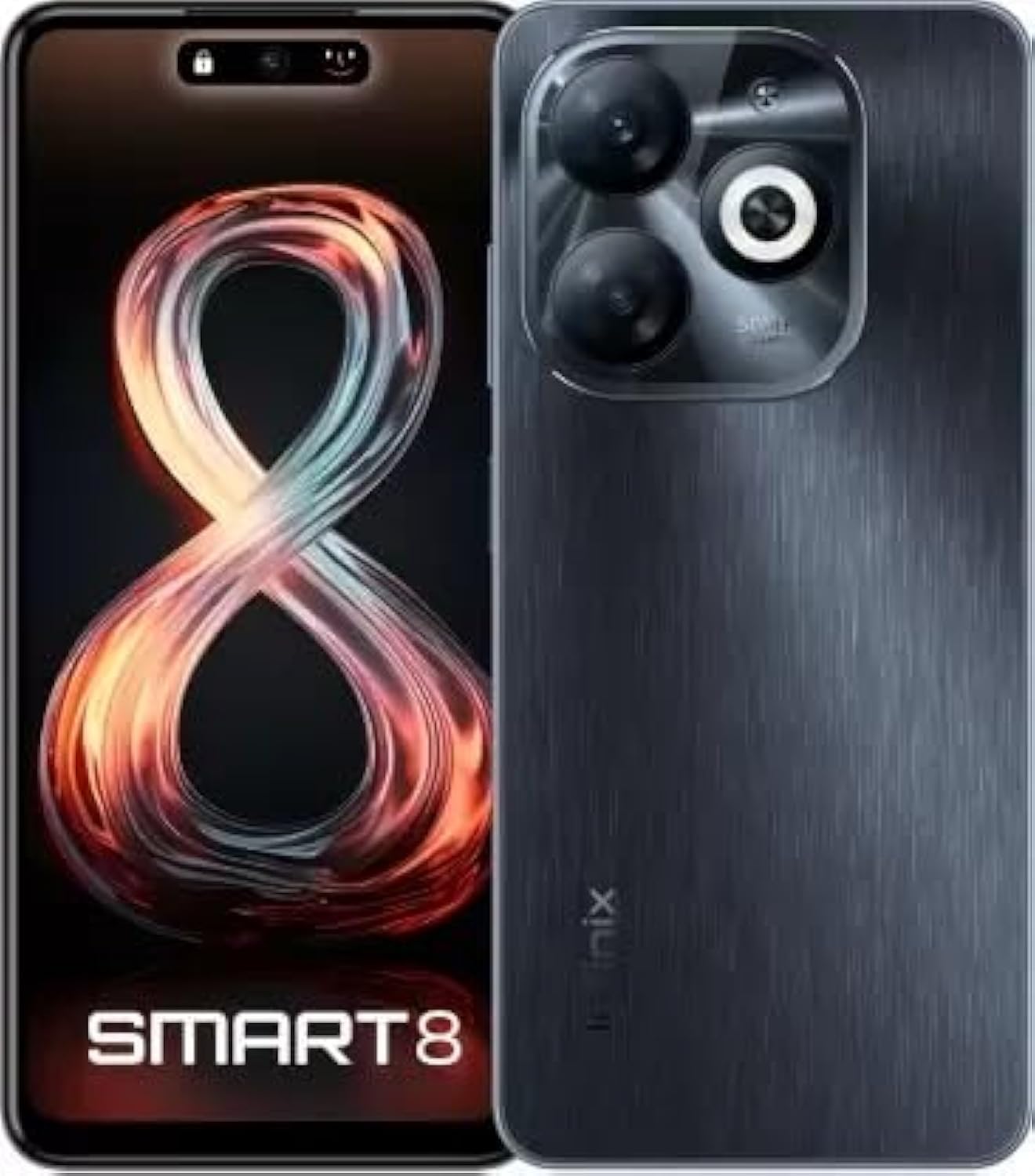
Image: Infinix Smart 8 smartphone in Timber Black, showcasing desainnya yang ramping dan modul kamera.
Apa yang ada di dalam kotak
Upon unboxing your Infinix Smart 8, please verify that all the following items are included:
- Telepon Genggam
- Adaptor
- Kabel USB Tipe-C
- Kasus TPU
- Pin Pengeluar SIM
- Panduan Memulai Cepat
- Kartu Garansi
- Xclub Card
Panduan Pengaturan
1. Memasang Kartu SIM dan Kartu Memori
Locate the SIM card tray on the side of your device. Use the provided SIM ejector pin to open the tray. Insert your Nano-SIM card(s) and/or a microSD card (for expandable storage up to 1 TB) into the designated slots. Ensure the cards are correctly oriented as shown in the diagram in the Quick Start Guide. Gently push the tray back into the device until it clicks into place.
2. Menghidupkan/Mematikan
- Untuk menghidupkan: Tekan dan tahan tombol daya (biasanya di sisi kanan) hingga logo Infinix muncul.
- Untuk mematikan: Tekan dan tahan tombol Daya, lalu pilih "Matikan" dari opsi yang muncul di layar.
- Untuk Memulai Ulang: Tekan dan tahan tombol Daya, lalu pilih "Mulai Ulang" dari pilihan yang ada.
3. Pengaturan Awal
The first time you power on your device, you will be guided through an initial setup process. This includes selecting your language, connecting to a Wi-Fi network, setting up your Google account, and configuring security features like fingerprint unlock. Follow the on-screen prompts to complete the setup.
Petunjuk Pengoperasian
Navigasi Dasar
- Menyentuh: Ketuk ikon untuk membuka aplikasi atau memilih item.
- Geser: Seret jari Anda melintasi layar untuk menggulir atau menavigasi antar layar.
- Mencubit: Gunakan dua jari untuk memperbesar atau memperkecil foto dan web halaman.
- Tekan lama: Tekan dan tahan item untuk pilihan lainnya atau untuk memindahkannya.
Melakukan Panggilan dan Mengirim Pesan
To make a call, open the Phone app, enter the number, and tap the call icon. To send a message, open the Messages app, tap the new message icon, enter the recipient's number or select from contacts, type your message, and tap send.
Menghubungkan ke Jaringan
- Wifinya: Go to Settings > Network & internet > Wi-Fi. Turn Wi-Fi on, select your desired network, and enter the password if required.
- Bluetooth dapat digunakan untuk berbagai keperluan, seperti: Go to Settings > Connected devices > Bluetooth. Turn Bluetooth on, then pair with available devices.
- Data Seluler: Ensure your SIM card is active. Go to Settings > Network & internet > Mobile network to manage data usage and settings.
Fitur Utama
The Infinix Smart 8 offers a range of features designed to enhance your mobile experience:
- Memori & Penyimpanan: Equipped with 4 GB RAM and 64 GB internal storage, expandable up to 1 TB via microSD card.
- Menampilkan: Features a 16.76 cm (6.6 inch) HD+ Display with a 90 Hz refresh rate and 5000 Nits brightness for clear and vibrant visuals.
- Sistem Kamera: A powerful 50MP main camera with AI Lens and a 5MP front camera for high-quality photos and selfies.
- Baterai: A large 5000 mAh battery ensures extended usage on a single charge.
- Prosesor: Powered by a G36 Processor for smooth performance and multitasking.
- Konektivitas: Supports 4G cellular networks, Bluetooth, USB, and Wi-Fi.
- Keamanan: Includes a fingerprint sensor for secure and convenient unlocking.
Penggunaan Kamera
Your Infinix Smart 8 comes with an advanced camera system to capture your moments.
Kamera Belakang
The main rear camera is 50 Megapixels, complemented by an AI Lens for enhanced image processing. It features a Quad-LED Flashlight for improved low-light photography.
Kamera Depan
The front camera is 5 Megapixels, perfect for clear selfies and video calls.

Gambar: Detail view of the Infinix Smart 8's rear camera setup, highlighting the 50MP dual camera and Quad-LED flashlight.
To access the camera, tap the Camera app icon. You can switch between photo, video, and other modes. Tap the shutter button to take a picture or start/stop recording a video.
Menampilkan Informasi
The Infinix Smart 8 features a vibrant 6.6-inch HD+ display.
- Ukuran: 16.76cm (6.6 inci)
- Resolusi: 1600 x 720 piksel
- Kecepatan Penyegaran: 90 Hz for smoother scrolling and gaming.
- Kecerahan: Up to 5000 Nits, ensuring visibility even in bright sunlight.
- Jenis: Punch-Hole Display design.

Image: The Infinix Smart 8's 6.6-inch HD+ display, illustrating its punch-hole design and high brightness.
Spesifikasi Teknis
Below are the detailed technical specifications for the Infinix Smart 8:
| Fitur | Spesifikasi |
|---|---|
| Sistem Operasi | Bahasa Indonesia: Android |
| RAM | 4 GB |
| Penyimpanan Internal | 64 GB |
| Penyimpanan yang Dapat Diperluas | Hingga 1 TB |
| Prosesor | G36 Processor |
| Ukuran Layar | 16.76 cm (6.6 inch) HD+ |
| Resolusi Tampilan | 1600 x 720 piksel |
| Kamera Belakang | 50MP + AI Lens |
| Kamera Depan | 5MP |
| Kapasitas Baterai | 5000 mAh |
| Waktu Bicara Telepon | 25 Jam |
| Komunikasi Nirkabel | Cellular (4G Ready) |
| Teknologi Konektivitas | Bluetooth, USB, Wi-Fi |
| Bahasa Indonesia: GPS | GLONASS |
| Soket Audio | Ya |
| Berat Barang | 350 gram |
| Nomor Model Barang | smart 8 |

Image: A visual summary of the Infinix Smart 8's technical specifications, including RAM, storage, battery, and processor details.
Informasi Baterai
The Infinix Smart 8 is equipped with a 5000 mAh battery, providing ample kekuatan untuk penggunaan sehari-hari.
- Kapasitas: 5000 Miliamp Jam
- Waktu Bicara: Hingga 25 jam dengan muatan penuh.
- Pengisian daya: Use the provided Adaptor and USB Type-C Cable for optimal charging.
For best battery life, avoid fully discharging the battery frequently and use the original charger.
Penyelesaian Masalah
If you encounter issues with your Infinix Smart 8, refer to the following common solutions:
- Perangkat Tidak Menyala: Ensure the battery is charged. Connect the charger and wait a few minutes before attempting to power on again. If unresponsive, try a forced restart by holding the power button for 10-15 seconds.
- Aplikasi mogok/macet: Close the problematic app and reopen it. If the issue persists, clear the app's cache (Settings > Apps > [App Name] > Storage & cache > Clear cache). Consider updating the app or the phone's software.
- Sinyal Jaringan Buruk: Periksa apakah kartu SIM Anda terpasang dengan benar. Coba mulai ulang perangkat. Pastikan Anda berada di area dengan jangkauan jaringan.
- Baterai Terkuras dengan Cepat: Reduce screen brightness, close unused apps running in the background, disable unnecessary notifications, and turn off Wi-Fi/Bluetooth when not in use.
- Layar Sentuh Tidak Responsif: Restart the device. If the issue continues, ensure the screen is clean and free of moisture.
For more complex issues, refer to the official Infinix support websitus atau hubungi layanan pelanggan.
Pemeliharaan dan Perawatan
To ensure the longevity and optimal performance of your Infinix Smart 8, follow these maintenance guidelines:
- Pembersihan: Gunakan kain lembut dan bebas serat untuk membersihkan layar dan bodi. Hindari bahan kimia keras atau bahan abrasif.
- Suhu: Jangan biarkan perangkat terkena suhu ekstrem (panas atau dingin) atau sinar matahari langsung dalam waktu lama.
- Paparan Air: The device is not waterproof. Avoid contact with water or other liquids.
- Pembaruan Perangkat Lunak: Regularly check for and install software updates to benefit from performance improvements and security patches.
- Penyimpanan: Avoid overfilling your device's storage. Regularly clear unnecessary filedan cache aplikasi.
Garansi dan Dukungan
Your Infinix Smart 8 is covered by a 7-day service center replacement/repair policy from the date of purchase. Please retain your purchase receipt and the warranty card for service claims.
- Pabrikan: Infinix (G mobile devices private ltd)
- Dukungan Bebas Pulsa: 18004190525
- Dukungan online: Kunjungi situs resmi Infinix. websitus untuk FAQ, sumber daya dukungan, dan informasi kontak.
For any issues or queries, please contact the manufacturer's support team.
Informasi Keselamatan Penting
Harap baca informasi keselamatan berikut dengan saksama untuk mencegah cedera atau kerusakan pada perangkat Anda:
- Do not attempt to disassemble, repair, or modify the device yourself. This can cause damage, fire, or electric shock.
- Use only original or certified compatible chargers and accessories.
- Avoid exposing the device to open flames or extreme heat.
- Jangan membuang perangkat ke dalam api atau air.
- Jauhkan perangkat dan aksesorinya dari jangkauan anak-anak dan hewan peliharaan.
- Patuhilah semua hukum dan peraturan setempat terkait penggunaan telepon seluler, terutama saat mengemudi.
Produk Selesaiview Video
Saksikan video produk resmi ini untuk melihat gambaran visualnya.view of the Infinix Smart 8's features and capabilities.
Video: Seorang pejabatview of the Infinix Smart 8 smartphone, detailing its technical specifications, key features, camera, and display.


