Perkenalan
Thank you for choosing the RAINPOINT Digital Sprinkler Timer, Model ITV105. This programmable 1-outlet automatic hose water timer is designed to provide convenient and precise control over your watering schedule, ensuring optimal moisture levels for your lawn and garden. This manual provides detailed instructions for setup, operation, maintenance, and troubleshooting to help you get the most out of your new device.
Produk Selesaiview dan Fitur Utama
The RAINPOINT ITV105 Sprinkler Timer is engineered for durability and ease of use, offering a reliable solution for automated garden irrigation.
- Kompatibilitas Standar: Features a 3/4" inlet and outlet thread, compatible with most standard garden hoses.
- Tahan Cuaca: IP54 waterproof rating and heavy-duty weather-resistant ABS housing ensure durability for outdoor use.
- Pemrograman yang Dapat Disesuaikan: Easy-to-use interface allows customization of start time, watering frequency, and duration for automated irrigation.
- Built-in Filter: Includes a built-in metal filter to improve water quality and protect plants from debris.
- Leakage Prevention: Upgraded strong and durable ABS material and water inlet thread, paired with Teflon tape and rubber washer to prevent water leakage.
- Layar LCD Besar: Displays detailed information such as watering time, frequency, power, and battery life for easy readability.
- Pemberitahuan Baterai Lemah: Powered by 2 AAA batteries (not included), with a low battery notification and automatic valve shut-off to prevent water waste.
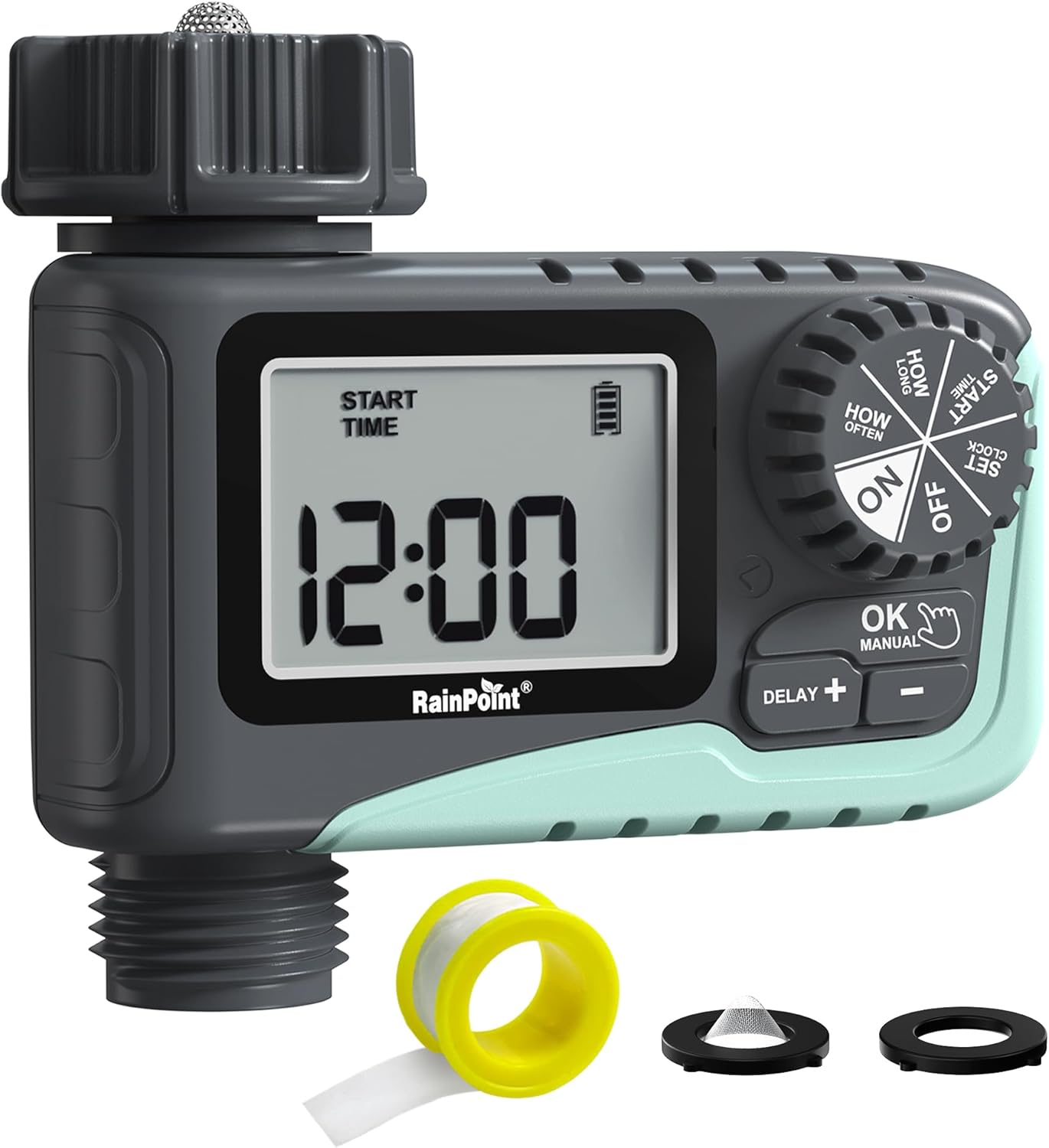
Gambar 1: Depan view of the RAINPOINT Digital Sprinkler Timer (ITV105) showing the large LCD screen, control dial, and buttons.
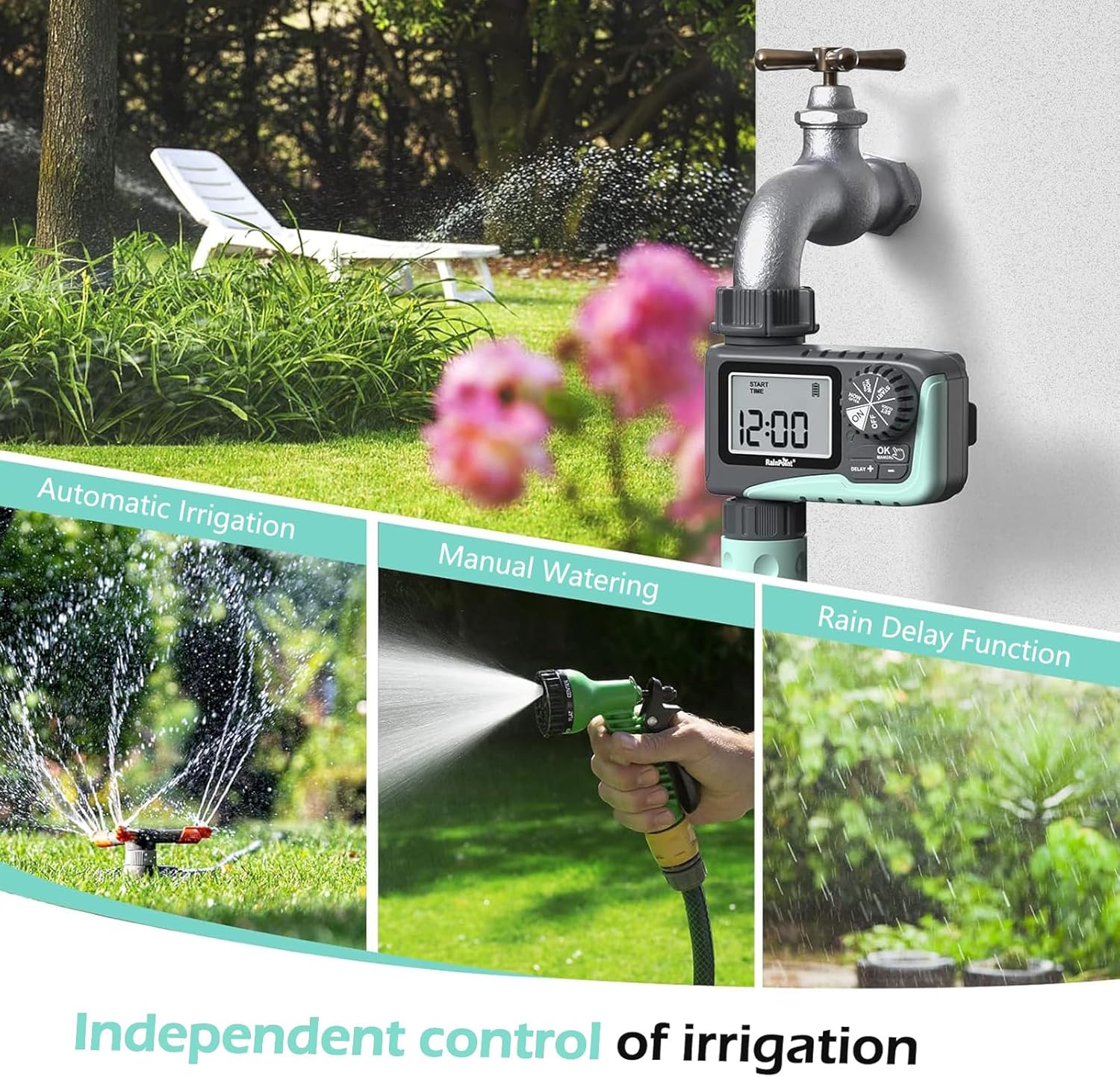
Figure 2: Illustration of the timer's three main functions: automatic irrigation, manual watering, and rain delay.
Isi Paket
Harap periksa isi kemasan saat dibuka untuk memastikan semua item ada:
- 1 x RAINPOINT Digital Sprinkler Timer (ITV105)
- 1 x Panduan Pengguna (dokumen ini)
- 1 x pita teflon
- 1 x Rubber washer
- 1 x Spare filter
Pengaturan dan Instalasi
Follow these steps to properly set up your sprinkler timer:
- Pasang Baterai:
Locate the battery compartment on the back of the timer. Insert 2 new AAA (1.5V) alkaline batteries, ensuring correct polarity. Close the battery compartment securely. The LCD screen will power on.
- Prepare Faucet:
Ensure your outdoor hose faucet is clean and free of debris. If necessary, apply the included Teflon tape to the faucet threads for a watertight seal.
- Attach Timer to Faucet:
Screw the timer's inlet (top connector) onto your 3/4" outdoor hose faucet. Hand-tighten firmly. Ensure the rubber washer is properly seated inside the timer's inlet to prevent leaks. The timer features a 360° rotating connector for easy positioning.
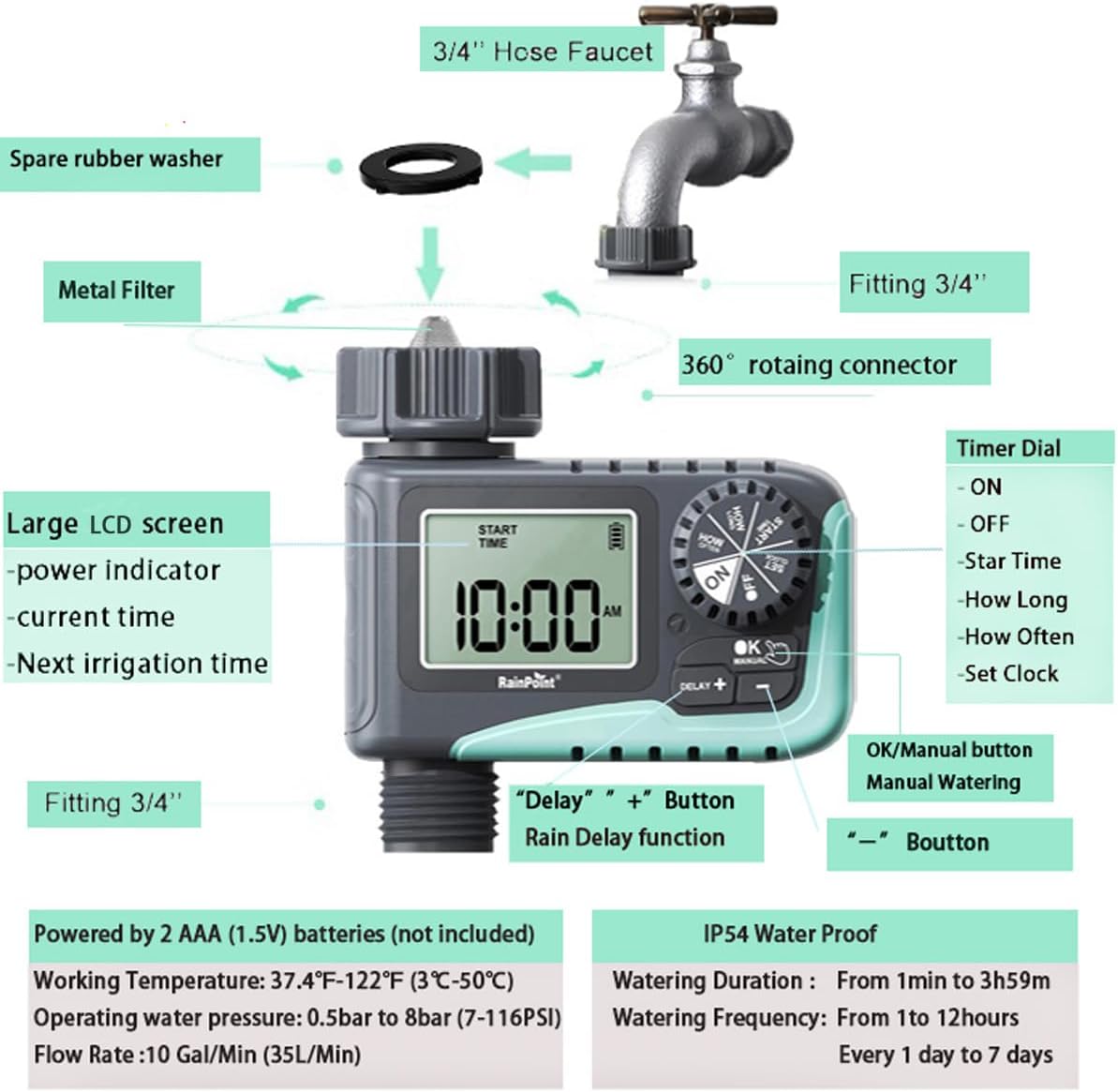
Figure 3: Diagram illustrating the components of the sprinkler timer, including the 3/4" hose faucet connection, metal filter, and LCD screen.
- Hubungkan Selang:
Attach your garden hose to the timer's outlet (bottom connector). Hand-tighten securely. Ensure a proper washer is in place at the hose connection point.
- Open Faucet:
Fully open your outdoor hose faucet. The timer is designed to withstand water pressure from 0.5 bar to 8 bar (7-116 PSI). The timer will control the water flow, not the faucet.
Petunjuk Pengoperasian
The RAINPOINT ITV105 timer features a large dial and intuitive buttons for easy programming.
Kontrol Posisi Dial:
- DI: Activates the timer for automatic watering.
- MATI: Deactivates the timer, stopping all watering.
- SETEL JAM: Tetapkan waktu saat ini.
- WAKTU MULAI: Set the desired start time for watering cycles.
- BERAPA LAMA: Set the duration of each watering cycle.
- SEBERAPA SERING: Set the frequency of watering cycles.
Tombol:
- OK/MANUAL: Mengkonfirmasi pengaturan atau memulai penyiraman manual.
- DELAY +: Increases values during setting or activates/adjusts rain delay.
- -: Menurunkan nilai selama pengaturan.
Setting the Current Time (SET CLOCK):
- Putar tombol ke SET JAM.
- Gunakan + Dan - tombol untuk mengatur jam. Tekan OK untuk mengonfirmasi.
- Gunakan + Dan - tombol untuk mengatur menit. Tekan OK untuk mengonfirmasi.
- Putar tombol ke ON to save the time and return to normal operation.
Setting Automatic Watering Program:
This timer allows you to set a start time, duration, and frequency for automated watering.
- Set Start Time (START TIME):
Putar tombol ke WAKTU MULAI. Menggunakan + Dan - to set the desired watering start hour and minute. Press OK untuk mengkonfirmasi setiap pengaturan.
- Set Watering Duration (HOW LONG):
Putar tombol ke BERAPA LAMA. Menggunakan + Dan - to set the watering duration from 1 minute to 3 hours and 59 minutes. Press OK untuk mengonfirmasi.

Figure 4: Screen showing settings for "HOW OFTEN" (frequency) and "HOW LONG" (duration) for automatic watering.
- Set Watering Frequency (HOW OFTEN):
Putar tombol ke SEBERAPA SERING. Menggunakan + Dan - to set the frequency:
- Every 1 hour to 12 hours.
- Every 1 day to 7 days.
Tekan OK untuk mengonfirmasi.
- Aktifkan Program:
Putar tombol ke ON. The timer will now operate according to your programmed schedule.
Penyiraman Manual:
Untuk menyiram segera tanpa mengganggu jadwal yang telah Anda program:
- Ensure the dial is in the ON posisi.
- Tekan tombol Oke/MANUAL button. The display will show the default manual watering duration (e.g., 10 minutes).
- Gunakan + Dan - tombol untuk mengatur durasi penyiraman manual dari 1 menit hingga 8 jam.
- Tekan OK again to start manual watering. The timer will count down the set duration.
- Untuk menghentikan penyiraman manual lebih awal, tekan Oke/MANUAL lagi.

Figure 5: Display showing the manual watering duration setting, adjustable from 1 minute to 8 hours.
Fungsi Penundaan Hujan:
The rain delay function allows you to pause your watering schedule for a set period due to rain or other reasons, preventing overwatering.
- Ensure the dial is in the ON posisi.
- Tekan tombol DELAY + button. The display will show a default delay time (e.g., 24H).
- Tekan DELAY + repeatedly to cycle through delay options (e.g., 24H, 48H, 72H).
- Once you select the desired delay, the timer will enter rain delay mode. The display will show the remaining delay time.
- After the delay period ends, the timer will automatically resume its programmed watering schedule.
- To cancel the rain delay, press the DELAY + button until the delay time disappears, or rotate the dial to OFF and then back to ON.

Figure 6: The timer displaying the rain delay countdown, highlighting its IP54 waterproof rating.
Pemeliharaan
Perawatan yang tepat memastikan umur panjang dan kinerja optimal dari pengatur waktu penyiram RAINPOINT Anda.
- Filter Bersih: Periodically check and clean the metal filter located at the timer's inlet. Remove the timer from the faucet, unscrew the filter, rinse it under running water to remove any debris, and reinsert it.
- Penggantian Baterai: When the low battery indicator appears on the LCD screen, replace the 2 AAA batteries promptly. Always use new alkaline batteries.
- Musim dingin: Before the first frost, remove the timer from the faucet and store it indoors in a dry, frost-free location. Remove the batteries before storage.
- Periksa Kebocoran: Regularly inspect all connections (faucet to timer, timer to hose) for any signs of leakage. Ensure all connections are hand-tightened and that rubber washers are properly seated.

Figure 7: Visual representation of the built-in metal filter and durable plastic material designed for anti-leakage and longer service life.
Penyelesaian Masalah
If you encounter issues with your RAINPOINT Sprinkler Timer, refer to the following common problems and solutions:
| Masalah | Kemungkinan Penyebab | Larutan |
|---|---|---|
| Timer not turning on / LCD blank. | Baterai mati atau tidak terpasang dengan benar. | Replace with 2 new AAA alkaline batteries, ensuring correct polarity. |
| Tidak ada aliran air. |
|
|
| Kebocoran air dari sambungan. |
|
|
| Timer tidak mengikuti jadwal. |
|
|
Spesifikasi
| Fitur | Spesifikasi |
|---|---|
| Model | ITV105 |
| Dimensi Produk | 10.5 x 10.3 x 5 cm (4 x 4 x 2 inci) |
| Bahan | Akrilonitril Butadiena Stirena (ABS) |
| Watering Duration (Automatic) | 1 menit hingga 3 jam 59 menit |
| Watering Frequency (Automatic) | Every 1 hour to 12 hours, or every 1 day to 7 days |
| Watering Duration (Manual) | 1 minute to 8 hours (Default: 10 minutes) |
| Laju Aliran Maksimum | 10 Gal/Min (35 L/Min) |
| Kisaran Tekanan Air | 0.5 bar hingga 8 bar (7-116 PSI) |
| Suhu Kerja | 3 -50 (37.4 -122 ) |
| Sumber Daya | 2 x AAA (1.5V) batteries (not included) |
| Peringkat Tahan Air | Tingkat IP54 |
Garansi dan Dukungan
RAINPOINT products are manufactured to high-quality standards. For specific warranty details, please refer to the warranty card included with your product or visit the official RAINPOINT website. If you encounter any issues or have questions not covered in this manual, please contact RAINPOINT customer support through their official websitus web atau pengecer tempat Anda membeli produk tersebut.
Untuk informasi dan dukungan lebih lanjut, Anda dapat mengunjungi Toko RAINPOINT di Amazon.


