1. Pendahuluan
Thank you for choosing the Klarstein Aqualine 6L Reverse Osmosis Water Filtration System. This advanced system is designed to provide clean, purified, and hydrogen-enriched drinking water for your home. It features a 5-stage filtration process, 3 integrated filters, and a hydrogen ionizer for enhanced hydration. The intuitive HD touchscreen allows for easy control over 6 temperature settings and provides essential information such as filter change alerts and TDS levels.
This manual contains important information regarding the installation, operation, maintenance, and troubleshooting of your new water filtration system. Please read it thoroughly before use and keep it for future reference.

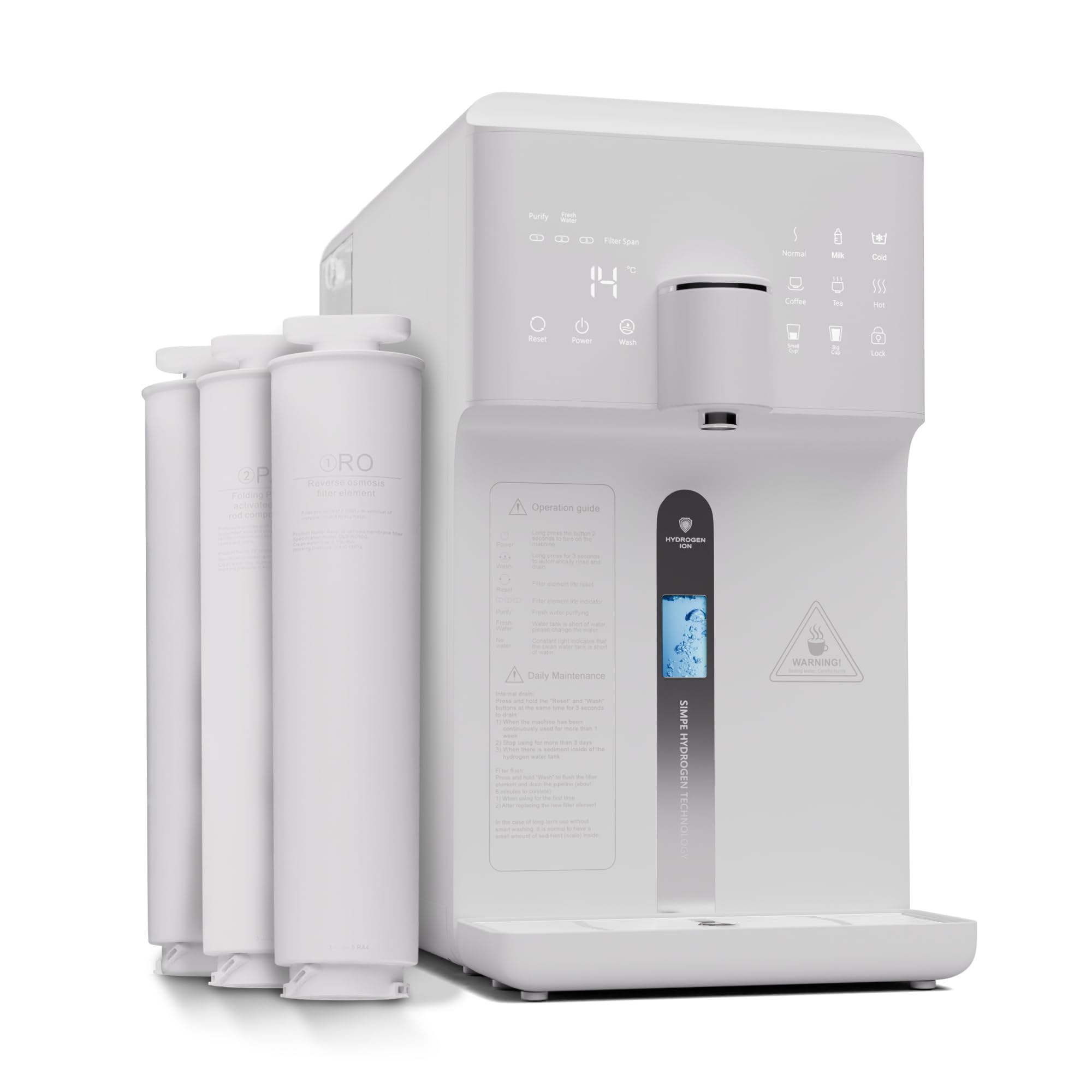
Figure 1: Klarstein Aqualine 6L Water Filtration System Overview
2. Informasi Keselamatan
- Baca semua instruksi sebelum mengoperasikan alat.
- Ensure the power supply matches the specifications indicated on the appliance.
- Jangan merendam peralatan, kabel listrik, atau steker dalam air atau cairan lainnya.
- Jauhkan alat ini dari jangkauan anak-anak.
- Do not operate the appliance if the power cord or plug is damaged. Contact customer support for assistance.
- Letakkan peralatan pada permukaan yang stabil, datar, dan kering.
- Jangan halangi lubang ventilasi.
- Only use original Klarstein replacement filters.
- Cabut steker peralatan sebelum membersihkan atau melakukan perawatan apa pun.
3. Komponen Produk
The Klarstein Aqualine 6L system includes the following main components:
- Main Filtration Unit
- PAC (Pre-Activated Carbon) Filter
- Filter Membran RO (Reverse Osmosis).
- CF (Carbon Block) Post-Filter
- 6-Liter Pure Water Tank (removable)
- 2-Liter Wastewater Tank (removable)
- Kabel listrik
- User Manual (dokumen ini)

Gambar 2: Atas view showing the three filter cartridges

Gambar 3: 5-Stage Proses Filtrasi
The filtration system consists of three main filters:
- PAC (Pre-Activated Carbon) Filter: A 2-in-1 pre-filter that removes larger particles like sand and rust, as well as chlorine and odors.
- RO (Reverse Osmosis) Membrane Filter: Contains ultra-fine pores to retain the smallest contaminants in the water.
- CF (Carbon Block) Post-Filter: A 2-in-1 post-filter that refines the water with valuable minerals (calcium, magnesium, sodium, potassium) and balances the pH value for a fresh taste.
4. Pengaturan dan Penggunaan Awal
4.1 Membongkar
- Keluarkan semua komponen dari kemasannya dengan hati-hati.
- Periksa kerusakan selama pengiriman. Jika rusak, jangan gunakan dan hubungi layanan pelanggan.
- Lepaskan semua lapisan pelindung dan bahan kemasan.
4.2 Pemasangan Filter
The filters are typically pre-installed but may require activation or removal of protective caps. Refer to the labels on the filter slots for correct placement (CF, RO, PAC).
- Pastikan alat dicabut.
- Align each filter with its corresponding slot.
- Insert the filter and rotate it clockwise until it clicks into place and is securely fastened.
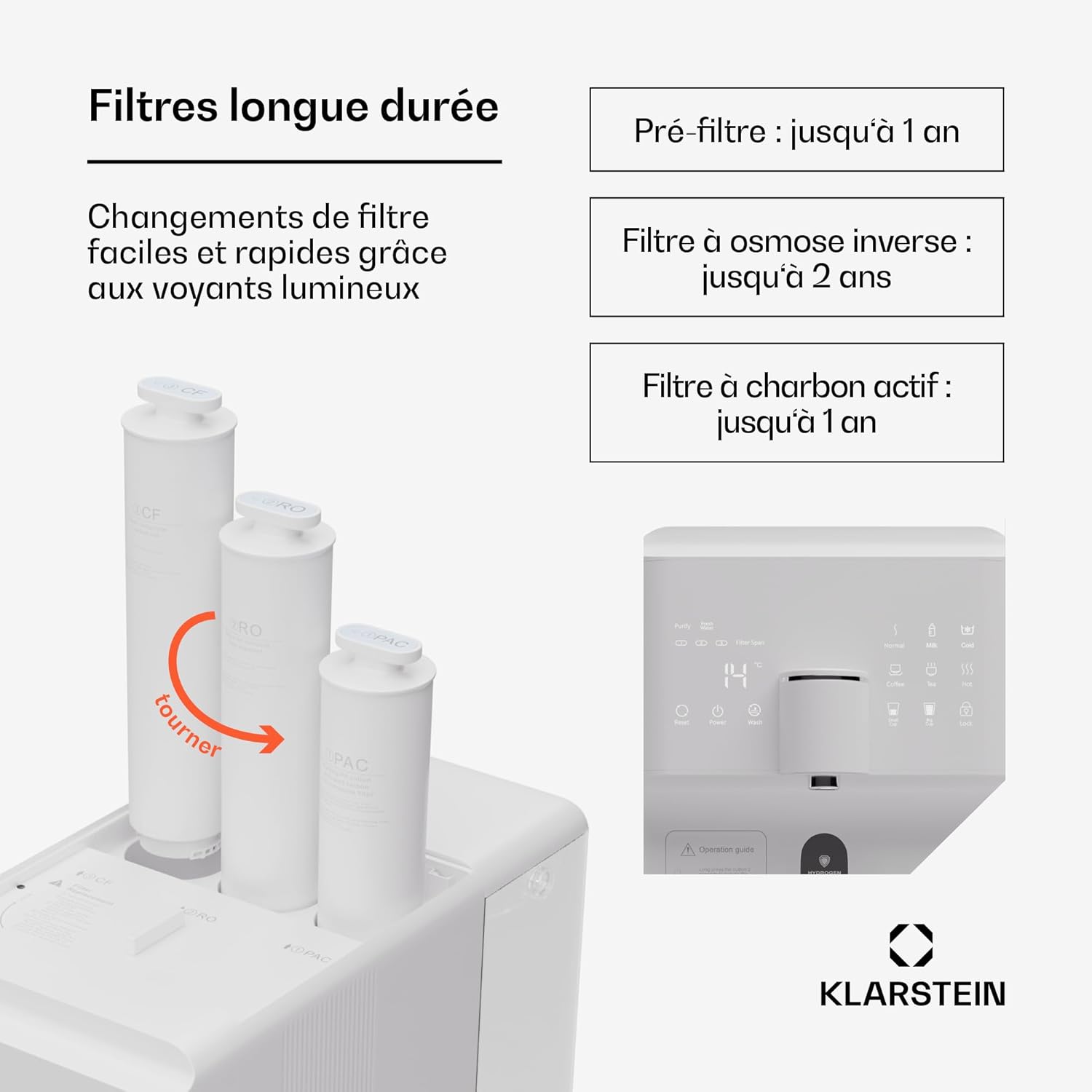
Figure 4: Filter Installation/Replacement
4.3 Mengisi Tangki Air
The system features a 6-liter pure water tank and a separate 2-liter wastewater tank.

Figure 5: Water Tank Capacity
- Remove the 6-liter pure water tank from the appliance.
- Fill the tank with tap water. Do not exceed the maximum fill line.
- Place the filled tank back into the appliance, ensuring it is properly seated.
4.4 Pembilasan Awal
Before first use, the system must be flushed to remove any manufacturing residues and prepare the filters.
- Hubungkan peralatannya.
- Turn on the appliance using the power button on the touchscreen.
- Follow the on-screen instructions for initial flushing. This process typically involves dispensing several full tanks of water to waste.
- Empty the wastewater tank as needed during the flushing process.
- Once flushing is complete, the system is ready for use.
5. Petunjuk Pengoperasian
5.1 Fungsi Layar Sentuh
The HD touchscreen provides access to all system functions and information.

Figure 6: HD Touchscreen Interface
- Daya Hidup/Mati: Touch the power icon to turn the appliance on or off.
- Filter Change Alerts: Indicators will light up when a filter needs replacement.
- Pemeriksaan TDS: Displays the Total Dissolved Solids level of the water.
- Pemilihan Suhu: Choose from 6 preset temperatures.
- Pengeluaran Air: Dispense predefined quantities (e.g., 150ml/300ml) or continuous flow.
5.2 Pengaturan Suhu
The system offers the following temperature options:
- Chilled Water: For refreshing cold drinks.
- Air Suhu Ruangan: For general drinking.
- 45°C (Warm): Ideal for baby formula.
- 80 °C: Suitable for green tea.
- 90 °C: Suitable for coffee.
- 100°C (Boiling): For black tea or instant noodles.
Select your desired temperature by touching the corresponding icon on the display.
5.3 Dispenser Air
- Place a cup or container under the dispenser spout.
- Pilih suhu yang diinginkan.
- Choose a predefined volume (e.g., 150ml, 300ml) or press the dispense button for continuous flow. Press again to stop.
5.4 Hydrogen Ionizer Function
The integrated hydrogen ionizer enriches the water with hydrogen gas. This hydrogen-rich water is believed to improve hydration and provide antioxidant benefits. Activate this function via the touchscreen if available, or it may be an automatic part of the filtration process.
6. Pemeliharaan
6.1 Penggantian Filter
Regular filter replacement is crucial for maintaining water quality and system performance. The touchscreen will indicate when a filter needs changing.

Figure 7: Recommended Filter Lifespan
| Jenis Filter | Recommended Lifespan |
|---|---|
| PAC (Pre-Activated Carbon) Filter | Hingga 1 tahun |
| Filter Membran RO (Reverse Osmosis). | Hingga 2 tahun |
| CF (Carbon Block) Post-Filter | Hingga 1 tahun |
Untuk mengganti filter:
- Cabut alat tersebut.
- Rotate the old filter counter-clockwise to unlock and remove it.
- Insert the new filter into the correct slot and rotate clockwise until it locks into place.
- After replacing filters, perform a short flush cycle as indicated in the operating instructions or on the touchscreen.
6.2 Membersihkan Tangki Air
The pure water and wastewater tanks are removable for easy cleaning.
- Cabut alat tersebut.
- Remove both the pure water tank and the wastewater tank.
- Wash the tanks with mild soap and warm water. Rinse thoroughly to remove all soap residue.
- Dry the tanks completely before reinserting them into the appliance.
6.3 Pembersihan Eksterior
Lap bagian luar alat dengan lembut, damp kain. Jangan gunakan pembersih atau pelarut yang bersifat abrasif.
7. Penyelesaian masalah
| Masalah | Kemungkinan Penyebab | Larutan |
|---|---|---|
| Tidak ada air yang dikeluarkan | Pure water tank empty; wastewater tank full; power off; filters clogged. | Refill pure water tank; empty wastewater tank; check power connection; replace filters. |
| Poor water taste/odor | Filters need replacement; initial flushing not completed. | Replace PAC or CF filter; perform initial flushing cycle. |
| Laju aliran air rendah | Filters clogged; air in system. | Replace filters; run a flush cycle to remove air. |
| Pesan kesalahan ditampilkan | System malfunction; sensor error. | Refer to the specific error code in the full manual (if available) or contact customer support. Try restarting the appliance. |
| Kebocoran air | Filters not properly installed; tank not seated correctly. | Ensure filters are securely locked; re-seat water tanks. |
If the problem persists after attempting these solutions, please contact Klarstein customer support.
8. Spesifikasi
Gambar 8: Dimensi Produk
| Fitur | Detil |
|---|---|
| Nomor Model | WFT2-AquaFina6LWhite |
| Merek | Klarstein |
| Dimensi (P x L x T) | Ukuran 43x24x47 cm |
| Berat | 14.3 kg |
| Kapasitas Tangki Air Murni | 6 liter |
| Kapasitas Tangki Air Limbah | 2 liter |
| Filtrasi Stages | tahun 5tages (3 Filters: PAC, RO, CF) |
| Metode Pemurnian | Osmosis Terbalik |
| Fitur Khusus | Hydrogen Ionizer |
| Bahan | Plastic, RO membrane, PAC and CF filters |
| Sumber Daya | Kabel listrik |
| Jenis Instalasi | Under Sink (Note: Product description states 'Sous évier' but images and other descriptions suggest countertop. User should verify.) |
| Laju Aliran Air | 30 liter / jam |
| Drain Ratio (Wastewater:Pure Water) | 1.2:1 |
9. Garansi dan Dukungan
Klarstein products are manufactured with care and undergo strict quality control. In the unlikely event of a defect, please refer to your purchase documentation for warranty terms and conditions. For technical support, replacement parts, or any questions regarding your Klarstein Aqualine 6L system, please contact Klarstein customer service through their official websitus web atau pengecer tempat Anda membeli produk tersebut.
Please have your model number (WFT2-AquaFina6LWhite) and purchase date ready when contacting support.