1. Pendahuluan
Thank you for choosing the Amazon Basics Automatic Pet Feeder with Cooling Pack. This device is designed to help you manage your pet's feeding schedule by automatically dispensing dry pet food meals and treats. It features a programmable timer and includes a cooling pack to help keep food fresh. Please read this manual thoroughly before use to ensure proper operation and maintenance.

Gambar 1: Atas view of the Amazon Basics Automatic Pet Feeder.
2. Informasi Keselamatan
- This product is for pet use only.
- Do not submerge the unit in water. The feeder tray is removable for cleaning.
- Pastikan wadah pakan diletakkan di permukaan yang stabil dan rata untuk mencegahnya terbalik.
- Jauhkan dari jangkauan anak-anak.
- Use only dry pet food. Do not use wet food without the cooling pack, and ensure the cooling pack is properly frozen if using wet food.
- Batteries are not included. Use 3 AA batteries. Replace batteries within 1 minute to keep settings.
- Do not force the rotation of the food tray manually.
3. Isi Paket
Before setting up your feeder, please verify that all components are present:
- Unit Pengumpan Hewan Peliharaan Otomatis
- Baki Makanan yang Dapat Dilepas (6 kompartemen)
- Cooling Pack (2 pieces)
- Manual Instruksi

Gambar 2: Meledak view dari komponen pengumpan.
Video Buka Kemasan
Video 1: An unboxing demonstration of a similar automatic pet feeder, showing typical package contents and initial setup steps.
4. Produk Lebihview
Familiarize yourself with the main parts of your automatic pet feeder:
- Tutup Atas: Covers the food tray and programming interface.
- nampan makanan: Contains 6 individual compartments for pet food.
- Panel Kontrol: Located on the top, it includes an LCD display and buttons for setting time and schedules.
- Cooling Pack Compartment: Located beneath the food tray, designed to hold the cooling packs.
- Kompartemen Baterai: Terletak di bagian bawah unit.
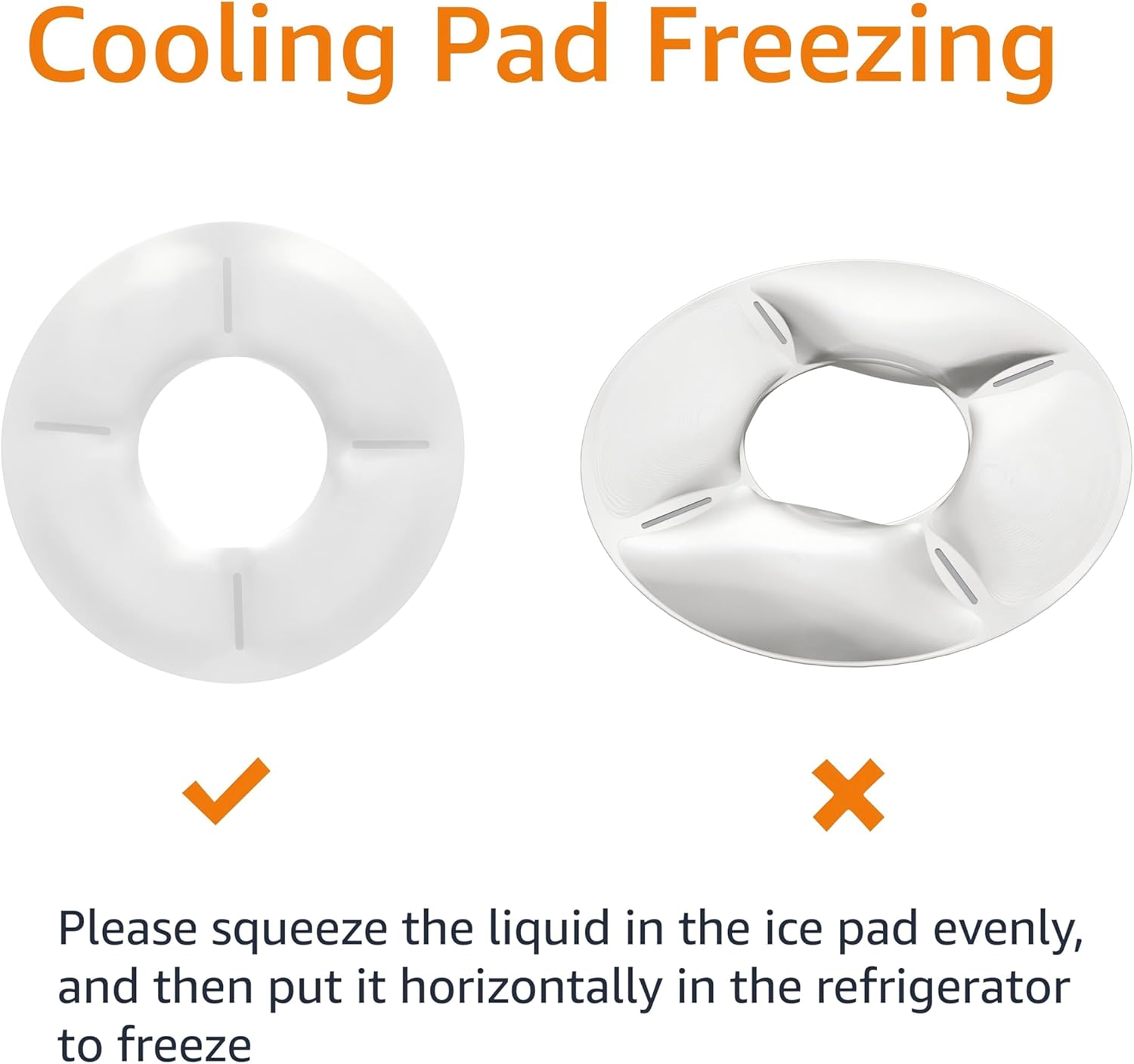
Figure 3: Product dimensions for the Amazon Basics Automatic Pet Feeder.
5. Pengaturan
5.1 Pemasangan Baterai
- Turn the feeder upside down.
- Temukan penutup ruang baterai.
- Open the cover and insert 3 new AA batteries, ensuring correct polarity (+/-).
- Tutup penutup ruang baterai dengan rapat.

Gambar 4: Bawah view of the feeder with the battery compartment indicated.
5.2 Cooling Pack Preparation
For wet food or to keep dry food fresh longer, use the included cooling packs:
- Place the cooling packs horizontally in a freezer until completely frozen.
- Remove the food tray from the feeder.
- Place the frozen cooling packs into the designated compartment at the base of the feeder.
- Reinsert the food tray.

Figure 5: Proper method for freezing the cooling pack.
5.3 Filling Food Trays
- Buka penutup atas tempat pakan.
- Fill each of the 6 compartments of the food tray with the desired amount of dry pet food or treats.
- Tutup penutup atas dengan rapat.
6. Petunjuk Pengoperasian
The feeder allows you to program up to 6 meals per day. The tray will rotate to expose the next meal at the scheduled time.
6.1 Mengatur Waktu Saat Ini
- Press and hold the 'SET' button until the hour digits on the LCD display start flashing.
- Use the 'UP' or 'DOWN' arrow buttons to adjust the hour.
- Press 'SET' again to move to the minute digits, then use 'UP' or 'DOWN' to adjust the minutes.
- Press 'SET' one more time to confirm and save the current time.
6.2 Programming Feeding Schedules
You can program up to 6 meal times. Each meal corresponds to one compartment of the food tray.
- After setting the current time, press 'SET' to enter the first meal setting (P1). The hour digits for P1 will flash.
- Use 'UP' or 'DOWN' to set the desired hour for the first meal.
- Press 'SET' to move to the minute digits, then use 'UP' or 'DOWN' to adjust the minutes.
- Press 'SET' to confirm P1 and move to the next meal setting (P2).
- Repeat steps 2-4 for up to 6 meals (P1-P6). If you do not wish to set all 6 meals, simply press 'SET' to skip to the next program or exit programming mode.
- After setting all desired meals, press 'SET' until the display returns to the current time. The feeder is now programmed.
6.3 Pemberian Makanan Secara Manual
To dispense a meal immediately, press the 'MANUAL' button. The tray will rotate to the next available compartment.

Figure 6: A pet enjoying a meal from the automatic feeder.
7. Pemeliharaan
7.1 Pembersihan
The food tray is dishwasher safe for easy cleaning. The main unit should be wiped clean with a damp kain. Jangan merendam unit utama dalam air.
- Remove the top lid and food tray.
- Wash the food tray in the dishwasher or by hand with warm, soapy water.
- Bersihkan unit utama dengan iklanamp cloth, ensuring no water enters the battery compartment or control panel.
- Biarkan semua bagian benar-benar kering sebelum dipasang kembali.
7.2 Penggantian Baterai
When the battery indicator on the LCD display shows low power, replace the batteries promptly. To retain your settings, replace all 3 AA batteries within 1 minute.
8. Penyelesaian masalah
| Masalah | Kemungkinan Penyebab | Larutan |
|---|---|---|
| Feeder does not turn on. | Baterai mati atau tidak terpasang dengan benar. | Ganti baterai dengan yang baru, pastikan polaritasnya benar. |
| Feeder does not dispense food at scheduled time. | Incorrect time or schedule settings; low batteries. | Verify current time and feeding schedules. Replace batteries if low. |
| Tray does not rotate smoothly. | Food debris obstructing mechanism; tray not properly seated. | Clean the feeder thoroughly, especially around the central mechanism. Ensure the tray is correctly aligned. |
| Pet is able to access food prematurely. | Tutup tidak tertutup rapat. | Ensure the top lid is firmly snapped into place after filling. |
9. Spesifikasi
- Model: DE116471
- Merek: Dasar-Dasar Amazon
- Bahan: Polietilen Tereftalat
- Warna: Putih
- Ukuran: 31.5 x 31.5 x 7.59 cm (12.4 x 12.4 x 3.0 inci)
- Berat: 640 gram
- Kekuatan: 3 x baterai AA (tidak termasuk)
- Pabrikan: Bahasa Indonesia: Amazon.com
- Negara Asal: Cina
10. Garansi dan Dukungan
This Amazon Basics product is backed by a limited warranty. For specific warranty details, please refer to the warranty information provided at the time of purchase or visit the Amazon Basics weblokasi.
For customer support, troubleshooting assistance, or to inquire about replacement parts, please contact Amazon customer service through your Amazon account or the Amazon Basics support page.


