1. Pendahuluan
The HIKMICRO ECO-V Handheld Thermography Camera is a versatile thermal imaging device designed for various professional applications. It offers thermal, bi-spectrum image fusion, and visible light modes to meet diverse business needs. This manual provides essential information for the safe and effective operation of your ECO-V camera.
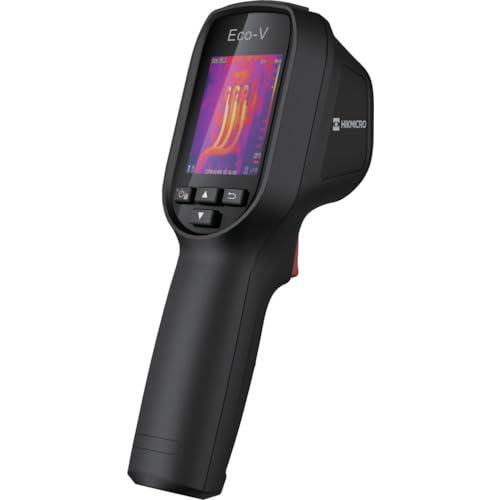
Figure 1: HIKMICRO ECO-V Handheld Thermography Camera
2. Informasi Keselamatan
Harap baca dan pahami semua peringatan dan petunjuk keselamatan sebelum menggunakan produk ini. Kegagalan mengikuti petunjuk ini dapat mengakibatkan sengatan listrik, kebakaran, atau cedera serius.
Tindakan pencegahan keselamatan umum
- Jangan mengoperasikan perangkat di lingkungan yang mudah meledak, seperti di dekat cairan, gas, atau debu yang mudah terbakar.
- Jauhkan perangkat dari air dan cairan lainnya.
- Jangan mencoba membuka atau memodifikasi perangkat. Serahkan semua servis kepada teknisi yang berkualifikasi.
- Use only HIKMICRO-approved accessories.
- Avoid direct exposure of the thermal lens to strong light sources (e.g., sun, laser) as this may damage the detector.
Keamanan Baterai
- The device contains a built-in Lithium-ion battery. Do not expose the battery to excessive heat, direct sunlight, or fire.
- Jangan menusuk, membuka, atau membongkar baterai.
- Charge the battery only with the provided USB cable and a compatible power adapter.
- Buang baterai sesuai dengan peraturan setempat.
3. Isi Paket
The HIKMICRO ECO-V package includes the following items:
- HIKMICRO Handheld Thermography Camera ECO-V
- Kabel USB Tipe-C
- Panduan Memulai Cepat (tidak disebutkan secara eksplisit tetapi standar)
- Calibration Certificate (not explicitly mentioned but standard)
Video 3.1: Unboxing the HIKMICRO M-Series (similar to ECO-V, showing typical package contents and device appearance).
4. Perangkat Berakhirview
Familiarize yourself with the physical components and interface of your HIKMICRO ECO-V camera.
Penampilan dan Antarmuka
The ECO-V features a compact, ergonomic design for comfortable handheld use. Key components include the thermal lens, optical lens, laser indicator, white light, trigger button, navigation buttons, and a 2.4-inch display.
Video 4.1: This video demonstrates the physical appearance and interface of a HIKMICRO M-Series camera, which shares similar design elements and interface components with the ECO-V.
5. Pengaturan
5.1 Mengisi Daya Perangkat
Before initial use, fully charge the device's built-in Lithium-ion battery.
- Hubungkan kabel USB Type-C yang tersedia ke port USB perangkat.
- Connect the other end of the USB cable to a compatible power adapter (5V2A recommended) and plug it into a power outlet.
- The charging indicator will show red during charging and turn green when fully charged.
Video 5.1: This HIKMICRO ECO operation video demonstrates the charging process for the device.
5.2 Daya Hidup/Mati
To power on the device, press and hold the power button for more than 6 seconds. To power off, press and hold the power button again until the device shuts down.
Video 5.2: This HIKMICRO ECO operation video demonstrates how to power on the device.
6. Petunjuk Pengoperasian
This section covers the basic and advanced operational features of your ECO-V camera.
6.1 Image Capture and Display
To capture a thermal image, aim the camera at the target and press the trigger button. The captured image will be saved to the internal EMMC storage. To view saved images, navigate to the 'Albums' section in the menu.
Video 6.1: This HIKMICRO ECO operation video demonstrates image capture and viewing saved snapshots.
6.2 Alat Ukur
The ECO-V provides various measurement tools to analyze thermal images:
- Hot Spot: Automatically identifies and displays the highest temperature point.
- Titik Dingin: Automatically identifies and displays the lowest temperature point.
- Tempat Tengah: Menampilkan suhu di tengah layar.
Video 6.2: This HIKMICRO ECO operation video demonstrates the use of measurement tools like hot, cold, and center spots.
6.3 Peningkatan Citra SuperIR
SuperIR technology enhances the thermal image resolution, providing more detail for analysis. You can enable or disable this feature in the settings menu.
Video 6.3: This HIKMICRO ECO operation video demonstrates how to enable and use the SuperIR image enhancement feature.
6.4 Mode Gambar
The ECO-V supports multiple image modes for different inspection needs:
- Panas: Displays only the thermal image.
- Fusi: Blends the thermal and visible light images for enhanced detail.
- PIP (Gambar-dalam-Gambar): Overlays a smaller thermal image on a visible light image.
- Optik: Displays only the visible light image.
Video 6.4: This HIKMICRO B10S product video demonstrates switching between different image modes, including Thermal, Fusion, PIP, and Optical.
6.5 Parallax Correction
When using fusion modes, adjust the parallax correction based on the distance to the target to ensure accurate alignment between thermal and visible images.
Video 6.5: This HIKMICRO B10S product video demonstrates how to adjust parallax correction for accurate image fusion.
6.6 Palette Adjustment
Select from various color palettes (e.g., White Hot, Black Hot, Rainbow, Ironbow) to visualize temperature differences more effectively. This can be adjusted in the settings menu.
Video 6.6: This HIKMICRO B10S product video demonstrates how to adjust color palettes.
6.7 Emissivity and Distance Settings
For accurate temperature measurements, it is crucial to set the correct emissivity value for the target material and the distance to the target. Refer to the general emissivity reference table in the specifications section.
Video 6.7: This HIKMICRO ECO operation video demonstrates setting emissivity and distance for accurate temperature readings.
6.8 Penunjuk Laser
The built-in laser pointer helps to precisely identify the measurement target. It can be enabled or disabled in the settings menu.
Video 6.8: This HIKMICRO ECO operation video demonstrates how to enable and use the laser pointer.
6.9 Alarm Suhu Tinggi
Set a high temperature alarm threshold to be notified when temperatures exceed a predefined limit. This feature is useful for identifying potential overheating issues.
Video 6.9: This HIKMICRO B10S product video demonstrates how to set a high temperature alarm.
6.10 Hotspot Connection
The ECO-V can connect to a mobile device via Wi-Fi hotspot for live viewing and data transfer. Enable the Wi-Fi hotspot function in the device settings and connect your mobile device.
Video 6.10: This HIKMICRO M-Series video demonstrates how to establish a hotspot connection with a mobile device.
6.11 HIKMIKRO Viewer App Connection
Unduh HIKMICRO Viewer app on your mobile device to access live view, manage images and videos, and generate reports. Connect the device to your phone via Wi-Fi.
Video 6.11: This HIKMICRO Pocket series video demonstrates connecting the device to the HIKMICRO Viewer app for various functions.
7. Pemeliharaan
7.1 Pembersihan
- Usap badan perangkat dengan kain lembut,amp kain. Jangan gunakan pembersih atau pelarut yang bersifat abrasif.
- Gently clean the lenses with a lens cleaning cloth. Avoid touching the lens surface with bare hands.
7.2 Penyimpanan
- Simpan perangkat di tempat yang sejuk dan kering, jauhkan dari sinar matahari langsung dan suhu ekstrem.
- Jika disimpan dalam jangka waktu lama, pastikan baterai terisi sebagian (sekitar 50%) dan isi ulang setiap beberapa bulan untuk menjaga kesehatan baterai.
8. Penyelesaian masalah
If you encounter issues with your HIKMICRO ECO-V, refer to the following common problems and solutions:
| Masalah | Kemungkinan Penyebab | Larutan |
|---|---|---|
| Perangkat tidak menyala | Baterai lemah; Kerusakan perangkat | Charge the battery; Contact support |
| Pembacaan suhu yang tidak akurat | Incorrect emissivity/distance settings; Dirty lens | Adjust emissivity/distance; Clean the lens |
| Cannot connect to Wi-Fi hotspot | Incorrect password; Hotspot not enabled | Verify password; Enable hotspot in settings |
9. Spesifikasi
Detailed technical specifications for the HIKMICRO ECO-V camera:
| Fitur | Spesifikasi |
|---|---|
| Model | ECO-V |
| Rentang Suhu Pengukuran | -20°C hingga 550°C |
| Minimum Temperature Display | 0.1 derajat celcius |
| Bidang View (FOV) | Sudut 50° × 50° |
| Resolusi Spasial (IFOV) | 8.89 juta rad |
| Kisaran Suhu Operasional | -10°C hingga 50°C |
| Kisaran Suhu Penyimpanan | -40°C hingga 70°C |
| Ukuran Layar | 2.4 inci |
| Sumber Daya | Baterai Lithium-ion bawaan |
| Waktu Pengoperasian Baterai | 8 jam |
| Wifi gratis | Tidak tersedia |
| Tingkat Perlindungan | Tingkat IP54 |
| Antarmuka | USB Tipe-C |
| Nada Piksel | 12μm |
| Measuring Wavelength | 7.5-14μm |
| bersih | < 40 mK (@ 25°C, F#=1.0) |
| Panjang Fokus | 1.35 mm |
| Bukaan | F1.0 |
| Jarak Fokus Minimum | 0.1m (0.33 kaki) |
| Kecepatan Bingkai | frekuensi 25Hz |
| Sistem Fokus | Bebas fokus |
| Media Rekaman | EMMC (4GB) |
| Kapasitas Penyimpanan Gambar | 30,000 gambar |
| Gambar File Format | BMP (includes measurement data) |
| Resolusi Gambar Termal | 96×96 (9,216 pixels) |
| Visible Image Resolution | Ukuran 640×480 |
| Ketepatan | ±2°C or ±2% (whichever is greater), when ambient temperature is 15°C to 35°C and target temperature is 0°C or above. |
| Bahan | Polikarbonat, resin ABS |
| Berat | 360 gram |
General Emissivity Reference
| Bahan | Emisivitas |
|---|---|
| Kulit Manusia | 0.98 |
| Papan Sirkuit Cetak | 0.91 |
| Beton Semen | 0.95 |
| Keramik | 0.92 |
| Karet | 0.95 |
| Cat | 0.93 |
| Kayu | 0.85 |
| Bata | 0.96 |
| Pasir | 0.90 |
| Tanah | 0.92 |
| Kapas | 0.98 |
| Kardus | 0.90 |
| Buku Putih | 0.96 |
| Air | 0.96 |
10. Garansi dan Dukungan
HIKMICRO products are covered by a limited warranty. For detailed warranty terms and conditions, please refer to the official HIKMICRO websitus atau hubungi distributor lokal Anda.
Dukungan Pelanggan
If you require technical assistance, troubleshooting, or have questions about your ECO-V camera, please contact HIKMICRO customer support through their official websitus atau informasi kontak yang tersedia dalam kemasan produk Anda.


