1. Pendahuluan
The Metzler VDM10 2.0 Horizon is an advanced modular video intercom system designed for both single and multi-family buildings, supporting up to 500 units. It integrates a high-resolution 4-inch IPS display with a Full HD camera, offering secure and convenient access control through various methods.
Fitur utama meliputi:
- High-Resolution IPS Display: A 4-inch IPS touchscreen display (IP65, IK08 rated) with an intuitive user interface, activating automatically upon approach.
- Berbagai Metode Akses: Supports door opening via RFID cards, customizable PIN codes, and a dedicated smartphone application.
- Full HD Camera with Night Vision: Features a 2 MP ultra-wide-angle camera for clear video, enhanced with infrared night vision for low-light conditions.
- Integrasi Aplikasi Ponsel Cerdas: Provides live video streaming and remote door opening capabilities through a free smartphone app, developed in collaboration with Hikvision. No subscription fees for core functionalities, updates, or data storage.
2. Pengaturan dan Instalasi
Proper installation is crucial for the optimal performance and security of your Metzler VDM10 2.0 system. It is highly recommended that installation be performed by a qualified professional.
2.1 Komponen Berakhirview
The system typically consists of an outdoor station (the video intercom unit) and optional indoor monitor units. Ensure all components are present before beginning installation.
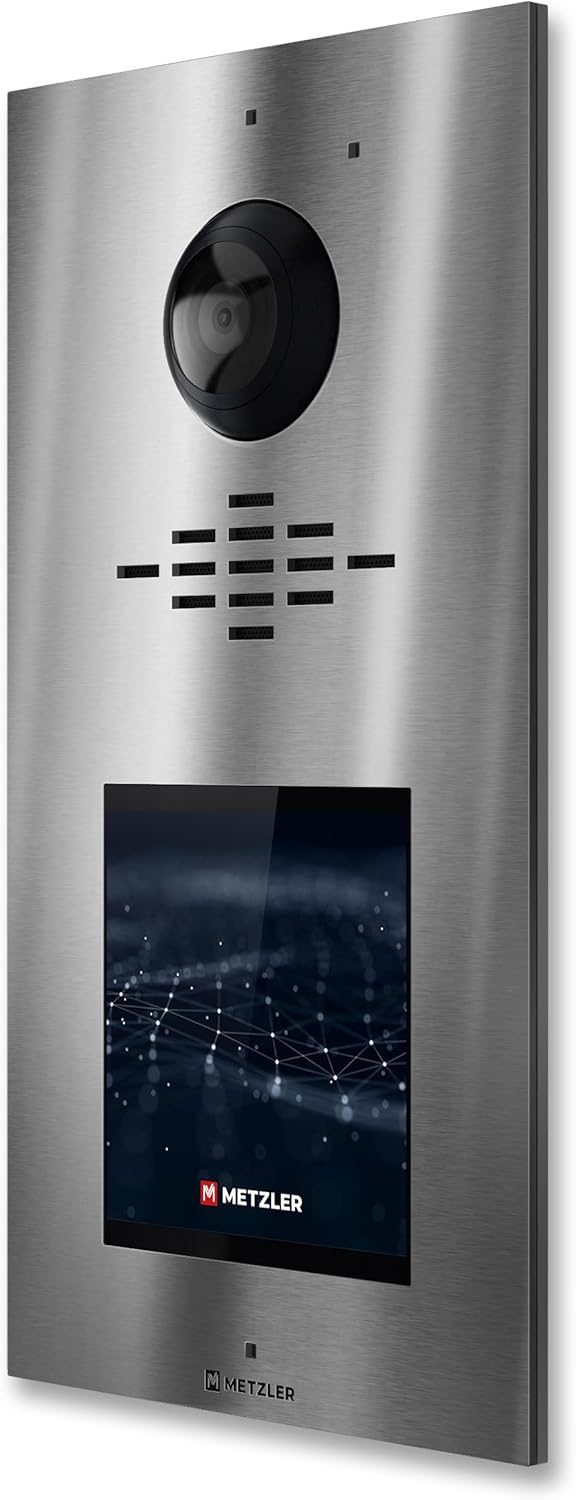
Gambar 1: Depan view of the Metzler VDM10 2.0 outdoor station. This image displays the stainless steel finish, the central camera lens, the speaker and microphone grilles, and the integrated 4-inch IPS touchscreen display at the bottom.
2.2 Pertimbangan Pemasangan
The outdoor station should be mounted at an appropriate height to ensure the camera captures visitors effectively. Consider the typical height of adults and children who will use the intercom.
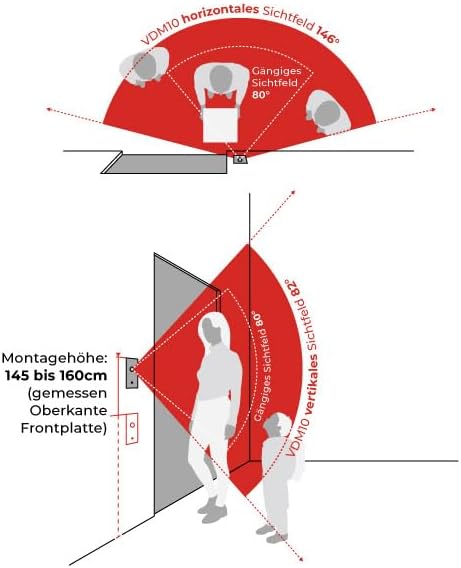
Figure 2: Mounting height and camera field of view. This diagram illustrates the recommended installation height for the VDM10, typically between 145 cm and 160 cm (measured to the top edge of the front plate), and demonstrates the wide 146° horizontal and 82° vertical camera viewsudut ing.
Ensure the mounting location is secure and protected from direct heavy rain or extreme weather conditions, even though the unit is IP65 rated.
2.3 Wiring (2-Wire System)
The VDM10 2.0 operates as a 2-wire system, simplifying installation. Connect the power and data lines according to the wiring diagram provided in the full installation guide (not included here). Proper polarity and secure connections are essential.
- Catu Daya: Connect to a compatible power source as specified in the detailed electrical requirements.
- Koneksi data: Establish communication with indoor monitors and network components.
- Door Lock Integration: Connect to your electronic door lock system for remote access control.
After physical installation, configure the system via the touchscreen interface and the smartphone app. This includes setting up user accounts, RFID cards, PIN codes, and network connectivity.
3. Petunjuk Pengoperasian
The Metzler VDM10 2.0 offers multiple ways to interact with visitors and manage access.
3.1 Visitor Interaction
- Memulai Panggilan: Visitors can use the intuitive touchscreen display to select a recipient (e.g., apartment number) and initiate a video call. The display activates automatically when a person approaches.
- Komunikasi Dua Arah: Once a call is established, residents can communicate with the visitor via an indoor monitor or the smartphone app.
- ViewMenonton Video Langsung: The 2 MP HD camera provides a live video feed to the indoor monitor and smartphone app, allowing residents to see who is at the door.
3.2 Kontrol Akses
The system supports various secure methods for granting access:
- Kartu RFID: Present a pre-programmed RFID card to the integrated reader on the outdoor station to unlock the door.
- Kode PIN: Enter a unique PIN code on the touchscreen keypad. PIN codes can be assigned individually for different users or access points.
- Aplikasi Ponsel Cerdas: Use the Metzler smartphone application to remotely unlock the door from anywhere with an internet connection.
- Monitor Dalam Ruangan: Unlock the door directly from an indoor monitor unit during a call or independently.
3.3 Penggunaan Aplikasi Smartphone
Download the official Metzler app from your device's app store. Follow the in-app instructions to pair your smartphone with the VDM10 2.0 system. The app allows you to:
- Receive video calls from the intercom.
- View umpan video langsung dari kamera.
- Remotely unlock the door.
- Manage system settings and user access (for administrators).

Figure 3: Metzler VDM10 2.0 installed. This image shows the video intercom unit mounted on a wall, highlighting its modern stainless steel aesthetic and how it integrates into a building's exterior.
4. Pemeliharaan
Regular maintenance ensures the longevity and optimal performance of your Metzler VDM10 2.0 system.
4.1 Pembersihan
- Luar: Wipe the stainless steel surface and display with a soft, damp cloth. Avoid abrasive cleaners or solvents that could damage the finish or screen.
- Lensa Kamera: Gently clean the camera lens with a microfiber cloth to ensure clear video quality. Do not use harsh chemicals.
4.2 Pembaruan Perangkat Lunak
The system receives free software updates. Ensure your system is connected to the internet to receive these updates automatically or manually check for them via the system settings or smartphone app. Updates often include performance improvements, new features, and security enhancements.
4.3 Pemeriksaan Reguler
- Periodically check all wiring connections for security and integrity.
- Test the intercom's calling, video, and door-opening functions regularly.
- Ensure the RFID reader and PIN pad are responsive.
5. Penyelesaian masalah
If you encounter issues with your Metzler VDM10 2.0, refer to the following common troubleshooting steps:
5.1 No Power / System Unresponsive
- Periksa Catu Daya: Ensure the system is receiving power and all power connections are secure.
- Pemutus Sirkuit: Verify that the circuit breaker supplying power to the intercom has not tripped.
5.2 Tidak Ada Video atau Kualitas Video Buruk
- Clean Camera Lens: Gently clean the camera lens as described in the Maintenance section.
- Periksa Koneksi: Ensure all video signal cables are securely connected.
- Konektivitas Jaringan: For app-based viewing, verify your internet connection and the intercom's network status.
5.3 Door Not Unlocking
- Check Door Lock Wiring: Ensure the wiring to the electronic door lock is correct and secure.
- Valid Credentials: Verify that the RFID card or PIN code used is valid and correctly programmed.
- Koneksi Aplikasi: If using the app, confirm it is connected to the intercom system.
5.4 Cannot Connect to Smartphone App
- Koneksi Internet: Ensure both your smartphone and the intercom system have a stable internet connection.
- Versi Aplikasi: Pastikan aplikasi Anda diperbarui ke versi terbaru.
- Pasangkan Kembali Perangkat: Try removing and re-pairing the intercom system within the app settings.
For persistent issues, consult the full product manual or contact Metzler customer support.
6. Spesifikasi
| Fitur | Detil |
|---|---|
| Merek | Metzler |
| Pabrikan | Metzler GmbH |
| Model | VDM10 2.0 Horizon |
| Warna | Baja tahan karat |
| Pengkabelan | Sistem 2 Kabel |
| Menampilkan | Layar Sentuh IPS 4 inci |
| Kamera | 2 MP Full HD, Ultra-wide-angle, Infrared Night Vision |
| Kontrol Akses | RFID Reader, PIN Code, Smartphone App |
| Peringkat Daya Tahan | IP65, IK08 |
| Unit yang Didukung | 1 sampai 500 unit |
7. Garansi dan Dukungan
For warranty information, please refer to the documentation included with your purchase or visit the official Metzler website. Metzler GmbH provides customer support for their products.
If you require technical assistance or have questions regarding your VDM10 2.0 system, please contact Metzler customer service through their official channels. Ensure you have your product model and purchase details available when contacting support.


