1. Pendahuluan dan Informasi Keselamatan
Terima kasih sudah membeliasing the SLuB SK20 80000mAh Mobile Power Bank. This device is designed to provide reliable portable power for your electronic devices. Please read this manual carefully before use to ensure safe and optimal performance.
Petunjuk Keselamatan Penting
- Jangan biarkan power bank terkena suhu ekstrem (di atas 60°C/140°F atau di bawah 0°C/32°F), sinar matahari langsung, atau api.
- Avoid dropping, disassembling, or attempting to repair the device yourself. This may cause damage or injury.
- Jauhkan power bank dari air, kelembapan, dan bahan korosif.
- Gunakan hanya kabel dan adaptor pengisian daya yang bersertifikat.
- Jauhkan dari jangkauan anak-anak.
- Buang power bank sesuai dengan peraturan setempat. Jangan membuangnya bersama sampah rumah tangga.
The SLuB SK20 is equipped with multiple protection systems, including overcharge, over-discharge, overheating, and short-circuit protection, to ensure safe operation.
2. Isi Paket
Verifikasi bahwa semua item ada dalam paket Anda:
- SLuB SK20 Mobile Power Bank
- Kabel Data USB (Tipe-C)
- Panduan Pengguna

3. Fitur Produk
- Kapasitas Tinggi 80000mAh: Provides multiple full charges for most smartphones and tablets, ideal for extended use or emergencies.
- Simultaneous 3-Device Charging: Equipped with multiple output ports to charge up to three devices concurrently.
- Pengisian Cepat 22.5W: Mendukung pengisian daya cepat untuk perangkat yang kompatibel, sehingga secara signifikan mengurangi waktu pengisian.
- Layar LCD Jernih: An easy-to-read digital screen shows the remaining battery percentage at a glance.
- Lampu LED Terintegrasi: A high-brightness LED light provides illumination for dark environments, useful for outdoor activities or emergencies.
- Beberapa Perlindungan Keamanan: Built-in safeguards against overcharge, over-discharge, overheating, and short circuits.


4. Pengaturan
Pengisian Awal Power Bank
Before first use, fully charge your SLuB SK20 Mobile Power Bank. This ensures optimal battery performance and longevity.
- Connect the provided USB Type-C cable to the Type-C input port on the power bank.
- Connect the other end of the cable to a compatible USB wall adapter (not included). For fast charging, an 18W or higher PD/QC compatible adapter is recommended.
- The LCD display will show the charging progress. The power bank is fully charged when the display shows 100%.

5. Petunjuk Pengoperasian
Mengisi Daya Perangkat Eksternal
The SLuB SK20 offers multiple output ports for charging various devices.
- Identify the appropriate charging cable for your device.
- Hubungkan salah satu ujung kabel pengisi daya ke perangkat Anda.
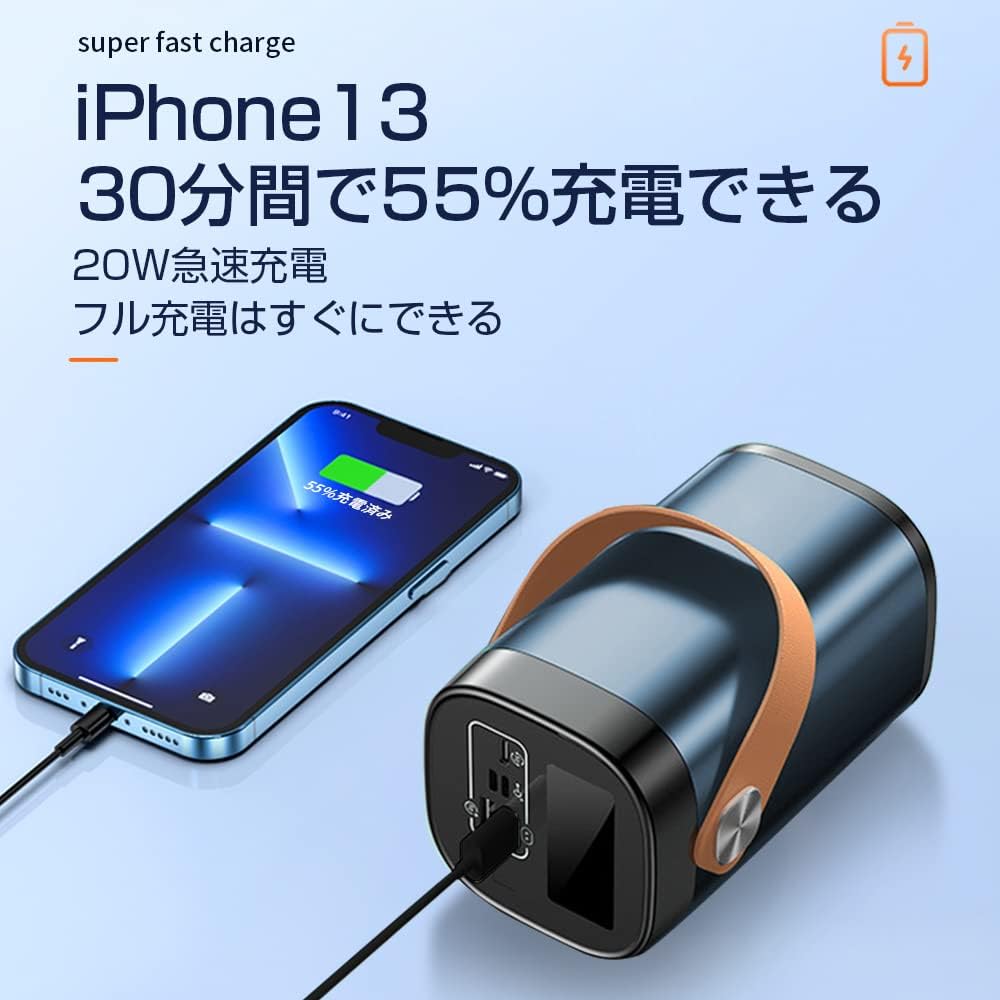
- Connect the other end of the cable to one of the output ports on the power bank (USB-A or Type-C).
- The power bank will automatically begin charging your device. The LCD display will show the power bank's remaining battery level.

Menggunakan Lampu LED
To activate the LED light, press and hold the power button for a few seconds. Repeat the action to turn it off.
Pelabuhan Overview

The power bank features the following ports:
- Input Ports (for charging the power bank):
- Masukan Mikro USB
- Masukan Petir
- Type-C Input (also functions as an output)
- Output Ports (for charging devices):
- 22.5W USB Output (x2)
- Type-C Output (also functions as an input)
6. Pemeliharaan
Proper maintenance ensures the longevity and performance of your power bank.
- Pembersihan: Use a soft, dry cloth to clean the exterior of the power bank. Do not use harsh chemicals or abrasive cleaners.
- Penyimpanan: Simpan power bank di tempat yang sejuk dan kering, jauhkan dari sinar matahari langsung dan suhu ekstrem. Jika disimpan dalam jangka waktu lama, isi daya power bank hingga sekitar 50-70% setiap 3 bulan untuk menjaga kesehatan baterai.
- Hindari Pengosongan Daya Berlebih: Do not allow the power bank to completely drain its battery frequently, as this can reduce its lifespan.
7. Penyelesaian masalah
If you encounter issues with your SLuB SK20 Mobile Power Bank, refer to the following common problems and solutions:
| Masalah | Kemungkinan Penyebab | Larutan |
|---|---|---|
| Bank daya tidak mengisi daya | Masalah kabel atau adaptor; power bank terisi penuh; port rusak. | Check cable and adapter connections. Try a different cable or adapter. Ensure the power bank is not already at 100%. Try a different input port. |
| Perangkat tidak mengisi daya dari bank daya | Power bank is empty; cable issue; device issue; incompatible device. | Recharge the power bank. Try a different charging cable. Ensure your device is functioning correctly. Verify device compatibility. |
| Pengisian daya lambat | Non-fast charging cable/adapter; device not supporting fast charge; multiple devices charging. | Use a fast-charging compatible cable and adapter. Ensure your device supports fast charging. Charging multiple devices simultaneously may reduce individual charging speeds. |
| Lampu LED tidak berfungsi | Not activated correctly; malfunction. | Press and hold the power button for a few seconds to activate. If it still doesn't work, contact customer support. |
If the problem persists after trying these solutions, please contact SLuB customer service for further assistance.
8. Spesifikasi
| Fitur | Detil |
|---|---|
| Nomor Model | SK20 |
| Kapasitas Baterai | 80000 mAh |
| Masukan (Tipe-C) | 22.5W (Maks) |
| Keluaran (Tipe-C) | 22.5W (Maks) |
| Keluaran (USB-A) | 22.5W (Maks) |
| Fitur Khusus | LED Indicator Light, Digital Display, LED Flashlight |
| Warna | Biru |
| Dimensi Produk | 14.5 cm (Panjang) x 8.5 cm (Lebar) x 8.5 cm (Tebal) |
| Perangkat yang Kompatibel | Smartphones, Tablets, Smartwatches, Headphones |
9. Garansi dan Dukungan
SLuB provides customer support for its products. In case of initial defects upon product arrival or shipping errors, we offer prompt exchange services.
If you have any questions, concerns, or require assistance with your SLuB SK20 Mobile Power Bank, please do not hesitate to contact our customer service team. Please refer to the contact information provided on the product packaging or the official SLuB weblokasi.