Panduan Pengguna Proyektor Mini BlitzWolf BW-VT2
Your comprehensive guide to setting up, operating, and maintaining your BlitzWolf BW-VT2 Mini Projector.
1. Produk Lebihview
1.1 Isi Paket
Harap verifikasi bahwa semua item ada dalam paket Anda:
- BlitzWolf BW-VT2 Mini Projector
- Kontrol Jarak Jauh
- Adaptor Daya
- Kabel HDMI
- User Manual (dokumen ini)
1.2 Tata Letak Perangkat
Familiarize yourself with the various parts and ports of your projector.
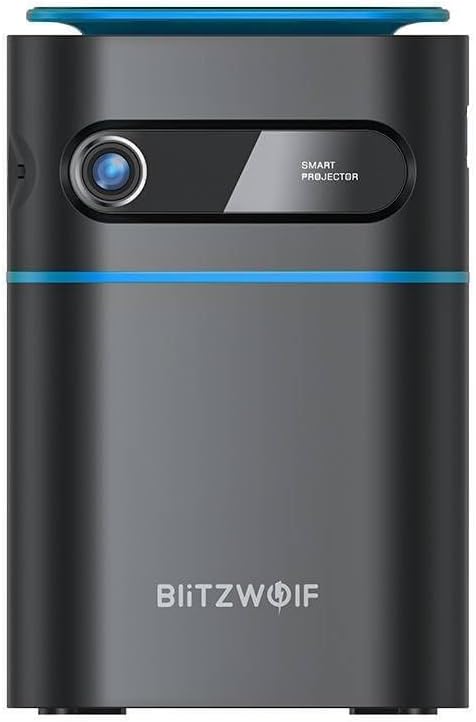
Gambar 1.1: Depan View. This image displays the front of the BlitzWolf BW-VT2 Mini Projector, highlighting the projection lens and the 'SMART PROJECTOR' branding.

Figure 1.2: Projector with Remote Control. This image shows the BlitzWolf BW-VT2 Mini Projector alongside its dedicated remote control, illustrating the compact size of both devices.
Gambar 1.3: Belakang View. The rear of the projector is shown, featuring ventilation grilles and various input/output ports.

Gambar 1.4: Sisi View. This image highlights the side of the projector where additional connectivity options such as USB and HDMI ports are located.

Gambar 1.5: Atas View. The top surface of the projector is visible, featuring the integrated touch control panel for direct interaction.
1.3 Port dan Kontrol
- Port HDMI: Connect to laptops, game consoles, Blu-ray players, etc.
- Port USB: Hubungkan flash drive USB untuk pemutaran media.
- Audio Out (3.5mm) Port: Hubungkan speaker eksternal atau headphone.
- Pelabuhan DC IN: Hubungkan adaptor daya.
- Tombol Daya: Menghidupkan/mematikan proyektor.
- Roda Fokus: Menyesuaikan kejernihan gambar.
- Panel Kontrol Sentuh: Navigate menus and control playback directly on the device.
2. Panduan Pengaturan
2.1 Menghidupkan
- Hubungkan adaptor daya ke port DC IN pada proyektor.
- Hubungkan adaptor daya ke stopkontak di dinding.
- Press and hold the Power Button on the projector or the remote control until the device powers on.
2.2 Penempatan Awal
Untuk optimal viewBerdasarkan pengalaman Anda, pertimbangkan hal berikut:
- Letakkan proyektor di atas permukaan yang stabil dan rata.
- Ensure there is adequate ventilation around the projector to prevent overheating.
- Position the projector perpendicular to the projection surface (wall or screen) for a rectangular image.
- Adjust the distance to achieve your desired screen size.
2.3 Penyesuaian Fokus
After powering on, adjust the focus to ensure a clear image:
- Rotate the focus wheel located near the lens until the projected image appears sharp and clear.
2.4 Pengaturan Kontrol Jarak Jauh
Insert batteries into the remote control before first use:
- Buka penutup kompartemen baterai di bagian belakang remote control.
- Masukkan dua baterai AAA (tidak termasuk), pastikan polaritasnya benar (+/-).
- Tutup penutup ruang baterai.
3. Petunjuk Pengoperasian
3.1 Navigasi
You can navigate the projector's interface using either the remote control or the touch control panel on top of the device.
- Kontrol Jarak Jauh: Use the directional buttons (up, down, left, right) to move through menus and the 'OK' button to select.
- Panel Kontrol Sentuh: Swipe and tap on the touch-sensitive surface to navigate.
3.2 Perangkat Penghubung
The BW-VT2 supports various input sources:
- Masukan HDMI: Connect your laptop, game console, or other HDMI-enabled devices using an HDMI cable. Select the HDMI input source from the projector's menu.
- Input USB: Insert a USB flash drive into the USB port. The projector's media player will typically detect the drive automatically, allowing you to browse and play supported media file(video, foto, musik).
- Konektivitas Wi-Fi: Navigate to the 'Settings' menu, then 'Network' or 'Wi-Fi'. Select your Wi-Fi network and enter the password to connect the projector to the internet. This enables access to online streaming apps and updates.
3.3 Android OS Features
As an Android-powered projector, the BW-VT2 offers smart functionalities:
- Akses Aplikasi: Download and install various streaming apps (e.g., Netflix, YouTube) directly from the pre-installed app store or by sideloading APKs.
- Pengaturan: Customize display settings, audio output, network configurations, and system preferences through the Android settings menu.
- Pencerminan Layar: Utilize built-in screen mirroring features (e.g., Miracast, AirPlay compatible apps) to project content from your smartphone or tablet wirelessly.
3.4 Keluaran Audio
The projector has built-in speakers, but you can also connect external audio devices:
- Keluaran Audio 3.5mm: Connect headphones or external speakers via the 3.5mm audio jack for enhanced sound.
4. Pemeliharaan
Perawatan yang tepat memastikan umur panjang dan kinerja optimal proyektor Anda.
4.1 Pembersihan Lensa
To maintain clear image quality, clean the projector lens regularly:
- Gunakan kain lembut dan tidak berbulu yang dirancang khusus untuk lensa optik.
- Gently wipe the lens in a circular motion.
- Avoid using abrasive cleaners or excessive force, which can scratch the lens.
4.2 Ventilasi
Ensure proper airflow to prevent overheating:
- Do not block the ventilation vents on the projector.
- Operasikan proyektor di area yang berventilasi baik.
- Periodically clean dust from the vents using a soft brush or compressed air.
4.3 Penyimpanan
When not in use, store your projector properly:
- Simpan proyektor di tempat yang sejuk dan kering, jauhkan dari sinar matahari langsung dan suhu ekstrem.
- Use the original packaging or a protective case to prevent dust accumulation and physical damage.
5. Penyelesaian masalah
Lihat bagian ini untuk masalah umum dan solusinya.
| Masalah | Kemungkinan Penyebab | Larutan |
|---|---|---|
| Proyektor tidak menyala. | Tidak ada koneksi daya; adaptor daya rusak. | Pastikan adaptor daya terhubung dengan aman ke proyektor dan stopkontak. Coba stopkontak lain. |
| Tidak ada gambar yang diproyeksikan. | Incorrect input source selected; loose HDMI/USB cable. | Verify the correct input source is selected in the menu. Check cable connections. |
| Gambarnya buram. | Focus not adjusted; projector too close/far. | Rotate the focus wheel until the image is clear. Adjust projection distance if necessary. |
| Tidak ada suara. | Volume too low; external audio device not connected properly. | Increase volume. Check connections to external speakers/headphones. Ensure audio output is set correctly in settings. |
| Masalah koneksi Wi-Fi. | Kata sandi salah; masalah router; gangguan sinyal. | Re-enter Wi-Fi password. Restart router. Move projector closer to router. |
| Kontrol jarak jauh tidak berfungsi. | Baterai habis; ada halangan; remote belum dipasangkan. | Replace batteries. Ensure no obstruction between remote and projector. |
6. Spesifikasi Teknis
Key specifications of the BlitzWolf BW-VT2 Mini Projector:
| Fitur | Spesifikasi |
|---|---|
| Merek | Serigala Blitz |
| Nomor Model | BW-VT2EU |
| Warna | Hitam |
| Teknologi Konektivitas | HDMI, USB, VGA, Wi-Fi |
| Resolusi Tampilan | 1920x1080 (HD Penuh) |
| Jenis Tampilan | LCD, LED |
| Faktor Bentuk | Portabel |
| Fitur Khusus | Portable, Android OS, Wi-Fi, HDMI, USB, VGA |
| Perangkat yang Kompatibel | Laptops, Smartphones, Game Consoles, Blu-ray Players, Media Players, Wi-Fi enabled devices |
| Penggunaan yang Direkomendasikan | Bioskop Rumah |
7. Garansi dan Dukungan
7.1 Garansi Pabrik
The BlitzWolf BW-VT2 Mini Projector comes with a Garansi pabrik 2 tahunGaransi ini mencakup cacat material dan pengerjaan dalam penggunaan normal. Harap simpan bukti pembelian Anda untuk klaim garansi.
7.2 Dukungan Pelanggan
If you encounter issues not covered in the troubleshooting section or require further assistance, please contact BlitzWolf customer support. Refer to the product packaging or the official BlitzWolf websitus untuk informasi kontak terkini.


