Perkenalan
Terima kasih sudah membeliasing the BlitzWolf BW-S25 75W Wall Charger. This manual provides important information regarding the setup, operation, maintenance, and troubleshooting of your device. Please read this manual thoroughly before using the product to ensure safe and optimal performance.
Informasi Keselamatan
- Jangan biarkan pengisi daya terkena air, kelembapan, atau suhu ekstrem.
- Hindari menjatuhkan atau membiarkan pengisi daya terkena benturan keras.
- Do not disassemble, modify, or attempt to repair the charger yourself. This will void the warranty and may cause electric shock or fire.
- Jauhkan dari jangkauan anak-anak.
- Pastikan stopkontak listrik voltage is compatible with the charger's input specifications (100-240V AC).
- Cabut pengisi daya saat terjadi badai petir atau saat tidak digunakan dalam waktu lama.
- Gunakan hanya dengan perangkat dan kabel yang kompatibel.
Produk Selesaiview
The BlitzWolf BW-S25 is a powerful 75W wall charger designed to efficiently charge multiple devices simultaneously. It features a versatile port configuration to accommodate various modern electronics.
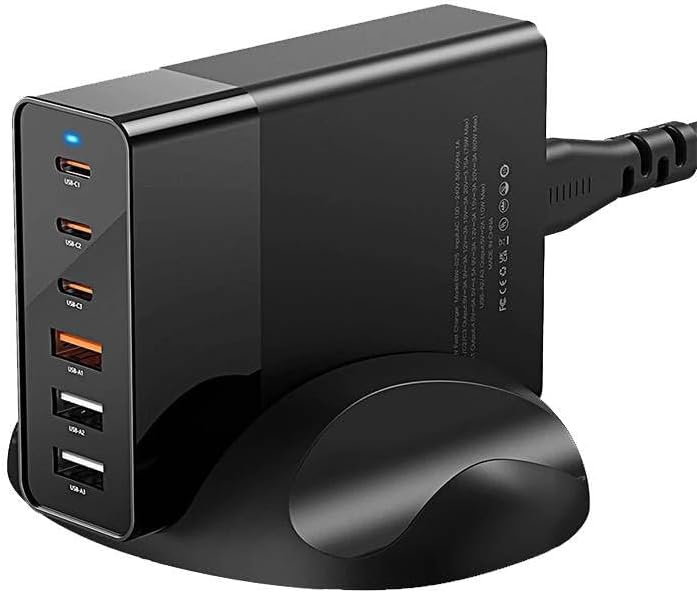
Gambar: Depan view of the BlitzWolf BW-S25 wall charger, clearly showing its three USB-C ports and three standard USB-A ports, along with a blue LED indicator light.
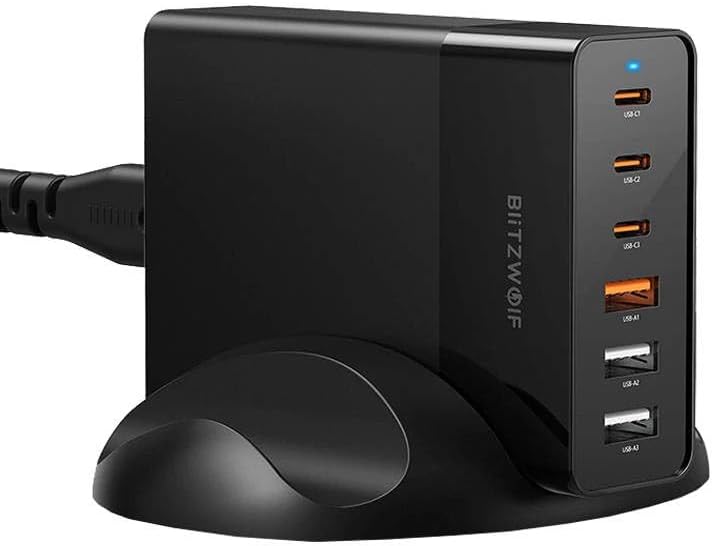
Gambar: Samping view of the BlitzWolf BW-S25 wall charger, highlighting the "BlitzWolf" brand logo vertically printed on its side, confirming its authenticity.
Konfigurasi Port:
- 3 x Port USB-C: For fast charging compatible devices like laptops, tablets, and smartphones.
- 3 x Port USB-A: For charging a wide range of standard USB devices.
Pengaturan
- Membongkar: Carefully remove the BlitzWolf BW-S25 charger from its packaging.
- Hubungkan ke Daya: Plug the charger's integrated power cord into a standard AC wall outlet (100-240V).
- Lampu Indikator: A blue LED indicator light on the charger will illuminate, indicating that the charger is powered on and ready for use.
Petunjuk Pengoperasian
- Hubungkan Perangkat: Use appropriate charging cables to connect your devices to the available USB-C or USB-A ports on the charger.
- Pengisian daya: The charger will automatically detect your device and deliver the optimal charging current up to its maximum output. The total output power is 75W shared across all active ports.
- Beberapa Perangkat: When charging multiple devices, the 75W power output will be intelligently distributed among the connected devices. For optimal fast charging, consider the power requirements of each device.
- Memutuskan: Once your devices are fully charged, disconnect them from the charger.
Catatan: For best performance and safety, always use certified charging cables that are compatible with your devices and the charger.
Pemeliharaan
- Pembersihan: Cabut pengisi daya dari stopkontak sebelum membersihkan. Gunakan kain lembut dan kering untuk menyeka permukaan. Jangan gunakan pembersih cair atau aerosol.
- Penyimpanan: Simpan pengisi daya di tempat yang sejuk dan kering, jauhkan dari sinar matahari langsung dan suhu ekstrem saat tidak digunakan.
- Perawatan Kabel: Hindari menekuk atau menjepit kabel daya secara berlebihan.
Penyelesaian Masalah
| Masalah | Kemungkinan Penyebab | Larutan |
|---|---|---|
| Charger not powering on (no LED light) | No power from outlet; loose connection; faulty charger. | Check if the outlet is working by plugging in another device. Ensure the charger is firmly plugged in. If the issue persists, contact support. |
| Perangkat tidak mengisi daya atau mengisi daya dengan lambat | Faulty cable; incompatible device; device's charging port issue; charger overloaded. | Try a different charging cable. Ensure your device is compatible. Try charging fewer devices simultaneously to reduce load. Clean device's charging port. |
| Pengisi daya terasa hangat saat digunakan | Pengoperasian normal di bawah beban. | It is normal for chargers to generate some heat during operation, especially when charging multiple devices or high-power devices. If it becomes excessively hot or emits smoke/smell, unplug immediately and contact support. |
Spesifikasi
| Merek | Serigala Blitz |
| Model | BW-S25 |
| Output Daya Total | 75 Watt |
| Port USB-C | 3 |
| Port USB-A | 3 |
| Warna | Hitam |
| Masukan Voltage | 100-240V AC |
Garansi dan Dukungan
The BlitzWolf BW-S25 charger comes with a standard manufacturer's warranty. Please refer to the warranty card included in your product packaging for specific terms and conditions. For technical support, troubleshooting assistance, or warranty claims, please contact the retailer or BlitzWolf customer service through their official weblokasi.
Harap simpan bukti pembelian Anda untuk tujuan garansi.


