Perkenalan
This manual provides detailed instructions for the Jennov 5MP PTZ WiFi Outdoor Surveillance Camera, model JS7016. It covers essential information regarding product features, installation procedures, operational guidelines, maintenance tips, and troubleshooting steps to ensure optimal performance and longevity of your device.
Important Note: This 5MP WiFi camera is designed as an additional unit for a Jennov 5MP WLAN Surveillance Camera Set. It cannot operate independently and requires connection to a Jennov NVR (Network Video Recorder) system.

Figure 1: Jennov 5MP PTZ WiFi Outdoor Surveillance Camera (Model JS7016)
Produk Selesaiview
Fitur Utama
- Video Resolusi Tinggi 5MP: Menangkap makanan dengan jelas dan detailtage.
- AI Human Detection & Sound-Light Alarm: Accurately identifies human figures and triggers audible and visual alerts.
- Pelacakan Otomatis: The camera automatically follows detected human movement within its surveillance area.
- 360° Coverage (355° Pan & 90° Tilt): Offers extensive monitoring without blind spots, controllable via smartphone application.
- Tiga Mode Penglihatan Malam: Includes Infrared, Full Color, and Sound-Light activated modes for clear visibility in low light.
- Audio Dua Arah: Mikrofon dan speaker internal untuk komunikasi waktu nyata.
- Perekaman Berkelanjutan 24/7: Ensures constant video capture when connected to a Jennov NVR.
- Easy Setup & Remote Access: Simple installation and remote viewing capabilities via smartphone, tablet, or computer.
- Peringkat Tahan Cuaca IP66: Dirancang untuk penggunaan di luar ruangan, tahan terhadap debu dan air.
Komponen Kamera

Gambar 2: Rinci view of the camera's external components and dimensions.
- Mengurung: Untuk memasang kamera.
- Antena: For WiFi connectivity.
- Kotak Tahan Air: Melindungi komponen internal dari unsur lingkungan.
- LED IR: Lampu inframerah untuk penglihatan malam.
- Lampu LED: For full-color night vision and alarm illumination.
- Lensa Sudut Lebar: Mencakup bidang yang luas view.
- Dual-light Sensor: Mendeteksi cahaya sekitar untuk peralihan mode otomatis.
- Pelabuhan Daya: Untuk menghubungkan adaptor daya.
- Pembicara: Untuk audio dua arah dan alarm yang dapat didengar.
Petunjuk Pengaturan
Daftar Periksa Pra-Instalasi
- Ensure you have a Jennov NVR system to pair this additional camera with.
- Verify stable WiFi coverage at the installation location.
- Gather necessary tools: drill, screwdriver, mounting screws, power outlet.
- Test the camera's functionality and signal strength near the NVR before permanent installation.
Instalasi Fisik
- Pilih Lokasi: Select an outdoor location that provides the desired surveillance coverage and has access to a power outlet. Ensure the camera is mounted securely and is within WiFi range of your Jennov NVR.
- Pasang Braket: Use the provided screws and anchors to securely attach the mounting bracket to the wall or ceiling.
- Pasang Kamera: Secure the camera to the mounted bracket. Adjust the angle for optimal viewing.
- Hubungkan Daya: Plug the camera's power adapter into a waterproof outdoor power outlet.

Figure 3: The camera's IP66 rating ensures durability in various outdoor conditions.
NVR Pairing (Adding the Camera)
Refer to your Jennov NVR system's manual for specific instructions on adding an additional camera. Generally, the process involves:
- Access NVR Settings: Connect a monitor to your Jennov NVR and navigate to the camera management or channel settings.
- Pencarian untuk New Cameras: Select the option to search for new wireless cameras. The NVR will scan for available Jennov cameras in range.
- Tambahkan Kamera: Once the JS7016 camera is detected, select it and follow the on-screen prompts to add it to an available channel.
- Verifikasi Koneksi: Ensure the camera's video feed appears on the NVR monitor.
Petunjuk Pengoperasian
Once the camera is successfully paired with your Jennov NVR, you can manage and view its feed through the NVR interface or the EseeCloud smartphone application.
Terpencil Viewing via EseeCloud App
- Unduh Aplikasi: Download and install the EseeCloud app on your smartphone or tablet.
- Tambahkan NVR: Register an account and add your Jennov NVR system to the app using its device ID or QR code.
- Access Camera Feed: Once the NVR is added, you can view the live feed from your JS7016 camera and control its functions remotely.

Gambar 4: Jarak Jauh viewing on various devices allows monitoring from anywhere.
AI Human Detection & Automatic Tracking
The camera utilizes advanced AI to distinguish human shapes from other moving objects, reducing false alarms. When a human is detected, the camera can automatically track their movement.
- Aktifkan/Nonaktifkan: These features can be enabled or disabled within the NVR settings or EseeCloud app.
- Peringatan: When human detection is triggered, you will receive notifications on your connected devices.

Figure 5: AI Human Detection in action, with app notification.

Figure 6: Custom detection areas can be configured to focus on specific zones.
Mode Penglihatan Malam
The camera offers three distinct night vision modes for various low-light conditions:
- Mode inframerah: Provides black and white video in complete darkness using IR LEDs.
- Mode Warna Penuh: Activates the built-in LED light to provide color video at night.
- Sound-Light Mode: The LED light and audible alarm are triggered upon detection of movement, illuminating the area and deterring intruders.

Figure 7: Illustration of the three night vision modes.
Audio Dua Arah
The integrated microphone and speaker allow for real-time two-way communication. You can speak through the app and hear responses from the camera's location.
- Komunikasi: Use this feature to greet visitors or warn intruders.
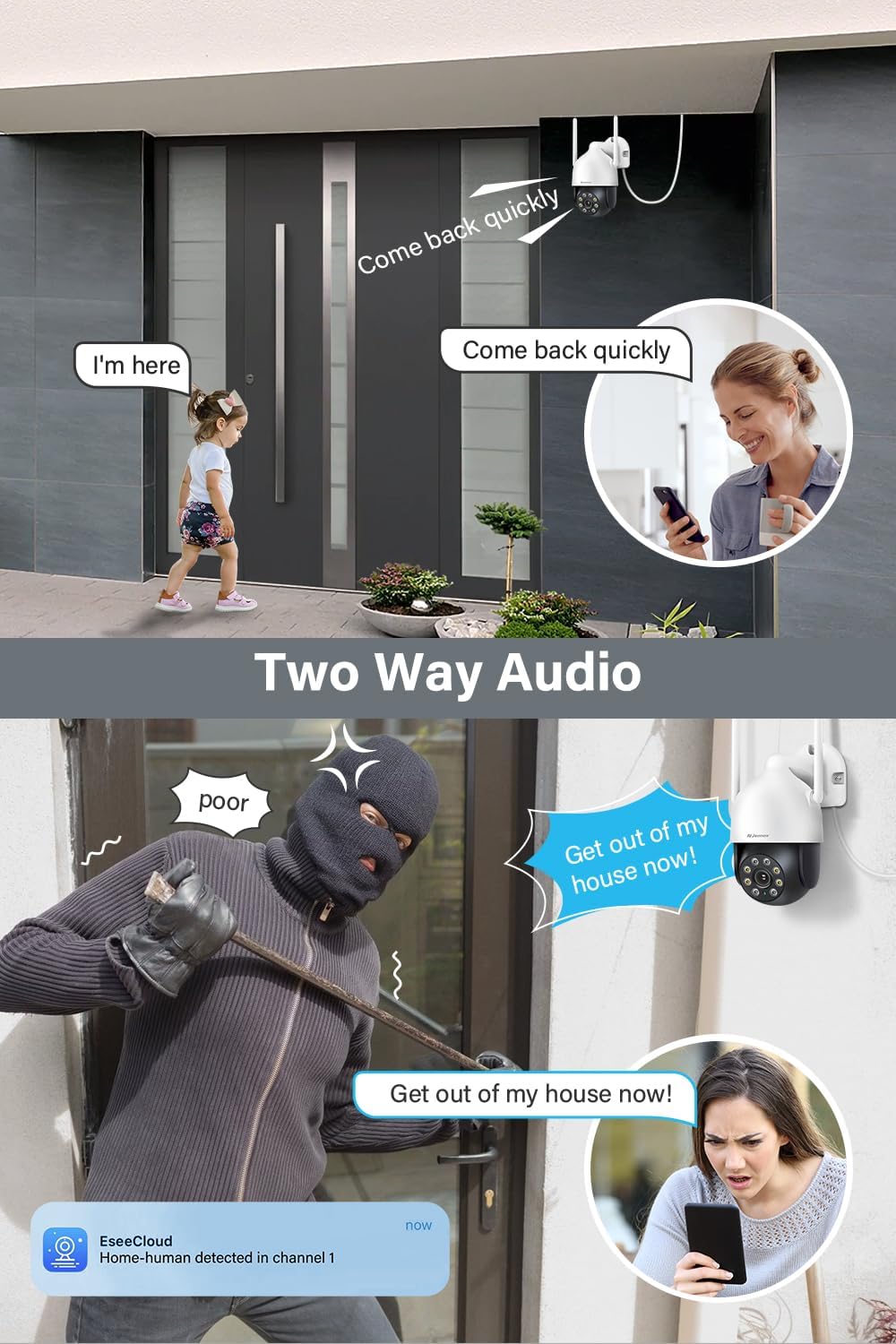
Gambar 8: Contohamples of two-way audio use cases.
PTZ Control (Pan, Tilt, Zoom)
The camera's pan (355°) and tilt (90°) functions can be controlled remotely via the EseeCloud app, allowing you to adjust the viewsudut ing sesuai kebutuhan.
- Kontrol manual: Geser ke siaran langsung view in the app to move the camera.
- Posisi Preset: Set and recall specific viewing angles for quick access.

Figure 9: Remote control of pan and tilt functions via the app.
Pemeliharaan
- Pembersihan Rutin: Bersihkan lensa dan casing kamera secara berkala dengan kain lembut dan halus.amp Gunakan kain untuk membersihkan debu dan kotoran. Jangan gunakan bahan kimia keras.
- Pembaruan Firmware: Check for and install firmware updates for your NVR and camera through the EseeCloud app or NVR interface to ensure optimal performance and security.
- Pemeriksaan Catu Daya: Ensure the power adapter and cable are in good condition and free from damage.
- Posisi Antena: Verify that the antennas are securely attached and positioned for optimal signal reception.
Penyelesaian Masalah
| Masalah | Kemungkinan Penyebab | Larutan |
|---|---|---|
| Kamera tidak menyala | No power, faulty adapter/cable | Check power connection, test outlet, replace adapter if necessary. |
| No video feed on NVR/App | Not paired with NVR, weak WiFi signal, NVR issue | Ensure camera is paired, check WiFi signal strength, restart NVR and camera. |
| Kualitas gambar buruk | Lensa kotor, cahaya redup, bandwidth jaringan | Clean lens, ensure adequate lighting or proper night vision mode, check network speed. |
| Deteksi gerakan tidak berfungsi | Feature disabled, incorrect sensitivity, obstructions | Enable human detection in settings, adjust sensitivity, clear camera's field of view. |
| Masalah audio dua arah | Microphone/speaker blocked, app volume low, network delay | Ensure clear path for audio, check app volume, verify stable network connection. |
Spesifikasi
| Fitur | Detil |
|---|---|
| Nomor Model | JS7016 |
| Pabrikan | Shenzhen Dianchen Industrial Co.,Ltd |
| Dimensi (P x L x T) | Ukuran 15x12x18 cm |
| Berat | 620 gram |
| Jenis Daya | Kabel listrik |
| Jil.tage | 12 Volt |
| Konsumsi Daya | 12 Watt |
| Teknologi Konektivitas | Nirkabel (Wi-Fi) |
| Resolusi Perekaman Video | 5MP (2.7K) |
| Fitur Khusus | Siren Alarm, Two-Way Audio, PTZ Control, Human Detection |
| Komponen yang Termasuk | EseeCloud (software) |
| Kapasitas Penyimpanan Memori | 256 GB (referring to NVR compatibility, not camera internal storage) |
| Sistem Operasi | Linux-based or proprietary operating system |
| Perangkat yang Kompatibel | Smartphones, Tablets, Computers (via EseeCloud app/software) |
Garansi dan Dukungan
For warranty information, technical support, or service inquiries, please refer to the documentation included with your Jennov NVR system or visit the official Jennov websitus. Simpan struk pembelian Anda sebagai bukti pembelian untuk klaim garansi.


