1. Informasi Keselamatan
Harap baca semua petunjuk keselamatan dengan saksama sebelum mengoperasikan alat. Kegagalan mengikuti petunjuk ini dapat mengakibatkan sengatan listrik, kebakaran, atau cedera serius.
- Pastikan voltase catu dayatage sesuai dengan spesifikasi peralatan tersebut.
- Jangan merendam alat dalam air atau cairan lainnya.
- Pastikan lubang ventilasi bersih dari halangan.
- Jangan gunakan alat ini jika kabel listrik atau stekernya rusak.
- Avoid touching internal components while the appliance is powered on.
- Peralatan ini tidak ditujukan untuk digunakan oleh orang dengan keterbatasan fisik, sensorik, atau mental kecuali diawasi atau diberi instruksi.
- Putuskan sambungan daya sebelum membersihkan atau melakukan pemeliharaan.
2. Produk Lebihview
The ICECO VL35+PB1000 is a portable fridge freezer designed for various applications, including automotive, camping, and travel. It features a SECOP compressor for efficient cooling and comes bundled with a 1075Wh PB1000 portable power station for extended off-grid use.
Fitur Utama:
- Kapasitas 35L: Menyediakan ample storage for food and beverages.
- SECOP Compressor: Ensures reliable and efficient cooling performance.
- Multi-opening Lid Design: Allows for flexible lid opening direction without reassembly, convenient for tight spaces.
- Input Daya Ganda: Operates on 12/24V DC and 110-240V AC.
- Integrated PB1000 Power Station: 1075Wh capacity with 1200W AC output and 9 outlets for powering various devices.
- Port Pengisian USB: Two USB outlets (USB-C PD100W Max, USB-A 18W Max) for mobile devices (available under DC power).
- Desain Manusiawi: Includes a drain hole, waterproof baffle, LED lights, and removable handles.
- Fungsi UPS: The PB1000 offers Uninterruptible Power Supply (UPS) with instant switching for emergency power.
Isi Paket:
- ICECO 35L Portable Fridge Freezer
- ICECO PB1000 Portable Power Station
- Keranjang yang Dapat Dilepas
- Gagang Pengganti
- Pelindung Sudut
- Tiriskan Colokan
- Kabel Daya AC
- Kabel Daya DC


3. Pengaturan
3.1 Pembongkaran dan Pemeriksaan Awal
- Keluarkan semua komponen dari kemasannya dengan hati-hati.
- Inspect the fridge freezer and power station for any signs of damage during transit. Contact customer support if any damage is found.
- Clean the interior of the fridge freezer with a damp kain sebelum digunakan pertama kali.
3.2 Menghubungkan Daya
The fridge freezer can be powered by either AC (home socket) or DC (car 12/24V) power. The PB1000 power station provides additional power options and portability.
AC Power Connection (110-240V):
- Locate the AC power input port on the fridge freezer.
- Connect the provided AC power cable to the fridge freezer and then to a standard wall outlet.
- The built-in AC transformer allows for direct connection to pre-cool the fridge.
DC Power Connection (12/24V):
- The fridge freezer has 12/24V DC ports on both sides.
- Connect the provided DC power cable to one of the DC ports on the fridge freezer and to your vehicle's 12V or 24V power outlet.

3.3 PB1000 Power Station Setup
The PB1000 power station can be used to power the fridge freezer or other electronic devices.
Charging the PB1000:
- Connect the PB1000 to an AC wall outlet using the provided charging cable for fast charging.
- The PB1000 supports 800W AC fast charging, achieving 0-100% in approximately 1.6 hours.

3.4 Multi-opening Lid Adjustment
The lid can be adjusted to open from different directions to suit your space requirements. No tools or reassembly are required for this adjustment.

4. Operasi
4.1 Powering On/Off and Temperature Control
- Connect the fridge freezer to a power source (AC or DC).
- Tekan tombol daya pada panel kontrol untuk menghidupkan unit.
- Use the temperature adjustment buttons (usually '+' and '-') to set the desired temperature between 0℉ and 50℉ (approximately -18℃ to 10℃).
- The display will show the current internal temperature and the set temperature.
- Untuk mematikan, tekan dan tahan tombol daya.
4.2 Using the PB1000 Power Station
The PB1000 power station can be used independently or in conjunction with the fridge freezer.
Perangkat Listrik:
- The PB1000 features multiple output ports: 1x Car Outlet (12V-10A), 2x DC Outlets (12V-5A), 2x USB-C (PD100W Max), 2x USB-A (18W Max), and 2x AC Wall Outlets (Total Output Power 2400W).
- Hubungkan perangkat Anda ke port output yang sesuai.
- The power display on the PB1000 clearly shows charging and power status.
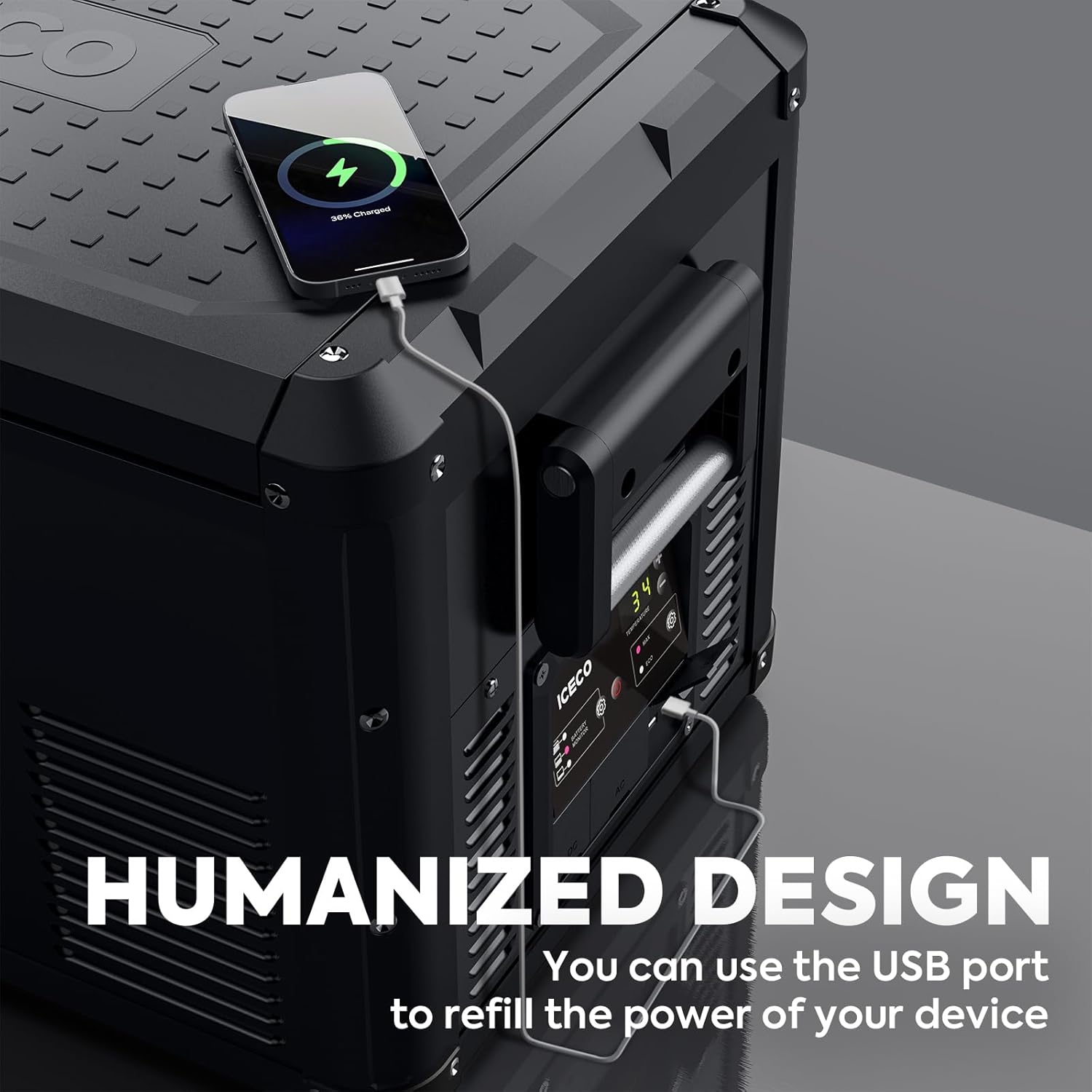
USB Charging from Fridge Freezer:
- The fridge freezer itself includes 2 USB outlets for charging mobile devices.
- These USB outlets are only available when the fridge freezer is powered by DC.

Fungsi Catu Daya Tak Terputus (UPS):
- The PB1000 can function as a UPS, providing seamless emergency power.
- Power switches instantly (within 0.01s) when the main power source is interrupted.
- Peringatan: Test this function thoroughly before relying on it for sensitive data or medical equipment to prevent potential damage.

5. Pemeliharaan
5.1 Cleaning the Fridge Freezer
- Putuskan Daya: Always unplug the appliance from all power sources before cleaning.
- Pembersihan Interior: Gunakan kain lembut dampened with mild detergent and warm water to clean the interior surfaces. Avoid abrasive cleaners.
- Lubang pembuangan: The integrated drain hole allows for easy removal of melted ice or spilled liquids. Ensure the drain plug is securely in place during operation and removed for draining.
- Pembersihan Eksterior: Bersihkan bagian luar dengan iklanamp kain. Jangan menyemprotkan air langsung ke unit.
- Waterproof Baffle: The waterproof baffle helps protect internal components. Ensure it is properly seated after cleaning.
- Pengeringan: Allow the interior to air dry completely before closing the lid or reconnecting power.
5.2 Perawatan Umum
- Regularly check power cables for any signs of wear or damage.
- Keep the ventilation grilles clear of dust and debris to ensure proper airflow for the compressor.
- Saat tidak digunakan dalam jangka waktu lama, bersihkan unit, biarkan penutup sedikit terbuka untuk mencegah bau, dan simpan di tempat yang kering dan berventilasi baik.
6. Penyelesaian masalah
If you encounter issues with your ICECO fridge freezer or PB1000 power station, refer to the following common troubleshooting steps:
| Masalah | Kemungkinan Penyebab | Larutan |
|---|---|---|
| Perangkat tidak menyala | No power supply; Damaged power cable; Blown fuse in vehicle | Check power connection; Inspect cable; Check vehicle fuse; Try different power source |
| Pendinginan tidak memadai | Ventilation blocked; Door not sealed properly; Ambient temperature too high; Overloaded with warm items | Clear vents; Ensure lid is closed tightly; Move to cooler area; Allow time to cool |
| Kebisingan yang tidak biasa | Appliance not level; Fan obstruction; Normal compressor operation | Place on a flat surface; Check for obstructions; Some noise is normal for compressors |
| PB1000 not charging devices | PB1000 battery low; Output port not activated; Device incompatible | Recharge PB1000; Ensure output port is turned on; Check device power requirements |
| Kode kesalahan ditampilkan | Kesalahan internal; Masalah sensor | Refer to specific error code in a more detailed manual (if available) or contact customer support. |
If the problem persists after attempting these solutions, please contact ICECO customer support for further assistance.
7. Spesifikasi
Detailed technical specifications for the ICECO VL35+PB1000 unit:
| Fitur | Spesifikasi |
|---|---|
| Merek | ICECO |
| Nomor Model | VL35+PB1000 |
| Kapasitas | 35 Liter (37 Quarts) |
| Dimensi Produk | 28.1 x 15.9 x 15.7 inci (71.4 x 40.4 x 39.9 cm) |
| Jenis Instalasi | Freestanding |
| Fitur Khusus | Portabel |
| Warna | Hitam |
| Sistem Pencairan | Buku petunjuk |
| Jumlah Pintu | 1 |
| PB1000 Battery Capacity | 1075 jam |
| PB1000 AC Output | 1200W (Total Output Power 2400W) |
| PB1000 AC Fast Charging | 800W (0-100% in 1.6 hours) |
| Kisaran Suhu | 0℉ - 50℉ (approximately -18℃ - 10℃) |
| Power Consumption (Max mode at 0℉) | ~0.43 kWh/24h |
8. Garansi dan Dukungan
8.1 Informasi Garansi
The ICECO VL35+PB1000 comes with a 5-year warranty on the SECOP compressor. For specific details regarding the full product warranty, please refer to the warranty card included with your purchase or visit the official ICECO weblokasi.

8.2 Dukungan Pelanggan
For technical assistance, warranty claims, or general inquiries, please contact ICECO customer support through their official website or the contact information provided in your product packaging. Please have your model number (VL35+PB1000) and purchase date ready when contacting support.


