1. Produk Lebihview
The 8Bitdo 18 Key Retro Mechanical Numpad is a versatile input device designed for both PC numpad functionality and standard calculator operations. It features a retro aesthetic, hot-swappable mechanical switches, and multiple connectivity options.

Gambar: Depan view of the 8Bitdo 18 Key Retro Mechanical Numpad, C64 Edition, showcasing its retro design and LED display.
2. Isi Paket
Sebelum melanjutkan pengaturan, pastikan semua item ada di dalam paket:
- 8Bitdo 18 Key Retro Mechanical Numpad
- Adaptor Nirkabel 2.4G
- Kabel USB-C
- Manual Instruksi

Image: The 8Bitdo Numpad alongside its packaging and included accessories, such as the 2.4G adapter and USB-C cable.
3. Pengaturan dan Konektivitas
3.1 Charging the Numpad
The numpad is equipped with a rechargeable Lithium Polymer battery. A full charge takes approximately 4 hours and provides up to 160 hours of use.
- Connect the supplied USB-C cable to the numpad's USB-C port.
- Hubungkan ujung kabel lainnya ke sumber daya USB (misalnya, port USB komputer, adaptor dinding USB).
- Indikator LED akan menunjukkan status pengisian daya dan mati saat daya terisi penuh.

Gambar: Samping view of the numpad, highlighting the USB-C charging port and the magnetic compartment for the 2.4G adapter.
3.2 Pilihan Konektivitas
The numpad supports three connection methods: Bluetooth, 2.4G Wireless, and Wired USB-C.
3.2.1 Koneksi Bluetooth
- Set the mode switch on the numpad to 'BT'.
- On your Windows or Android device, go to Bluetooth settings and enable Bluetooth.
- Press and hold the Bluetooth pairing button on the numpad (usually indicated by a Bluetooth icon) until the LED starts blinking rapidly.
- Select '8Bitdo Retro Numpad' from the list of available devices on your computer or phone.
- The LED will become solid when connected.
3.2.2 Koneksi Nirkabel 2.4G
- Locate the 2.4G wireless adapter stored in the magnetic compartment on the numpad's side.
- Set the mode switch on the numpad to '2.4G'.
- Colokkan adaptor nirkabel 2.4G ke port USB yang tersedia di PC Anda.
- The numpad should automatically connect. The LED indicator will become solid.

Image: A hand demonstrating the insertion of the 2.4G wireless adapter into its magnetic storage compartment on the numpad.
3.2.3 Koneksi USB-C Berkabel
- Set the mode switch on the numpad to 'OFF' or 'BT'/'2.4G' (wired connection will override wireless).
- Connect the USB-C cable from the numpad to a USB port on your PC.
- The numpad will be recognized as a standard USB input device.
3.3 Kompatibilitas
The 8Bitdo Retro Mechanical Numpad is compatible with:
- Windows 10 (1803) and above
- Android 9.0 dan di atasnya
4. Operating the Numpad
4.1 Switching Between Numpad and Calculator Modes
The device functions as both a PC numpad and a standalone calculator. Use the dedicated mode switch or button (often labeled 'CAL' or a similar icon) to toggle between these modes.

Image: A user operating the 8Bitdo Numpad in Standard Calculator Mode, demonstrating its use as a standalone calculator.
4.2 Windows Calculator App Shortcut
A dedicated shortcut button is available to instantly launch the Windows Calculator application on your PC. Refer to the numpad's control panel for the specific button.
4.3 Panel Kontrol Independen
The numpad features an independent control panel with a turn dial and buttons for effortless operations. These controls manage connectivity modes, power, and potentially other functions.
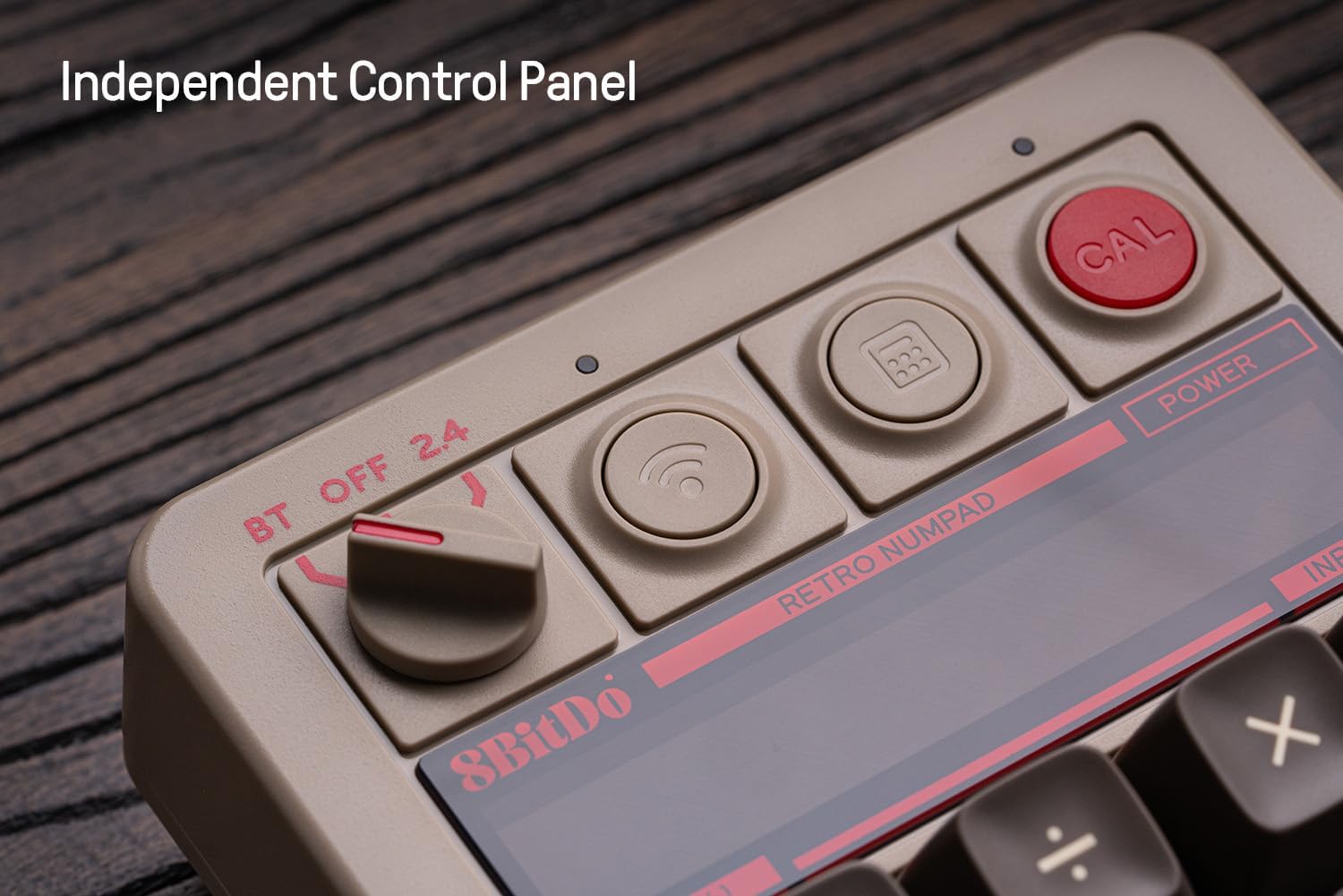
Gambar: Close-up view of the numpad's independent control panel, showing the mode switch, wireless/Bluetooth buttons, and the calculator shortcut button.
4.4 Retro LED Display
The numpad incorporates a nine-digit seven-segment LED display, providing clear and visible numerical output for calculator mode and status indicators.
4.5 Hot-swappable PCB and Switches
The numpad features a hot-swappable PCB, allowing users to easily change the mechanical switches without soldering. It comes equipped with Kailh Box White switches V2.

Gambar: Detail view of the hot-swappable PCB, showing a keycap and switch removed to illustrate the ease of switch replacement.
4.6 N-key Rollover
The numpad supports N-key rollover, ensuring that every key press is registered accurately, even when multiple keys are pressed simultaneously.
4.7 Tutup Tombol
The C64 Edition features double-shot ABS keycaps with an SA profile, providing durability and a distinct tactile feel.
5. Pemeliharaan
5.1 Pembersihan
To maintain the numpad's appearance and functionality:
- Gunakan kain lembut dan kering untuk menyeka bagian luar.
- Untuk kotoran membandel, sedikit dampBilas kain dengan air atau larutan pembersih ringan. Hindari bahan kimia keras.
- Gunakan udara bertekanan untuk menghilangkan debu dan kotoran dari sela-sela tombol.
5.2 Penggantian Tutup Tombol dan Sakelar
Due to the hot-swappable design, keycaps and switches can be replaced. Use a keycap puller and switch puller (not included) for safe removal and installation. Ensure the new switches are compatible with the PCB.
5.3 Perawatan Baterai
Untuk memperpanjang masa pakai baterai:
- Hindari mengosongkan baterai sepenuhnya secara sering.
- Store the numpad in a cool, dry place when not in use for extended periods.
- Charge the battery at least once every three months if unused.
6. Penyelesaian masalah
6.1 Masalah Konektivitas
- No Connection (Bluetooth/2.4G): Ensure the numpad is charged and the mode switch is set correctly. Re-pair Bluetooth or re-insert the 2.4G adapter. Try a different USB port for the 2.4G adapter.
- Koneksi Intermiten: Reduce distance between numpad and device. Avoid sources of interference (e.g., other wireless devices).
- Wired Connection Not Recognized: Try a different USB-C cable or USB port on your PC. Ensure the cable is fully inserted.
6.2 Masalah Tampilan
- Tampilan Kosong: Ensure the numpad is powered on and charged. If in PC numpad mode, the display may show less information. Switch to calculator mode to verify.
- Karakter yang Salah: Restart the numpad. If persistent, check for firmware updates.
6.3 Key Input Problems
- Tombol Tidak Merespons: Check for debris under keycaps. If hot-swappable, ensure switches are fully seated.
- Double Input/Missed Input: This could indicate a faulty switch. Utilize the hot-swappable feature to replace the affected switch.
6.4 Baterai Tidak Mengisi Daya
- Ensure the USB-C cable is functional and properly connected.
- Coba gunakan sumber daya USB yang berbeda.
- Jika masalah berlanjut, hubungi dukungan pelanggan.
7. Spesifikasi
| Fitur | Detil |
|---|---|
| Nama Model | C64 Edition |
| Jumlah Kunci | 18 |
| Saklar | Kailh Box White switches V2 (Hot-swappable) |
| Kartu kunci | Double-shot ABS (C64 edition) |
| Konektivitas | Bluetooth, 2.4G Wireless, Wired USB-C |
| Kesesuaian | Windows (10 ke atas), Android (9.0 ke atas) |
| Jenis Baterai | Polimer Litium |
| Daya Tahan Baterai | Up to 160 use hours |
| Waktu Pengisian Daya | Sekitar 4 jam |
| Menampilkan | Nine-digit seven-segment LED |
| Ukuran | 7.91x7.05x2.36 inci |
| Berat Barang | 1.3 pon |
8. Informasi Garansi
8Bitdo products typically come with a limited manufacturer's warranty. For specific details regarding the warranty period and terms for your 8Bitdo 18 Key Retro Mechanical Numpad, please refer to the warranty card included in your product packaging or visit the official 8Bitdo weblokasi.
9. Dukungan
For further assistance, firmware updates, or to download the 8Bitdo Ultimate Software V2 (for firmware updates only), please visit the official 8Bitdo support weblokasi:
You may also contact 8Bitdo customer service through their website for technical support or inquiries.


