Perkenalan
The Mytrix Tac Master Wireless Gaming Headset is designed to provide a high-quality audio experience for gaming across multiple platforms. Featuring 2.4GHz lossless wireless technology, Bluetooth 5.3, and a 3.5mm wired connection, this headset offers versatile connectivity, low latency, and immersive surround sound. The detachable noise-canceling microphone ensures clear communication, while the ergonomic design and long battery life provide comfort for extended use.
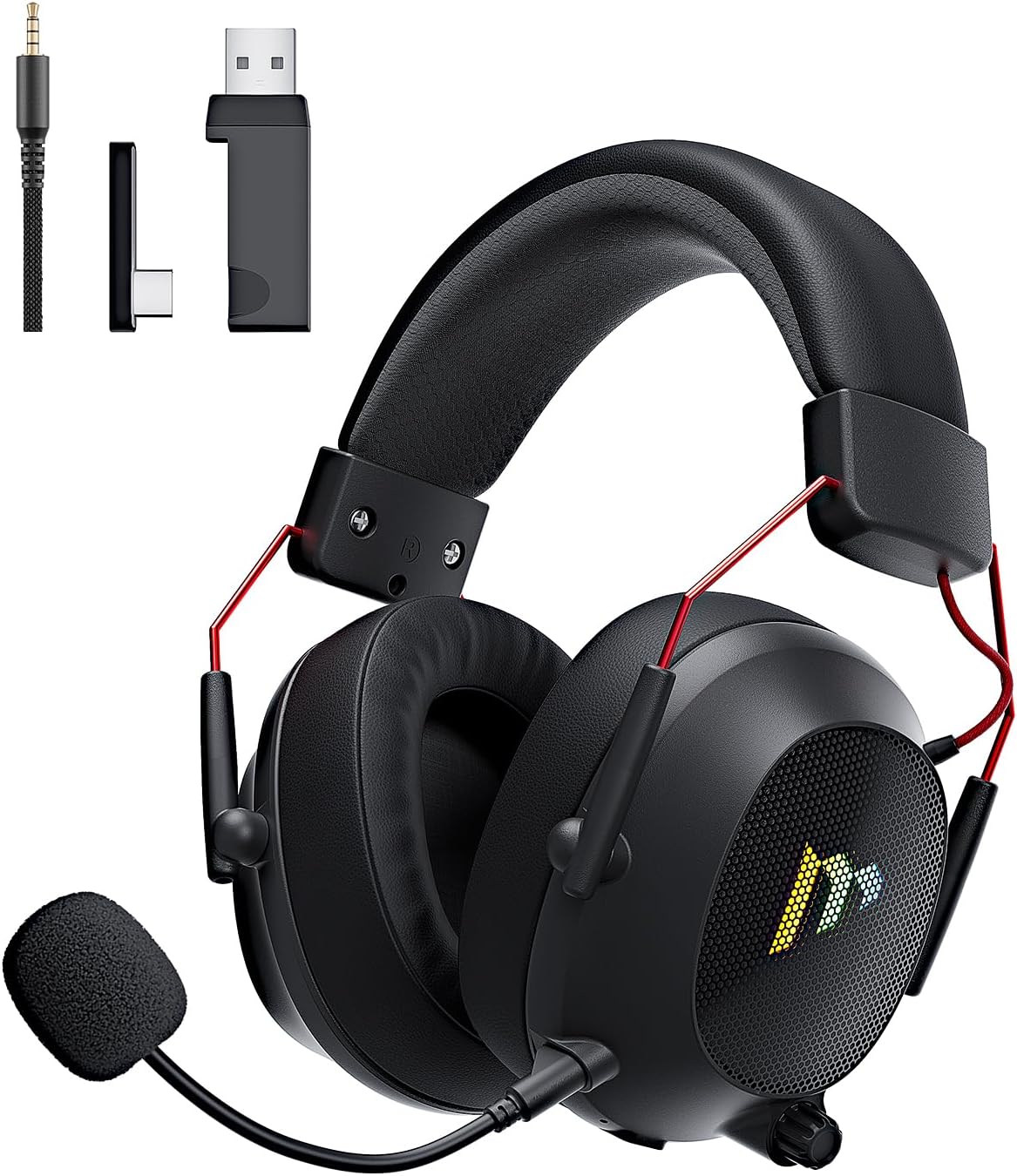
Image: The Mytrix Tac Master Wireless Gaming Headset, showcasing its sleek black design with red accents, detachable microphone, and included USB dongle and Type-C adapter.
Isi Paket
Harap verifikasi bahwa semua item yang tercantum di bawah ini disertakan dalam paket Anda:
- Mytrix Tac Master Wireless Gaming Headset
- Mikrofon Peredam Kebisingan yang Dapat Dilepas
- Dongle Nirkabel USB-A 2.4GHz
- USB Type-C Transmitter
- Kabel Audio 3.5mm
- Kabel Pengisian USB (USB-A ke USB-C)
- User Manual (dokumen ini)
Headset Controls and Components
Familiarize yourself with the various controls and components of your Mytrix Tac Master headset:

Image: Diagram illustrating the location and function of controls on the Mytrix Tac Master headset, including power button, volume wheel, microphone mute button, and mode switch.
- Tombol Daya: Press and hold for 3 seconds to turn on/off. Single press to pause/play audio.
- Tombol Mode (M): Single press to toggle microphone on/off. Double press to switch between Bluetooth and 2.4G wireless modes. Press and hold for 3 seconds to turn RGB lights on/off.
- Roda Volume: Rotate up to increase volume, rotate down to decrease volume.
- Port Mikrofon: Untuk memasang mikrofon yang dapat dilepas.
- Jack Audio 3.5mm: Untuk koneksi kabel.
- Port Pengisian Daya USB-C: Untuk mengisi daya headset.
- Pencahayaan RGB: Located on the earcups.
Pengaturan
1. Mengisi Daya Headset
Before first use, fully charge the headset. Connect the USB charging cable to the headset's USB-C port and the other end to a USB power source (e.g., computer USB port, USB wall adapter). The LED indicator will show charging status and turn off when fully charged. A full charge takes approximately 3 hours and provides up to 48 hours of battery life.

Image: Visual representation of the headset's long-lasting battery life, indicating approximately 50 hours of use and a 3-hour charging time.
2. Memasang Mikrofon
Insert the detachable microphone into the microphone port on the left earcup. Ensure it is securely seated. The microphone is flexible and omni-directional, allowing for angle adjustment.
3. Opsi Konektivitas
The Mytrix Tac Master headset offers multiple connection methods for broad compatibility:

Image: Diagram illustrating the four connection modes: 2.4GHz Dongle (USB-A and USB-C), Bluetooth 5.3, and 3.5mm Wired, along with compatible devices for each mode.
3.1. 2.4GHz Wireless Connection (Recommended for PC, PS4, PS5, Switch Docked Mode)
- Identify the appropriate dongle for your device:
- For devices with a USB-A port (PC, PS4, PS5, Switch Docked): Use the 2.4GHz USB-A dongle.
- For devices with a USB-C port (Switch Handheld, Laptops, Tablets): Use the USB Type-C transmitter.
- Plug the selected 2.4GHz dongle/transmitter into an available USB port on your device.
- Power on the headset by pressing and holding the Power button for 3 seconds.
- Ensure the headset is in 2.4GHz mode. If not, double-press the 'M' button to switch modes until the headset connects to the dongle. The headset will automatically pair with the dongle.
- On your device, select the headset as the audio output and input device.
3.2. Bluetooth 5.3 Connection (Recommended for Mobile Phones, Tablets, Laptops)
- Power on the headset by pressing and holding the Power button for 3 seconds.
- Double-press the 'M' button to switch the headset to Bluetooth pairing mode. The LED indicator will flash, indicating it's ready to pair.
- On your device, enable Bluetooth and search for "Mytrix Tac Master" in the list of available devices.
- Select "Mytrix Tac Master" to connect. Once connected, the LED indicator will stop flashing.
3.3. 3.5mm Wired Connection (Recommended for Xbox, Game Console Controllers, Devices without USB/Bluetooth)
- Hubungkan salah satu ujung kabel audio 3.5 mm ke jack 3.5 mm pada headset.
- Connect the other end of the 3.5mm audio cable to the audio jack on your device (e.g., Xbox controller, phone).
- In wired mode, the headset's microphone and RGB lighting functions are not active.
Petunjuk Pengoperasian
Daya Hidup/Mati
- Untuk menghidupkan: Press and hold the Power button for approximately 3 seconds until the headset powers on.
- Untuk mematikan: Press and hold the Power button for approximately 3 seconds until the headset powers off.
Kontrol Volume
- Tingkatkan Volume: Rotate the Volume wheel upwards.
- Kurangi Volume: Rotate the Volume wheel downwards.
Kontrol Mikrofon
- Bisukan/Suarakan Mikrofon: Single press the 'M' button.
- The detachable microphone features noise cancellation for clear voice chat.
Kontrol Pencahayaan RGB
- Turn RGB Lights On/Off: Press and hold the 'M' button for approximately 3 seconds.
Kontrol Pemutaran Audio
- Putar/Jeda Audio: Tekan tombol daya sekali saja.
Suara Sekitar
The headset features 7.1 stereo surround sound for an immersive audio experience, allowing for precise positioning of sound details in games.

Gambar: Sebuah ledakan view of the headset's 50mm drivers, illustrating the components that contribute to its 7.1 stereo surround sound capability.
Pemeliharaan
- Pembersihan: Gunakan kain lembut dan kering untuk membersihkan headset. Jangan gunakan pembersih abrasif atau pelarut. Untuk penutup telinga, usap perlahan dengan kain lembut.amp Lap dengan kain dan biarkan mengering sepenuhnya sebelum digunakan.
- Penyimpanan: Simpan headset di tempat yang sejuk dan kering, jauhkan dari sinar matahari langsung dan suhu ekstrem. Jika disimpan dalam jangka waktu lama, pastikan baterai terisi sebagian (sekitar 50%) untuk menjaga kesehatan baterai.
- Perawatan Baterai: Avoid fully discharging the battery frequently. Charge the headset regularly, even if not in constant use, to maintain battery longevity.
- Perawatan Mikrofon: Handle the detachable microphone gently. Avoid excessive bending or twisting.
Penyelesaian Masalah
| Masalah | Kemungkinan Penyebab | Larutan |
|---|---|---|
| Tidak ada suara dari headset. | Headset not powered on, low battery, incorrect audio output selected, connection issue. | Ensure headset is powered on and charged. Check device's audio settings to confirm "Mytrix Tac Master" is selected as output. Re-establish 2.4GHz or Bluetooth connection. For wired mode, ensure cable is fully inserted. |
| Mikrofon tidak berfungsi. | Microphone muted, not properly attached, incorrect audio input selected, wired mode limitation. | Single press the 'M' button to unmute. Ensure microphone is securely attached. Check device's audio settings to confirm "Mytrix Tac Master" is selected as input. Note: Microphone does not function in 3.5mm wired mode. |
| Cannot connect via 2.4GHz wireless. | Dongle not recognized, headset not in 2.4GHz mode, interference. | Ensure dongle is fully inserted into a working USB port. Double-press 'M' button to switch headset to 2.4GHz mode. Try a different USB port. Move closer to the dongle to reduce interference. |
| Tidak dapat terhubung melalui Bluetooth. | Headset not in pairing mode, Bluetooth disabled on device, already connected to another device. | Double-press 'M' button to enter Bluetooth pairing mode (LED flashes). Ensure Bluetooth is enabled on your device. Disconnect from other Bluetooth devices if necessary. |
| Lampu RGB tidak berfungsi. | Lights turned off, low battery, wired mode limitation. | Press and hold the 'M' button for 3 seconds to toggle RGB lights. Ensure headset has sufficient battery. Note: RGB lights do not function in 3.5mm wired mode. |
Spesifikasi
| Fitur | Detil |
|---|---|
| Nama Model | Gaming Headset (G901) |
| Teknologi Konektivitas | Nirkabel 2.4GHz, Bluetooth 5.3, Kabel 3.5mm |
| Jack Headphone | 3.5 mm Jack |
| Range Nirkabel | Up to 50 feet (in open spaces) |
| Latensi | ≤20ms (2.4GHz) |
| Jenis Penggerak Audio | Driver Dinamis 50mm |
| Fitur Suara | 7.1 Stereo Surround Sound |
| Mikropon | Detachable, Omni-directional, Noise-Canceling |
| Daya Tahan Baterai | Hingga 48 jam |
| Waktu Pengisian Daya | Sekitar 3 jam |
| Jenis Baterai | 1 baterai Lithium Ion (termasuk) |
| Bentuk Lubang Suara | Di Atas Telinga |
| Fitur Khusus | Ergonomic Design, RGB Lighting, Foldable & Portable |
| Dimensi Produk | 5.91x3.94x5.91 inci |
| Berat Barang | 13.4 ons |
| Pabrikan | Mytrix |
Garansi dan Dukungan
Mytrix products are manufactured to high quality standards. For information regarding warranty coverage, technical support, or service inquiries, please refer to the warranty card included with your product or visit the official Mytrix website. You may also contact Mytrix customer support directly for assistance with your Tac Master Gaming Headset.
Untuk bantuan lebih lanjut, silakan kunjungi Mytrix Store on Amazon.
Informasi Keselamatan Penting
- Jangan biarkan headset terkena suhu ekstrem, kelembapan, atau cairan.
- Hindari menjatuhkan atau membenturkan headset ke benda keras.
- Do not attempt to disassemble or repair the headset yourself. This will void the warranty.
- Dengarkan dengan volume sedang untuk mencegah kerusakan pendengaran. Paparan suara keras dalam waktu lama dapat menyebabkan gangguan pendengaran permanen.
- Jauhkan dari jangkauan anak-anak.