Perkenalan
Thank you for choosing the Oakcastle HIFI150 Stereo System. This manual provides essential information for setting up, operating, and maintaining your device. Please read it thoroughly before use and retain it for future reference.
Informasi Keselamatan
Untuk memastikan pengoperasian yang aman dan mencegah kerusakan, harap perhatikan tindakan pencegahan keselamatan berikut:
- Jangan biarkan unit terkena hujan, kelembapan, atau suhu ekstrem.
- Jangan membuka casing. Serahkan semua servis kepada personel yang berkualifikasi.
- Pastikan ventilasi yang baik di sekitar unit. Jangan menghalangi lubang ventilasi apa pun.
- Gunakan hanya adaptor daya yang disertakan dengan unit.
- Keep the unit away from heat sources such as radiators, stoves, or other heat-producing appliances.
- Bersihkan unit hanya dengan kain kering.
Isi Paket
Harap periksa apakah semua item ada dalam paket Anda:
- Oakcastle HIFI150 Stereo System
- Kontrol Jarak Jauh
- Baterai untuk Remote Control
- Kabel listrik
- Panduan Pengguna
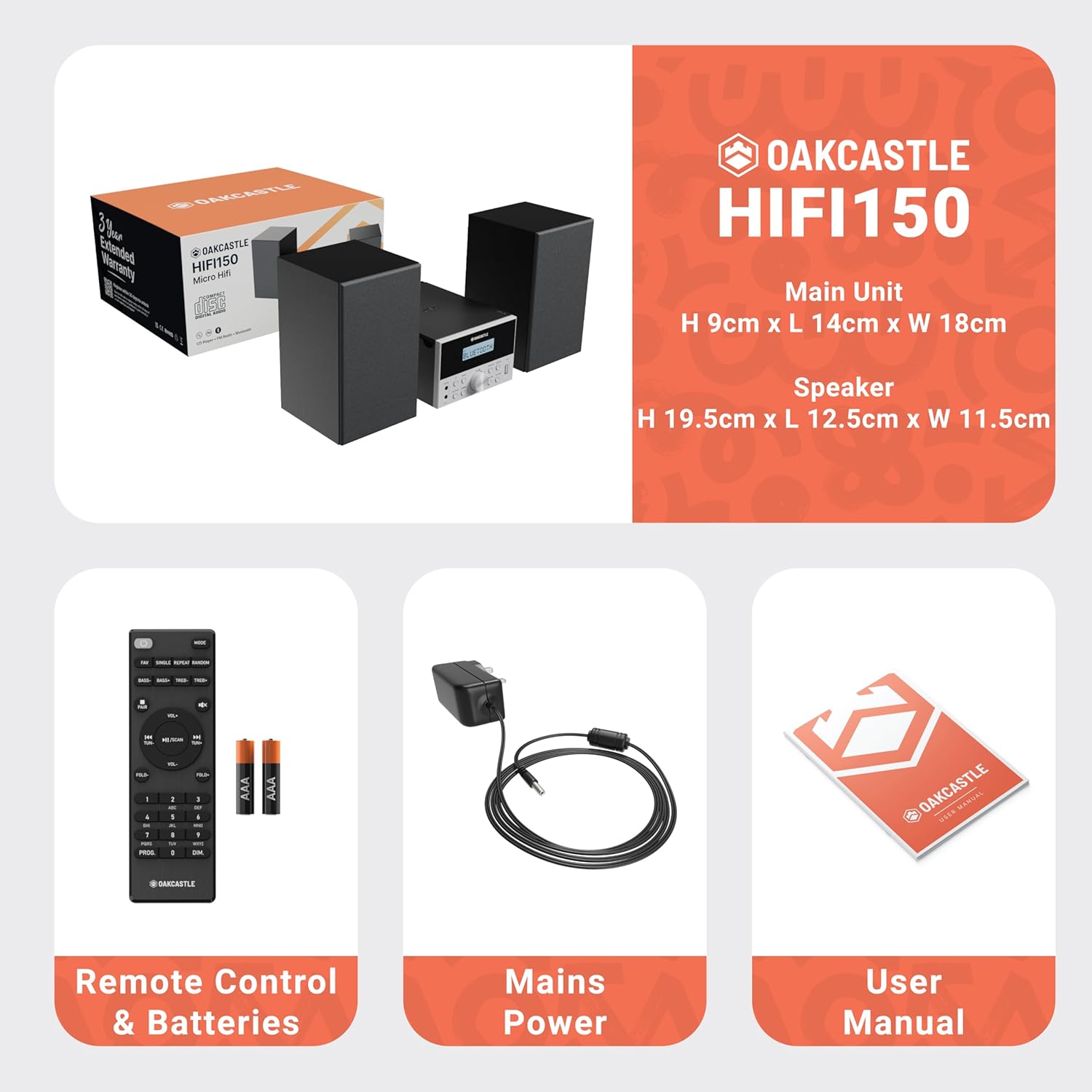
Image: The Oakcastle HIFI150 package contents, showing the main unit, two speakers, remote control with batteries, power adapter, and user manual.
Produk Selesaiview
The Oakcastle HIFI150 features a compact design with intuitive controls and multiple connectivity options.
Kontrol dan Tampilan Panel Depan

Image: A close-up of the Oakcastle HIFI150 main unit's front panel, highlighting the digital display, central volume knob, mode selection buttons, and front-facing AUX In and USB ports. The display shows 'BLUETOOTH'.
- Menampilkan: Shows current mode, track information, and radio frequency.
- Tombol Daya: Menyalakan atau mematikan unit.
- Tombol Mode: Cycles through input sources (CD, FM, Bluetooth, AUX, USB).
- Tombol Volume: Menyesuaikan volume master.
- Tombol Putar/Jeda: Mengontrol pemutaran untuk CD, USB, dan Bluetooth.
- Tombol Lewati/Setel: Navigates tracks or tunes radio frequencies.
- AUX Di Pelabuhan: Untuk menghubungkan perangkat audio eksternal melalui kabel 3.5 mm.
- Port USB: Untuk memutar audio files dari drive USB.
Koneksi Panel Belakang
The rear panel includes connections for speakers and power.
Pengaturan
1. Menghubungkan Speaker
Connect the included speakers to the speaker terminals on the rear of the main unit. Ensure correct polarity (red to red, black to black) for optimal sound quality.
2. Koneksi Daya
Plug the power cable into the AC inlet on the rear of the main unit, then plug the other end into a standard wall outlet.
Petunjuk Pengoperasian
Daya Hidup/Mati
Tekan tombol Kekuatan Gunakan tombol di panel depan atau remote control untuk menghidupkan atau mematikan unit.
Pemilihan Mode
Tekan tombol Mode button on the front panel or remote control repeatedly to cycle through the available input sources: CD, Radio FM Indonesia, Bahasa Indonesia: Bluetooth, Kabel Tambahan, Dan USB.
Operasi Bluetooth
- Memilih Bahasa Indonesia: Bluetooth mode using the Mode button. The display will show 'BLUETOOTH' and the unit will enter pairing mode.
- Pada ponsel pintar atau perangkat Bluetooth lainnya, aktifkan Bluetooth dan cari perangkat yang tersedia.
- Select 'OAKCASTLE HIFI150' from the list. Once connected, the unit will confirm the connection.
- You can now stream audio wirelessly from your device to the HIFI150.
Pemutaran CD

Image: The Oakcastle HIFI150 with its top-loading CD player mechanism open, revealing a compact disc placed inside. The display shows 'CD'.
- Buka penutup kompartemen CD.
- Place a CD (MP3, CD, WMA, or CD-R format) onto the spindle with the label side facing up.
- Tutup penutup kompartemen CD.
- Memilih CD mode. The unit will read the disc and begin playback automatically.
- Gunakan tombol Putar/Jeda dan Lewati untuk mengontrol pemutaran.
Operasi Radio FM

Image: The Oakcastle HIFI150 main unit with its telescopic antenna extended, displaying an FM radio frequency on its screen. The unit is placed between two speakers.
- Memilih Radio FM Indonesia mode.
- Perpanjang antena teleskopik untuk penerimaan yang lebih baik.
- Pemindaian Otomatis: Press and hold the Play/Pause button to automatically scan and save available FM stations (up to 30 presets).
- Penyetelan Manual: Use the Skip/Tune buttons to manually adjust the frequency.
- Ingat Preset: Use the 'FAV/PROG' button on the remote to cycle through saved stations.
Pemutaran USB
- Masukkan drive USB ke port USB di panel depan.
- Memilih USB mode. The unit will automatically detect and begin playing compatible audio file(MP3, WMA).
- Gunakan tombol Putar/Jeda dan Lewati untuk mengontrol pemutaran.
Masukan AUX
- Hubungkan perangkat audio eksternal (misalnya, pemutar MP3, ponsel pintar) ke AUX Masuk port on the front panel using a 3.5mm audio cable (not included).
- Memilih Kabel Tambahan mode.
- Kontrol pemutaran dari perangkat eksternal Anda yang terhubung.
Kontrol Volume
Putar Kenop Volume pada panel depan atau gunakan VOL+/- tombol pada remote control untuk mengatur level suara.
Penggunaan Kontrol Jarak Jauh
The included remote control provides full functionality for the HIFI150. Ensure batteries are correctly inserted. Point the remote control towards the front panel of the main unit for optimal response.
Pemeliharaan
Pembersihan
- Bersihkan unit dengan kain lembut dan kering.
- Jangan gunakan pembersih abrasif, lilin, atau pelarut karena dapat merusak lapisan akhir.
Penyimpanan
If the unit is not used for an extended period, unplug it from the power outlet and store it in a cool, dry place.
Penyelesaian Masalah
If you encounter issues with your HIFI150, please refer to the following common problems and solutions:
| Masalah | Kemungkinan Penyebab | Larutan |
|---|---|---|
| Tidak ada daya | Kabel daya tidak tersambung; Stopkontak rusak | Pastikan kabel daya tersambung dengan benar; Coba stopkontak lain. |
| Tidak ada suara | Volume too low; Incorrect input mode; Speakers not connected | Increase volume; Select correct input mode; Check speaker connections. |
| CD tidak dapat diputar | CD inserted incorrectly; Disc scratched/dirty; Incorrect format | Reinsert CD correctly; Clean or replace disc; Ensure disc is compatible (MP3, CD, WMA, CD-R). |
| Bluetooth tidak terhubung | Bluetooth mode not selected; Device too far; Device already connected to another unit | Pilih mode Bluetooth; Dekatkan perangkat; Putuskan sambungan dari perangkat lain dan coba lagi. |
| Penerimaan FM buruk | Antena tidak diperpanjang; Sinyal lemah | Fully extend the telescopic antenna; Try repositioning the unit. |
Spesifikasi
| Nomor Model | 1000002971 |
| Merek | kastil oak |
| Konektivitas | Bluetooth 5.2, USB, AUX |
| Keluaran Audio | 20W |
| Media yang Didukung | CD, MP3, WMA, CD-R, USB |
| Radio | FM Radio with 30 Presets |
| Perangkat yang Kompatibel | Pemutar MP3, Ponsel Pintar, Tablet |
| Bahan Kabinet | Kayu |
| Warna | Hitam |
| Dimensi Barang (P x L x T) | Ukuran 13.7x17.8x9 cm |
| Berat Barang | 2 Kilogram |
Garansi dan Dukungan
The Oakcastle HIFI150 comes with an extended 3-year warranty. Registration is required to activate the full warranty period. Please refer to the warranty card included in your package or visit the official Oakcastle website for registration details and support information.
For technical assistance or further inquiries, please contact Oakcastle customer support through their official channels.


