Perkenalan
This user manual provides comprehensive instructions for the setup, operation, maintenance, and troubleshooting of your Thomson Streaming Stick 4K 145G. Please read this manual carefully before using the device to ensure proper functionality and to avoid damage.

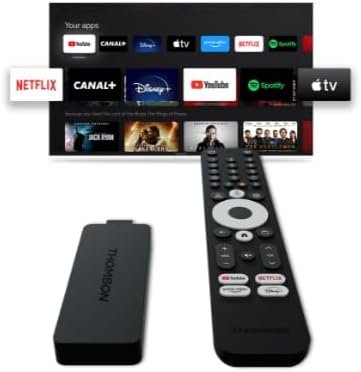
Image: The Thomson Streaming Stick 4K 145G alongside its remote control, illustrating the main components of the product.
Apa yang ada di dalam kotak
Upon unboxing your Thomson Streaming Stick 4K 145G, please verify that all components are present:
- Thomson Streaming Stick 4K 145G
- Kontrol Jarak Jauh
- Adaptor daya
- Kabel USB (untuk daya)
- HDMI Extender (optional, may be included)
- Panduan Memulai Cepat
Panduan Pengaturan
Follow these steps to set up your Thomson Streaming Stick 4K 145G:
- Connect the Streaming Stick: Plug the Thomson Streaming Stick 4K 145G directly into an available HDMI port on your television. If space is limited, use an HDMI extender if provided.
- Hubungkan Daya: Connect the provided USB cable to the power input port on the streaming stick and then connect the other end to the power adapter. Plug the power adapter into a wall outlet.
- Nyalakan TV dan Pilih Input: Turn on your television and select the HDMI input to which the streaming stick is connected.
- Pengaturan awal: The device will boot up and guide you through the initial setup process on your TV screen. This typically includes:
- Pilihan bahasa.
- Menghubungkan ke jaringan Wi-Fi Anda.
- Signing in with your Google account (required for Google TV features and app downloads).
- Menerima syarat dan ketentuan.
- Pemasangan Kontrol Jarak Jauh: The remote control should automatically pair with the device. If not, follow the on-screen instructions or press and hold the Home and Back buttons simultaneously on the remote until pairing is complete.
Gambar: Detail view of the Thomson Streaming Stick 4K 145G, highlighting its HDMI connector for TV input and the power input port.
Petunjuk Pengoperasian
Once set up, you can begin using your Thomson Streaming Stick 4K 145G to access various streaming services and content.
Fungsi Kontrol Jarak Jauh
Biasakan diri Anda dengan tombol-tombol kendali jarak jauh:
- Tombol Daya: Menghidupkan atau mematikan perangkat (mode siaga).
- Tombol Asisten Google: Mengaktifkan perintah suara untuk pencarian dan kontrol.
- Tombol Navigasi (Lingkaran): Use up, down, left, right to navigate menus.
- Tombol OK/Pilih: Konfirmasikan pilihan.
- Tombol Kembali: Kembali ke layar sebelumnya.
- Tombol Home: Kembali ke layar beranda Google TV.
- Tombol Volume (+/-): Menyesuaikan volume TV.
- Tombol Bisu: Mutes TV volume.
- Tombol Pintasan Aplikasi: Dedicated buttons for Netflix, Disney+, YouTube, and Prime Video for quick access.

Image: The Thomson Streaming Stick 4K 145G and its remote control, showing the layout of the buttons on the remote.
Menavigasi Google TV
The Google TV interface organizes content from your streaming services into a single, personalized experience.
- Layar Beranda: Displays recommended content, installed apps, and your watchlist.
- Aplikasi: Access all your installed applications. You can download more from the Google Play Store.
- Perpustakaan: Find your purchased movies and TV shows from Google Play.
- Mencari: Use the search icon or Google Assistant button to find content by title, genre, or actor.
To stream content, simply select an app or a recommended title from the home screen. Ensure you have an active subscription for paid services.
Pemeliharaan
Proper maintenance ensures the longevity and optimal performance of your streaming stick.
- Pembersihan: Use a soft, dry, lint-free cloth to clean the device and remote control. Do not use liquid cleaners or aerosols.
- Ventilasi: Ensure the streaming stick is placed in a well-ventilated area and not covered, as proper airflow prevents overheating.
- Pembaruan Perangkat Lunak: The device will automatically check for and install software updates. Ensure it remains connected to the internet for these updates.
- Penyimpanan: Saat tidak digunakan dalam jangka waktu lama, simpan perangkat di tempat yang sejuk dan kering, terhindar dari sinar matahari langsung.
Penyelesaian Masalah
If you encounter issues with your Thomson Streaming Stick 4K 145G, refer to the following common problems and solutions:
| Masalah | Kemungkinan Penyebab | Larutan |
|---|---|---|
| Tidak ada daya/Perangkat tidak menyala | Power adapter not connected, faulty outlet, or damaged cable. | Pastikan adaptor daya terpasang dengan aman ke perangkat dan stopkontak yang berfungsi. Coba stopkontak lain. |
| Tidak ada sinyal di TV. | Incorrect HDMI input selected, loose HDMI connection, or device not powered on. | Verify the TV is on the correct HDMI input. Re-seat the HDMI cable. Ensure the streaming stick has power. |
| Pengendali jarak jauh tidak merespons | Batteries low/dead, remote not paired, or obstruction. | Replace batteries. Re-pair the remote by holding Home and Back buttons. Ensure no obstructions between remote and device. |
| Buffering atau kualitas streaming yang buruk | Weak Wi-Fi signal, internet speed issues, or network congestion. | Move the device closer to the Wi-Fi router. Restart your router. Check your internet speed. Reduce other network activity. |
| Aplikasi mogok atau macet | Outdated app, insufficient memory, or software glitch. | Restart the device. Check for app updates in the Google Play Store. Clear app cache (Settings > Apps > [App Name] > Clear cache). |
If the issue persists after trying these solutions, you may need to perform a factory reset (Settings > System > About > Factory reset). Note that a factory reset will erase all data and settings on the device.
Spesifikasi
Key technical specifications for the Thomson Streaming Stick 4K 145G:
- Nama Model: STREAMING STICK 4K THOMSON 145G
- Nomor Model: 145G
- Resolusi: Resolusi 4K UHD
- Konektivitas: Wi-Fi, USB, Ethernet (via adapter), HDMI, IR
- Tipe Konektor: Video yang menggunakan HDMI
- Layanan Internet yang Didukung: Netflix, Disney+, Prime Video, YouTube, Spotify (and others via Google Play Store)
- Tipe Pengontrol: Kontrol Jarak Jauh
- Faktor Bentuk: Tongkat TV
- Warna: Hitam
- Dimensi Produk: Ukuran 1.3x9.3x3.4 cm
- Berat: 460 gram
- Pabrikan: Bahasa Indonesia: Thomson
- Pertama Tersedia: 8 Agustus 2024
Garansi dan Dukungan
For warranty information and technical support, please refer to the documentation included with your purchase or visit the official Thomson support websitus. Simpan bukti pembelian Anda untuk klaim garansi.
Pabrikan: Bahasa Indonesia: Thomson
Pembaruan perangkat lunak terjamin hingga: Unknown (as per product data)


