1. Pendahuluan dan Selesaiview
The Infinity Smart Watch for Women is designed to seamlessly integrate into your daily life, offering a blend of elegance and advanced functionality. Featuring a vibrant AMOLED 1.1" screen, this smartwatch provides comprehensive health and fitness tracking, communication features, and smart notifications. It is compatible with both iOS and Android phones.

Gambar 1: Depan view of the Infinity Smart Watch for Women, showcasing its elegant design and vibrant AMOLED display.
2. Apa yang ada di dalam kotak
- Infinity Smart Watch (Model WS_BLK)
- Kabel Pengisian Daya
- Panduan Pengguna
3. Pengaturan
3.1 Pengisian Awal
Before first use, fully charge your smartwatch. Connect the magnetic charging cable to the charging points on the back of the watch and plug the USB end into a compatible power adapter (not included) or computer USB port. The watch display will indicate charging status.

Figure 2: The smartwatch connected to its magnetic charging cable, showing the battery charging indicator.
3.2 Instalasi dan Pemasangan Aplikasi
- Scan the QR code provided in the manual or on the watch screen (if available) to download the companion app. Alternatively, search for the app name (e.g., 'VeryFit' or 'FitCloudPro' as seen in related videos) in your smartphone's app store (iOS App Store or Google Play Store).
- Instal aplikasi tersebut pada telepon pintar Anda.
- Buka aplikasi dan ikuti petunjuk di layar untuk membuat akun dan mengatur versi pro Anda.file.
- Pastikan Bluetooth diaktifkan di ponsel cerdas Anda.
- In the app, navigate to the device pairing section and select your Infinity Smart Watch from the list of available devices.
- Konfirmasikan permintaan pemasangan pada telepon pintar dan jam tangan pintar Anda.
Video 1: Official product video demonstrating the Infinity Smart Watch for Women, including its features and design. This video provides a visual guide to the watch's capabilities.
4. Petunjuk Pengoperasian
4.1 Navigasi Dasar
- Geser ke atas: View recent notifications/messages.
- Geser ke bawah: Access quick settings (brightness, Do Not Disturb, flashlight, phone finder, settings).
- Geser ke Kiri/Kanan: Scroll through main features like activity data, heart rate, sleep tracking, and weather.
- Tekan Tombol Samping: Kembali ke tampilan jam atau akses menu utama.
4.2 Membuat dan Menjawab Panggilan
Once paired with your smartphone, you can make and answer calls directly from your smartwatch.
- Untuk Menelepon: Access the phone function from the main menu, use the dial pad or select a contact from your synced phonebook.
- Untuk Menjawab Panggilan: Saat ada panggilan masuk, jam tangan akan menampilkan ID penelepon. Ketuk ikon hijau untuk menjawab atau ikon merah untuk menolak.
4.3 Notifikasi Cerdas
Receive alerts for incoming calls, text messages, and app notifications directly on your wrist. Configure notification preferences within the companion app.

Figure 3: The smartwatch interface showing options for Bluetooth calls, smart notifications, and voice assistant.
4.4 Menyesuaikan Tampilan Jam
The smartwatch offers a variety of customizable watch faces to suit your style. You can change them directly on the watch or through the companion app, which provides over 200 options.
5. Fitur Pemantauan Kesehatan
The Infinity Smart Watch is equipped with a comprehensive suite of health and fitness tracking features:
- Pemantauan Denyut Jantung: Melacak detak jantung Anda secara terus-menerus sepanjang hari.
- Pemantauan Tekanan Darah: Provides on-demand blood pressure readings.
- Pemantauan Tidur: Menganalisis pola tidur Anda, termasuk tidur nyenyak, tidur ringan, dan waktu terjaga.
- Alat pengukur langkah: Counts your steps, distance traveled, and calories burned.
- Beberapa Mode Olahraga: Supports over 100 sports modes, allowing you to track specific workouts like walking, running, cycling, and swimming.
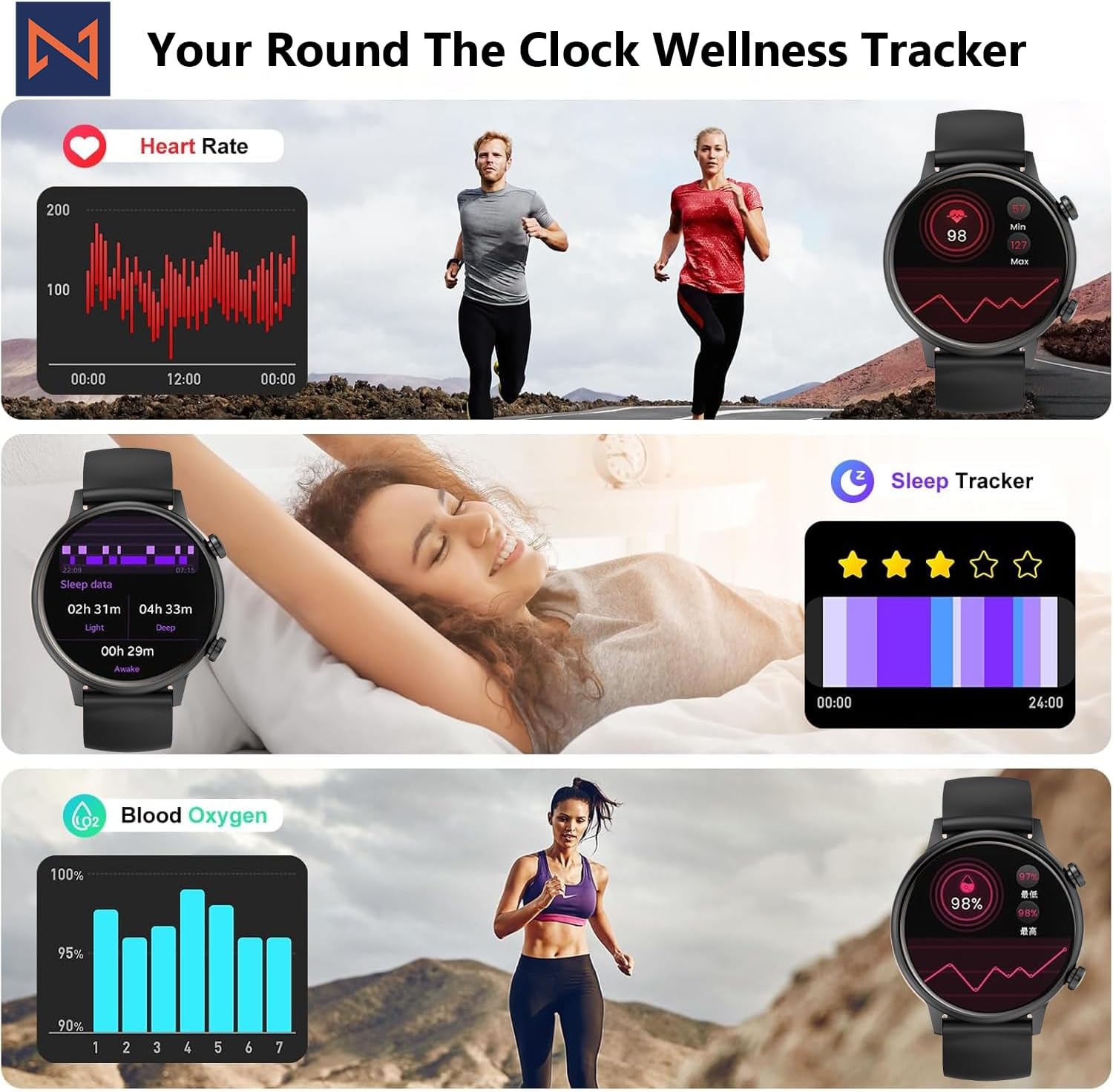
Figure 4: The smartwatch interface showing real-time heart rate, sleep tracking, and blood oxygen levels.

Figure 5: The smartwatch showing a selection of its multiple sports tracking modes.
6. Tahan Air
The Infinity Smart Watch has an IP68 waterproof rating, making it resistant to dust, sweat, and water. It is suitable for daily wear, including hand washing, face washing, and swimming. Catatan: Avoid using the watch in hot water (e.g., hot showers, saunas) or for deep-sea diving, as extreme temperatures or high-pressure water may compromise its water resistance.

Figure 6: The smartwatch demonstrating its IP68 waterproof capability during water exposure.
7. Baterai dan Pengisian Daya
The smartwatch features a 200 mAh Lithium Polymer battery. A full charge typically takes approximately 2 hours, providing 3-5 days of working time and up to 30 days of standby time, depending on usage.
8. Spesifikasi
| Fitur | Detil |
|---|---|
| Nomor Model | WS_BLK |
| Ukuran Layar | 1.1 inci AMOLED |
| Peringkat Tahan Air | Tingkat IP68 |
| Kapasitas Baterai | 200 Miliamp Jam (Polimer Litium) |
| Konektivitas | Bahasa Indonesia: Bluetooth |
| Sistem Operasi | Android (kompatibel dengan iOS) |
| Kapasitas Penyimpanan Memori | 128MB |
| Berat Barang | 5 ons |
| Pabrikan | Kizzy Enterprises Inc |
9. Penyelesaian masalah
- Jam tidak menyala: Pastikan jam tangan terisi penuh daya. Tekan lama tombol samping untuk menghidupkan jam tangan.
- Tidak dapat dipasangkan dengan telepon: Ensure Bluetooth is enabled on your phone and the watch is within range. Restart both devices and try pairing again through the app.
- Notifikasi tidak diterima: Check app settings on your phone to ensure notification permissions are granted for the smartwatch app. Also, verify that 'Do Not Disturb' mode is not active on the watch.
- Pembacaan kesehatan yang tidak akurat: Ensure the watch is worn snugly on your wrist, not too tight or too loose. Clean the sensors regularly. Note that the blood pressure monitor may not be medically accurate and is for reference only.
- Pembekuan layar: Restart the smartwatch by long-pressing the side button until it powers off, then power it back on. If the issue persists, check for app updates.
10. Garansi dan Dukungan
For warranty information, technical support, or service inquiries, please refer to the contact details provided on the product packaging or the manufacturer's official websitus. Simpan struk pembelian Anda sebagai bukti pembelian untuk klaim garansi.


